my desktop is a AMD A6 3500 Triple Core 2.4GHz, 8GB RAM
Motherboard is ASUS f1a55-m le
I'm trying to enable crossfire with my Raedon 6670 graphics card and the APU. I beleive I need to change a setting in BIOs to 'onboard' graphics because at the moment the system is only recognizing the 6670 graphics card and not the APU graphics as well when I plug in the 6670.
My problem is that I can't enter the BIOS. When I load up I press Enter but all I'm left with is a black screen, I've tired pressing ESC, F1 etc but no luck.
There's not even a boot screen image on load up (of ASUS logo and menu at the bottom outlining which key to press for bios etc) which there was on my previous computer.
I have it hooked up to my HDTV (PC> DVI adapter>HDMI cable>HDTV)
It was suggested I tried running the HDMI directly from the 6670 discrete card but no joy I still can't access/enter the bios screen
Are you pressing the "delete" key when the post screen comes up? To my knowledge, to enter the BIOS on any system, that is what you have to do.
My Computer
At a glance
Windows 7 Home Premium x64Intel 2500k @4.5ghz 66deg max P95/IBT8 Gigs Patriot Viper 2 Extreme @1600EVGA GTX 580 3 GIG 35degrees idle
Computer Manufacturer/Model Number
Home Made
OS
Windows 7 Home Premium x64
CPU
Intel 2500k @4.5ghz 66deg max P95/IBT
Motherboard
Gigabyte Z68A-D3-B3
Memory
8 Gigs Patriot Viper 2 Extreme @1600
Graphics Card(s)
EVGA GTX 580 3 GIG 35degrees idle
Sound Card
Nvidia HD audio via HDMI to 7.1 Receiver
Monitor(s) Displays
32" Olevia hdtv
Screen Resolution
1080p
Hard Drives
64gig SSD(OS/Apps)
250gig (Files and Dox)
1tb (imaging and backup)
PSU
Corsair vx550w
Case
Thermaltake V3 black
Cooling
CM 212+(push n pull) 4 case fans
Keyboard
Logitech wireless Combo, G13
Mouse
G300
Internet Speed
40mps
Other Info
Two others up and running; C2D E5200/MSI G41M-P26/Corsair XMS3 8gb/GTS 250 1gb and C2D E8200/xFx 750sli/8gb Corsair Dominator/2x EVGA 550ti
Working on; i2600 Build...
HP DV6
@Work I use a Lenovo 5536B8U + Lenovo U300s
Microsoft Security Essentials and Malwarebytes Premium
Browser
Pale Moon
Other Info
All fans PWM; speeds at idle: CPU circa 500 rpm; intake circa 600 rpm; exhaust circa 600 rpm; CPU temps 27 idle and 47 C load in a warm room (27 C/81 F) when running Intel Extreme Tuning Utility stress test.
Try clearing your CMOS. You have jumpers on your MoBo. First unplug your PC. Open the side of the case. Ground yourself by holding the chassis with one hand and with the other, move the jumper. The original position should be pin1-2, you need to configure it to pin2-3 for about 10 seconds, then reset to the original pins.
My Computer
At a glance
Windows 7 Home Premium x64Intel 2500k @4.5ghz 66deg max P95/IBT8 Gigs Patriot Viper 2 Extreme @1600EVGA GTX 580 3 GIG 35degrees idle
Computer Manufacturer/Model Number
Home Made
OS
Windows 7 Home Premium x64
CPU
Intel 2500k @4.5ghz 66deg max P95/IBT
Motherboard
Gigabyte Z68A-D3-B3
Memory
8 Gigs Patriot Viper 2 Extreme @1600
Graphics Card(s)
EVGA GTX 580 3 GIG 35degrees idle
Sound Card
Nvidia HD audio via HDMI to 7.1 Receiver
Monitor(s) Displays
32" Olevia hdtv
Screen Resolution
1080p
Hard Drives
64gig SSD(OS/Apps)
250gig (Files and Dox)
1tb (imaging and backup)
PSU
Corsair vx550w
Case
Thermaltake V3 black
Cooling
CM 212+(push n pull) 4 case fans
Keyboard
Logitech wireless Combo, G13
Mouse
G300
Internet Speed
40mps
Other Info
Two others up and running; C2D E5200/MSI G41M-P26/Corsair XMS3 8gb/GTS 250 1gb and C2D E8200/xFx 750sli/8gb Corsair Dominator/2x EVGA 550ti
Working on; i2600 Build...
HP DV6
@Work I use a Lenovo 5536B8U + Lenovo U300s
Yes it is. Wouldn't happen to have a wired keyboard handy would you. A lot of times a wireless keyboard can't access the bios as the wireless part doesn't load/initialize until Windows starts to load.
My Computer
At a glance
Win 7 Ultimate x64FX-8350 @ 4.6 GHz so farADATA XPG V1 Series Black 8GB DDR3 1600Sapphire R9 270x Dual-X
Yes it is. Wouldn't happen to have a wired keyboard handy would you. A lot of times a wireless keyboard can't access the bios as the wireless part doesn't load/initialize until Windows starts to load.
I didn't consider that. Just because my wireless keyboard(s) are able to access the BIOS on my machines, doesn't mean that the same result will present on all systems. Especially since the only ASUS MoBo I have is still not finished...
Nice thought Stormy13.
My Computer
At a glance
Windows 7 Home Premium x64Intel 2500k @4.5ghz 66deg max P95/IBT8 Gigs Patriot Viper 2 Extreme @1600EVGA GTX 580 3 GIG 35degrees idle
Computer Manufacturer/Model Number
Home Made
OS
Windows 7 Home Premium x64
CPU
Intel 2500k @4.5ghz 66deg max P95/IBT
Motherboard
Gigabyte Z68A-D3-B3
Memory
8 Gigs Patriot Viper 2 Extreme @1600
Graphics Card(s)
EVGA GTX 580 3 GIG 35degrees idle
Sound Card
Nvidia HD audio via HDMI to 7.1 Receiver
Monitor(s) Displays
32" Olevia hdtv
Screen Resolution
1080p
Hard Drives
64gig SSD(OS/Apps)
250gig (Files and Dox)
1tb (imaging and backup)
PSU
Corsair vx550w
Case
Thermaltake V3 black
Cooling
CM 212+(push n pull) 4 case fans
Keyboard
Logitech wireless Combo, G13
Mouse
G300
Internet Speed
40mps
Other Info
Two others up and running; C2D E5200/MSI G41M-P26/Corsair XMS3 8gb/GTS 250 1gb and C2D E8200/xFx 750sli/8gb Corsair Dominator/2x EVGA 550ti
Working on; i2600 Build...
HP DV6
@Work I use a Lenovo 5536B8U + Lenovo U300s
Microsoft Security Essentials and Malwarebytes Premium
Browser
Pale Moon
Other Info
All fans PWM; speeds at idle: CPU circa 500 rpm; intake circa 600 rpm; exhaust circa 600 rpm; CPU temps 27 idle and 47 C load in a warm room (27 C/81 F) when running Intel Extreme Tuning Utility stress test.
I definitely agree there. My Gigabyte MoBo has a very small window where the keystroke is recognized, where as my MIS and xFx boards have a longer time for recognition.
My Computer
At a glance
Windows 7 Home Premium x64Intel 2500k @4.5ghz 66deg max P95/IBT8 Gigs Patriot Viper 2 Extreme @1600EVGA GTX 580 3 GIG 35degrees idle
Computer Manufacturer/Model Number
Home Made
OS
Windows 7 Home Premium x64
CPU
Intel 2500k @4.5ghz 66deg max P95/IBT
Motherboard
Gigabyte Z68A-D3-B3
Memory
8 Gigs Patriot Viper 2 Extreme @1600
Graphics Card(s)
EVGA GTX 580 3 GIG 35degrees idle
Sound Card
Nvidia HD audio via HDMI to 7.1 Receiver
Monitor(s) Displays
32" Olevia hdtv
Screen Resolution
1080p
Hard Drives
64gig SSD(OS/Apps)
250gig (Files and Dox)
1tb (imaging and backup)
PSU
Corsair vx550w
Case
Thermaltake V3 black
Cooling
CM 212+(push n pull) 4 case fans
Keyboard
Logitech wireless Combo, G13
Mouse
G300
Internet Speed
40mps
Other Info
Two others up and running; C2D E5200/MSI G41M-P26/Corsair XMS3 8gb/GTS 250 1gb and C2D E8200/xFx 750sli/8gb Corsair Dominator/2x EVGA 550ti
Working on; i2600 Build...
HP DV6
@Work I use a Lenovo 5536B8U + Lenovo U300s
I believe you have the Board manual. You might want to check with Chapter 1 page 14. It's actually just like what James has told you. If it still doesn't work you can try combining it by also removing the CMOS battery and do the jumper as indicated.
But still have to make sure your wireless keyboard battery are still good and have it properly reset.
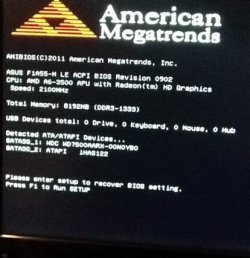
I seem to have taken a few steps back! I changed to a wired keyboard and mouse but still couldn't access BIOS so I cleared the CMOS. As soon as I rebooted the screen attached appeared. So I pressed F1 and was left with a black screen. I powered off the PC and rebooted but now Windows won't even start. I've tried system recovery but it's not working! :S
Uninstall your GPU and Connect one monitor to your onboard. Try again and let us know what happens.
My Computer
At a glance
Windows 7 Home Premium x64Intel 2500k @4.5ghz 66deg max P95/IBT8 Gigs Patriot Viper 2 Extreme @1600EVGA GTX 580 3 GIG 35degrees idle
Computer Manufacturer/Model Number
Home Made
OS
Windows 7 Home Premium x64
CPU
Intel 2500k @4.5ghz 66deg max P95/IBT
Motherboard
Gigabyte Z68A-D3-B3
Memory
8 Gigs Patriot Viper 2 Extreme @1600
Graphics Card(s)
EVGA GTX 580 3 GIG 35degrees idle
Sound Card
Nvidia HD audio via HDMI to 7.1 Receiver
Monitor(s) Displays
32" Olevia hdtv
Screen Resolution
1080p
Hard Drives
64gig SSD(OS/Apps)
250gig (Files and Dox)
1tb (imaging and backup)
PSU
Corsair vx550w
Case
Thermaltake V3 black
Cooling
CM 212+(push n pull) 4 case fans
Keyboard
Logitech wireless Combo, G13
Mouse
G300
Internet Speed
40mps
Other Info
Two others up and running; C2D E5200/MSI G41M-P26/Corsair XMS3 8gb/GTS 250 1gb and C2D E8200/xFx 750sli/8gb Corsair Dominator/2x EVGA 550ti
Working on; i2600 Build...
HP DV6
@Work I use a Lenovo 5536B8U + Lenovo U300s
Huh? Didn't you say you have a discrete 6670? That's a GPU. Remove it and connect one monitor to the onboard video out.
My Computer
At a glance
Windows 7 Home Premium x64Intel 2500k @4.5ghz 66deg max P95/IBT8 Gigs Patriot Viper 2 Extreme @1600EVGA GTX 580 3 GIG 35degrees idle
Computer Manufacturer/Model Number
Home Made
OS
Windows 7 Home Premium x64
CPU
Intel 2500k @4.5ghz 66deg max P95/IBT
Motherboard
Gigabyte Z68A-D3-B3
Memory
8 Gigs Patriot Viper 2 Extreme @1600
Graphics Card(s)
EVGA GTX 580 3 GIG 35degrees idle
Sound Card
Nvidia HD audio via HDMI to 7.1 Receiver
Monitor(s) Displays
32" Olevia hdtv
Screen Resolution
1080p
Hard Drives
64gig SSD(OS/Apps)
250gig (Files and Dox)
1tb (imaging and backup)
PSU
Corsair vx550w
Case
Thermaltake V3 black
Cooling
CM 212+(push n pull) 4 case fans
Keyboard
Logitech wireless Combo, G13
Mouse
G300
Internet Speed
40mps
Other Info
Two others up and running; C2D E5200/MSI G41M-P26/Corsair XMS3 8gb/GTS 250 1gb and C2D E8200/xFx 750sli/8gb Corsair Dominator/2x EVGA 550ti
Working on; i2600 Build...
HP DV6
@Work I use a Lenovo 5536B8U + Lenovo U300s
Looking at that picture the bios isn't detected either the mouse or keyboard. Just did a quick restart on mine and it shows both the mouse and keyboard (both wired and USB) as detected, where yours is shows zeroes.
Try with just the keyboard and connect it to each of the USB ports on the back, restarting each time (won't work otherwise) and hopefully on one of them it will finally detect the keyboard.
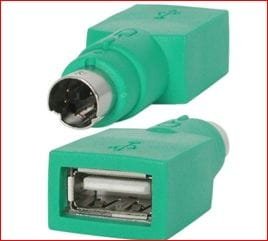
If that still fails you wouldn't happen to have one of these lying around would you?
If everything else fails I would consider contacting Asus and see what they have to say.
My Computer
At a glance
Win 7 Ultimate x64FX-8350 @ 4.6 GHz so farADATA XPG V1 Series Black 8GB DDR3 1600Sapphire R9 270x Dual-X
Thanks stormy13 i've reconnected the USB and it is showing on that screen, So they are been recognised. But still having the problem I mentioned above after i cleared the CMOS
In common with many a BIOS the screen tells you to press F1 to enter setup, which is the BIOS setup. Being Asus the wireless keyboard shouldn't matter, the BIOS loads a key\mouse driver.
My Computer
At a glance
Windows 7 home premium x64AMD FX-4100 AM3+ 3.6GHz 12MB Black EditionCrsair vengeance 12Gb DDR3 1600MHz CL9Asus GTX 560 1GB
Later I will try removing the CMOS battery as suggested and try again. If I can't get it working is there a fix? Will I need to reset to factory settings or have I messed up the hardware?