Unable to find .mp3 or .wma files in Temporary Internet Folder

jiayi

New member
Local time
12:24 AM
Messages
4
Hello expert,

I just installed Windows 7 on my laptop. However, I am not able to find the .mp3, .wma, .wmv files in the Temporary Internet Folder. I can do this easily in Wins XP but not in Windows 7 :sarc:...

The current location of Temporary Internet Folder is:
C:\Users\<username>\AppData\Local\Microsoft\Windows\Temporary Internet Files.

Note: I can see all the downloaded files with format .doc, .pdf, ;jpeg there, but strangely, I cannot see the downloaded .mp3, .wmv files. Why?

Also, I have checked the folder C:\Users\<username>\AppData\Local\Temp but cannot find any also.... sigh...

Your advice will be much appreciated.

Thanks,
Jiayi
 

My Computer My Computer

At a glance

Windows 7 Enterprise x64
OS
Windows 7 Enterprise x64
Hi jiayi and welcome to SF

you won't find MP3s in the path you looked at..try this one instead:

C:\Users\<username>\AppData\Local\Microsoft\Windows\Temporary Internet Files\Low\Content.IE5

-DG
( you might not see those directories underneath "Temporary Internet Files" so just punch it into the URL...you'll end up at several cryptic named folders That's where you should look)
 

My Computer My Computer

At a glance

Windows 7 Ultimate x86DualCore AMD Athlon 64 X2, 2600 MHz 5200+Samsung 2GB DDR2Onboard NVIDIA GeForce 6150SE nForce 430
Computer Manufacturer/Model Number
HP m8000n
OS
Windows 7 Ultimate x86
CPU
DualCore AMD Athlon 64 X2, 2600 MHz 5200+
Motherboard
Asus M2N68-LA (Narra)
Memory
Samsung 2GB DDR2
Graphics Card(s)
Onboard NVIDIA GeForce 6150SE nForce 430
Sound Card
Onboard nVIDIA nForce 6100-430 (MCP61P)
Monitor(s) Displays
Westinghouse 19" LED
Screen Resolution
1280x1024
Hard Drives
SATA II Seagate Barracuda 500GB
USB II WD Elements 500GB
USB II WD My Book 1TB
USB II WD My Book 2TB
PSU
Stock (HP)
Case
Stock (HP)
Cooling
Stock
Keyboard
Logitech Classic KB 200
Mouse
Standard HP opticle USB mouse
If you want to save some time, d/l this handy tool:

VideoCache View (BTW....it's free)

Play offline/Save .flv video files from Web browser cache

After watching a video in a Web site, you may want to save the video file into your local disk for playing it offline in the future. If the video file is stored in your browser's cache, this utility can help you to extract the video file from the cache and save it for watching it in the future.
It automatically scans the entire cache of Internet Explorer and Mozilla-based Web browsers (Including Firefox) and finds all video files that are currently stored in it. It allows you to easily copy the cached video files into another folder for playing/watching them in the future. If you have a movie player that is configured to play flv files, it also allows you to play the video directly from your browser's cache.
 

My Computer My Computer

At a glance

Win 7 32 Home Premium, Win 7 64 Pro, Win 8.1,...Intel Core 2 Duo 2.93GHzNot much with my ADHDATI Radeon HD 4350
Computer type
PC/Desktop
Computer Manufacturer/Model Number
Dell Hell oh Well
OS
Win 7 32 Home Premium, Win 7 64 Pro, Win 8.1, Win 10
CPU
Intel Core 2 Duo 2.93GHz
Memory
Not much with my ADHD
Graphics Card(s)
ATI Radeon HD 4350
Monitor(s) Displays
24" HDTV/Monitor
Screen Resolution
Blurry after a Scotch or 2
Hard Drives
1 HDD 250 GB, 1 HDD 1 TB, 3 - 1 TB Externals
Case
Don't get on my case...man :D
Cooling
I have an Air Conditioner & Diet Pepsi
Keyboard
Saitek Cyborg
Mouse
10 yr old MS optical mouse that still works
Internet Speed
Never fast enough
Antivirus
Various
Browser
Various
Thanks a lot SledgeDG. I can find it now based on your useful tips!
 

My Computer My Computer

At a glance

Windows 7 Enterprise x64
OS
Windows 7 Enterprise x64
Hi,

I am facing the same problem too and cant seem to find the mp3 or wma files in my temp folder. i tried C:\Users\<username>\AppData\Local\Microsoft\Windows\Temporary Internet Files\Low\Content.IE5 but there isnt any in in too..

please help
 

My Computer My Computer

At a glance

Windows 7 professional 32bit
OS
Windows 7 professional 32bit
Well, if you used Internet Explorer and have those files in the cache...that's the place to find them. But you do realize, not all websites let their material be cached anymore...that's usually prevented by a simple html instruction in the web page's header (So it's not always sure you'll find the mp3 or wma you're looking for).
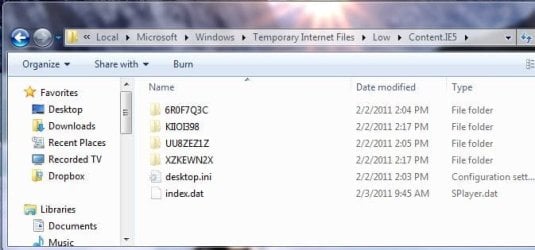
If you go to the Content.IE5 folder you usually see something like this.
Capture.JPG

If you can't find what you're looking for in one of those cryptic sub folders it's not on your system.

just past the following in any window's URL bar:
%LocalAppData%\Microsoft\Windows\Temporary Internet Files\Low\Content.IE5
That is the default cache for all the bigger files like FLVs MP4s etc.
If you use Firefox you might want to look here too:
type into Firefoxes URL about:cache and see if your files under any of those 3 List links

If you use Google Chrome thee is this neat little cache viewer from Nirsoft here:
ChromeCacheView - Cache viewer for Google Chrome Web browser

The users of Opera get lucky here:
OperaCacheView - Cache viewer for Opera Web browser

-DG
 

My Computer My Computer

At a glance

Windows 7 Ultimate x86DualCore AMD Athlon 64 X2, 2600 MHz 5200+Samsung 2GB DDR2Onboard NVIDIA GeForce 6150SE nForce 430
Computer Manufacturer/Model Number
HP m8000n
OS
Windows 7 Ultimate x86
CPU
DualCore AMD Athlon 64 X2, 2600 MHz 5200+
Motherboard
Asus M2N68-LA (Narra)
Memory
Samsung 2GB DDR2
Graphics Card(s)
Onboard NVIDIA GeForce 6150SE nForce 430
Sound Card
Onboard nVIDIA nForce 6100-430 (MCP61P)
Monitor(s) Displays
Westinghouse 19" LED
Screen Resolution
1280x1024
Hard Drives
SATA II Seagate Barracuda 500GB
USB II WD Elements 500GB
USB II WD My Book 1TB
USB II WD My Book 2TB
PSU
Stock (HP)
Case
Stock (HP)
Cooling
Stock
Keyboard
Logitech Classic KB 200
Mouse
Standard HP opticle USB mouse
Hi SledgeDG, Thanks for replying. Please pardon me as i am very slow when it comes to IT. just for your info, i recently ugraded from vista to windows 7 pro(dunno if this step would caused the problem). I tried typing the address and in the folder content.ie5, it says empty, i cant seem to find all the other folders as mentioned. I tried the website on other computers running xp system and i can get the mp3 files from temp folder easily so it would not be the website. please advice how to find the folders that seem to be hidden in my laptop..

Thank you.
 

My Computer My Computer

At a glance

Windows 7 professional 32bit
OS
Windows 7 professional 32bit
Since I'm not convinced yet that your Windows behaves different from any other Windows, there can be only one explanation:
Those cryptic folders must have been deleted (either through Ccleaner and the likes or some other means of house cleaning (removing temp files, caches and the likes))
Just to make sure we're on the same page here: you have your comp set to show hidden files/folders, right?

http://www.sevenforums.com/tutorials/394-hidden-files-folders-show-hide.html

-DG
 

My Computer My Computer

At a glance

Windows 7 Ultimate x86DualCore AMD Athlon 64 X2, 2600 MHz 5200+Samsung 2GB DDR2Onboard NVIDIA GeForce 6150SE nForce 430
Computer Manufacturer/Model Number
HP m8000n
OS
Windows 7 Ultimate x86
CPU
DualCore AMD Athlon 64 X2, 2600 MHz 5200+
Motherboard
Asus M2N68-LA (Narra)
Memory
Samsung 2GB DDR2
Graphics Card(s)
Onboard NVIDIA GeForce 6150SE nForce 430
Sound Card
Onboard nVIDIA nForce 6100-430 (MCP61P)
Monitor(s) Displays
Westinghouse 19" LED
Screen Resolution
1280x1024
Hard Drives
SATA II Seagate Barracuda 500GB
USB II WD Elements 500GB
USB II WD My Book 1TB
USB II WD My Book 2TB
PSU
Stock (HP)
Case
Stock (HP)
Cooling
Stock
Keyboard
Logitech Classic KB 200
Mouse
Standard HP opticle USB mouse
Found the solution elsewhere on this forum: Its not the 'hidden files and folder's but the 'hide protected operating system files' option that is keeping the files from being displayed. Uncheck in the folder options and the files should be visible!
 

My Computer My Computer

At a glance

Windows 7 ultimate x32
OS
Windows 7 ultimate x32
Right you are. That's what I get for not double checking what I write here :D :D

Thanks

-DG
 

My Computer My Computer

At a glance

Windows 7 Ultimate x86DualCore AMD Athlon 64 X2, 2600 MHz 5200+Samsung 2GB DDR2Onboard NVIDIA GeForce 6150SE nForce 430
Computer Manufacturer/Model Number
HP m8000n
OS
Windows 7 Ultimate x86
CPU
DualCore AMD Athlon 64 X2, 2600 MHz 5200+
Motherboard
Asus M2N68-LA (Narra)
Memory
Samsung 2GB DDR2
Graphics Card(s)
Onboard NVIDIA GeForce 6150SE nForce 430
Sound Card
Onboard nVIDIA nForce 6100-430 (MCP61P)
Monitor(s) Displays
Westinghouse 19" LED
Screen Resolution
1280x1024
Hard Drives
SATA II Seagate Barracuda 500GB
USB II WD Elements 500GB
USB II WD My Book 1TB
USB II WD My Book 2TB
PSU
Stock (HP)
Case
Stock (HP)
Cooling
Stock
Keyboard
Logitech Classic KB 200
Mouse
Standard HP opticle USB mouse
I am running Windows 7 (Home Premium 64bit). I could locate the temporary files based on your instructions above but the .wma file is shown as .dat file in the temporary internet folder. I copied it to the desktop and change the extension to .wma but it will not play at all. I have the same problem in another laptop running Windows Vista but no problem retrieving the files in Windows XP.

Please advise. Thank you
 

My Computer My Computer

At a glance

MS Windows 7 Home Premium 64-bit SP1Intel Core i7 2620M @ 2.70GHz Sandy Bridge 32...8.00 GBNVIDIA GeForce GT 520M 1GB
Computer Manufacturer/Model Number
Asus/Pro36SD Laptop
OS
MS Windows 7 Home Premium 64-bit SP1
CPU
Intel Core i7 2620M @ 2.70GHz Sandy Bridge 32nm Technology
Motherboard
ASUSTeK Computer Inc. U36SD (CPU 1)
Memory
8.00 GB
Graphics Card(s)
NVIDIA GeForce GT 520M 1GB
Sound Card
Realtek High Definition Audio
Monitor(s) Displays
Generic PnP Monitor on Intel HD Graphics Family
Screen Resolution
1366x768@60Hz
Hard Drives
488GB Western Digital WDC WD5000BPVT-80HXZT1 (SATA)
Mouse
Synaptics PS/2 Port TouchPad
Internet Speed
10 Mbs
Back
Top