Unable to Format a free partition space in WIN 7...

myArvind

New member
Local time
5:17 AM
Messages
7
Location
Klang, Malaysia
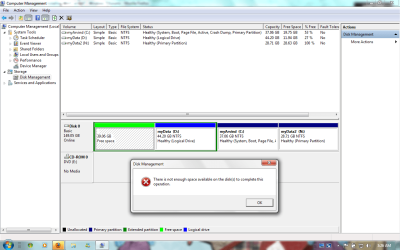
Hi... im having this prob where a total of 40GB of space out of 160Gb in my HD cant be formatted. I were using Windows Vista before upgrading it into Win 7....
I had 3 partitions ( c:, d:, & N:)... All 3 of it works perfectly. The only problem im facing here is with this 40GB of free space which i couldn't Format in anyway.. it keeps on bugging me with this warning of "not enough space to complete operation" thingy...
Here is an image of it, where the green colored free space (39.06Gb)... cant be formatted.
I tried Formatting it while the w7 installation process, yet, i still couldn't do anything.
Can someone plz help me out......... :cry:
 

Attachments

  • partition.png
    partition.png
    54.1 KB · Views: 421

My Computer My Computer

At a glance

Microsoft Windows 7 Ultimate,(32-Bit), 6.1.7600Mobile DualCore Intel Pentium T2330, 1600 MHz1GB DDR2/800 Kingsoft + 512MB DDR2/667 KingstoneIntel GMA X3100
OS
Microsoft Windows 7 Ultimate,(32-Bit), 6.1.7600
CPU
Mobile DualCore Intel Pentium T2330, 1600 MHz
Motherboard
Wistron 30CD
Memory
1GB DDR2/800 Kingsoft + 512MB DDR2/667 Kingstone
Graphics Card(s)
Intel GMA X3100
Sound Card
Conexant Cx20549 @ Intel 82801HBM ICH8M
Monitor(s) Displays
LG Philips LP141WX3-TLB4
Screen Resolution
1280 x 800
Hard Drives
Seagate Momentus 5400.3 160821
Internet Speed
~1.0 Mb/sec
Other Info
Compaq Presario V3000
I'm in the process of setting up my secondary rig, and haven't done too much more than the installation, and I ended up with an unallocated space ahead of the partitions, much as your's except mine is much larger. I intend to use a third party program such as Acronis Disk Director Suite, or something else to move and resize the partitions. I can't recommend DDS, because it is not W7 compatible, but I already have it, and I think that it would do the job, booting from it's disk.

There are other partitioning tools available that are free, but I haven't used any of them, except Partition Wizard, but I'm not familiar with it enough to say that it would handle this type of problem or not.
 

My Computer My Computer

At a glance

W7x64 Pro, SuSe 12.1/** W7 x64 Pro, XP MCEPhenom II 1090T w/Noctua NH-D14 /**4400+ X2 w...2 x 2GB Patriot PGS34g1600LLKA/**4x1GB Corsai...EVGA GTX460 SC/**EVGA 8800GTS
Computer Manufacturer/Model Number
DIY
OS
W7x64 Pro, SuSe 12.1/** W7 x64 Pro, XP MCE
CPU
Phenom II 1090T w/Noctua NH-D14 /**4400+ X2 w/CM Hyper TX 3
Motherboard
ASRock 890FX Deluxe 4/**A8N-SLI
Memory
2 x 2GB Patriot PGS34g1600LLKA/**4x1GB Corsair VS
Graphics Card(s)
EVGA GTX460 SC/**EVGA 8800GTS
Sound Card
Asus Xonar D2X/**Xonar D1
Monitor(s) Displays
Acer X233H, Dell E152FPc /**LG M237-WD
Screen Resolution
1920x1080 & 1024x768/**1980x1080
Hard Drives
WDC 2TB, 1.5TB, 1TB, 500GB,Seagate 500GB , Maxtor 80GB /**500GB Seagate & WDC 1TB Black
PSU
CM RS600 w/ APC BX1000G/**Antec 500 TP w/ APC BX1000
Case
HAF922/**Antec 1040IIB
Cooling
3x200mm, 1x140 and 1x120mm/**5x80mm fans
Keyboard
Logitech Media USB/**Saitek Eclipse
Mouse
Cordless Trackman Wheel/**Ditto
Internet Speed
3.3Mbps
Other Info
SB 560 5.1 w/ Sennheiser RS140/**Creative T20 speakers, Dvico FusionHDTV7 Gold RT, Cisco E3000, HP 5510V AIO, Linksys E3000, Belkin F5U237 hub and **F5D8055 adapter
(** = 2nd rig)
Partition Wizard is a free download and is pretty handy at issues like this. While you are at it, consider using the Copy command to move C:\ to the unallocated space, since it is the fastest access region on the drive.

In PW, you set it all up (with options to back out) within the windows GUI and then when you re-start, PW will step in and complete the operations before automatically booting back into windows. It is able to move the entire Windows installation without losing any setup, users etc.
 

My Computer My Computer

At a glance

7 x64 UltimateAMD Ryzen 516GB DDR4Radeon R7 360
Computer type
PC/Desktop
Computer Manufacturer/Model Number
Custom
OS
7 x64 Ultimate
CPU
AMD Ryzen 5
Motherboard
Gigabyte GA-AB350-Gaming
Memory
16GB DDR4
Graphics Card(s)
Radeon R7 360
Monitor(s) Displays
2 x Dell U2518D
Screen Resolution
2560x1440 2560x1440
Hard Drives
WD 500GB x2
Samsung SSD 128MB (OS)
XPG SX8200 Pro M.2 2280 1TB
PSU
Antec 500
Cooling
Hyper 212 EVO
Keyboard
Logitech cordless K800
Mouse
Logitech M510
Antivirus
Avira
Often times when I want to clean out and re-format a partition I right click on the partition (with Computer Management) and select "Delete Volume." Then I'm allowed to format.

Don't know if the same thing would apply in your case.
 

My Computer My Computer

At a glance

Windows 10 HomeIntel Core i5 3550Corsair Vengeance DDR3 16GBNvidia GEForce GTX 970 SSC
Computer type
PC/Desktop
Computer Manufacturer/Model Number
Self build
OS
Windows 10 Home
CPU
Intel Core i5 3550
Motherboard
ASUS P8Z77-V LX (LGA1155)
Memory
Corsair Vengeance DDR3 16GB
Graphics Card(s)
Nvidia GEForce GTX 970 SSC
Monitor(s) Displays
Hanns-G 23.6", Acer 17"
Screen Resolution
1920x1080, 1440x900
Hard Drives
Sandisk SSD 256 GB
WD500GB
WD640GB
Seagage Ultra + 1TB ext.
BWD 800GB
WD 1TB ext
PSU
Antec 650w
Case
Cooler Master Centurion 534
Cooling
COOLER MASTER GeminII S524, 3 120 mm case fans.
Keyboard
Logitech MK300
Mouse
Logitech MK300
Internet Speed
Cable
Antivirus
MSSE, Malwarebytes
Browser
IE 10, Chrome
Often times when I want to clean out and re-format a partition I right click on the partition (with Computer Management) and select "Delete Volume." Then I'm allowed to format.

Don't know if the same thing would apply in your case.


I was about to suggest the same thing. Deleting and recreating the partition.
 

My Computer My Computer

At a glance

Windows 7 Home Premium 64bitIntel Core i7 2700k8GB Mushkin Redline Ridgebacks @1866EVGA GTX570 SC
Computer Manufacturer/Model Number
Custom (Self Build)
OS
Windows 7 Home Premium 64bit
CPU
Intel Core i7 2700k
Motherboard
eVGA P67 SLI
Memory
8GB Mushkin Redline Ridgebacks @1866
Graphics Card(s)
EVGA GTX570 SC
Sound Card
XiFi Titanium HD
Monitor(s) Displays
LG W2453V
Screen Resolution
1920x1080
Hard Drives
Intel 320 80GB -- Intel X25-V 40GB --WD Black 1TB x2 -- WD Blue 640GB
PSU
Seasonic x750
Case
Corsair 600T SE White
Cooling
eVGA Superclocked CPU Cooler
Keyboard
Saitek Cyborg
Antivirus
Kaspersky
Browser
IE
Other Info
LG BD/DVD
No, unallocated/free space is not a partition, therfore it can't be deleted.
 

My Computer My Computer

At a glance

W7x64 Pro, SuSe 12.1/** W7 x64 Pro, XP MCEPhenom II 1090T w/Noctua NH-D14 /**4400+ X2 w...2 x 2GB Patriot PGS34g1600LLKA/**4x1GB Corsai...EVGA GTX460 SC/**EVGA 8800GTS
Computer Manufacturer/Model Number
DIY
OS
W7x64 Pro, SuSe 12.1/** W7 x64 Pro, XP MCE
CPU
Phenom II 1090T w/Noctua NH-D14 /**4400+ X2 w/CM Hyper TX 3
Motherboard
ASRock 890FX Deluxe 4/**A8N-SLI
Memory
2 x 2GB Patriot PGS34g1600LLKA/**4x1GB Corsair VS
Graphics Card(s)
EVGA GTX460 SC/**EVGA 8800GTS
Sound Card
Asus Xonar D2X/**Xonar D1
Monitor(s) Displays
Acer X233H, Dell E152FPc /**LG M237-WD
Screen Resolution
1920x1080 & 1024x768/**1980x1080
Hard Drives
WDC 2TB, 1.5TB, 1TB, 500GB,Seagate 500GB , Maxtor 80GB /**500GB Seagate & WDC 1TB Black
PSU
CM RS600 w/ APC BX1000G/**Antec 500 TP w/ APC BX1000
Case
HAF922/**Antec 1040IIB
Cooling
3x200mm, 1x140 and 1x120mm/**5x80mm fans
Keyboard
Logitech Media USB/**Saitek Eclipse
Mouse
Cordless Trackman Wheel/**Ditto
Internet Speed
3.3Mbps
Other Info
SB 560 5.1 w/ Sennheiser RS140/**Creative T20 speakers, Dvico FusionHDTV7 Gold RT, Cisco E3000, HP 5510V AIO, Linksys E3000, Belkin F5U237 hub and **F5D8055 adapter
(** = 2nd rig)
No, unallocated/free space is not a partition, therfore it can't be deleted.

Makes sense. So would he have an option to extend his D: volume into that space? I have extended and shrunk with Vista, but it's been awhile and I have low retention rate the older I get. :confused: I seem to remember something about the extendable space being to the right of the volume you're extending, though. Maybe I had just better leave this alone before I confuse the poor guy more. :)
 

My Computer My Computer

At a glance

Windows 10 HomeIntel Core i5 3550Corsair Vengeance DDR3 16GBNvidia GEForce GTX 970 SSC
Computer type
PC/Desktop
Computer Manufacturer/Model Number
Self build
OS
Windows 10 Home
CPU
Intel Core i5 3550
Motherboard
ASUS P8Z77-V LX (LGA1155)
Memory
Corsair Vengeance DDR3 16GB
Graphics Card(s)
Nvidia GEForce GTX 970 SSC
Monitor(s) Displays
Hanns-G 23.6", Acer 17"
Screen Resolution
1920x1080, 1440x900
Hard Drives
Sandisk SSD 256 GB
WD500GB
WD640GB
Seagage Ultra + 1TB ext.
BWD 800GB
WD 1TB ext
PSU
Antec 650w
Case
Cooler Master Centurion 534
Cooling
COOLER MASTER GeminII S524, 3 120 mm case fans.
Keyboard
Logitech MK300
Mouse
Logitech MK300
Internet Speed
Cable
Antivirus
MSSE, Malwarebytes
Browser
IE 10, Chrome
Start From Scratch

I would start from scratch and delete all partitions then format entire drive and recreate your partitions.

Or better yet add a second physical drive to store data on which would better protect your data, if the drive you are using physically fails so to do all your partitions so a second physical drive is always better.
 

My Computer My Computer

At a glance

Windows 7 Ultimate 32 bitAMD Athlon 64 X2 4200+ Overclocked to 3.0Ghz2 Gigs of G.Skill DDR2 800HIS ATI Radeon HD 2600 Pro With IceQ cooler
Computer Manufacturer/Model Number
Custom Built
OS
Windows 7 Ultimate 32 bit
CPU
AMD Athlon 64 X2 4200+ Overclocked to 3.0Ghz
Motherboard
Biostar TF560 A2+
Memory
2 Gigs of G.Skill DDR2 800
Graphics Card(s)
HIS ATI Radeon HD 2600 Pro With IceQ cooler
Sound Card
6.1 Channel Sound Blaster Live 24 Bit
Monitor(s) Displays
Dual 20.5 " LG Flatrons W2052TO
Screen Resolution
1152x864
Hard Drives
Dual 36 Gig 10,000 RPM Raptors
PSU
430 watt Seasonic 80%+ Dual 12v Rails 2x80mm fans
Case
CHIEFMAX YA-5X
Cooling
4-80mm case fans 1-140mm case fan freezer 64 Pro CPU cooler
Keyboard
Saitek Eclipse II
Mouse
A4Tech wireless battery free optical scroll mouse
Internet Speed
1.5 meg down 384 up
Other Info
Logisys LED fan/light controller and dual 16" LED sticks mounted inside top of case all fans are LED all lighting is blue
DVD RW and CD RW both and Memory card reader
One thing you may try is to partition PART of it. Say 39gigs or a little less and see what happens. To be honest I have NEVER seen a partion or freespace shown AHEAD of my system partion (C). This is all a bit prplexing for me as well..I would reinstall just because it looks kind of screwy...but I am new to the way things are being done with Win 7. I am of course making guesses here and there are folks here that know more than I do.
 

My Computer My Computer

At a glance

Win7 UltimateCeleron E1400 @ 2 gig dual core4 gig dual channelnVidia 6600LE 512mgs mem
Computer Manufacturer/Model Number
I made it
OS
Win7 Ultimate
CPU
Celeron E1400 @ 2 gig dual core
Motherboard
MSI MS-7529
Memory
4 gig dual channel
Graphics Card(s)
nVidia 6600LE 512mgs mem
Sound Card
On Board Realtek HD
Monitor(s) Displays
1 Sceptre Flat
Screen Resolution
I like 1280x800
Hard Drives
System Drive: 300 gig Maxtor SATA3 (It was cheap)

My Storage: 160 gig WD SATA3
Wife's Storage 160 gig WD SATA3
Keyboard
MS Dgital Media Pro
Mouse
MS Optical 3000
Internet Speed
1.5 DSL
No, unallocated/free space is not a partition, therfore it can't be deleted.

I though Win 7 showed unalloacted as Black in the diagram and listed as such?
Perhaps I misunderstood, or overlooked something here.

Apologies if so.

I tend to agree a fresh install would be best, so the Os isnt in the middle
(slower part of the drive)

Just back up all data you need to keep and delte everything and remake partitions in setup.
 

My Computer My Computer

At a glance

Windows 7 Home Premium 64bitIntel Core i7 2700k8GB Mushkin Redline Ridgebacks @1866EVGA GTX570 SC
Computer Manufacturer/Model Number
Custom (Self Build)
OS
Windows 7 Home Premium 64bit
CPU
Intel Core i7 2700k
Motherboard
eVGA P67 SLI
Memory
8GB Mushkin Redline Ridgebacks @1866
Graphics Card(s)
EVGA GTX570 SC
Sound Card
XiFi Titanium HD
Monitor(s) Displays
LG W2453V
Screen Resolution
1920x1080
Hard Drives
Intel 320 80GB -- Intel X25-V 40GB --WD Black 1TB x2 -- WD Blue 640GB
PSU
Seasonic x750
Case
Corsair 600T SE White
Cooling
eVGA Superclocked CPU Cooler
Keyboard
Saitek Cyborg
Antivirus
Kaspersky
Browser
IE
Other Info
LG BD/DVD
Upgraded

Remember he said he "upgraded" from Vista to 7 also but it sounded like he said he was having issues even before the upgrade.

Windows 7 creates a partition ahead of the actual primary partition in use which would show as "system reserved" and is usually 100 MB it sounds like something went wrong in the upgrade (no big surprise)

Like I said i would start from scratch at this point.
 

My Computer My Computer

At a glance

Windows 7 Ultimate 32 bitAMD Athlon 64 X2 4200+ Overclocked to 3.0Ghz2 Gigs of G.Skill DDR2 800HIS ATI Radeon HD 2600 Pro With IceQ cooler
Computer Manufacturer/Model Number
Custom Built
OS
Windows 7 Ultimate 32 bit
CPU
AMD Athlon 64 X2 4200+ Overclocked to 3.0Ghz
Motherboard
Biostar TF560 A2+
Memory
2 Gigs of G.Skill DDR2 800
Graphics Card(s)
HIS ATI Radeon HD 2600 Pro With IceQ cooler
Sound Card
6.1 Channel Sound Blaster Live 24 Bit
Monitor(s) Displays
Dual 20.5 " LG Flatrons W2052TO
Screen Resolution
1152x864
Hard Drives
Dual 36 Gig 10,000 RPM Raptors
PSU
430 watt Seasonic 80%+ Dual 12v Rails 2x80mm fans
Case
CHIEFMAX YA-5X
Cooling
4-80mm case fans 1-140mm case fan freezer 64 Pro CPU cooler
Keyboard
Saitek Eclipse II
Mouse
A4Tech wireless battery free optical scroll mouse
Internet Speed
1.5 meg down 384 up
Other Info
Logisys LED fan/light controller and dual 16" LED sticks mounted inside top of case all fans are LED all lighting is blue
DVD RW and CD RW both and Memory card reader
Unallocated Space is space that has not been partitioned.

Free space is unused space inside a partition.

You would need to create another logical drive from the Free space, then format it.
 

My Computers My Computers

  • At a glance

    7 X64i5 84002x8gb 3200mhz
    Computer type
    PC/Desktop
    OS
    7 X64
    CPU
    i5 8400
    Motherboard
    gigabyte b365m ds3h
    Memory
    2x8gb 3200mhz
    Hard Drives
    various
    PSU
    pure power 11 400w cm
    Case
    Coolermaster
    Cooling
    cryorig m9i
  • At a glance

    7x64g54008gb ddr4 2400
    Computer type
    PC/Desktop
    OS
    7x64
    CPU
    g5400
    Motherboard
    ga b365m ds3h
    Memory
    8gb ddr4 2400
    PSU
    xfx pro 450w
Windows 7 creates a partition ahead of the actual primary partition in use which would show as "system reserved" and is usually 100 MB.

Only under certain circumstances , and not when you do an in-place upgrade.
 

My Computers My Computers

  • At a glance

    7 X64i5 84002x8gb 3200mhz
    Computer type
    PC/Desktop
    OS
    7 X64
    CPU
    i5 8400
    Motherboard
    gigabyte b365m ds3h
    Memory
    2x8gb 3200mhz
    Hard Drives
    various
    PSU
    pure power 11 400w cm
    Case
    Coolermaster
    Cooling
    cryorig m9i
  • At a glance

    7x64g54008gb ddr4 2400
    Computer type
    PC/Desktop
    OS
    7x64
    CPU
    g5400
    Motherboard
    ga b365m ds3h
    Memory
    8gb ddr4 2400
    PSU
    xfx pro 450w
Windows 7 creates a partition ahead of the actual primary partition in use which would show as "system reserved" and is usually 100 MB.

Only under certain circumstances , and not when you do an in-place upgrade.

I never do upgrades so you maybe right about that.... none the less I would wipe the whole thing and start over.
 

My Computer My Computer

At a glance

Windows 7 Ultimate 32 bitAMD Athlon 64 X2 4200+ Overclocked to 3.0Ghz2 Gigs of G.Skill DDR2 800HIS ATI Radeon HD 2600 Pro With IceQ cooler
Computer Manufacturer/Model Number
Custom Built
OS
Windows 7 Ultimate 32 bit
CPU
AMD Athlon 64 X2 4200+ Overclocked to 3.0Ghz
Motherboard
Biostar TF560 A2+
Memory
2 Gigs of G.Skill DDR2 800
Graphics Card(s)
HIS ATI Radeon HD 2600 Pro With IceQ cooler
Sound Card
6.1 Channel Sound Blaster Live 24 Bit
Monitor(s) Displays
Dual 20.5 " LG Flatrons W2052TO
Screen Resolution
1152x864
Hard Drives
Dual 36 Gig 10,000 RPM Raptors
PSU
430 watt Seasonic 80%+ Dual 12v Rails 2x80mm fans
Case
CHIEFMAX YA-5X
Cooling
4-80mm case fans 1-140mm case fan freezer 64 Pro CPU cooler
Keyboard
Saitek Eclipse II
Mouse
A4Tech wireless battery free optical scroll mouse
Internet Speed
1.5 meg down 384 up
Other Info
Logisys LED fan/light controller and dual 16" LED sticks mounted inside top of case all fans are LED all lighting is blue
DVD RW and CD RW both and Memory card reader
No, unallocated/free space is not a partition, therfore it can't be deleted.

Makes sense. So would he have an option to extend his D: volume into that space? I have extended and shrunk with Vista, but it's been awhile and I have low retention rate the older I get. :confused: I seem to remember something about the extendable space being to the right of the volume you're extending, though. Maybe I had just better leave this alone before I confuse the poor guy more. :)
It seems that you and I are in the same boat. If it were not for the fact that I have been dealing with this kind of thing myself recently, I wouldn't be able to answer his question. Six months from now, ask me about this, and all that you would probably get from me is a dumb look.

However, since I last posted, it occurred to me that what I said might only be partially right. I think that it is possible to create a partition without formatting it, and it would contain unallocated space, and the partition could be deleted, leaving the same unallocated space free. It seems like I did this long ago, in preparation for installing Linux on a partition. I let Linux do the formatting. However, that is not the case at hand.
 

My Computer My Computer

At a glance

W7x64 Pro, SuSe 12.1/** W7 x64 Pro, XP MCEPhenom II 1090T w/Noctua NH-D14 /**4400+ X2 w...2 x 2GB Patriot PGS34g1600LLKA/**4x1GB Corsai...EVGA GTX460 SC/**EVGA 8800GTS
Computer Manufacturer/Model Number
DIY
OS
W7x64 Pro, SuSe 12.1/** W7 x64 Pro, XP MCE
CPU
Phenom II 1090T w/Noctua NH-D14 /**4400+ X2 w/CM Hyper TX 3
Motherboard
ASRock 890FX Deluxe 4/**A8N-SLI
Memory
2 x 2GB Patriot PGS34g1600LLKA/**4x1GB Corsair VS
Graphics Card(s)
EVGA GTX460 SC/**EVGA 8800GTS
Sound Card
Asus Xonar D2X/**Xonar D1
Monitor(s) Displays
Acer X233H, Dell E152FPc /**LG M237-WD
Screen Resolution
1920x1080 & 1024x768/**1980x1080
Hard Drives
WDC 2TB, 1.5TB, 1TB, 500GB,Seagate 500GB , Maxtor 80GB /**500GB Seagate & WDC 1TB Black
PSU
CM RS600 w/ APC BX1000G/**Antec 500 TP w/ APC BX1000
Case
HAF922/**Antec 1040IIB
Cooling
3x200mm, 1x140 and 1x120mm/**5x80mm fans
Keyboard
Logitech Media USB/**Saitek Eclipse
Mouse
Cordless Trackman Wheel/**Ditto
Internet Speed
3.3Mbps
Other Info
SB 560 5.1 w/ Sennheiser RS140/**Creative T20 speakers, Dvico FusionHDTV7 Gold RT, Cisco E3000, HP 5510V AIO, Linksys E3000, Belkin F5U237 hub and **F5D8055 adapter
(** = 2nd rig)
Partitions

You have to create a partition first before you can format it, free space is just that free space.
 

My Computer My Computer

At a glance

Windows 7 Ultimate 32 bitAMD Athlon 64 X2 4200+ Overclocked to 3.0Ghz2 Gigs of G.Skill DDR2 800HIS ATI Radeon HD 2600 Pro With IceQ cooler
Computer Manufacturer/Model Number
Custom Built
OS
Windows 7 Ultimate 32 bit
CPU
AMD Athlon 64 X2 4200+ Overclocked to 3.0Ghz
Motherboard
Biostar TF560 A2+
Memory
2 Gigs of G.Skill DDR2 800
Graphics Card(s)
HIS ATI Radeon HD 2600 Pro With IceQ cooler
Sound Card
6.1 Channel Sound Blaster Live 24 Bit
Monitor(s) Displays
Dual 20.5 " LG Flatrons W2052TO
Screen Resolution
1152x864
Hard Drives
Dual 36 Gig 10,000 RPM Raptors
PSU
430 watt Seasonic 80%+ Dual 12v Rails 2x80mm fans
Case
CHIEFMAX YA-5X
Cooling
4-80mm case fans 1-140mm case fan freezer 64 Pro CPU cooler
Keyboard
Saitek Eclipse II
Mouse
A4Tech wireless battery free optical scroll mouse
Internet Speed
1.5 meg down 384 up
Other Info
Logisys LED fan/light controller and dual 16" LED sticks mounted inside top of case all fans are LED all lighting is blue
DVD RW and CD RW both and Memory card reader
For all intents and purposes you are correct, but if you select the option for it to not format a partition, it is marked as raw, which I think is essentially the same as unallocated/free space, except that it is contained within a partition.
 

My Computer My Computer

At a glance

W7x64 Pro, SuSe 12.1/** W7 x64 Pro, XP MCEPhenom II 1090T w/Noctua NH-D14 /**4400+ X2 w...2 x 2GB Patriot PGS34g1600LLKA/**4x1GB Corsai...EVGA GTX460 SC/**EVGA 8800GTS
Computer Manufacturer/Model Number
DIY
OS
W7x64 Pro, SuSe 12.1/** W7 x64 Pro, XP MCE
CPU
Phenom II 1090T w/Noctua NH-D14 /**4400+ X2 w/CM Hyper TX 3
Motherboard
ASRock 890FX Deluxe 4/**A8N-SLI
Memory
2 x 2GB Patriot PGS34g1600LLKA/**4x1GB Corsair VS
Graphics Card(s)
EVGA GTX460 SC/**EVGA 8800GTS
Sound Card
Asus Xonar D2X/**Xonar D1
Monitor(s) Displays
Acer X233H, Dell E152FPc /**LG M237-WD
Screen Resolution
1920x1080 & 1024x768/**1980x1080
Hard Drives
WDC 2TB, 1.5TB, 1TB, 500GB,Seagate 500GB , Maxtor 80GB /**500GB Seagate & WDC 1TB Black
PSU
CM RS600 w/ APC BX1000G/**Antec 500 TP w/ APC BX1000
Case
HAF922/**Antec 1040IIB
Cooling
3x200mm, 1x140 and 1x120mm/**5x80mm fans
Keyboard
Logitech Media USB/**Saitek Eclipse
Mouse
Cordless Trackman Wheel/**Ditto
Internet Speed
3.3Mbps
Other Info
SB 560 5.1 w/ Sennheiser RS140/**Creative T20 speakers, Dvico FusionHDTV7 Gold RT, Cisco E3000, HP 5510V AIO, Linksys E3000, Belkin F5U237 hub and **F5D8055 adapter
(** = 2nd rig)
Often times when I want to clean out and re-format a partition I right click on the partition (with Computer Management) and select "Delete Volume." Then I'm allowed to format.

Don't know if the same thing would apply in your case.


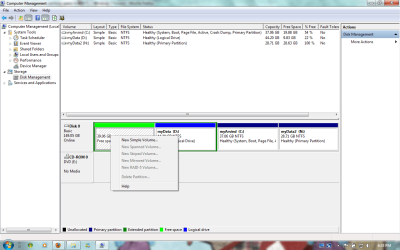
nope... its not possible....
 

Attachments

  • Partition 2.png
    Partition 2.png
    50 KB · Views: 193

My Computer My Computer

At a glance

Microsoft Windows 7 Ultimate,(32-Bit), 6.1.7600Mobile DualCore Intel Pentium T2330, 1600 MHz1GB DDR2/800 Kingsoft + 512MB DDR2/667 KingstoneIntel GMA X3100
OS
Microsoft Windows 7 Ultimate,(32-Bit), 6.1.7600
CPU
Mobile DualCore Intel Pentium T2330, 1600 MHz
Motherboard
Wistron 30CD
Memory
1GB DDR2/800 Kingsoft + 512MB DDR2/667 Kingstone
Graphics Card(s)
Intel GMA X3100
Sound Card
Conexant Cx20549 @ Intel 82801HBM ICH8M
Monitor(s) Displays
LG Philips LP141WX3-TLB4
Screen Resolution
1280 x 800
Hard Drives
Seagate Momentus 5400.3 160821
Internet Speed
~1.0 Mb/sec
Other Info
Compaq Presario V3000
If you decide to wipe the drive entirely, and start from scratch, I would make two recommendations...place your C: partition ahead of all others and make it larger than you have. You will fill the space that you now have very quickly.
 

My Computer My Computer

At a glance

W7x64 Pro, SuSe 12.1/** W7 x64 Pro, XP MCEPhenom II 1090T w/Noctua NH-D14 /**4400+ X2 w...2 x 2GB Patriot PGS34g1600LLKA/**4x1GB Corsai...EVGA GTX460 SC/**EVGA 8800GTS
Computer Manufacturer/Model Number
DIY
OS
W7x64 Pro, SuSe 12.1/** W7 x64 Pro, XP MCE
CPU
Phenom II 1090T w/Noctua NH-D14 /**4400+ X2 w/CM Hyper TX 3
Motherboard
ASRock 890FX Deluxe 4/**A8N-SLI
Memory
2 x 2GB Patriot PGS34g1600LLKA/**4x1GB Corsair VS
Graphics Card(s)
EVGA GTX460 SC/**EVGA 8800GTS
Sound Card
Asus Xonar D2X/**Xonar D1
Monitor(s) Displays
Acer X233H, Dell E152FPc /**LG M237-WD
Screen Resolution
1920x1080 & 1024x768/**1980x1080
Hard Drives
WDC 2TB, 1.5TB, 1TB, 500GB,Seagate 500GB , Maxtor 80GB /**500GB Seagate & WDC 1TB Black
PSU
CM RS600 w/ APC BX1000G/**Antec 500 TP w/ APC BX1000
Case
HAF922/**Antec 1040IIB
Cooling
3x200mm, 1x140 and 1x120mm/**5x80mm fans
Keyboard
Logitech Media USB/**Saitek Eclipse
Mouse
Cordless Trackman Wheel/**Ditto
Internet Speed
3.3Mbps
Other Info
SB 560 5.1 w/ Sennheiser RS140/**Creative T20 speakers, Dvico FusionHDTV7 Gold RT, Cisco E3000, HP 5510V AIO, Linksys E3000, Belkin F5U237 hub and **F5D8055 adapter
(** = 2nd rig)
Partition Wizard is a free download and is pretty handy at issues like this. While you are at it, consider using the Copy command to move C:\ to the unallocated space, since it is the fastest access region on the drive.

In PW, you set it all up (with options to back out) within the windows GUI and then when you re-start, PW will step in and complete the operations before automatically booting back into windows. It is able to move the entire Windows installation without losing any setup, users etc.


Damn! partition wizard had ruin it all... i formatted only the the free space now the myData drive went swept clean!!!!!!!!! all my files gone! done with it...
cryin over the split milk... should had done a new back up before formatting!!!!!!!:cry::cry::cry:
hell thanks 2 it...i recovered the missing 40gb of space! yet gone with all my files..
lucky i have the back up copy of it.. not all but...haiz......
 
Last edited:

My Computer My Computer

At a glance

Microsoft Windows 7 Ultimate,(32-Bit), 6.1.7600Mobile DualCore Intel Pentium T2330, 1600 MHz1GB DDR2/800 Kingsoft + 512MB DDR2/667 KingstoneIntel GMA X3100
OS
Microsoft Windows 7 Ultimate,(32-Bit), 6.1.7600
CPU
Mobile DualCore Intel Pentium T2330, 1600 MHz
Motherboard
Wistron 30CD
Memory
1GB DDR2/800 Kingsoft + 512MB DDR2/667 Kingstone
Graphics Card(s)
Intel GMA X3100
Sound Card
Conexant Cx20549 @ Intel 82801HBM ICH8M
Monitor(s) Displays
LG Philips LP141WX3-TLB4
Screen Resolution
1280 x 800
Hard Drives
Seagate Momentus 5400.3 160821
Internet Speed
~1.0 Mb/sec
Other Info
Compaq Presario V3000
Back
Top