Unable to format a system drive?

ccwildcard

New member
Local time
10:42 PM
Messages
1
partition.jpg


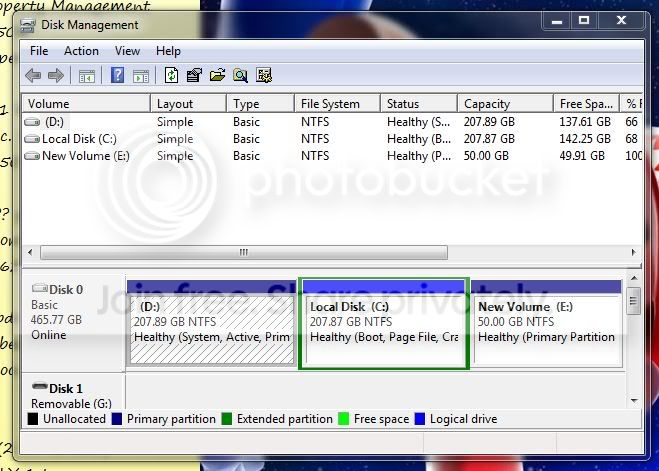
So to give an idea of whats going on: D: Drive is where Vista USED to be. C: Is where I put 7. E: Is a small drive I dropped in for XP.

Now that 7 is on C: I have no real use for Vista and want to format D: for storage of all non-system files. However its not letting me delete all the files (it shows about 50+ GB os files in D:\Program Files\ and D:\Windows from the old installation) OR Format the drive because it treats is as a system drive. Any way around this? Any help appreciated.

http://i27.photobucket.com/albums/c186/ccwildcard/error1.jpg is the error I get when I try to format

http://i27.photobucket.com/albums/c186/ccwildcard/error2.jpg the error I get when trying to delete
 

My Computer

OS
Windows 7/Windows XP
First off welcome to the sevenforums! ccwildcard

You are in a bit of fix there! First off if you delete the former Vista C primary neither XP or 7 will start up! The main boot files are located on the now seen by as D primary. Apparently you first saw an install of XP following Vista by the looks of the setup there.

In order to see a working dual boot of XP with 7 now you would need to follow a few steps I can outline for you here. But that will mean another slight change in the way things are setup.

1)You have two options of first seeing a second 7 installation on the first primary originally used by Vista. Or you can backup the two primaries and delete both the Vista and 7 primaries in order to see one larger new one for a fresh install of 7.

2)If you elect the later once you have the new primary created and formatted in order to be ready for use you first perform a repair install of XP in order to see the new mbr entries along with the new boot files placed at the root of the new C drive. How to Perform a Windows XP Repair Install

3)Once XP is up and running again following the repair install which will preserve the existing XP installation you can then install a fresh copy of 7 on the new primary then becoming the default OS as well as seeing XP added into the 7 boot loader seen as "previous version of Windows".

The BCD editor tool can be downloaded separately in order to rename that to XP Home or Professional depending on the edition. The free tool will also work on Windows 7 as well as Vista for both 32bit and 64bit RCs. System Tools - BCD Editor

To rename the previous versions item you simply click on the "set descriptions" button and enter the new name that will be seen on the 7 boot options screen. You can also set which will be the default OS as well as the amount of display time as you can see how that looks from the image on the download page there.

If you elect to save time by seeing the second copy of 7 installed on the existing first primary you can elect to reformat the now C primary in order to see the first removed. The BCD editing tool also sees the delete option for removing the entry for that as well.

 

My Computers

System One System Two

  • Computer type
    PC/Desktop
    Computer Manufacturer/Model Number
    Custom builds = 2
    OS
    W7 Ultimate x64/W10 Pro x64/W11 Pro Triple Boot - Main PC W7 Remote PC Micro ATX W7 Pro x64/W11 Pro
    CPU
    AMD Phenom II X4 975 Deneb 3.6ghz - 965 2nd remote pc
    Motherboard
    Gigabyte GA-790XTA-UD4-Gigabyte GA-880GM-D2H remote pc
    Memory
    Kingston Hyper X DDR3 1600 1.5v 16gb - Hyper X Fury 8gb 2nd
    Graphics Card(s)
    MSI HD Radeon 5750 1gb - MSI HD Radeon 6450 on mini tower
    Sound Card
    Creative Labs X-Fi Xtreme Audio P - Realtek onooard 2nd case
    Monitor(s) Displays
    ASUS VW199T-P 19" HP 2082a Main-HP 2082a 20" remote pc
    Screen Resolution
    Asus 1440x900 - HP 1600x900
    Hard Drives
    WD Black 1TB HD per OS W7, W10, and pending W11 presently on 500gb OS Drive - Pending Triple 1TB HDs for Spanned Storage/backup volume
    Single 2TB external USB enclosure, single 1TB System 7 Host/Boot drive, Pending 8TB external HD for system image b
    PSU
    Corsair 750TX - primary / Corsair CX600 - second
    Case
    Antec 900-2 - SSD compatible / NZXT Vulcan mini tower
    Cooling
    Zalman CNPS9900A
    Keyboard
    AZIO L70 Backlit Letters Gaming - ONN Cordless/USB
    Mouse
    MSI DS200 Programmable, Logitech Cordless
    Internet Speed
    30mbps upgrade - primary hard wired - mini tower usb WiFi
    Antivirus
    GFI VIPRE Internet Security 2014 on W7 2016 beta on W10,
    Browser
    Cyberfox, WaterFox 64bit FF variants, FireFox x64, Pale Moon
    Other Info
    Accomdata fan cooled usb 2.0 PIDE/Sata II, III external enclosure.
    Sambient usb/eSata PATA/Sata II, III external enclosure.
  • Computer type
    PC/Desktop
    System Manufacturer/Model Number
    CUSTOM ASSEMBLY
    OS
    W7 Pro x64/W11 Pro
    CPU
    AMD Deneb 3.6ghz - 965
    Motherboard
    Gigabyte GA-880GM-D2H remote pc
    Memory
    Kingston Hyper X Fury 8gb
    Graphics Card(s)
    MSI HD Radeon 6450 DVI Output
    Sound Card
    Realtek onooard Creative or Other separate PENDING
    Monitor(s) Displays
    VIZIO 32" LCD TV Separate LCD Pending
    Screen Resolution
    1600x1080
    Hard Drives
    WD 500GB OS Host/Boot WD Green 1TB Storage/Backup
    PSU
    Corsair 600W - THERMALTAKE 600W spare case
    Case
    NZXT Vulcan mini tower
    Cooling
    Twin 120mm Top Fans - 240mm Side Cover
    Keyboard
    ONN Cordless/USB Logitech Cordless
    Mouse
    ONN USB/Cordless - Logitech Cordless
    Internet Speed
    DSL 5G
    Browser
    MS Edge, FireFox, WaterFox x64, FireFox Nightly
    Other Info
    OS Testing-Remote Access to Main TeamViewer
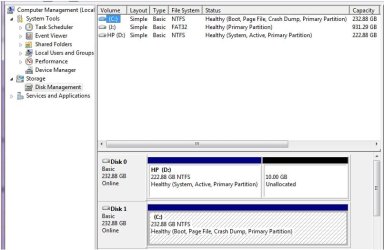
I want to do the same thing except my new Win 7 install is on drive C and an old vista install is on Drive D... Does that make it any easier? I would rather not re-install if i dont have to. I would like to just wipe the D drive clean.


Thanks!
 

Attachments

  • Drives.jpg
    Drives.jpg
    51.7 KB · Views: 951

My Computer

OS
Win 7
Once you wipe the first drive there seen as Disk 0 you will have to peform an upgrade repair install on 7 without the first drive plugged in since your mbr entries and boot files are still on the first drive seen in 7 as D.

If you had installed 7 as a stand alone on the second drive with the first unplugged you would have no worries since all that will still be intact on the second drive. But you likely installed 7 with the Vista drive still plugged in didn't you?
 

My Computers

System One System Two

  • Computer type
    PC/Desktop
    Computer Manufacturer/Model Number
    Custom builds = 2
    OS
    W7 Ultimate x64/W10 Pro x64/W11 Pro Triple Boot - Main PC W7 Remote PC Micro ATX W7 Pro x64/W11 Pro
    CPU
    AMD Phenom II X4 975 Deneb 3.6ghz - 965 2nd remote pc
    Motherboard
    Gigabyte GA-790XTA-UD4-Gigabyte GA-880GM-D2H remote pc
    Memory
    Kingston Hyper X DDR3 1600 1.5v 16gb - Hyper X Fury 8gb 2nd
    Graphics Card(s)
    MSI HD Radeon 5750 1gb - MSI HD Radeon 6450 on mini tower
    Sound Card
    Creative Labs X-Fi Xtreme Audio P - Realtek onooard 2nd case
    Monitor(s) Displays
    ASUS VW199T-P 19" HP 2082a Main-HP 2082a 20" remote pc
    Screen Resolution
    Asus 1440x900 - HP 1600x900
    Hard Drives
    WD Black 1TB HD per OS W7, W10, and pending W11 presently on 500gb OS Drive - Pending Triple 1TB HDs for Spanned Storage/backup volume
    Single 2TB external USB enclosure, single 1TB System 7 Host/Boot drive, Pending 8TB external HD for system image b
    PSU
    Corsair 750TX - primary / Corsair CX600 - second
    Case
    Antec 900-2 - SSD compatible / NZXT Vulcan mini tower
    Cooling
    Zalman CNPS9900A
    Keyboard
    AZIO L70 Backlit Letters Gaming - ONN Cordless/USB
    Mouse
    MSI DS200 Programmable, Logitech Cordless
    Internet Speed
    30mbps upgrade - primary hard wired - mini tower usb WiFi
    Antivirus
    GFI VIPRE Internet Security 2014 on W7 2016 beta on W10,
    Browser
    Cyberfox, WaterFox 64bit FF variants, FireFox x64, Pale Moon
    Other Info
    Accomdata fan cooled usb 2.0 PIDE/Sata II, III external enclosure.
    Sambient usb/eSata PATA/Sata II, III external enclosure.
  • Computer type
    PC/Desktop
    System Manufacturer/Model Number
    CUSTOM ASSEMBLY
    OS
    W7 Pro x64/W11 Pro
    CPU
    AMD Deneb 3.6ghz - 965
    Motherboard
    Gigabyte GA-880GM-D2H remote pc
    Memory
    Kingston Hyper X Fury 8gb
    Graphics Card(s)
    MSI HD Radeon 6450 DVI Output
    Sound Card
    Realtek onooard Creative or Other separate PENDING
    Monitor(s) Displays
    VIZIO 32" LCD TV Separate LCD Pending
    Screen Resolution
    1600x1080
    Hard Drives
    WD 500GB OS Host/Boot WD Green 1TB Storage/Backup
    PSU
    Corsair 600W - THERMALTAKE 600W spare case
    Case
    NZXT Vulcan mini tower
    Cooling
    Twin 120mm Top Fans - 240mm Side Cover
    Keyboard
    ONN Cordless/USB Logitech Cordless
    Mouse
    ONN USB/Cordless - Logitech Cordless
    Internet Speed
    DSL 5G
    Browser
    MS Edge, FireFox, WaterFox x64, FireFox Nightly
    Other Info
    OS Testing-Remote Access to Main TeamViewer
use diskpart dude. on the desktop click start button.
on the search bar type in CMD then press CTRL+SHIFT+enter to run as administrator.

then the CMD will pop up as administrator. type in diskpart.<enter>

now when you are prompted to diskpart type in LIST DISK plus the correspondent no. which you want to select.


once your inside the drive type in LIST PARTITION
you will see all of your partition
Now, select the partition you want type in SELECT PARTITION and no. correspond to the partition you want to format.

once you are in the selected partition, TYPE in FORMAT then <ENTER>

and thats it...

remeber once you format the partition all files in that partition will be remove permanently so if you have important files on it better back it up..


hope this will help you:)
 

My Computer

OS
windows 7, Vista
Once you wipe the first drive there seen as Disk 0 you will have to peform an upgrade repair install on 7 without the first drive plugged in since your mbr entries and boot files are still on the first drive seen in 7 as D.

If you had installed 7 as a stand alone on the second drive with the first unplugged you would have no worries since all that will still be intact on the second drive. But you likely installed 7 with the Vista drive still plugged in didn't you?

Yes I did install 7 on C drive with D drive plugged in... what about what april said? How can I tell if 7 installed the mbr entries and boot files on the D drive?
 

My Computer

OS
Win 7
You have to look to see if D is the first drive on the system as it looks as well as which drive is set as the default boot device. If the 7 drive is the second the mbr and boot files went onto the first D meaning a format of that will make 7 unavailable since it won't load.

To know for sure look at the root of D and see if the "Boot" folder is seen at the root as well as the bootmgr, hiderfil.sys, SAVEBCD, config.xml files. If those are present there but not on the 7 root... ut oh! :(

Either a clean install of 7 or the repair install by upgrade without the Vista drive plugged to see if the installer will place a new BCD store and boot information on the 7 drive are your options. That's the one drawback when dual or multibooting across more then one drive. If you don't make each installation a stand alone OS you are relying on one host drive for everything!
 

My Computers

System One System Two

  • Computer type
    PC/Desktop
    Computer Manufacturer/Model Number
    Custom builds = 2
    OS
    W7 Ultimate x64/W10 Pro x64/W11 Pro Triple Boot - Main PC W7 Remote PC Micro ATX W7 Pro x64/W11 Pro
    CPU
    AMD Phenom II X4 975 Deneb 3.6ghz - 965 2nd remote pc
    Motherboard
    Gigabyte GA-790XTA-UD4-Gigabyte GA-880GM-D2H remote pc
    Memory
    Kingston Hyper X DDR3 1600 1.5v 16gb - Hyper X Fury 8gb 2nd
    Graphics Card(s)
    MSI HD Radeon 5750 1gb - MSI HD Radeon 6450 on mini tower
    Sound Card
    Creative Labs X-Fi Xtreme Audio P - Realtek onooard 2nd case
    Monitor(s) Displays
    ASUS VW199T-P 19" HP 2082a Main-HP 2082a 20" remote pc
    Screen Resolution
    Asus 1440x900 - HP 1600x900
    Hard Drives
    WD Black 1TB HD per OS W7, W10, and pending W11 presently on 500gb OS Drive - Pending Triple 1TB HDs for Spanned Storage/backup volume
    Single 2TB external USB enclosure, single 1TB System 7 Host/Boot drive, Pending 8TB external HD for system image b
    PSU
    Corsair 750TX - primary / Corsair CX600 - second
    Case
    Antec 900-2 - SSD compatible / NZXT Vulcan mini tower
    Cooling
    Zalman CNPS9900A
    Keyboard
    AZIO L70 Backlit Letters Gaming - ONN Cordless/USB
    Mouse
    MSI DS200 Programmable, Logitech Cordless
    Internet Speed
    30mbps upgrade - primary hard wired - mini tower usb WiFi
    Antivirus
    GFI VIPRE Internet Security 2014 on W7 2016 beta on W10,
    Browser
    Cyberfox, WaterFox 64bit FF variants, FireFox x64, Pale Moon
    Other Info
    Accomdata fan cooled usb 2.0 PIDE/Sata II, III external enclosure.
    Sambient usb/eSata PATA/Sata II, III external enclosure.
  • Computer type
    PC/Desktop
    System Manufacturer/Model Number
    CUSTOM ASSEMBLY
    OS
    W7 Pro x64/W11 Pro
    CPU
    AMD Deneb 3.6ghz - 965
    Motherboard
    Gigabyte GA-880GM-D2H remote pc
    Memory
    Kingston Hyper X Fury 8gb
    Graphics Card(s)
    MSI HD Radeon 6450 DVI Output
    Sound Card
    Realtek onooard Creative or Other separate PENDING
    Monitor(s) Displays
    VIZIO 32" LCD TV Separate LCD Pending
    Screen Resolution
    1600x1080
    Hard Drives
    WD 500GB OS Host/Boot WD Green 1TB Storage/Backup
    PSU
    Corsair 600W - THERMALTAKE 600W spare case
    Case
    NZXT Vulcan mini tower
    Cooling
    Twin 120mm Top Fans - 240mm Side Cover
    Keyboard
    ONN Cordless/USB Logitech Cordless
    Mouse
    ONN USB/Cordless - Logitech Cordless
    Internet Speed
    DSL 5G
    Browser
    MS Edge, FireFox, WaterFox x64, FireFox Nightly
    Other Info
    OS Testing-Remote Access to Main TeamViewer
Dual Boot in the bottom

I have the same issue, and find this to be great post. So, if I remove my Device 0 drive, and turn the computer back on with the install cd in the cd rom drive, run and upgrade, will that make the device 1 drive my stand alone boot drive? Will I loose my configurations I have spent hours on? Will I loose any data in my documents and such? Will applications not work properly and need to be reinstalled? Boy, if I would have known!

Again, thank you for your advice and help. It is very good to find answers. THANK YOU!!!

When I put the old drive back in, are there any special things I must know? Can I then format the second drive that HAD XP running on it?
 
Last edited:

My Computer

OS
7
I want to do the same thing except my new Win 7 install is on drive C and an old vista install is on Drive D... Does that make it any easier? I would rather not re-install if i dont have to. I would like to just wipe the D drive clean.


Thanks!

Mark the C: drive active in Disk Management.

Unplug the D: drive and plug C: drive into its cable, or change BIOS to boot D: drive first.

Boot into the Win7 installer and run Startup Repair 3 times, as it needs to fix multiple issues.

You can now plug D; drive back in and format.

If Disk management fails to perform any of these functions, use free Partition Wizard bootable.
 
Last edited:
Wanting to keep the 7 RC running on one drive here but still see a clean install of the retail 7 on sata #4 I swapped data cables with sata #1 which had been used for a test drive but a WD Green Power model good for storage/backup not performance.

Once Drive 3 saw the cable swap with the former Drive 0 and made the default boot device the installation proceeded from there. Note prior to having arrived GParted live was used to wipe both of those drives while the RC sat intact on the now Drive 1.

The interesting to note about that is that the fresh install of the retail 7 did not add the RC into it's own BCD store as it would have for XP or Vista if one of those was the OS instead. Once you have the data cables swapped you can elect to have Vista in as the second OS on then Drive 1 instead when seeing a fresh install of 7.

When performing a quick test install of the RC on a 3rd drive in order to use the Windows Easy Transfer tool formerly seen as Files and Settings Transfer Wizard in XP and Vista the bcd entries where still on the first RC's drive where attempts to export the BCD over to the test install to make that drive bootable as a stand alone failed. That's the drive that now sees a clean install of the retail 7!
 

My Computers

System One System Two

  • Computer type
    PC/Desktop
    Computer Manufacturer/Model Number
    Custom builds = 2
    OS
    W7 Ultimate x64/W10 Pro x64/W11 Pro Triple Boot - Main PC W7 Remote PC Micro ATX W7 Pro x64/W11 Pro
    CPU
    AMD Phenom II X4 975 Deneb 3.6ghz - 965 2nd remote pc
    Motherboard
    Gigabyte GA-790XTA-UD4-Gigabyte GA-880GM-D2H remote pc
    Memory
    Kingston Hyper X DDR3 1600 1.5v 16gb - Hyper X Fury 8gb 2nd
    Graphics Card(s)
    MSI HD Radeon 5750 1gb - MSI HD Radeon 6450 on mini tower
    Sound Card
    Creative Labs X-Fi Xtreme Audio P - Realtek onooard 2nd case
    Monitor(s) Displays
    ASUS VW199T-P 19" HP 2082a Main-HP 2082a 20" remote pc
    Screen Resolution
    Asus 1440x900 - HP 1600x900
    Hard Drives
    WD Black 1TB HD per OS W7, W10, and pending W11 presently on 500gb OS Drive - Pending Triple 1TB HDs for Spanned Storage/backup volume
    Single 2TB external USB enclosure, single 1TB System 7 Host/Boot drive, Pending 8TB external HD for system image b
    PSU
    Corsair 750TX - primary / Corsair CX600 - second
    Case
    Antec 900-2 - SSD compatible / NZXT Vulcan mini tower
    Cooling
    Zalman CNPS9900A
    Keyboard
    AZIO L70 Backlit Letters Gaming - ONN Cordless/USB
    Mouse
    MSI DS200 Programmable, Logitech Cordless
    Internet Speed
    30mbps upgrade - primary hard wired - mini tower usb WiFi
    Antivirus
    GFI VIPRE Internet Security 2014 on W7 2016 beta on W10,
    Browser
    Cyberfox, WaterFox 64bit FF variants, FireFox x64, Pale Moon
    Other Info
    Accomdata fan cooled usb 2.0 PIDE/Sata II, III external enclosure.
    Sambient usb/eSata PATA/Sata II, III external enclosure.
  • Computer type
    PC/Desktop
    System Manufacturer/Model Number
    CUSTOM ASSEMBLY
    OS
    W7 Pro x64/W11 Pro
    CPU
    AMD Deneb 3.6ghz - 965
    Motherboard
    Gigabyte GA-880GM-D2H remote pc
    Memory
    Kingston Hyper X Fury 8gb
    Graphics Card(s)
    MSI HD Radeon 6450 DVI Output
    Sound Card
    Realtek onooard Creative or Other separate PENDING
    Monitor(s) Displays
    VIZIO 32" LCD TV Separate LCD Pending
    Screen Resolution
    1600x1080
    Hard Drives
    WD 500GB OS Host/Boot WD Green 1TB Storage/Backup
    PSU
    Corsair 600W - THERMALTAKE 600W spare case
    Case
    NZXT Vulcan mini tower
    Cooling
    Twin 120mm Top Fans - 240mm Side Cover
    Keyboard
    ONN Cordless/USB Logitech Cordless
    Mouse
    ONN USB/Cordless - Logitech Cordless
    Internet Speed
    DSL 5G
    Browser
    MS Edge, FireFox, WaterFox x64, FireFox Nightly
    Other Info
    OS Testing-Remote Access to Main TeamViewer
Page filing

enable to view hidden files and you'll probably see you have a page filing folder on your drive. if so get to my computer properties. advanced system settings>advanced tab>performance settings>advanced tab (again)>select virtual memory "change">select drive to be formatted and highlight "NO Paging File" and "SET", hit okay>hit apply> hit okay, (closing performance options> hit apply and okay closing system properties. restart pc and try to format now.
 

My Computer

OS
windows ultimate x64
Okay I liked April's post, and kinda stopped there until the disclaimer came up at the end saying "don't delete files"... So, I turned the computer off unplugged the drive and booted. plugged the drive back in after getting into windows. System Flag gone was able to format, even though i was just trying to encrypt (you can't do one if you can't do the other).

Thank you guys for chit chatting.
 

My Computer

OS
7
Unable to format system drive

I have a HCL dual core based pc. I have 5 partitions of my hard drive. On c drive i have windows 7 and on d i have vista. I wanna format that vista drive d without making any changes to windows 7. I dun have cd drive to go through setup and format it so i need to format from windows 7 nly. So plZ tel me soln.....
 

My Computer

OS
---windows 7 ultimate 32bit
Please post back a screenshot of your maximized Disk Management drive map and listings:

1. Type Disk Management in Start :orb: Search box.
2. Open Disk Mgmt. window and maximize it.
3. Type Snipping Tool in Start Search box.
4. Open Snipping Tool, choose Rectangular Snip, click New, draw a box around full drive map and all listings.
5, Save Snip, attach using paper clip in Reply Box.

Tell us what is on each partition and what you'd like to see done with each.
 
If I take out the one system drive I want to format and put it in another computer can I format it there?
 

My Computer

Computer type
PC/Desktop
Computer Manufacturer/Model Number
Custom
OS
Windows 7 Professional x64
CPU
Intel Core i5 2500k @ 4.5GHz
Motherboard
EVGA P67 FTW
Memory
8GB G.Skill Ripjaw @ 1866MHz
Graphics Card(s)
Galaxy GeForce GTX670 GC
Hard Drives
- Intel 520 Series 120GB SSD
- WD 1TB
- Seagate 320GB
Browser
Chrome

My Computer

Computer type
PC/Desktop
Computer Manufacturer/Model Number
Skylake Special #666
OS
Windows 10 Pro x64
CPU
Intel Core i7 6700K
Motherboard
Asus Sabertooth Z170 Mark 1
Memory
GSkill TridentZ RGB 16GB 3600 16-16-16-36
Graphics Card(s)
EVGA GTX 980 Ti SC x2
Sound Card
Realtek High Definition
Monitor(s) Displays
AOC G2460PG
Screen Resolution
1920 x 1080 144Hz
Hard Drives
Samsung 860 Pro 256GB, Seagate Barracuda 4TB x2
PSU
EVGA 1000 P2, EVGA White Custom Braided Cables
Case
Corsair Vengeance C70 Gunmetal Black
Cooling
Corsair H100i v2, Corsair ML120 x2, Thermal Grizzly Kryonaut
Keyboard
Logitech G910 Orion Spectrum
Mouse
Logitech G700s
Internet Speed
Verizon Fios Quantum Gateway 75/75
Antivirus
Windows Defender, Malwarebytes Free 3.8.3
Browser
Chrome
Other Info
Corsair SP120 x4, LG Blu-ray Drive, Durabrand HT-395 100 Watt Dolby Digital Amp, Corsair H2100 Wireless 7.1 Headset
Back
Top