
Unable to format hdd

Pot8ohead

New member
Local time
3:22 PM
Messages
7
Location
Ontario, Canada
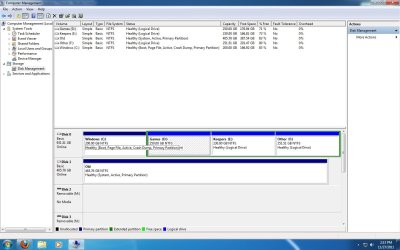
Hi all, I recently installed a new, bigger, hard drive into my computer. I successfully installed Windows 7 Ultimate (x64) onto the new drive, partitioned it and copied all of the data I wanted to save from my old drive onto the new. The last thing I want to do is format the old drive. Using Disk Management, I successfully removed all of the partitions from the old drive and it now shows as 1 (almost) 500 gig drive. When I attempt to format it, though, I get the message "Windows cannot format the system partition on this disk." After doing a quick search of the web, I found a site suggesting a way to fix this is, by using the "diskpart" command at the command prompt, to set the partition to inactive. I gave that a shot, rebooted the computer and only received a boot failure message (non system disk inserted or something to that effect). I managed to change that particular partition back to active and am now able to boot up the computer once more, but I'm still back to being unable to format the old drive. In Disk Management, the new drive's properties are as follows: "Boot, Page File, Active, Crash Dump, Primary Partition." The old drive shows as only "System, Active, Primary Partition." What can I do to be able to format that old drive and, if I need to, set the new drive (or Windows installation partition) to "System"? Thanks in advance. Pot8ohead
 

My Computer

OS
Windows 7 Ultimate x64
CPU
Athlon XP 64 Dual Core 6000+ 3GHz
Memory
3 GB
Graphics Card(s)
ATI Radeon 5550
Sound Card
SoundBlaster X-Fi Xtreme
Hard Drives
Seagate Barracuda 1 TB
Seagate Barracuda 500 GB
make your windows partition active.
make partition inactive on old disk, just the way you did earlier.
Now start your pc. you may have to perform a startup repair (maybe 3 times)
 

My Computer

Computer type
Laptop
Computer Manufacturer/Model Number
ACER ASPIRE 5742G
OS
Microsoft Windows 7 Home Premium 64-bits 7601 Multiprocessor Free Service Pack 1
CPU
Intel(R) Core(TM) i3 CPU M 370 @ 2.40GHz
Motherboard
Acer Aspire 5742G
Memory
4,00 GB
Graphics Card(s)
ATI Mobility Radeon HD 5400 Series
Sound Card
(1) AMD High Definition Audio Device (2) Realtek High Defi
Screen Resolution
1366 x 768 x 32 bits (4294967296 colors) @ 60 Hz
Hard Drives
WDC WD5000BEVT-22ZAT0
make your windows partition active.
make partition inactive on old disk, just the way you did earlier.
Now start your pc. you may have to perform a startup repair (maybe 3 times)

Thanks for the quick response. The new Windows partition is already set to active, but I'll try setting the old one to inactive again and using startup repair instead of just changing settings back again. I was a little leery of messing around too much the first time around.
 

My Computer

OS
Windows 7 Ultimate x64
CPU
Athlon XP 64 Dual Core 6000+ 3GHz
Memory
3 GB
Graphics Card(s)
ATI Radeon 5550
Sound Card
SoundBlaster X-Fi Xtreme
Hard Drives
Seagate Barracuda 1 TB
Seagate Barracuda 500 GB
just do a startup repair maybe 3 times. If it doesn't work ... post error message
 

My Computer

Computer type
Laptop
Computer Manufacturer/Model Number
ACER ASPIRE 5742G
OS
Microsoft Windows 7 Home Premium 64-bits 7601 Multiprocessor Free Service Pack 1
CPU
Intel(R) Core(TM) i3 CPU M 370 @ 2.40GHz
Motherboard
Acer Aspire 5742G
Memory
4,00 GB
Graphics Card(s)
ATI Mobility Radeon HD 5400 Series
Sound Card
(1) AMD High Definition Audio Device (2) Realtek High Defi
Screen Resolution
1366 x 768 x 32 bits (4294967296 colors) @ 60 Hz
Hard Drives
WDC WD5000BEVT-22ZAT0
Can you post a screen shot of Disk management?
http://www.sevenforums.com/tutorials/9733-how-post-screenshot-seven-forums.html

Diskmgmt SS.jpg

I tried Kaktussoft's suggestion, but didn't get any further than I did initially. The startup repair utility attempted to fix the problem three times. The first time, there was a file missing (never thought to write down the name of it & can't remember for sure now), something to do with the boot record or some such thing. Bootmgr, maybe? Anyhow, it said that problem was successfully repaired. The second time, it said something about partition corruption, but again, successfully repaired it. The third time, it found no errors, but I still couldn't boot from the hard drive at all.

It just occurred to me that I only attempted to repair boot issues with the latest installation of Windows; not with the old installation. I just naturally assumed that since this is the only copy of Windows I'll be running with, once the old drive is formatted, it made no sense trying to repair that copy.
 

My Computer

OS
Windows 7 Ultimate x64
CPU
Athlon XP 64 Dual Core 6000+ 3GHz
Memory
3 GB
Graphics Card(s)
ATI Radeon 5550
Sound Card
SoundBlaster X-Fi Xtreme
Hard Drives
Seagate Barracuda 1 TB
Seagate Barracuda 500 GB
My Computer

OS
ME/XP/Vista/Win7

Thanks again for the responses.

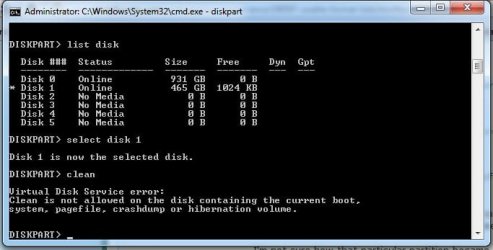
Attempted to do as suggested, but only got the following message when I tried (with both Clean & Clean All):

"Virtual Disk Service error:
Clean is not allowed on the disk containing the current boot
system, pagefile, crashdump or hibernation volume."

I'm not sure how that particular partition became a "System" partition, but it's the only one that's got that attribute attached to it. I'm guessing if I can clear that attribute and/or reassign it to the new Windows partition, these problems would go away. I took a look at the Attributes command within diskpart, but "System" isn't one of the attributes that are listed.
 

My Computer

OS
Windows 7 Ultimate x64
CPU
Athlon XP 64 Dual Core 6000+ 3GHz
Memory
3 GB
Graphics Card(s)
ATI Radeon 5550
Sound Card
SoundBlaster X-Fi Xtreme
Hard Drives
Seagate Barracuda 1 TB
Seagate Barracuda 500 GB
select disk # (old HD)

You need to select the Old HD drive.
 

My Computer

OS
ME/XP/Vista/Win7
select disk # (old HD)

You need to select the Old HD drive.
Diskpart SS.jpg

That's how I did it, as seen in the SS. :cry:

Edit: In case the drive being marked as Online was part of the problem, I tried taking it offline, but got the following message:

"Virtual Disk Service error:
Disk attributes may not be changed on the current system disk or BIOS disk 0."
 

My Computer

OS
Windows 7 Ultimate x64
CPU
Athlon XP 64 Dual Core 6000+ 3GHz
Memory
3 GB
Graphics Card(s)
ATI Radeon 5550
Sound Card
SoundBlaster X-Fi Xtreme
Hard Drives
Seagate Barracuda 1 TB
Seagate Barracuda 500 GB
Try doing from the Windows 7 DVD, but unplug the new HD drive first.

Boot DVD & Press Shift+F10 (for command prompt)
http://www.sevenforums.com/tutorials/119713-diskpart-pc-startup.html

If you unplug the old HD drive, will Windows boot?
 

My Computer

OS
ME/XP/Vista/Win7

Try doing from the Windows 7 DVD, but unplug the new HD drive first.

Boot DVD & Press Shift+F10 (for command prompt)
http://www.sevenforums.com/tutorials/119713-diskpart-pc-startup.html

If you unplug the old HD drive, will Windows boot?

I tried unplugging the old hard drive at one point, after the startup repair utility failed to get things up & running after the 3rd time through, but made no progress. I'll give Diskpart/Clean a shot with the new hard drive unplugged (and from the Win7 dvd), but my concern there is the lack of that "System" attribute on the new Windows installation partition.

I'll let you know how it goes! Thanks again for all the help.
 

My Computer

OS
Windows 7 Ultimate x64
CPU
Athlon XP 64 Dual Core 6000+ 3GHz
Memory
3 GB
Graphics Card(s)
ATI Radeon 5550
Sound Card
SoundBlaster X-Fi Xtreme
Hard Drives
Seagate Barracuda 1 TB
Seagate Barracuda 500 GB
Well, that didn't work. Turns out I was leery for good reason. Once I used the "clean" command on the old drive, I no longer had a bootable hard drive. The startup repair utility still found no errors on the new drive and yet I was still unable to boot from it.

I guess the good news was that I hadn't started reinstalling all of my other programs, so reinstalling Windows wasn't as painful as it could have been...
 

My Computer

OS
Windows 7 Ultimate x64
CPU
Athlon XP 64 Dual Core 6000+ 3GHz
Memory
3 GB
Graphics Card(s)
ATI Radeon 5550
Sound Card
SoundBlaster X-Fi Xtreme
Hard Drives
Seagate Barracuda 1 TB
Seagate Barracuda 500 GB
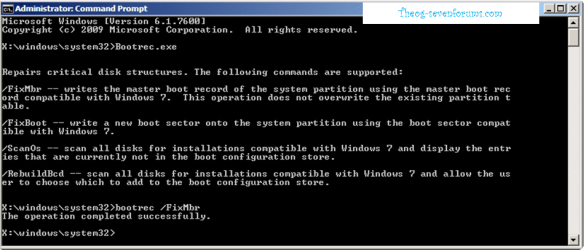
Do this with the old HD drive unpluged.

   Information
Boot up using the Startup Repair CD or Windows 7 DVD. (not the OEM manufacturer's Recovery Disk) If you have a Netbook, you will need a CD/DVD drive.
NOTE: Make sure no USB drives are plugged in.
Do not use a USB Pendrive for Startup Repair.
startup repair disc-create

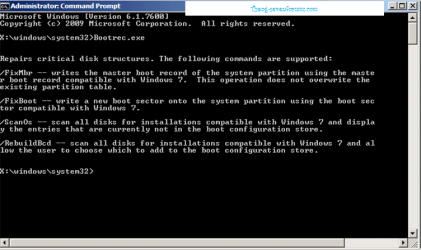
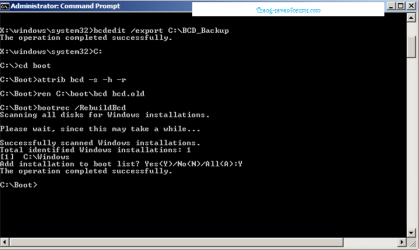
1) Use the Rebuild BCD in this tutorial:
How to use the Bootrec.exe tool in the Windows Recovery Environment to troubleshoot and repair startup issues in Windows

Startup Repair 4.PNG Startup Repair 5.PNG

2) Restore MBR.

Startup Repair 6.PNG
 

My Computer

OS
ME/XP/Vista/Win7
  1. unplug your old disk, just to be sure
  2. restart to "recovery environment" and enter "command prompt". Did it find any windows installations? If so what driveletter? That driveleter is the driveletter of windows in recovery environment
DIR C: or DIR D: do you see windows folder then that's your windows drive letter in recovery environment. assume it's C

BOOTSECT /NT60 C:
BOOTSECT /NT60 C: /MBR

both commands ended succesfully?
bcdedit /store c:\boot\bcd /enum all
do you see something like this? The items marked red I'm interested in

Windows-opstartbeheer
---------------------
id {bootmgr}
device partition=C:
path \bootmgr
description Windows Boot Manager
locale nl-NL
inherit {globalsettings}
default {default}
resumeobject {fa1a7f9d-ab26-11df-bc4f-ce7145d50d35}
displayorder {default}
toolsdisplayorder {memdiag}
timeout 10
Windows-opstartlaadprogramma
----------------------------
id {default}
device partition=C:
path \Windows\system32\winload.exe
description Windows 7 Home Premium
locale nl-NL
inherit {bootloadersettings}
recoverysequence {fa1a7fa1-ab26-11df-bc4f-ce7145d50d35}
recoveryenabled Yes
osdevice partition=C:
systemroot \Windows
resumeobject {fa1a7f9d-ab26-11df-bc4f-ce7145d50d35}
nx OptIn
Windows-opstartlaadprogramma
----------------------------
id {fa1a7fa1-ab26-11df-bc4f-ce7145d50d35}
device ramdisk=[C:]\Recovery\fa1a7fa1-ab26-11df-bc4f-ce7145d50
35\Winre.wim,{fa1a7fa2-ab26-11df-bc4f-ce7145d50d35}
path \windows\system32\winload.exe
description Windows Recovery Environment
inherit {bootloadersettings}
osdevice ramdisk=[C:]\Recovery\fa1a7fa1-ab26-11df-bc4f-ce7145d50
35\Winre.wim,{fa1a7fa2-ab26-11df-bc4f-ce7145d50d35}
systemroot \windows
nx OptIn
winpe Yes
Hervatten uit sluimerstand
--------------------------
id {fa1a7f9d-ab26-11df-bc4f-ce7145d50d35}
device partition=C:
path \Windows\system32\winresume.exe
description Windows Resume Application
locale nl-NL
inherit {resumeloadersettings}
filedevice partition=C:
filepath \hiberfil.sys
debugoptionenabled No
Windows-geheugentest
--------------------
id {memdiag}
device partition=C:
path \boot\memtest.exe
description Windows Memory Diagnostic
locale nl-NL
inherit {globalsettings}
badmemoryaccess Yes
EMS-instellingen
----------------
id {emssettings}
bootems Yes
Debugger-instellingen
---------------------
id {dbgsettings}
debugtype Serial
debugport 1
baudrate 115200
RAM-defecten
------------
id {badmemory}
Globale instellingen
--------------------
id {globalsettings}
inherit {dbgsettings}
{emssettings}
{badmemory}
Instellingen voor opstartlaadprogramma
--------------------------------------
id {bootloadersettings}
inherit {globalsettings}
{hypervisorsettings}
Hypervisor-instellingen
-------------------
id {hypervisorsettings}
hypervisordebugtype Serial
hypervisordebugport 1
hypervisorbaudrate 115200
Instellingen voor hervattingslaadprogramma
------------------------------------------
id {resumeloadersettings}
inherit {globalsettings}
Apparaatopties
--------------
id {fa1a7fa2-ab26-11df-bc4f-ce7145d50d35}
description Ramdisk Options
ramdisksdidevice partition=C:
ramdisksdipath \Recovery\fa1a7fa1-ab26-11df-bc4f-ce7145d50d35\boot.sdi
 

My Computer

Computer type
Laptop
Computer Manufacturer/Model Number
ACER ASPIRE 5742G
OS
Microsoft Windows 7 Home Premium 64-bits 7601 Multiprocessor Free Service Pack 1
CPU
Intel(R) Core(TM) i3 CPU M 370 @ 2.40GHz
Motherboard
Acer Aspire 5742G
Memory
4,00 GB
Graphics Card(s)
ATI Mobility Radeon HD 5400 Series
Sound Card
(1) AMD High Definition Audio Device (2) Realtek High Defi
Screen Resolution
1366 x 768 x 32 bits (4294967296 colors) @ 60 Hz
Hard Drives
WDC WD5000BEVT-22ZAT0
Back
Top