Solved Unable to get a stable connection

Sidiox

New member
Member
Local time
2:58 AM
Messages
26
Location
Netherlands
I've been having problems with the router/modem provided by my ISP (KPN, Dutch company) (IP Conflicts, losing standard gateway and such). In order to resolve my issues I bought a router: TP-Link Wdr4300. This has resolved most of my problems, I now a have stable internet on our laptop, tablet and smartphone.
But our desktop has been having more problems then ever. I sometimes can't connect to either of our routers without a reason. Also the connection keeps dropping. Windows builtin problem solver can't detect any problems and keeps saying it is my router.

Router1: zte h220n with ISP altered firmware
Router2: TP-LINK wDR4300
ISP: KPN (Dutch company)
Computer having problems: see system specs
Laptop: Acer Travelmate
Tablet: Surface RT
Smartphone: HTC Desire Brown
Methode of getting internet: ADSL
All Devices are connected through WiFi

I've tried
Reinstalling the drivers
Updating the drivers
copying the network profile from the laptop
Trying to connect using Ubuntu OS
Resetting both routers
Resetting the IP
Changing the IP Range
Giving the PC a resereved IP
Changing channels
turning Router 2 off
 
Last edited:

My Computer My Computer

Computer type
PC/Desktop
Computer Manufacturer/Model Number
HP h8 1010nl
OS
Windows Home Premium 64bit
CPU
Intel i5 Quad @2.9 Ghz
Memory
10Gb (4+2+2+2)
Graphics Card(s)
nVidia GTX 550 Ti
Monitor(s) Displays
Samsung SyncMaster 2243
Screen Resolution
1650*1080
Hard Drives
Seagate 1,5TB
Samsung M3 1TB USB3
Keyboard
Logitech G710+
Mouse
Logitech G600
Internet Speed
0,6MB/s
Antivirus
AVG
Browser
Google Chrome
Hi Sidiox,

Can we get some output and additional info regarding your issue by following the requirements here?
 

My Computer My Computer

Computer Manufacturer/Model Number
Lenovo Desktop/Samsung Laptop
OS
Win7 & Win8 64bit
CPU
Intel i5
Internet Speed
Charter-20 Mbps
Antivirus
Avast
Browser
FF, IE9 and Chrome
I experienced a similar issue when I upgraded a older lap top from Vista HB to Vista Ultimatex64. After a evenings Google search my fix was to change three setting in the router from the default setting.

I changed the "Fragmentation Threshold" from the default to 2306.
I changed the "RTS Threshold" from default to 2304 and last I changed the "MTU" from 1500 to 1492.

I haven't had a dropped connection in any OS since, five Linux variations and Win xp to 7u and no change in connection speed.

YMMV
 

My Computer My Computer

Computer type
PC/Desktop
Computer Manufacturer/Model Number
Custom, Dell and Lenono LT's
OS
Win8/8.1,Win7-U64, Vista U64, uncounted Linux distor's
CPU
AMD and Intell, 9590, 8350, i5 3570k
Motherboard
CFVFZ, GA990FXA, Z77e-itx
Memory
Corsair G Skill
Graphics Card(s)
Crossfired Sapphire HD 7950 Vapor-X, ASUS R9 280X TOP
Sound Card
Realtek ALC889
Monitor(s) Displays
ViewSonic VX2770SMH 27" / ViewSonic VX2433 LCD 24"
Screen Resolution
1080i HD
Hard Drives
Samsung SSD 840 Pro
OCZ Agility 3's
OCZ Vector's
WD's Blue, red, green, Velociraptors
Seagate USB3 & Hybrid's
ASUS Blu-Ray
ASUS DVD
PSU
Corsair AX1200i, Seasonice 850 Gold
Case
Cooler Master HAF 922 & HAF 932, Lian Li Train case.
Cooling
Air, Glacer 240L expanded, custom EK loop with duel D5's
Keyboard
Microsoft SideWinder X4 USB Keyboard / Logitech 250 PS2
Mouse
Logitech G500 / MS wireless 5000
Internet Speed
Best of 5ms / 75+ dn / 12+ up More or less.
Antivirus
MS esentials-MalwareBytes
Browser
Firefox Chromebook
Sorry for my late reply. I have changed the settings in my TP-LINK WDR4300, but the Fragmentation Threshold box was greyed out so I couldn't change that one. Since the changes (monday afternoon GMT +1) I haven't had any problems yet.
Also 2xg what other info do you require?
Router1: zte h220n with ISP altered firmware
Router2: TP-LINK wDR4300
ISP: KPN (Dutch company)
Computer having problems: see system specs
Laptop: Acer Travelmate
Tablet: Surface RT
Smartphone: HTC Desire Brown
Methode of getting internet: ADSL
All Devices are connected through WiFi
 

My Computer My Computer

Computer type
PC/Desktop
Computer Manufacturer/Model Number
HP h8 1010nl
OS
Windows Home Premium 64bit
CPU
Intel i5 Quad @2.9 Ghz
Memory
10Gb (4+2+2+2)
Graphics Card(s)
nVidia GTX 550 Ti
Monitor(s) Displays
Samsung SyncMaster 2243
Screen Resolution
1650*1080
Hard Drives
Seagate 1,5TB
Samsung M3 1TB USB3
Keyboard
Logitech G710+
Mouse
Logitech G600
Internet Speed
0,6MB/s
Antivirus
AVG
Browser
Google Chrome
Thanks for the info provided. It will be helpful if you can provide (2) ipconfig /all output, one coming from your computer and another one from a working computer.

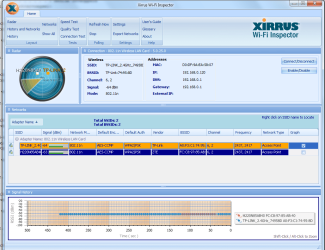
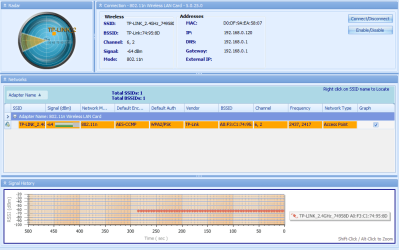
Also, a Xirrus capture from your computer would be nice. All instructions are in the link that I've provided you.

We'll appreciate another update.
 

My Computer My Computer

Computer Manufacturer/Model Number
Lenovo Desktop/Samsung Laptop
OS
Win7 & Win8 64bit
CPU
Intel i5
Internet Speed
Charter-20 Mbps
Antivirus
Avast
Browser
FF, IE9 and Chrome
Okay this afternoon I will do both ipconfig /all and I will install Xirrus too. And madcrate's solution didn't work unfortunatly still getting the same problems.
 

My Computer My Computer

Computer type
PC/Desktop
Computer Manufacturer/Model Number
HP h8 1010nl
OS
Windows Home Premium 64bit
CPU
Intel i5 Quad @2.9 Ghz
Memory
10Gb (4+2+2+2)
Graphics Card(s)
nVidia GTX 550 Ti
Monitor(s) Displays
Samsung SyncMaster 2243
Screen Resolution
1650*1080
Hard Drives
Seagate 1,5TB
Samsung M3 1TB USB3
Keyboard
Logitech G710+
Mouse
Logitech G600
Internet Speed
0,6MB/s
Antivirus
AVG
Browser
Google Chrome
Here are the 2 ipconfigs, they are both in Dutch I can translate if needed:

Not working pc:
--------------------
Windows IP-configuratie

Hostnaam . . . . . . . . . . . . : HP-Desktop
Primair DNS-achtervoegsel . . . . :
Knooppunttype . . . . . . . . . . : hybride
IP-routering ingeschakeld . . . . : nee
WINS-proxy ingeschakeld . . . . . : nee

Draadloos LAN-adapter voor Draadloze netwerkverbinding 3:

Mediumstatus. . . . . . . . . . . : medium ontkoppeld
Verbindingsspec. DNS-achtervoegsel:
Beschrijving. . . . . . . . . . . : Microsoft Virtual WiFi Miniport Adapter #2
Fysiek adres. . . . . . . . . . . : D0-DF-9A-EA-58-06
DHCP ingeschakeld . . . . . . . . : ja
Autom. configuratie ingeschakeld : ja

Draadloos LAN-adapter voor Draadloze netwerkverbinding:

Verbindingsspec. DNS-achtervoegsel:
Beschrijving. . . . . . . . . . . : 802.11n Wireless LAN Card
Fysiek adres. . . . . . . . . . . : D0-DF-9A-EA-58-07
DHCP ingeschakeld . . . . . . . . : ja
Autom. configuratie ingeschakeld : ja
Link-local IPv6-adres . . . . . . : fe80::b9c3:8b55:a5f5:3a91%37(voorkeur)
IPv4-adres. . . . . . . . . . . . : 192.168.0.120(voorkeur)
Subnetmasker. . . . . . . . . . . : 255.255.255.0
Lease verkregen . . . . . . . . . : woensdag 4 september 2013 15:05:50
Lease verlopen. . . . . . . . . . : zaterdag 11 oktober 2149 22:01:21
Standaardgateway. . . . . . . . . : 192.168.0.1
DHCP-server . . . . . . . . . . . : 192.168.0.1
DHCPv6 IAID . . . . . . . . . . . : 785440666
DHCPv6-client DUID. . . . . . . . : 00-01-00-01-15-F4-07-53-E0-69-95-D1-2C-55
DNS-servers . . . . . . . . . . . : 192.168.0.1
NetBIOS via TCPIP . . . . . . . . : ingeschakeld

Ethernet-adapter voor LAN-verbinding:

Mediumstatus. . . . . . . . . . . : medium ontkoppeld
Verbindingsspec. DNS-achtervoegsel:
Beschrijving. . . . . . . . . . . : Realtek PCIe GBE Family Controller
Fysiek adres. . . . . . . . . . . : E0-69-95-D1-2C-55
DHCP ingeschakeld . . . . . . . . : ja
Autom. configuratie ingeschakeld : ja

Tunnel-adapter voor LAN-verbinding* 9:

Mediumstatus. . . . . . . . . . . : medium ontkoppeld
Verbindingsspec. DNS-achtervoegsel:
Beschrijving. . . . . . . . . . . : Microsoft 6to4 Adapter
Fysiek adres. . . . . . . . . . . : 00-00-00-00-00-00-00-E0
DHCP ingeschakeld . . . . . . . . : nee
Autom. configuratie ingeschakeld : ja

Tunnel-adapter voor isatap.lan:

Mediumstatus. . . . . . . . . . . : medium ontkoppeld
Verbindingsspec. DNS-achtervoegsel:
Beschrijving. . . . . . . . . . . : Microsoft ISATAP Adapter
Fysiek adres. . . . . . . . . . . : 00-00-00-00-00-00-00-E0
DHCP ingeschakeld . . . . . . . . : nee
Autom. configuratie ingeschakeld : ja

Tunnel-adapter voor LAN-verbinding* 31:

Verbindingsspec. DNS-achtervoegsel:
Beschrijving. . . . . . . . . . . : Teredo Tunneling Pseudo-Interface
Fysiek adres. . . . . . . . . . . : 00-00-00-00-00-00-00-E0
DHCP ingeschakeld . . . . . . . . : nee
Autom. configuratie ingeschakeld : ja
IPv6-adres. . . . . . . . . . . . : 2001:0:4137:9e76:283d:3fa4:a9a6:e062(voorkeur)
Link-local IPv6-adres . . . . . . : fe80::283d:3fa4:a9a6:e062%35(voorkeur)
Standaardgateway. . . . . . . . . : ::
NetBIOS via TCPIP . . . . . . . . : uitgeschakeld

Tunnel-adapter voor isatap.{08A1BB57-F48E-40BA-A75F-070FCEC7FFD4}:

Mediumstatus. . . . . . . . . . . : medium ontkoppeld
Verbindingsspec. DNS-achtervoegsel:
Beschrijving. . . . . . . . . . . : Microsoft ISATAP Adapter #5
Fysiek adres. . . . . . . . . . . : 00-00-00-00-00-00-00-E0
DHCP ingeschakeld . . . . . . . . : nee
Autom. configuratie ingeschakeld : ja
----------------------------------

Working PC

Windows IP-configuratie

Hostnaam . . . . . . . . . . . . : TravelMate-7740
Primair DNS-achtervoegsel . . . . :
Knooppunttype . . . . . . . . . . : hybride
IP-routering ingeschakeld . . . . : nee
WINS-proxy ingeschakeld . . . . . : nee

Draadloos LAN-adapter voor Draadloze netwerkverbinding:

Mediumstatus. . . . . . . . . . . : medium ontkoppeld
Verbindingsspec. DNS-achtervoegsel:
Beschrijving. . . . . . . . . . . : Microsoft Virtual WiFi Miniport Adapter
Fysiek adres. . . . . . . . . . . : 92-9F-FA-92-DB-DD
DHCP ingeschakeld . . . . . . . . : nee
Autom. configuratie ingeschakeld : ja

Draadloos LAN-adapter voor Draadloze netwerkverbinding 2:

Verbindingsspec. DNS-achtervoegsel:
Beschrijving. . . . . . . . . . . : Atheros AR5B97 Wireless Network Adapter
Fysiek adres. . . . . . . . . . . : 88-9F-FA-92-DB-DD
DHCP ingeschakeld . . . . . . . . : ja
Autom. configuratie ingeschakeld : ja
Link-local IPv6-adres . . . . . . : fe80::cde1:b0c1:e98b:fa1%12(voorkeur)
IPv4-adres. . . . . . . . . . . . : 192.168.0.100(voorkeur)
Subnetmasker. . . . . . . . . . . : 255.255.255.0
Lease verkregen . . . . . . . . . : woensdag 4 september 2013 12:30:04
Lease verlopen. . . . . . . . . . : woensdag 4 september 2013 16:30:04
Standaardgateway. . . . . . . . . : 192.168.0.1
DHCP-server . . . . . . . . . . . : 192.168.0.1
DHCPv6 IAID . . . . . . . . . . . : 445161466
DHCPv6-client DUID. . . . . . . . : 00-01-00-01-14-C1-96-7E-60-EB-69-B7-E9-66
DNS-servers . . . . . . . . . . . : 192.168.0.1
NetBIOS via TCPIP . . . . . . . . : ingeschakeld

Ethernet-adapter voor LAN-verbinding:

Mediumstatus. . . . . . . . . . . : medium ontkoppeld
Verbindingsspec. DNS-achtervoegsel:
Beschrijving. . . . . . . . . . . : Atheros AR8151 PCI-E Gigabit Ethernet Controller (NDIS 6.20)
Fysiek adres. . . . . . . . . . . : 60-EB-69-B7-E9-66
DHCP ingeschakeld . . . . . . . . : ja
Autom. configuratie ingeschakeld : ja

Tunnel-adapter voor isatap.{E7A66D2E-A005-4FF4-AA05-8B78EA1638E0}:

Mediumstatus. . . . . . . . . . . : medium ontkoppeld
Verbindingsspec. DNS-achtervoegsel:
Beschrijving. . . . . . . . . . . : Microsoft ISATAP Adapter
Fysiek adres. . . . . . . . . . . : 00-00-00-00-00-00-00-E0
DHCP ingeschakeld . . . . . . . . : nee
Autom. configuratie ingeschakeld : ja

Tunnel-adapter voor LAN-verbinding* 2:

Mediumstatus. . . . . . . . . . . : medium ontkoppeld
Verbindingsspec. DNS-achtervoegsel:
Beschrijving. . . . . . . . . . . : Microsoft 6to4 Adapter
Fysiek adres. . . . . . . . . . . : 00-00-00-00-00-00-00-E0
DHCP ingeschakeld . . . . . . . . : nee
Autom. configuratie ingeschakeld : ja

Tunnel-adapter voor LAN-verbinding* 13:

Verbindingsspec. DNS-achtervoegsel:
Beschrijving. . . . . . . . . . . : Teredo Tunneling Pseudo-Interface
Fysiek adres. . . . . . . . . . . : 00-00-00-00-00-00-00-E0
DHCP ingeschakeld . . . . . . . . : nee
Autom. configuratie ingeschakeld : ja
IPv6-adres. . . . . . . . . . . . : 2001:0:5ef5:79fb:14f1:3c8d:a9a6:e062(voorkeur)
Link-local IPv6-adres . . . . . . : fe80::14f1:3c8d:a9a6:e062%19(voorkeur)
Standaardgateway. . . . . . . . . : ::
NetBIOS via TCPIP . . . . . . . . : uitgeschakeld

Tunnel-adapter voor isatap.{BC4DC2A0-5B6B-4975-9AA0-916A4CFBE783}:

Mediumstatus. . . . . . . . . . . : medium ontkoppeld
Verbindingsspec. DNS-achtervoegsel:
Beschrijving. . . . . . . . . . . : Microsoft ISATAP Adapter #3
Fysiek adres. . . . . . . . . . . : 00-00-00-00-00-00-00-E0
DHCP ingeschakeld . . . . . . . . : nee
Autom. configuratie ingeschakeld : ja

Tunnel-adapter voor isatap.{FA640E42-6478-4A9C-9FB7-53CC5D7F0903}:

Mediumstatus. . . . . . . . . . . : medium ontkoppeld
Verbindingsspec. DNS-achtervoegsel:
Beschrijving. . . . . . . . . . . : Microsoft ISATAP Adapter #4
Fysiek adres. . . . . . . . . . . : 00-00-00-00-00-00-00-E0
DHCP ingeschakeld . . . . . . . . : nee
Autom. configuratie ingeschakeld : ja
--------------------------------------

The 2 attached files are two screen shots from Xirrus with only a few moments in between. I also noticed that the channels were the same so I changed one of the routers to channel 13.
 

Attachments

  • 2013-09-04_154457.png
    2013-09-04_154457.png
    59.3 KB · Views: 3
  • 2013-09-04_154252.png
    2013-09-04_154252.png
    28.1 KB · Views: 2
Last edited:

My Computer My Computer

Computer type
PC/Desktop
Computer Manufacturer/Model Number
HP h8 1010nl
OS
Windows Home Premium 64bit
CPU
Intel i5 Quad @2.9 Ghz
Memory
10Gb (4+2+2+2)
Graphics Card(s)
nVidia GTX 550 Ti
Monitor(s) Displays
Samsung SyncMaster 2243
Screen Resolution
1650*1080
Hard Drives
Seagate 1,5TB
Samsung M3 1TB USB3
Keyboard
Logitech G710+
Mouse
Logitech G600
Internet Speed
0,6MB/s
Antivirus
AVG
Browser
Google Chrome
Problem solved.
Today the network started to cause BSOD's so I replaced it and now it is fine.
 

My Computer My Computer

Computer type
PC/Desktop
Computer Manufacturer/Model Number
HP h8 1010nl
OS
Windows Home Premium 64bit
CPU
Intel i5 Quad @2.9 Ghz
Memory
10Gb (4+2+2+2)
Graphics Card(s)
nVidia GTX 550 Ti
Monitor(s) Displays
Samsung SyncMaster 2243
Screen Resolution
1650*1080
Hard Drives
Seagate 1,5TB
Samsung M3 1TB USB3
Keyboard
Logitech G710+
Mouse
Logitech G600
Internet Speed
0,6MB/s
Antivirus
AVG
Browser
Google Chrome
Sorry for the delay, I was extremely busy. May we ask what you've replaced and got it to work?
Problem solved.
Today the network started to cause BSOD's so I replaced it and now it is fine.
 

My Computer My Computer

Computer Manufacturer/Model Number
Lenovo Desktop/Samsung Laptop
OS
Win7 & Win8 64bit
CPU
Intel i5
Internet Speed
Charter-20 Mbps
Antivirus
Avast
Browser
FF, IE9 and Chrome
O yeah left that bit out.
Well I started getting BSOD's (my system autoreboots when a BSOD occurs so they hardly ever cause trouble), so I checked when they occured and I turned out to be when the networkcard started connection. In devicesmanager I saw, after the first one, that Windows had turned of the card. So I immediately bought a new card and placed in there. The only unfortunate thing is that the old card had an extremly large antenna which covered nearly the entire top of my pc and I can't hook it up to my new one.
Old card: standard HP 802.11n WiFicard (mini pci)
New one: ICIDU 150N PCI-E (only model the shops had with PCI-E)
 

My Computer My Computer

Computer type
PC/Desktop
Computer Manufacturer/Model Number
HP h8 1010nl
OS
Windows Home Premium 64bit
CPU
Intel i5 Quad @2.9 Ghz
Memory
10Gb (4+2+2+2)
Graphics Card(s)
nVidia GTX 550 Ti
Monitor(s) Displays
Samsung SyncMaster 2243
Screen Resolution
1650*1080
Hard Drives
Seagate 1,5TB
Samsung M3 1TB USB3
Keyboard
Logitech G710+
Mouse
Logitech G600
Internet Speed
0,6MB/s
Antivirus
AVG
Browser
Google Chrome
Good to know that all is well now. Thanks for the update and letting us know about the resolution.
O yeah left that bit out.
Well I started getting BSOD's (my system autoreboots when a BSOD occurs so they hardly ever cause trouble), so I checked when they occured and I turned out to be when the networkcard started connection. In devicesmanager I saw, after the first one, that Windows had turned of the card. So I immediately bought a new card and placed in there. The only unfortunate thing is that the old card had an extremly large antenna which covered nearly the entire top of my pc and I can't hook it up to my new one.
Old card: standard HP 802.11n WiFicard (mini pci)
New one: ICIDU 150N PCI-E (only model the shops had with PCI-E)
 

My Computer My Computer

Computer Manufacturer/Model Number
Lenovo Desktop/Samsung Laptop
OS
Win7 & Win8 64bit
CPU
Intel i5
Internet Speed
Charter-20 Mbps
Antivirus
Avast
Browser
FF, IE9 and Chrome
Back
Top