unable to get picture on screen after putting in video card

rage

New member
Local time
8:58 AM
Messages
28
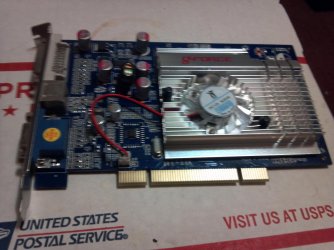
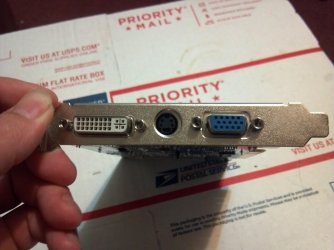
I have a older pc the onboard is really weak. it was meant for win xp but I have win7. I just got a NVidia GeForce FX 5500 250mb 128bit PCI TV+DVI. it came with the driver disk cause I got it new in box, when I put it in and start the pc I get nothing on the screen from onboard or the card. I tried disabling the onboard that didn't work, so then I tried taking the card out and starting pc an installing the drivers first but it said it couldn't find a device for the drivers, meaning I have to have the card in before I can install the drivers. how can I get video to come up weather it be onboard or video card long enough to install the drivers?

:axe:
 

My Computer My Computer

At a glance

windows 7 home premium 32bitProcessor Intel(R) Pentium(R) 4 CPU 3.00GHz, ...Installed Physical Memory (RAM) 2.50 GBAdapter Description Intel(R) 82865G Graphics ...
Computer type
PC/Desktop
Computer Manufacturer/Model Number
hp
OS
windows 7 home premium 32bit
CPU
Processor Intel(R) Pentium(R) 4 CPU 3.00GHz, 2992 Mhz,1 Core
Motherboard
System Model HP dc5000 uT(PJ355UA)
Memory
Installed Physical Memory (RAM) 2.50 GB
Graphics Card(s)
Adapter Description Intel(R) 82865G Graphics Controller
Hard Drives
Model Maxtor 5T040H4 ATA Device
Antivirus
avg free
Browser
internet explorer 9
Hi there .. Make sure your PCI slot is clean and try reseating the Card ... If it still does not work you would need to test it on another Computer ...
 

My Computer My Computer

At a glance

windows 7 home 64bitINTEL-CORE I716GB
Computer Manufacturer/Model Number
W530-3630QM1
OS
windows 7 home 64bit
CPU
INTEL-CORE I7
Memory
16GB
Hard Drives
750GB
Browser
Chrome
Hi there .. Make sure your PCI slot is clean and try reseating the Card ... If it still does not work you would need to test it on another Computer ...


thanks. the slot is clean and I had a network card I tried to make sure all the slots are working. the other pc I have has pci express slots so I cant test on it.
 

My Computer My Computer

At a glance

windows 7 home premium 32bitProcessor Intel(R) Pentium(R) 4 CPU 3.00GHz, ...Installed Physical Memory (RAM) 2.50 GBAdapter Description Intel(R) 82865G Graphics ...
Computer type
PC/Desktop
Computer Manufacturer/Model Number
hp
OS
windows 7 home premium 32bit
CPU
Processor Intel(R) Pentium(R) 4 CPU 3.00GHz, 2992 Mhz,1 Core
Motherboard
System Model HP dc5000 uT(PJ355UA)
Memory
Installed Physical Memory (RAM) 2.50 GB
Graphics Card(s)
Adapter Description Intel(R) 82865G Graphics Controller
Hard Drives
Model Maxtor 5T040H4 ATA Device
Antivirus
avg free
Browser
internet explorer 9
I can't tell from any of the searches I did, but is there a power connector on that card? There shouldn't be, but I thought I'd ask.

You may also have to turn off the onboard video in BIOS to get the new card to show video, or set the new video card to be the first device in BIOS.

Also, what port is your monitor plugged in to?
 

My Computer My Computer

At a glance

Win 7 Pro x64/Win 10 Pro x64 dual bootAMD FX 8350 Vishera @ 420016 GB Mushkin Blackline DDR3-2400 @ 1866 (9-1...XFX Radeon R9 280 Double D Black Edition
Computer type
PC/Desktop
Computer Manufacturer/Model Number
Mellon Labs (custom build)
OS
Win 7 Pro x64/Win 10 Pro x64 dual boot
CPU
AMD FX 8350 Vishera @ 4200
Motherboard
ASUS M5A97 R2.0
Memory
16 GB Mushkin Blackline DDR3-2400 @ 1866 (9-10-10-10-31)
Graphics Card(s)
XFX Radeon R9 280 Double D Black Edition
Sound Card
Realtek HD Audio on MB. Sounds great.
Monitor(s) Displays
Acer 24", Acer 22"
Screen Resolution
3840 x 1080
Hard Drives
1 x Mushkin Chronos 120 GB SSD (Win 10)
1 x Samsung 850 EVO 250 GB SSD (Win 7)
1 x WD 1TB SATA Blue
1 x WD 1TB SATA Green
PSU
Corsair TX-750
Case
CoolerMaster HAF 912+
Cooling
Coolermaster Seidon 240M Liquid AIO. 6 case fans
Keyboard
Logitech G710+
Mouse
Logitech G500s
Internet Speed
Much better since I got fiber, but still way overpriced.
Antivirus
MSE, Malware Bytes for scanning
Browser
Firefox
Other Info
Corsair VOID USB headphones.

A Mellon Labs X-1 - LCD Smartie driven system status display.

Brought to you by the letter E
Ditto on the location (slot). Many of those older motherboards required the video card to be in a specific slot. You might try digging up a manual and check.
 

My Computer My Computer

At a glance

Windows 7 Pro-x64i7-2600 3.4GHz - 3.8GHz Turbo8Gb - 2x4GB, Muskin 991770 PC3-1333Integrated Intel HD 2000
Computer type
PC/Desktop
Computer Manufacturer/Model Number
Built 2/11/2011
OS
Windows 7 Pro-x64
CPU
i7-2600 3.4GHz - 3.8GHz Turbo
Motherboard
Intel DH67BL-B3
Memory
8Gb - 2x4GB, Muskin 991770 PC3-1333
Graphics Card(s)
Integrated Intel HD 2000
Sound Card
Integrated Intel 10.1 HD, RealTek ALC892
Monitor(s) Displays
Asus LCD VH222H, Haier HL24XSL2a
Screen Resolution
1920x1080, 1920x1080
Hard Drives
Crucial SSD C300-128Gb,
Western Digital WD5002AALX - 500Gb,
Western Digital WD7501AALS - 750Gb
PSU
Seasonic 650W 80+ Gold Modular
Case
Rosewill Defender
Cooling
Stock CPU, Four 120mm case fans, PCH fan added
Keyboard
Logitech EX100 Y-RBH94 Wireless
Mouse
Logitech EX100 M-RCE95 Wireless
Internet Speed
3.0/1.5 Mbs
Antivirus
Microsoft Security Essentials
Browser
Microsoft Internet Explorer 11
Other Info
Antec Veris Premier-Multimedia IR Station,
Cyber Accoustics-3602 Speakers,
AFT XM-5U Card Reader,
Hauppauge TV-HVR-2250,
Sony LX300 USB Turntable
I can't tell from any of the searches I did, but is there a power connector on that card? There shouldn't be, but I thought I'd ask.

You may also have to turn off the onboard video in BIOS to get the new card to show video, or set the new video card to be the first device in BIOS.

Also, what port is your monitor plugged in to?


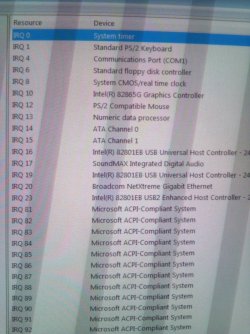
only power connector I see on the card is the oncard fan plug. I tried all 4 card ports. the bios on this pc is crazy different from the ones im use to, most of the stuff is not a simple enable/disable, its dealing with IRQ's an I don't know anything about that an don't want to mess it up. the pc I had before I simply when in an turned off the onboard, an that halfway worked on that one cause it would display from the onboard till it got to windows then switch to the video card display. but this one there is a couple things in there about video but its dealing with IRQ stuff.
 

My Computer My Computer

At a glance

windows 7 home premium 32bitProcessor Intel(R) Pentium(R) 4 CPU 3.00GHz, ...Installed Physical Memory (RAM) 2.50 GBAdapter Description Intel(R) 82865G Graphics ...
Computer type
PC/Desktop
Computer Manufacturer/Model Number
hp
OS
windows 7 home premium 32bit
CPU
Processor Intel(R) Pentium(R) 4 CPU 3.00GHz, 2992 Mhz,1 Core
Motherboard
System Model HP dc5000 uT(PJ355UA)
Memory
Installed Physical Memory (RAM) 2.50 GB
Graphics Card(s)
Adapter Description Intel(R) 82865G Graphics Controller
Hard Drives
Model Maxtor 5T040H4 ATA Device
Antivirus
avg free
Browser
internet explorer 9
Ditto on the location (slot). Many of those older motherboards required the video card to be in a specific slot. You might try digging up a manual and check.


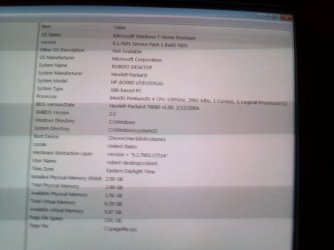
I tried all 4 pci ports an its the same for all of them. ill try to look for a manual online but its gonna be a chore figuring out the proper motherboard name cause the name the bios name the system information gives (which I cant lookup cause im got different pc hooked up right now) I only can find little bits of info about it an not the book.
 

My Computer My Computer

At a glance

windows 7 home premium 32bitProcessor Intel(R) Pentium(R) 4 CPU 3.00GHz, ...Installed Physical Memory (RAM) 2.50 GBAdapter Description Intel(R) 82865G Graphics ...
Computer type
PC/Desktop
Computer Manufacturer/Model Number
hp
OS
windows 7 home premium 32bit
CPU
Processor Intel(R) Pentium(R) 4 CPU 3.00GHz, 2992 Mhz,1 Core
Motherboard
System Model HP dc5000 uT(PJ355UA)
Memory
Installed Physical Memory (RAM) 2.50 GB
Graphics Card(s)
Adapter Description Intel(R) 82865G Graphics Controller
Hard Drives
Model Maxtor 5T040H4 ATA Device
Antivirus
avg free
Browser
internet explorer 9
by the way thank you all for the help
 

My Computer My Computer

At a glance

windows 7 home premium 32bitProcessor Intel(R) Pentium(R) 4 CPU 3.00GHz, ...Installed Physical Memory (RAM) 2.50 GBAdapter Description Intel(R) 82865G Graphics ...
Computer type
PC/Desktop
Computer Manufacturer/Model Number
hp
OS
windows 7 home premium 32bit
CPU
Processor Intel(R) Pentium(R) 4 CPU 3.00GHz, 2992 Mhz,1 Core
Motherboard
System Model HP dc5000 uT(PJ355UA)
Memory
Installed Physical Memory (RAM) 2.50 GB
Graphics Card(s)
Adapter Description Intel(R) 82865G Graphics Controller
Hard Drives
Model Maxtor 5T040H4 ATA Device
Antivirus
avg free
Browser
internet explorer 9
Does the BIOS list the IRQs for the hardware in use? Check to see if IRQ 16 is in use. If not, use that for video. That's what Windows most often assigns. There may also be an "Auto" option too. Can you post a pic of the BIOS?
 

My Computer My Computer

At a glance

Windows 7 Pro-x64i7-2600 3.4GHz - 3.8GHz Turbo8Gb - 2x4GB, Muskin 991770 PC3-1333Integrated Intel HD 2000
Computer type
PC/Desktop
Computer Manufacturer/Model Number
Built 2/11/2011
OS
Windows 7 Pro-x64
CPU
i7-2600 3.4GHz - 3.8GHz Turbo
Motherboard
Intel DH67BL-B3
Memory
8Gb - 2x4GB, Muskin 991770 PC3-1333
Graphics Card(s)
Integrated Intel HD 2000
Sound Card
Integrated Intel 10.1 HD, RealTek ALC892
Monitor(s) Displays
Asus LCD VH222H, Haier HL24XSL2a
Screen Resolution
1920x1080, 1920x1080
Hard Drives
Crucial SSD C300-128Gb,
Western Digital WD5002AALX - 500Gb,
Western Digital WD7501AALS - 750Gb
PSU
Seasonic 650W 80+ Gold Modular
Case
Rosewill Defender
Cooling
Stock CPU, Four 120mm case fans, PCH fan added
Keyboard
Logitech EX100 Y-RBH94 Wireless
Mouse
Logitech EX100 M-RCE95 Wireless
Internet Speed
3.0/1.5 Mbs
Antivirus
Microsoft Security Essentials
Browser
Microsoft Internet Explorer 11
Other Info
Antec Veris Premier-Multimedia IR Station,
Cyber Accoustics-3602 Speakers,
AFT XM-5U Card Reader,
Hauppauge TV-HVR-2250,
Sony LX300 USB Turntable
Does the BIOS list the IRQs for the hardware in use? Check to see if IRQ 16 is in use. If not, use that for video. That's what Windows most often assigns. There may also be an "Auto" option too. Can you post a pic of the BIOS?


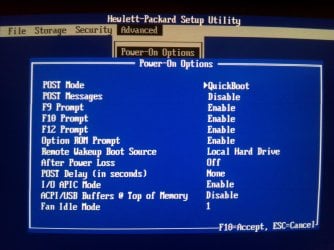
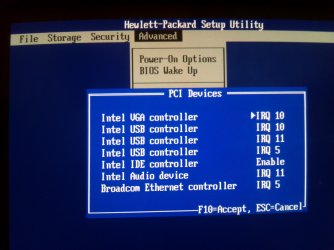
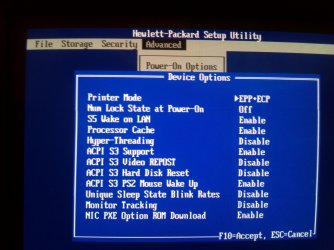
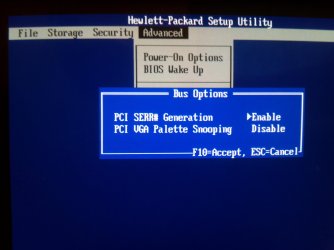
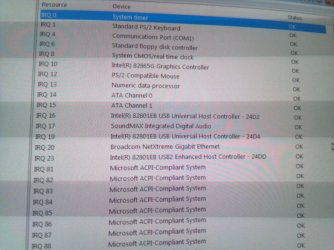
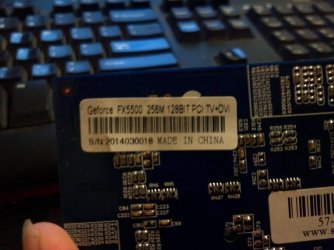
here is the bios advanced list, and the video card (NVidia GeForce FX 5500 250mb 128bit)

all the bios settings are on default in the pics. im scared to mess with them.
 

Attachments

  • 2014-08-09 17.40.26.jpg
    2014-08-09 17.40.26.jpg
    542.5 KB · Views: 1
  • 2014-08-09 17.40.41.jpg
    2014-08-09 17.40.41.jpg
    365 KB · Views: 0
  • 2014-08-09 17.40.54.jpg
    2014-08-09 17.40.54.jpg
    313.1 KB · Views: 0
  • 2014-08-09 17.41.53.jpg
    2014-08-09 17.41.53.jpg
    422 KB · Views: 0
  • 2014-08-09 17.42.59.jpg
    2014-08-09 17.42.59.jpg
    539.2 KB · Views: 0
  • 2014-08-09 17.42.48.jpg
    2014-08-09 17.42.48.jpg
    364.3 KB · Views: 0
  • 2014-08-09 17.47.15.jpg
    2014-08-09 17.47.15.jpg
    582.7 KB · Views: 0
  • 2014-08-09 17.47.50.jpg
    2014-08-09 17.47.50.jpg
    616.8 KB · Views: 1
  • 2014-08-09 17.47.40.jpg
    2014-08-09 17.47.40.jpg
    474.2 KB · Views: 1

My Computer My Computer

At a glance

windows 7 home premium 32bitProcessor Intel(R) Pentium(R) 4 CPU 3.00GHz, ...Installed Physical Memory (RAM) 2.50 GBAdapter Description Intel(R) 82865G Graphics ...
Computer type
PC/Desktop
Computer Manufacturer/Model Number
hp
OS
windows 7 home premium 32bit
CPU
Processor Intel(R) Pentium(R) 4 CPU 3.00GHz, 2992 Mhz,1 Core
Motherboard
System Model HP dc5000 uT(PJ355UA)
Memory
Installed Physical Memory (RAM) 2.50 GB
Graphics Card(s)
Adapter Description Intel(R) 82865G Graphics Controller
Hard Drives
Model Maxtor 5T040H4 ATA Device
Antivirus
avg free
Browser
internet explorer 9
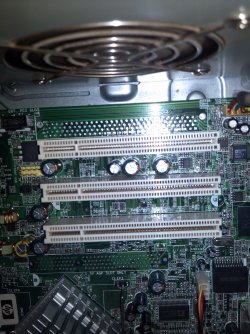
Can you also get a shot of your PCI slots? Your video card looks like a 32-bit interface. Are there any other PCI cards installed? The problem with the old PCI bus is that all the cards share the bandwidth at the speed of the slowest card. The specs on your power supply would help too. It may not support the current draw of the card. If your PC still has the old 200-250W PSU, that could be a problem.

IRQ 10 is used for both the on-board video and one of the USB controllers. This probably wouldn't be a problem unless you had a mouse and keyboard on that same IRQ (USB). I don't see any other PCI devices in the BIOS that would indicate the video card is recognized. So it may be that the card is not powering up or the BIOS may not support it. That's an old PC but you might see if you can find a BIOS update. It's a long-shot but worth a look. But get the specs on the PSU for now.
 

My Computer My Computer

At a glance

Windows 7 Pro-x64i7-2600 3.4GHz - 3.8GHz Turbo8Gb - 2x4GB, Muskin 991770 PC3-1333Integrated Intel HD 2000
Computer type
PC/Desktop
Computer Manufacturer/Model Number
Built 2/11/2011
OS
Windows 7 Pro-x64
CPU
i7-2600 3.4GHz - 3.8GHz Turbo
Motherboard
Intel DH67BL-B3
Memory
8Gb - 2x4GB, Muskin 991770 PC3-1333
Graphics Card(s)
Integrated Intel HD 2000
Sound Card
Integrated Intel 10.1 HD, RealTek ALC892
Monitor(s) Displays
Asus LCD VH222H, Haier HL24XSL2a
Screen Resolution
1920x1080, 1920x1080
Hard Drives
Crucial SSD C300-128Gb,
Western Digital WD5002AALX - 500Gb,
Western Digital WD7501AALS - 750Gb
PSU
Seasonic 650W 80+ Gold Modular
Case
Rosewill Defender
Cooling
Stock CPU, Four 120mm case fans, PCH fan added
Keyboard
Logitech EX100 Y-RBH94 Wireless
Mouse
Logitech EX100 M-RCE95 Wireless
Internet Speed
3.0/1.5 Mbs
Antivirus
Microsoft Security Essentials
Browser
Microsoft Internet Explorer 11
Other Info
Antec Veris Premier-Multimedia IR Station,
Cyber Accoustics-3602 Speakers,
AFT XM-5U Card Reader,
Hauppauge TV-HVR-2250,
Sony LX300 USB Turntable
Does the BIOS list the IRQs for the hardware in use? Check to see if IRQ 16 is in use. If not, use that for video. That's what Windows most often assigns. There may also be an "Auto" option too. Can you post a pic of the BIOS?
Forget this earlier post. I forgot the old PCs, I think, only went to IRQ 15.
 

My Computer My Computer

At a glance

Windows 7 Pro-x64i7-2600 3.4GHz - 3.8GHz Turbo8Gb - 2x4GB, Muskin 991770 PC3-1333Integrated Intel HD 2000
Computer type
PC/Desktop
Computer Manufacturer/Model Number
Built 2/11/2011
OS
Windows 7 Pro-x64
CPU
i7-2600 3.4GHz - 3.8GHz Turbo
Motherboard
Intel DH67BL-B3
Memory
8Gb - 2x4GB, Muskin 991770 PC3-1333
Graphics Card(s)
Integrated Intel HD 2000
Sound Card
Integrated Intel 10.1 HD, RealTek ALC892
Monitor(s) Displays
Asus LCD VH222H, Haier HL24XSL2a
Screen Resolution
1920x1080, 1920x1080
Hard Drives
Crucial SSD C300-128Gb,
Western Digital WD5002AALX - 500Gb,
Western Digital WD7501AALS - 750Gb
PSU
Seasonic 650W 80+ Gold Modular
Case
Rosewill Defender
Cooling
Stock CPU, Four 120mm case fans, PCH fan added
Keyboard
Logitech EX100 Y-RBH94 Wireless
Mouse
Logitech EX100 M-RCE95 Wireless
Internet Speed
3.0/1.5 Mbs
Antivirus
Microsoft Security Essentials
Browser
Microsoft Internet Explorer 11
Other Info
Antec Veris Premier-Multimedia IR Station,
Cyber Accoustics-3602 Speakers,
AFT XM-5U Card Reader,
Hauppauge TV-HVR-2250,
Sony LX300 USB Turntable
Can you also get a shot of your PCI slots? Your video card looks like a 32-bit interface. Are there any other PCI cards installed? The problem with the old PCI bus is that all the cards share the bandwidth at the speed of the slowest card. The specs on your power supply would help too. It may not support the current draw of the card. If your PC still has the old 200-250W PSU, that could be a problem.

IRQ 10 is used for both the on-board video and one of the USB controllers. This probably wouldn't be a problem unless you had a mouse and keyboard on that same IRQ (USB). I don't see any other PCI devices in the BIOS that would indicate the video card is recognized. So it may be that the card is not powering up or the BIOS may not support it. That's an old PC but you might see if you can find a BIOS update. It's a long-shot but worth a look. But get the specs on the PSU for now.


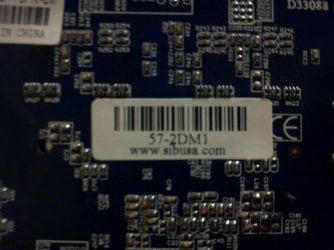
the barcodes are from the video card. there are no pci cards installed although I did try a Ethernet card to make sure they all work. im still looking for bios update. according to the system info the the year of its last update was 2004 lol. the onboard video was not compatible with windows 7 till I found a program called DriverMax.
 

Attachments

  • 2014-08-09 20.05.13.jpg
    2014-08-09 20.05.13.jpg
    640.6 KB · Views: 1
  • 2014-08-09 20.05.23.jpg
    2014-08-09 20.05.23.jpg
    966.2 KB · Views: 1
  • 2014-08-09 20.11.51.jpg
    2014-08-09 20.11.51.jpg
    873.1 KB · Views: 1
  • 2014-08-09 20.14.08.jpg
    2014-08-09 20.14.08.jpg
    971.4 KB · Views: 1
  • 2014-08-09 20.14.24.jpg
    2014-08-09 20.14.24.jpg
    973.9 KB · Views: 1
  • 2014-08-09 20.16.05.jpg
    2014-08-09 20.16.05.jpg
    909.8 KB · Views: 1
  • 2014-08-09 20.29.43.jpg
    2014-08-09 20.29.43.jpg
    507.4 KB · Views: 1
  • 2014-08-09 20.29.54.jpg
    2014-08-09 20.29.54.jpg
    454.4 KB · Views: 1

My Computer My Computer

At a glance

windows 7 home premium 32bitProcessor Intel(R) Pentium(R) 4 CPU 3.00GHz, ...Installed Physical Memory (RAM) 2.50 GBAdapter Description Intel(R) 82865G Graphics ...
Computer type
PC/Desktop
Computer Manufacturer/Model Number
hp
OS
windows 7 home premium 32bit
CPU
Processor Intel(R) Pentium(R) 4 CPU 3.00GHz, 2992 Mhz,1 Core
Motherboard
System Model HP dc5000 uT(PJ355UA)
Memory
Installed Physical Memory (RAM) 2.50 GB
Graphics Card(s)
Adapter Description Intel(R) 82865G Graphics Controller
Hard Drives
Model Maxtor 5T040H4 ATA Device
Antivirus
avg free
Browser
internet explorer 9
What about specs on the power supply (PSU)?

Read the label and list the individual current ratings (amps) for the three voltages.
3.3v
5.0v
12v
 

My Computer My Computer

At a glance

Windows 7 Pro-x64i7-2600 3.4GHz - 3.8GHz Turbo8Gb - 2x4GB, Muskin 991770 PC3-1333Integrated Intel HD 2000
Computer type
PC/Desktop
Computer Manufacturer/Model Number
Built 2/11/2011
OS
Windows 7 Pro-x64
CPU
i7-2600 3.4GHz - 3.8GHz Turbo
Motherboard
Intel DH67BL-B3
Memory
8Gb - 2x4GB, Muskin 991770 PC3-1333
Graphics Card(s)
Integrated Intel HD 2000
Sound Card
Integrated Intel 10.1 HD, RealTek ALC892
Monitor(s) Displays
Asus LCD VH222H, Haier HL24XSL2a
Screen Resolution
1920x1080, 1920x1080
Hard Drives
Crucial SSD C300-128Gb,
Western Digital WD5002AALX - 500Gb,
Western Digital WD7501AALS - 750Gb
PSU
Seasonic 650W 80+ Gold Modular
Case
Rosewill Defender
Cooling
Stock CPU, Four 120mm case fans, PCH fan added
Keyboard
Logitech EX100 Y-RBH94 Wireless
Mouse
Logitech EX100 M-RCE95 Wireless
Internet Speed
3.0/1.5 Mbs
Antivirus
Microsoft Security Essentials
Browser
Microsoft Internet Explorer 11
Other Info
Antec Veris Premier-Multimedia IR Station,
Cyber Accoustics-3602 Speakers,
AFT XM-5U Card Reader,
Hauppauge TV-HVR-2250,
Sony LX300 USB Turntable
What about specs on the power supply (PSU)?

Read the label and list the individual current ratings (amps) for the three voltages.
3.3v
5.0v
12v


I wouldn't be able to see that in the system information window will I? cause the PSU don't have any writings or stickers on it its a cheap no name PSU. this whole pc was Frankensteined from old parts. motherboard if from a old Kayser-Roth work pc everything else is just scraps. even the power button is rigged, I used a 2 prong pc fan plug and the spliced power switch to this pc case. the cpu fan is held with zip strips and luck lol.

no I just looked system information don't have nothing about the PSU
 
Last edited:

My Computer My Computer

At a glance

windows 7 home premium 32bitProcessor Intel(R) Pentium(R) 4 CPU 3.00GHz, ...Installed Physical Memory (RAM) 2.50 GBAdapter Description Intel(R) 82865G Graphics ...
Computer type
PC/Desktop
Computer Manufacturer/Model Number
hp
OS
windows 7 home premium 32bit
CPU
Processor Intel(R) Pentium(R) 4 CPU 3.00GHz, 2992 Mhz,1 Core
Motherboard
System Model HP dc5000 uT(PJ355UA)
Memory
Installed Physical Memory (RAM) 2.50 GB
Graphics Card(s)
Adapter Description Intel(R) 82865G Graphics Controller
Hard Drives
Model Maxtor 5T040H4 ATA Device
Antivirus
avg free
Browser
internet explorer 9
If I could get the pc to boot off the usb drive then I would just put Linux on it cause its so old, and I have a 3yr old pc custom built and only lacks a video card. I use that one for gaming though. I want to use this one for media type stuff like XBMC soon to be KODI. but sense the onboard video sucks xbmc don't work :cry:
 

My Computer My Computer

At a glance

windows 7 home premium 32bitProcessor Intel(R) Pentium(R) 4 CPU 3.00GHz, ...Installed Physical Memory (RAM) 2.50 GBAdapter Description Intel(R) 82865G Graphics ...
Computer type
PC/Desktop
Computer Manufacturer/Model Number
hp
OS
windows 7 home premium 32bit
CPU
Processor Intel(R) Pentium(R) 4 CPU 3.00GHz, 2992 Mhz,1 Core
Motherboard
System Model HP dc5000 uT(PJ355UA)
Memory
Installed Physical Memory (RAM) 2.50 GB
Graphics Card(s)
Adapter Description Intel(R) 82865G Graphics Controller
Hard Drives
Model Maxtor 5T040H4 ATA Device
Antivirus
avg free
Browser
internet explorer 9
The BIOS and Windows aren't recognizing the video card. I was trying to eliminate the PSU as the source of the problem. Just to be sure, did you have the card installed when you took the pictures of the BIOS hardware list (IRQs)?

Those old motherboards and hardware were power hungry. I would try another PSU and see if the BIOS will recognize it.
 

My Computer My Computer

At a glance

Windows 7 Pro-x64i7-2600 3.4GHz - 3.8GHz Turbo8Gb - 2x4GB, Muskin 991770 PC3-1333Integrated Intel HD 2000
Computer type
PC/Desktop
Computer Manufacturer/Model Number
Built 2/11/2011
OS
Windows 7 Pro-x64
CPU
i7-2600 3.4GHz - 3.8GHz Turbo
Motherboard
Intel DH67BL-B3
Memory
8Gb - 2x4GB, Muskin 991770 PC3-1333
Graphics Card(s)
Integrated Intel HD 2000
Sound Card
Integrated Intel 10.1 HD, RealTek ALC892
Monitor(s) Displays
Asus LCD VH222H, Haier HL24XSL2a
Screen Resolution
1920x1080, 1920x1080
Hard Drives
Crucial SSD C300-128Gb,
Western Digital WD5002AALX - 500Gb,
Western Digital WD7501AALS - 750Gb
PSU
Seasonic 650W 80+ Gold Modular
Case
Rosewill Defender
Cooling
Stock CPU, Four 120mm case fans, PCH fan added
Keyboard
Logitech EX100 Y-RBH94 Wireless
Mouse
Logitech EX100 M-RCE95 Wireless
Internet Speed
3.0/1.5 Mbs
Antivirus
Microsoft Security Essentials
Browser
Microsoft Internet Explorer 11
Other Info
Antec Veris Premier-Multimedia IR Station,
Cyber Accoustics-3602 Speakers,
AFT XM-5U Card Reader,
Hauppauge TV-HVR-2250,
Sony LX300 USB Turntable
The BIOS and Windows aren't recognizing the video card. I was trying to eliminate the PSU as the source of the problem. Just to be sure, did you have the card installed when you took the pictures of the BIOS hardware list (IRQs)?

Those old motherboards and hardware were power hungry. I would try another PSU and see if the BIOS will recognize it.


no the pictures of the bios was without the card, with the card in I cant get video from the nether the onboard or the video card, that's why I couldn't install it cause the drivers won't install unless the card is in the slot. if I could get the onboard to come on long enough then I'd be golden. :picnic:
 

My Computer My Computer

At a glance

windows 7 home premium 32bitProcessor Intel(R) Pentium(R) 4 CPU 3.00GHz, ...Installed Physical Memory (RAM) 2.50 GBAdapter Description Intel(R) 82865G Graphics ...
Computer type
PC/Desktop
Computer Manufacturer/Model Number
hp
OS
windows 7 home premium 32bit
CPU
Processor Intel(R) Pentium(R) 4 CPU 3.00GHz, 2992 Mhz,1 Core
Motherboard
System Model HP dc5000 uT(PJ355UA)
Memory
Installed Physical Memory (RAM) 2.50 GB
Graphics Card(s)
Adapter Description Intel(R) 82865G Graphics Controller
Hard Drives
Model Maxtor 5T040H4 ATA Device
Antivirus
avg free
Browser
internet explorer 9
also the PSU that's in the pc is the only one I have right now
 

My Computer My Computer

At a glance

windows 7 home premium 32bitProcessor Intel(R) Pentium(R) 4 CPU 3.00GHz, ...Installed Physical Memory (RAM) 2.50 GBAdapter Description Intel(R) 82865G Graphics ...
Computer type
PC/Desktop
Computer Manufacturer/Model Number
hp
OS
windows 7 home premium 32bit
CPU
Processor Intel(R) Pentium(R) 4 CPU 3.00GHz, 2992 Mhz,1 Core
Motherboard
System Model HP dc5000 uT(PJ355UA)
Memory
Installed Physical Memory (RAM) 2.50 GB
Graphics Card(s)
Adapter Description Intel(R) 82865G Graphics Controller
Hard Drives
Model Maxtor 5T040H4 ATA Device
Antivirus
avg free
Browser
internet explorer 9
Do you get any beeps during the Power On Self Test (POST) with the video card installed? (Must have a speaker attached to the motherboard.)
 

My Computer My Computer

At a glance

Windows 7 Pro-x64i7-2600 3.4GHz - 3.8GHz Turbo8Gb - 2x4GB, Muskin 991770 PC3-1333Integrated Intel HD 2000
Computer type
PC/Desktop
Computer Manufacturer/Model Number
Built 2/11/2011
OS
Windows 7 Pro-x64
CPU
i7-2600 3.4GHz - 3.8GHz Turbo
Motherboard
Intel DH67BL-B3
Memory
8Gb - 2x4GB, Muskin 991770 PC3-1333
Graphics Card(s)
Integrated Intel HD 2000
Sound Card
Integrated Intel 10.1 HD, RealTek ALC892
Monitor(s) Displays
Asus LCD VH222H, Haier HL24XSL2a
Screen Resolution
1920x1080, 1920x1080
Hard Drives
Crucial SSD C300-128Gb,
Western Digital WD5002AALX - 500Gb,
Western Digital WD7501AALS - 750Gb
PSU
Seasonic 650W 80+ Gold Modular
Case
Rosewill Defender
Cooling
Stock CPU, Four 120mm case fans, PCH fan added
Keyboard
Logitech EX100 Y-RBH94 Wireless
Mouse
Logitech EX100 M-RCE95 Wireless
Internet Speed
3.0/1.5 Mbs
Antivirus
Microsoft Security Essentials
Browser
Microsoft Internet Explorer 11
Other Info
Antec Veris Premier-Multimedia IR Station,
Cyber Accoustics-3602 Speakers,
AFT XM-5U Card Reader,
Hauppauge TV-HVR-2250,
Sony LX300 USB Turntable
Back
Top