Unable to hide icon of taskbar

wasim

Banned
Local time
3:02 PM
Messages
34
Location
Mumbai
hot.gif

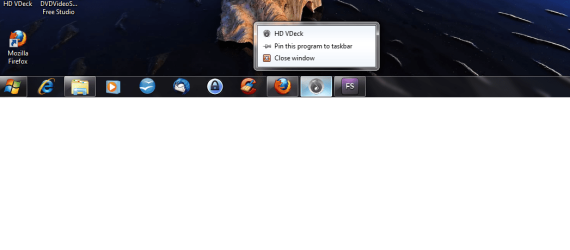
in my PC the "VIA HD audio deck" is a start up program the problem is. it appear in task bar not in hidden icons i try to exit the program but it stuck on my task bar see the screen shot i want to hide that icon
any one help
 

Attachments

  • Capture.PNG
    Capture.PNG
    13 KB · Views: 16

My Computer My Computer

At a glance

Windows 7 Ultimate x64Intel Pentium Dual core [email protected]4GBOn Board
Computer Manufacturer/Model Number
Intel
OS
Windows 7 Ultimate x64
CPU
Intel Pentium Dual core [email protected]
Motherboard
Gigabyte G41 COMBO
Memory
4GB
Graphics Card(s)
On Board
Sound Card
On Board
Monitor(s) Displays
LG 15inch
Screen Resolution
1360*768
Hard Drives
250GB SATA
Case
Intex
Cooling
Normal
Keyboard
Circle
Mouse
circle
Internet Speed
5Mbps
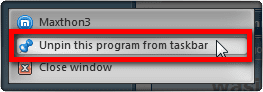
Right click the icon, select Unpin this program from Taskbar:

Unpin_from_taskbar.png

Kari
 

My Computer My Computer

At a glance

Windows 10 Pro x64 EN-GB1.6 GHz Intel Core i7-720QM Processor6 GBATI Mobility Radeon HD 5850 Graphics
Computer type
Laptop
Computer Manufacturer/Model Number
HP ENVY 17-1150eg
OS
Windows 10 Pro x64 EN-GB
CPU
1.6 GHz Intel Core i7-720QM Processor
Memory
6 GB
Graphics Card(s)
ATI Mobility Radeon HD 5850 Graphics
Sound Card
Beats sound system with integrated subwoofer
Monitor(s) Displays
17" laptop display, 22" LED and 32" Full HD TV through HDMI
Screen Resolution
1600*900 (1), 1920*1080 (2&3)
Hard Drives
Internal: 2 x 500 GB SATA Hard Disk Drive 7200 rpm
External: 2TB for backups, 3TB USB3 network drive for media
Cooling
As Envy runs a bit warm, I have it on a Cooler Master pad
Keyboard
Logitech diNovo Media Desktop Laser (bluetooth)
Mouse
Logitech Performance Mouse MX
Internet Speed
50/10 Mbps VDSL
Antivirus
Windows Defender 4.3.9431.0
Browser
Maxthon 3.5.2., IE11
the unpin option is not present only pin option is present it is active icon forever see the screen shot
close window is also not help full
 

Attachments

  • Untitled.png
    Untitled.png
    55.1 KB · Views: 14

My Computer My Computer

At a glance

Windows 7 Ultimate x64Intel Pentium Dual core [email protected]4GBOn Board
Computer Manufacturer/Model Number
Intel
OS
Windows 7 Ultimate x64
CPU
Intel Pentium Dual core [email protected]
Motherboard
Gigabyte G41 COMBO
Memory
4GB
Graphics Card(s)
On Board
Sound Card
On Board
Monitor(s) Displays
LG 15inch
Screen Resolution
1360*768
Hard Drives
250GB SATA
Case
Intex
Cooling
Normal
Keyboard
Circle
Mouse
circle
Internet Speed
5Mbps
Is there an option within the program to minimise to the system tray?
 

My Computer My Computer

At a glance

Windows 7 Home Premium x64 SP1intel(R)core(TM)2 duo CPU T6600 @ 2.20GHz3 gb ddr3ati radeon hd4570/512mb
Computer Manufacturer/Model Number
acer aspire 5935g
OS
Windows 7 Home Premium x64 SP1
CPU
intel(R)core(TM)2 duo CPU T6600 @ 2.20GHz
Motherboard
intel gm45/gm47 revision 07
Memory
3 gb ddr3
Graphics Card(s)
ati radeon hd4570/512mb
Monitor(s) Displays
lop156wh2-tle1 15.3 flat
Screen Resolution
1366x768
Hard Drives
OCZ-Agility3 60gig ssd
320gig external hdd
500gig external hdd
Mouse
Optical
Internet Speed
30Mbps Down/30Mbps Up
no option for "minimise to the system tray"
 

My Computer My Computer

At a glance

Windows 7 Ultimate x64Intel Pentium Dual core [email protected]4GBOn Board
Computer Manufacturer/Model Number
Intel
OS
Windows 7 Ultimate x64
CPU
Intel Pentium Dual core [email protected]
Motherboard
Gigabyte G41 COMBO
Memory
4GB
Graphics Card(s)
On Board
Sound Card
On Board
Monitor(s) Displays
LG 15inch
Screen Resolution
1360*768
Hard Drives
250GB SATA
Case
Intex
Cooling
Normal
Keyboard
Circle
Mouse
circle
Internet Speed
5Mbps
Try rightclicking on an empty area of your taskbar. You should get a context menu with a submenu "Toolbars" at the top. See if you find the VIA HD audio deck there, if yes you can uncheck it there and it should vanish.
 

My Computer My Computer

At a glance

Windows 7 Professional SP1 32-bitIntel Core 2 Duo E6600 2.4GHz4GB DDR2-667 (4x1GB in dual-channel config)nVidia GeForce 9800 GT
Computer type
PC/Desktop
Computer Manufacturer/Model Number
Custom-built
OS
Windows 7 Professional SP1 32-bit
CPU
Intel Core 2 Duo E6600 2.4GHz
Motherboard
Asus PL5D2
Memory
4GB DDR2-667 (4x1GB in dual-channel config)
Graphics Card(s)
nVidia GeForce 9800 GT
Sound Card
Creative X-Fi XtremeMusic
Monitor(s) Displays
Acer P236H
Screen Resolution
1920x1200 (DVI)
Hard Drives
OCZ SSD Vertex Plus 60GB SATA (Firmware 3.55), 64MB cache
Hitachi HD321KJ SATA, 320GB, 7200rpm, 16MB cache

PSU
Antec TruePower 2.0
Case
Cooler Master Centurion
Cooling
Too many fans
Keyboard
Standard
Mouse
Microsoft wireless optical mouse
Internet Speed
AT&T U-verse (18mbit/sec)
Antivirus
Microsoft Security Essentials
Browser
Firefox
Other Info
Other devices:
Compaq CQ-60 laptop
Google Nexus 7 (2012) tablet
Nvidia SHIELD tablet (US/LTE)
Hardkernel ODROID-XU single-board computer (Samsung Exynos 5420)
the main problem is here that when i open the program and close it the icon is disappear but at next boot it comes again on that position and again i have to close it manually i think it is a sound driver application which is important to load on start up that's why i not remove it from start up
 

My Computer My Computer

At a glance

Windows 7 Ultimate x64Intel Pentium Dual core [email protected]4GBOn Board
Computer Manufacturer/Model Number
Intel
OS
Windows 7 Ultimate x64
CPU
Intel Pentium Dual core [email protected]
Motherboard
Gigabyte G41 COMBO
Memory
4GB
Graphics Card(s)
On Board
Sound Card
On Board
Monitor(s) Displays
LG 15inch
Screen Resolution
1360*768
Hard Drives
250GB SATA
Case
Intex
Cooling
Normal
Keyboard
Circle
Mouse
circle
Internet Speed
5Mbps
Well, why haven't you told us before it's set to autostart with Windows??

In all likelihood, it's not as important as you think it is...try simply disabling it through msconfig so the icon won't return. I doubt it'll make your sound stop working altogether.
 

My Computer My Computer

At a glance

Windows 7 Professional SP1 32-bitIntel Core 2 Duo E6600 2.4GHz4GB DDR2-667 (4x1GB in dual-channel config)nVidia GeForce 9800 GT
Computer type
PC/Desktop
Computer Manufacturer/Model Number
Custom-built
OS
Windows 7 Professional SP1 32-bit
CPU
Intel Core 2 Duo E6600 2.4GHz
Motherboard
Asus PL5D2
Memory
4GB DDR2-667 (4x1GB in dual-channel config)
Graphics Card(s)
nVidia GeForce 9800 GT
Sound Card
Creative X-Fi XtremeMusic
Monitor(s) Displays
Acer P236H
Screen Resolution
1920x1200 (DVI)
Hard Drives
OCZ SSD Vertex Plus 60GB SATA (Firmware 3.55), 64MB cache
Hitachi HD321KJ SATA, 320GB, 7200rpm, 16MB cache
PSU
Antec TruePower 2.0
Case
Cooler Master Centurion
Cooling
Too many fans
Keyboard
Standard
Mouse
Microsoft wireless optical mouse
Internet Speed
AT&T U-verse (18mbit/sec)
Antivirus
Microsoft Security Essentials
Browser
Firefox
Other Info
Other devices:
Compaq CQ-60 laptop
Google Nexus 7 (2012) tablet
Nvidia SHIELD tablet (US/LTE)
Hardkernel ODROID-XU single-board computer (Samsung Exynos 5420)
Back
Top