Solved Unable to install convenience Rollup pack for windows 7

reachme

New member
Local time
12:00 PM
Messages
4
Hello All,
I need some help on troubleshooting this issue as i already spent too many hours and now I'm out of ideas.
I'm rolling out convenience rollup(KB3125574) for windows 7 to all workstations but some of them are failing with the below errors in cbs logs. I tried all basic stuff like sfc /scannow, reset windows update components, update win update agent, system readiness tool, manual installation, update using dism tool, but nothing is fixed this issue. it is working in 70% of workstations and failing in 30%. i cannot see any pattern here as it is failing in all kind of models and both x32 and x64bit.
I ran this command as well but no errors were found.
dism /online /cleanup-image /scanhealth
Note:
Of course i have installed pre-requiste of servicing stack and also updated windows update agent as well.

I have faced different issue in few systems and with the help of your existing forums post i fixed it but ended up with below one now. Sorry i'm unable to find any help in online.

2017-06-11 22:17:57, Info CBS Progress: UI message updated. Operation type: Update. Stage: 1 out of 1. Percent progress: 15.
2017-06-11 22:17:57, Info CBS Failed to launch poqexec, ExeName: \??\C:\Windows\System32\poqexec.exe, CommandLine: C:\Windows\System32\poqexec.exe /noreboot /transaction 1072 /display_progress \SystemRoot\WinSxS\pending.xml [HRESULT = 0xd0000022 - NTSTATUS Error]
2017-06-11 22:17:57, Info CBS SQM: Reporting poqexec status with status: 0xd0000022, failed file: (null), interfering process: (null), context: Shutdown, first merged sequence: 252
2017-06-11 22:17:57, Info CBS SQM: Upload requested for report: PoqexecStatus, session id: 142861, sample type: Standard
2017-06-11 22:17:57, Info CBS SQM: Ignoring upload request because the sample type is not enabled: Standard
2017-06-11 22:17:57, Info CBS Set the CCP impactful-commit disabling value
2017-06-11 22:17:57, Error CBS Shtd: Failed while processing critical primitive operations queue. [HRESULT = 0xd0000022 - NTSTATUS Error]
2017-06-11 22:17:57, Info CBS Progress: UI message updated. Operation type: Update. Stage: 1 out of 1. Temporary Rollback.
2017-06-11 22:17:57, Info CBS SQM: Waiting up to 60000 ticks for pending uploads to complete.
2017-06-11 22:17:57, Info CBS Shtd: progress thread terminating. [HRESULT = 0x00000000 - S_OK]

Regards,
Mohan
 

My Computer My Computer

At a glance

windows 7 Professional 32bit
Computer type
PC/Desktop
OS
windows 7 Professional 32bit
Hi Mohan,
according to MS
The Pending Operations Queue Exec log. This log is located at %windir%\winsxs\poqexec.log. It contains errors for the rest of the installation after a computer is restarted. Every failure in the pending operations queue generates one line in Poqexec.log.

Now the CBS log states
C:\Windows\System32\poqexec.exe /noreboot /transaction 1072 /display_progress \SystemRoot\WinSxS\pending.xml [HRESULT = 0xd0000022 - NTSTATUS Error]

Although i cant find that error code, apart from what stated in the log, copied above.
They appear to be in conflict
REBOOT required -- NO REBOOT.

Are the non-updating comps allways on??
Or is there a GPO set for all affected comps.

Anything in the poqexec log.


Roy
 

My Computer My Computer

At a glance

W7 home premium 32bit/W7HP 64bit/w10 tp insid...E5300 dual core3gbNvidia Geforce 7100 Nforce 630i
Computer type
PC/Desktop
Computer Manufacturer/Model Number
medionl/Aspire 6930G/acer x55a
OS
W7 home premium 32bit/W7HP 64bit/w10 tp insider ring
CPU
E5300 dual core
Motherboard
medion MS7366
Memory
3gb
Graphics Card(s)
Nvidia Geforce 7100 Nforce 630i
Monitor(s) Displays
avixc
Internet Speed
n (isp resticted to 72)
Antivirus
mse/pands
Browser
palemoon
Other Info
Belkin Fd7050 n USB using Railink RT2870 drivers, more upto date
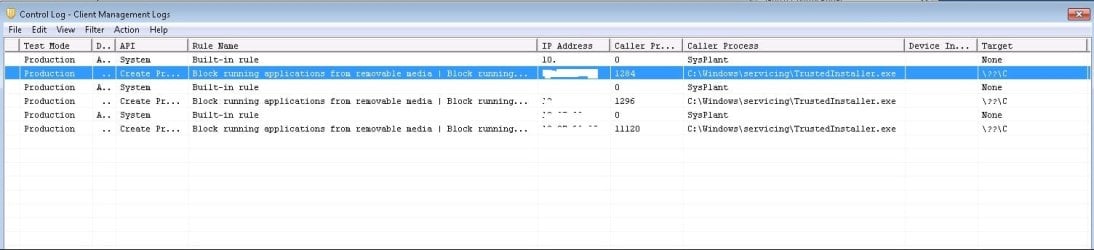
I have fixed this issue. it's because of Symantec Antivirus is blocking *.exe running from removable disk and i believe patches are loading from memory so it is considering it as a removable disk.

Please find the attached log screenshot from Symantec AV. Hope it will help someone :)

Just a quick question. I can see winusb.inf/machine.inf and volume.inf is missing or unable to overwrite the existing files in this path "C:\Windows\System32\DriverStore\FileRepository" in few systems which causes rollback issue in few workstations in my environment. i have fixed this issue by manually importing these inf's using pnputil command but is there a way that i can automate this in all problematic systems or to find the root cause and fix it permanently like applying some hotfix from MS? Thanks for your time.

2017-06-10 16:50:45, Info CBS Progress: UI message updated. Operation type: Update. Stage: 1 out of 1. Percent progress: 12.
2017-06-10 16:50:45, Info CBS INSTALL index: 51, phase: 2, result 0, inf: mpio.inf
2017-06-10 16:50:45, Info CBS INSTALL index: 52, phase: 2, result 0, inf: stornvme.inf
2017-06-10 16:50:45, Info CBS INSTALL index: 0, phase: 3, result 0, inf: volume.inf
2017-06-10 16:50:45, Info CBS INSTALL index: 1, phase: 3, result 0, inf: vhdmp.inf
2017-06-10 16:50:45, Info CBS INSTALL index: 2, phase: 3, result 0, inf: usbstor.inf
2017-06-10 16:50:45, Info CBS INSTALL index: 3, phase: 3, result 0, inf: usb.inf
2017-06-10 16:50:45, Info CBS INSTALL index: 4, phase: 3, result 0, inf: umbus.inf
2017-06-10 16:50:45, Info CBS INSTALL index: 5, phase: 3, result 0, inf: tpm.inf
2017-06-10 16:50:45, Info CBS INSTALL index: 6, phase: 3, result 0, inf: nvraid.inf
2017-06-10 16:50:45, Info CBS INSTALL index: 7, phase: 3, result 0, inf: mshdc.inf
2017-06-10 16:50:46, Info CBS INSTALL index: 8, phase: 3, result 0, inf: machine.inf
2017-06-10 16:51:24, Info CBS INSTALL index: 9, phase: 3, result 0, inf: keyboard.inf
2017-06-10 16:51:24, Info CBS INSTALL index: 10, phase: 3, result 0, inf: iscsi.inf
2017-06-10 16:51:24, Info CBS INSTALL index: 11, phase: 3, result 0, inf: ipmidrv.inf
2017-06-10 16:51:24, Info CBS INSTALL index: 12, phase: 3, result 0, inf: input.inf
2017-06-10 16:51:24, Info CBS INSTALL index: 13, phase: 3, result 0, inf: iastorv.inf
2017-06-10 16:51:24, Info CBS INSTALL index: 14, phase: 3, result 0, inf: disk.inf
2017-06-10 16:51:24, Info CBS INSTALL index: 15, phase: 3, result 0, inf: cdrom.inf
2017-06-10 16:51:24, Info CBS INSTALL index: 16, phase: 3, result 0, inf: amdsata.inf
2017-06-10 16:51:24, Info CBS INSTALL index: 17, phase: 3, result 0, inf: acpi.inf
2017-06-10 16:51:24, Info CBS INSTALL index: 18, phase: 3, result 0, inf: 1394.inf
2017-06-10 16:51:24, Info CBS INSTALL index: 19, phase: 3, result 0, inf: usbport.inf
2017-06-10 16:51:24, Info CBS INSTALL index: 20, phase: 3, result 0, inf: wvmbus.inf
2017-06-10 16:51:24, Info CBS INSTALL index: 21, phase: 3, result 0, inf: wudfusbcciddriver.inf
2017-06-10 16:51:24, Info CBS INSTALL index: 22, phase: 3, result 0, inf: wsdscdrv.inf
2017-06-10 16:51:24, Info CBS Progress: UI message updated. Operation type: Update. Stage: 1 out of 1. Percent progress: 13.
2017-06-10 17:08:08, Info CBS INSTALL index: 23, phase: 3, result 6701, inf: winusb.inf
2017-06-10 17:08:08, Info CBS DriverUpdateInstallUpdates failed [HRESULT = 0x80071a2d - ERROR_TRANSACTION_NOT_ACTIVE]
2017-06-10 17:08:08, Error CBS Doqe: Failed installing driver updates [HRESULT = 0x80071a2d - ERROR_TRANSACTION_NOT_ACTIVE]
2017-06-10 17:08:08, Info CBS Perf: Doqe: Install ended.
2017-06-10 17:08:08, Info CBS Failed installing driver updates [HRESULT = 0x80071a2d - ERROR_TRANSACTION_NOT_ACTIVE]
2017-06-10 17:08:08, Error CBS Shtd: Failed while processing non-critical driver operations queue. [HRESULT = 0x80071a2d - ERROR_TRANSACTION_NOT_ACTIVE]
2017-06-10 17:08:08, Info CBS Shtd: Rolling back KTM, because drivers failed.
2017-06-10 17:08:08, Info CBS Progress: UI message updated. Operation type: Update. Stage: 1 out of 1. Temporary Rollback.

Regards,
Mohan
 

Attachments

  • SCCM Error.jpg
    SCCM Error.jpg
    61.1 KB · Views: 4

My Computer My Computer

At a glance

windows 7 Professional 32bit
Computer type
PC/Desktop
OS
windows 7 Professional 32bit
Hi ReachMe,
glad you got that sorted.
now have a look here setupapi.dev.log: for those other errors.

Tends imply a deployment key is missing
standard fix is SURT, kb 947821 and sfc/scannow as a back up
note that kb can in some cases run for a couple hours.

a quicker alternative sfcfix, compliments of Sysnative forum
http://www.sysnative.com/niemiro/apps/SFCFix.exe


Roy
 

My Computer My Computer

At a glance

W7 home premium 32bit/W7HP 64bit/w10 tp insid...E5300 dual core3gbNvidia Geforce 7100 Nforce 630i
Computer type
PC/Desktop
Computer Manufacturer/Model Number
medionl/Aspire 6930G/acer x55a
OS
W7 home premium 32bit/W7HP 64bit/w10 tp insider ring
CPU
E5300 dual core
Motherboard
medion MS7366
Memory
3gb
Graphics Card(s)
Nvidia Geforce 7100 Nforce 630i
Monitor(s) Displays
avixc
Internet Speed
n (isp resticted to 72)
Antivirus
mse/pands
Browser
palemoon
Other Info
Belkin Fd7050 n USB using Railink RT2870 drivers, more upto date
Still i'm unable to find the root cause or automated way to solve this failed to load few INF files. So far i found that only these 3 inf's are giving problem in most of the workstations and as a workaround i'm loading it manually using pnputil -a command but i don't know how can i automate it in failed workstations remotely as pnputil doesn't have a silent switch for unsigned drivers :cry:

machine.inf_x86_neutral_cf216418bf1bbd53
volume.inf_x86_neutral_9318813554e8ef49
winusb.inf_x86_neutral_12d74fde7082c1af
 

My Computer My Computer

At a glance

windows 7 Professional 32bit
Computer type
PC/Desktop
OS
windows 7 Professional 32bit
AHA,
the magic words
UNSIGNED drivers.
theres a default - block unsigned driver system setting

UAC may have to be set to OFF
Settings charm > More PC Settings > General > Advanced Startup (Restart Now)
Troubleshoot > Advanced Options > Windows Startup Settings > Restart
Use keyboard and press enter on "Disable Diver Signature Enforcement"

There are other methods via registry

HKLM\SOFTWARE\Policies\Microsoft\Windows NT\Driver Signing\BehaviorOnFailedVerify

Set as DWORD = 0

2) Command Prompt: Make sure you "Run as Administrator"

NOT RECCOMMENDED

bcdedit.exe -set loadoptions DDISABLE_INTEGRITY_CHECKS
bcdedit.exe -set TESTSIGNINGON


Roy
 

My Computer My Computer

At a glance

W7 home premium 32bit/W7HP 64bit/w10 tp insid...E5300 dual core3gbNvidia Geforce 7100 Nforce 630i
Computer type
PC/Desktop
Computer Manufacturer/Model Number
medionl/Aspire 6930G/acer x55a
OS
W7 home premium 32bit/W7HP 64bit/w10 tp insider ring
CPU
E5300 dual core
Motherboard
medion MS7366
Memory
3gb
Graphics Card(s)
Nvidia Geforce 7100 Nforce 630i
Monitor(s) Displays
avixc
Internet Speed
n (isp resticted to 72)
Antivirus
mse/pands
Browser
palemoon
Other Info
Belkin Fd7050 n USB using Railink RT2870 drivers, more upto date
Thanks Torchwood for your help and time. Sorry i cannot use the above method as i need to implement it in corporate environment so it's better i will live with .inf import for now. Hope this issue will not occur in future :p
 

My Computer My Computer

At a glance

windows 7 Professional 32bit
Computer type
PC/Desktop
OS
windows 7 Professional 32bit
Back
Top