Unable to install or copy file from second DVD.

jpchint

New member
Member
VIP
Local time
9:52 AM
Messages
166
Location
India
My crysis Game installation is interrupted after inserting 2nd DVD.I'm not able to continue installation or copy file from 2nd dvd.It is isnt write or read protected but unable to copy content
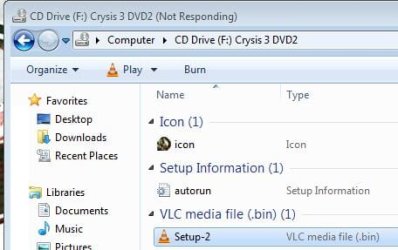
When i'm trying to do so,windows explorer is freezing,till dvd is ejected manually.
2nd DVD consists of an autorun ,setup,and a data(cab) file.
I Have nero essentials but it copies entire data from disc in form of single file,which can only be burned into another DVD.
Can any one help me finding software in force extracting these files to PC folder,so that i can i continue installation from PC,I had already copied all content from DVD 1.Any help would be greatly appreciated....
 

My Computer My Computer

At a glance

windows 7 ultimate 64 bitIntel core i3-2350M cpu@!2.30 Ghz4.00 GBAMD RADEON HD 6370M(1GB)
Computer type
Laptop
Computer Manufacturer/Model Number
LENOVO G570
OS
windows 7 ultimate 64 bit
CPU
Intel core i3-2350M cpu@!2.30 Ghz
Motherboard
Lenovo
Memory
4.00 GB
Graphics Card(s)
AMD RADEON HD 6370M(1GB)
Monitor(s) Displays
Generic pnp Monitor
Screen Resolution
1366*768
Hard Drives
ST9500325AS ATA device(500GB) NTFS
Keyboard
Standard ps/2 keyboard
Mouse
synaptics ps/2 port Touchpad
Internet Speed
921.6 kbps(Dial up Connection)
Antivirus
Quick Heal,MSE
Browser
Opera,Chrome
Open a Elevated Command Prompt.
Put the DVD in.
As soon as Windows Explorer starts to open, close it immediately.
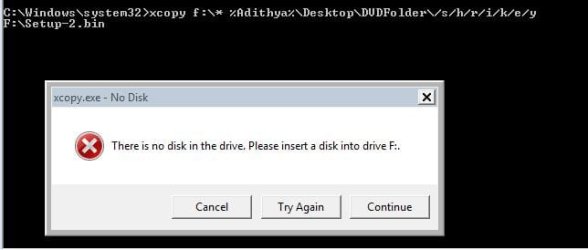
If that works, use xcopy to copy the content of the DVD to a folder on your harddrive.

If the DVD drive is D: for instance:

xcopy d:\* %userprofile%\Desktop\DVDFolder\ /s/h/r/i/k/e/y

This will copy everything from the DVD to a DVDFolder on your Desktop.
Once that completes, type

%userprofile%\Desktop\DVDFolder\setup

That should start the installation.
 

My Computer My Computer

At a glance

Windows 10 Pro X64Intel Quad Core i7-4770 @ 3.4Ghz16.0GB PC3-12800 DDR3 SDRAM 1600 MHzIntel Integrated HD Graphics
Computer type
PC/Desktop
Computer Manufacturer/Model Number
Lenovo IdeaCenter 450
OS
Windows 10 Pro X64
CPU
Intel Quad Core i7-4770 @ 3.4Ghz
Memory
16.0GB PC3-12800 DDR3 SDRAM 1600 MHz
Graphics Card(s)
Intel Integrated HD Graphics
Sound Card
Realtek HD Audio
Monitor(s) Displays
HP 22" LCD
Screen Resolution
1680 x 1050
Hard Drives
250GB Samsung EVO SATA-3 SSD
2TB Seagate ST2000DM001 SATA-2
1.5TB Seagate ST3150041AS SATA
Keyboard
Dell USB
Mouse
Lenovo USB
Internet Speed
Cable via Road Runner 3MB Upload, 30MB Download
Antivirus
Windows Defender, MBAM Pro, MBAE
Browser
Seamonkey
Other Info
UEFI/GPT
PLDS DVD-RW DH16AERSH
Open a Elevated Command Prompt.
Put the DVD in.
As soon as Windows Explorer starts to open, close it immediately.
If that works, use xcopy to copy the content of the DVD to a folder on your harddrive.

If the DVD drive is D: for instance:

xcopy d:\* %userprofile%\Desktop\DVDFolder\ /s/h/r/i/k/e/y

This will copy everything from the DVD to a DVDFolder on your Desktop.
Once that completes, type

%userprofile%\Desktop\DVDFolder\setup

That should start the installation.

Of no use,still facing the same problem....Explorer is freezing when trying to copy the setup(bin) file of 4GB.Its neither installing or copying.
 

Attachments

  • cap.JPG
    cap.JPG
    21.1 KB · Views: 10
  • cap 2.JPG
    cap 2.JPG
    28.1 KB · Views: 10

My Computer My Computer

At a glance

windows 7 ultimate 64 bitIntel core i3-2350M cpu@!2.30 Ghz4.00 GBAMD RADEON HD 6370M(1GB)
Computer type
Laptop
Computer Manufacturer/Model Number
LENOVO G570
OS
windows 7 ultimate 64 bit
CPU
Intel core i3-2350M cpu@!2.30 Ghz
Motherboard
Lenovo
Memory
4.00 GB
Graphics Card(s)
AMD RADEON HD 6370M(1GB)
Monitor(s) Displays
Generic pnp Monitor
Screen Resolution
1366*768
Hard Drives
ST9500325AS ATA device(500GB) NTFS
Keyboard
Standard ps/2 keyboard
Mouse
synaptics ps/2 port Touchpad
Internet Speed
921.6 kbps(Dial up Connection)
Antivirus
Quick Heal,MSE
Browser
Opera,Chrome
Are you able to try it on another computer in case the Optical drive is unable to read it for whatever reason or the DVD is somehow damaged
 

My Computer My Computer

At a glance

Windows 7 Ultimate x64Q6600 3.1ghzKingston DDR2 6400 8GBGigabyte Radeon HD 6850 1GB 256-Bit
Computer type
PC/Desktop
Computer Manufacturer/Model Number
Home Made
OS
Windows 7 Ultimate x64
CPU
Q6600 3.1ghz
Motherboard
Gigabyte GA-P35-DS3L
Memory
Kingston DDR2 6400 8GB
Graphics Card(s)
Gigabyte Radeon HD 6850 1GB 256-Bit
Sound Card
On board
Monitor(s) Displays
Acer X243H
Screen Resolution
1920x1080
Hard Drives
Intel 330 120GB SSD
WD 2TB 7200
PSU
Thermaltake Toughpower 750W Semi Modular
Case
Modified Alienware
Keyboard
A4Tech
Mouse
Gigabyte ECO600
Antivirus
Comodo
Browser
Cyberfox
Tried that too,in another lenovo laptop 64 bit dvd rw optical drive,facing same problem.
 

My Computer My Computer

At a glance

windows 7 ultimate 64 bitIntel core i3-2350M cpu@!2.30 Ghz4.00 GBAMD RADEON HD 6370M(1GB)
Computer type
Laptop
Computer Manufacturer/Model Number
LENOVO G570
OS
windows 7 ultimate 64 bit
CPU
Intel core i3-2350M cpu@!2.30 Ghz
Motherboard
Lenovo
Memory
4.00 GB
Graphics Card(s)
AMD RADEON HD 6370M(1GB)
Monitor(s) Displays
Generic pnp Monitor
Screen Resolution
1366*768
Hard Drives
ST9500325AS ATA device(500GB) NTFS
Keyboard
Standard ps/2 keyboard
Mouse
synaptics ps/2 port Touchpad
Internet Speed
921.6 kbps(Dial up Connection)
Antivirus
Quick Heal,MSE
Browser
Opera,Chrome
Then I would say there is something wrong with the 2nd disc. You could try making a copy of it using CD\DVD burning programs like Roxio, Nero, CDBurnerXP (freeware), all can do the job. You may get lucky and this will work. If so, that may resolve your problem.
 
Last edited:

My Computer My Computer

At a glance

Windows 10 Pro X64Intel Quad Core i7-4770 @ 3.4Ghz16.0GB PC3-12800 DDR3 SDRAM 1600 MHzIntel Integrated HD Graphics
Computer type
PC/Desktop
Computer Manufacturer/Model Number
Lenovo IdeaCenter 450
OS
Windows 10 Pro X64
CPU
Intel Quad Core i7-4770 @ 3.4Ghz
Memory
16.0GB PC3-12800 DDR3 SDRAM 1600 MHz
Graphics Card(s)
Intel Integrated HD Graphics
Sound Card
Realtek HD Audio
Monitor(s) Displays
HP 22" LCD
Screen Resolution
1680 x 1050
Hard Drives
250GB Samsung EVO SATA-3 SSD
2TB Seagate ST2000DM001 SATA-2
1.5TB Seagate ST3150041AS SATA
Keyboard
Dell USB
Mouse
Lenovo USB
Internet Speed
Cable via Road Runner 3MB Upload, 30MB Download
Antivirus
Windows Defender, MBAM Pro, MBAE
Browser
Seamonkey
Other Info
UEFI/GPT
PLDS DVD-RW DH16AERSH
Back
Top