hellsbells
New member
- Local time
- 7:59 AM
- Messages
- 4
I'm doing a fresh install on a newly-assembled PC. It has an SSD (~220GB) and a magnetic HDD (1TB). Ultimately I plan to dual-boot with Fedora Linux, so I want to partition for Windows to not use the whole disks.
The first time I did this installation, I didn't pay attention to whether Windows 7 used MBR or GPT partitioning, and I've since learned that it has to use GPT partitioning if I want it to use UEFI. It seems like I want to use UEFI (that's new to me), so I'm trying to re-install, this time using GPT.
I've followed the "How to Install Windows 7 Using [UEFI]" tutorial, but something's going wrong for me. Step 8 says, "You will notice that the disk has now been formatted as GPT with 3 partitions." But that's exactly what I don't notice.
Because I had already installed using GPT, I've used 'diskpart' to convert both of the previously-partitioned hard drives to GPT. When I'm on the screen shown in step 6, I go off with Shift-F10 and use 'diskpart'. Long story short, before returning to installation, 'list disk' shows me '*' in the 'Gpt' column for both disks. It looks like they're GPT. If I come back to 'diskpart' immediately, they still look 'Gpt'.
Now if I click 'New' and create the partition I want for Windows (140GB of the 220GB available), I get 'To ensure that all Windows features work correctly, Windows might create additional partitions for system files", then it shows me two partitions: "Partition 1: System Reserved" (100MB) and "Partition 2" (140GB). If I now go back to diskpart and look at 'list disk', it shows this disk as no longer 'Gpt'.
I have noticed two gotchas on this subject, so let me address explicitly them right-off:
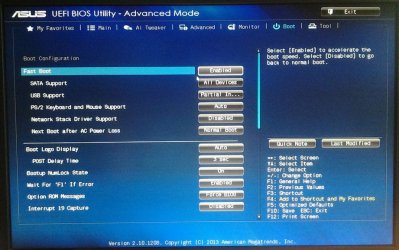
1. From the UEFI BIOS, I did choose the UEFI boot option for the installation DVD.
2. I am using a 64-bit installation DVD. Or at least, I am sure that the filename that I burned indicated it was such, so I feel about 95% on this. Not sure how I can confirm this besides re-installing and looking inside of Windows.
As a workaround, perhaps I should try installing Fedora first... Then I wouldn't have to ask Windows to create the partitions from scratch.
The first time I did this installation, I didn't pay attention to whether Windows 7 used MBR or GPT partitioning, and I've since learned that it has to use GPT partitioning if I want it to use UEFI. It seems like I want to use UEFI (that's new to me), so I'm trying to re-install, this time using GPT.
I've followed the "How to Install Windows 7 Using [UEFI]" tutorial, but something's going wrong for me. Step 8 says, "You will notice that the disk has now been formatted as GPT with 3 partitions." But that's exactly what I don't notice.
Because I had already installed using GPT, I've used 'diskpart' to convert both of the previously-partitioned hard drives to GPT. When I'm on the screen shown in step 6, I go off with Shift-F10 and use 'diskpart'. Long story short, before returning to installation, 'list disk' shows me '*' in the 'Gpt' column for both disks. It looks like they're GPT. If I come back to 'diskpart' immediately, they still look 'Gpt'.
Now if I click 'New' and create the partition I want for Windows (140GB of the 220GB available), I get 'To ensure that all Windows features work correctly, Windows might create additional partitions for system files", then it shows me two partitions: "Partition 1: System Reserved" (100MB) and "Partition 2" (140GB). If I now go back to diskpart and look at 'list disk', it shows this disk as no longer 'Gpt'.
I have noticed two gotchas on this subject, so let me address explicitly them right-off:
1. From the UEFI BIOS, I did choose the UEFI boot option for the installation DVD.
2. I am using a 64-bit installation DVD. Or at least, I am sure that the filename that I burned indicated it was such, so I feel about 95% on this. Not sure how I can confirm this besides re-installing and looking inside of Windows.
As a workaround, perhaps I should try installing Fedora first... Then I wouldn't have to ask Windows to create the partitions from scratch.
My Computer
At a glance
Windows 7 Ultimate x64
- Computer type
- PC/Desktop
- OS
- Windows 7 Ultimate x64