- Local time
- 9:08 PM
- Messages
- 50,634
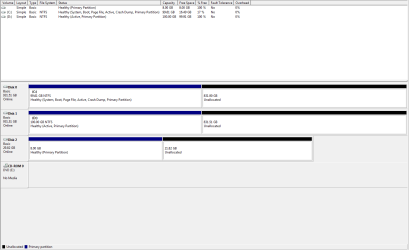
If the drives aren't visible as shown in Install Windows on System with MSATA and ISRT
then you'll need to insert the IRST driver as shown in tutorial to proceed.
Otherwise follow the steps in red here as they pertain to drivers for Clean Reinstall - Factory OEM Windows 7 because Win7 might have drivers it prefers which should be given first choice. After enabling Automatically deliver drivers via Windows Update (Step 3) and running all rounds of Important and Optional Updates, with requested reboots, you can import any drivers still missing in Device Manager. Always replace Standard VGA display driver if nothing newer is delivered.
then you'll need to insert the IRST driver as shown in tutorial to proceed.
Otherwise follow the steps in red here as they pertain to drivers for Clean Reinstall - Factory OEM Windows 7 because Win7 might have drivers it prefers which should be given first choice. After enabling Automatically deliver drivers via Windows Update (Step 3) and running all rounds of Important and Optional Updates, with requested reboots, you can import any drivers still missing in Device Manager. Always replace Standard VGA display driver if nothing newer is delivered.