
Unable To Install Windows Server 2012 On Vmware Player

soaef

New member
Local time
1:05 AM
Messages
13
Hello

Today I have download Microsoft server 2012 from Microsoft website.
There the link- Download Windows Server 2012

When I install on my Vmware Player it is showing me "Windows cannot find the Microsoft software License Terms.Make sure the installation sources are valid and restart the installation."

I have tried many times but I am getting same error.

Please anyone can help me to solve this problem.
 

Attachments
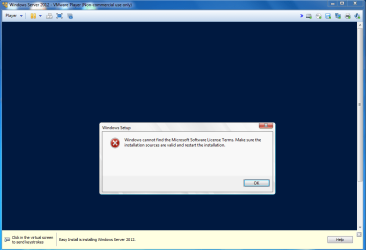
  • 2012.PNG
    2012.PNG
    93.1 KB · Views: 2

My Computer

Computer type
PC/Desktop
OS
Windows 7 Ultimate 32 Bit
Motherboard
Asus
Antivirus
Webroot
Browser
Chrome
Any One Can Help Me Please.Still Waiting To Get It.
 

My Computer

Computer type
PC/Desktop
OS
Windows 7 Ultimate 32 Bit
Motherboard
Asus
Antivirus
Webroot
Browser
Chrome

My Computer

Computer type
PC/Desktop
Computer Manufacturer/Model Number
Home Built Desktop By DataTech
OS
Windows 7 Ultimate X64 SP1
CPU
Intel i5-2550K, Differing ~4.4-4.8GHz No built in GPU
Motherboard
ASUS P8Z68-V PRO/GEN3
Memory
16GB G.Skill Sniper 1866MHz @ 2133MHz 2x8GB
Graphics Card(s)
ASUS GTX650TIB-DC2OC-2GD5, (650TI Boost)
Sound Card
Onboard Realtek 5-1
Monitor(s) Displays
Samsung P2570HD
Screen Resolution
1920x1080
Hard Drives
Samsung 840 Pro 256GB SSD for OS, 500GB Seagate Constellation (Enterprise drive) for Data
PSU
Corsair HX650W
Case
Inwin Dragon Rider
Cooling
Hyper 212 EVO w/two Noctua fans, push-pull, @1300 RPM
Keyboard
E-Z Eyes, bright yellow keys with large characters
Mouse
steelseries SENSEI Laser Pro Gaming
Internet Speed
48-51Mbs Mbs down, 11 Mbs up Xfinity Cable
Antivirus
Norton Internet Security 2013
Browser
IE 10, Opera, Pale Moon if needed
Other Info
4 case fans, LG BluRay-RE, ASUS DVD-RW, Mr. Fusion power supply, 1.21 gigawatts.
It works for me

When you create a New virtual machine
- Choose the option: I will install the operating system later.(The virtual machine will be created with a blank hard disk.)
Do not type the path to the ISO file
- After creating New virtual machine additionally set the path to the ISO file (VM/ settings/ CD-DVD.../Use ISO image file)
- After running the New virtual machine to automatically install classicl (otherwise runs probably Express= error)
 

My Computer

Computer type
PC/Desktop
OS
Outside the US or Canada
Back
Top