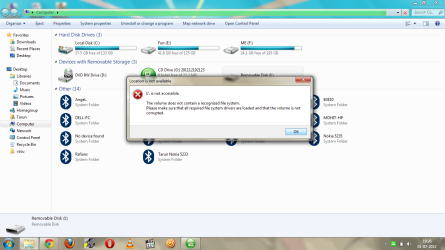
unable to open mass storage device

tarun chaudhary

New member
Local time
5:17 PM
Messages
13
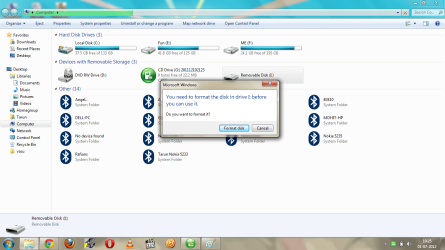
hi guys, i am unable to open my pen drive(mass storage device) after leaving my machine on hybernate without ejecting the device.. now it shows that windows can't open the device. plz.. help as i don't want to loose the data on the device.... any solution????
 

Attachments
  • problem.png
    problem.png
    77.1 KB · Views: 31
  • prblm2.png
    prblm2.png
    77.3 KB · Views: 20

My Computer My Computer

OS
window 7 64bit home premium
sounds like it its corrupted. Not much windows will be able to do if it wont let you open it that is about it from that side. Something I would try is seeing if it will open under a linux partition. If you go to Download - Linux Mint you can download it to a bootable CD and then run it with out installing it. It is worth a shot to see if it will open it. If it does open it just copy it to another drive and then reformat that one. The only other option that i know of is to send it to a professional data retrieval person. VERY expensive so guess it depends on what the data is worth to you.
 

My Computer My Computer

Computer Manufacturer/Model Number
DIY
OS
Windows 7
CPU
Core 2 Due 3.16ghz
Motherboard
P5N-D
Memory
Kingston 4g ddr2 800Mhrz
Graphics Card(s)
Radeon HD 4650
Sound Card
on board
Monitor(s) Displays
AOC 22"
Hard Drives
WD 250g 10200rpm
Segate 500g 7200rpm
Segate 80g 7200rpm
Case
coolmaster HAF 932
Cooling
Big Fans
Internet Speed
Fast
There are a few programs like Recuva that will recover any data it can find. Whether they work for you or not probably depends on the condition of the drive. It is free. so worth a try.
 

My Computers My Computers

System One System Two

  • Computer type
    PC/Desktop
    Computer Manufacturer/Model Number
    ALWAYS UNDER CONSTRUCTION
    OS
    Windows 11 Pro
    CPU
    Ryzen 9 5900X
    Motherboard
    Asus X570 Crosshair Viii Hero
    Memory
    32GB G Skill DDR4-3600
    Graphics Card(s)
    EVGA RTX 3080 FTW 3 Ultra
    Sound Card
    On Board/Sennheiser PC37X Headset
    Monitor(s) Displays
    3 X Asus 27"
    Screen Resolution
    2560x1440
    Hard Drives
    2 X 1 TB NVME drives
    PSU
    EVGA 850
    Case
    Phanteks Eclipse P400A
    Cooling
    EVGA 280 AIO
    Keyboard
    Logitech G510s/ Logitech G13
    Mouse
    Logitech G502
    Internet Speed
    24/1
    Antivirus
    ESET/MBAM Pro/SAS Pro
    Browser
    Chrome/ Firefox/ Edge
  • Computer type
    Laptop
    System Manufacturer/Model Number
    Dell 16 Plus
    OS
    Windows 11 Pro
    CPU
    Intel Ultra 9 288V
    Memory
    32 GB LPDDR5X 8533
    Monitor(s) Displays
    16" Mini-LED HDR600 Touch 90 Hz
    Screen Resolution
    2560X1600
    Hard Drives
    1 TB NVME
I think your disk is gone (out of service). You can try user permission or clean disk command. Clean disk will erase your data.
 

My Computer My Computer

Computer type
PC/Desktop
Computer Manufacturer/Model Number
Gigabyte g41 Combo
OS
Windows 8.1 x64 Enterprise & Windows 7 x86 Ultimate Dual boot.
CPU
Core™2 Duo E8400
Motherboard
Gigabyte g41m combo
Memory
4GB
Graphics Card(s)
built in
Sound Card
built in
Monitor(s) Displays
Samsung syncmaster 794mg
Screen Resolution
1024x768
Hard Drives
WD-500GB
Antivirus
MSE
Browser
Firefox and chrome.
Back
Top