
Unable to Print & Open Files in Word 2007 - Pls Assist!

Parry

New member
Local time
10:51 PM
Messages
67
Hi,

I installed novaPDF Lite 7 and tried converting a word file to pdf. It did'nt work but since then I have been facing issues with printing word documents through my laser printer.

1) The 'Print' dialog does not open on pressing Ctrl+P and when i do a quick print i get the following error message.


Whereas, I am able to open the 'Print' dialog box in other office applications and print documents.

2) When I try opening any word file from Start Menu>Recent Documents, I am getting the error message as:


3) Also, am unable to open any word file by browsing through the folders. Only way I can open a word file is through start menu of Word

4) And for some reasons system restore is also not able to restore to any date prior to the installation.

Have done the following so far;
i) Checked my default printer settings. Have uninstalled & re-installed my laser printer.
ii) Have tried repairing Office from control panel.
iii) Have uninstalled novaPDF.
iv) Used Microsoft Fix it (How do I uninstall the 2007 Office suites if I cannot uninstall it by using the "Add or Remove Programs" feature?).
v) Have tried uninstalling & re-installing Office 2007, but no luck.


An observation:
When I uninstalled & re-installed Office 2007, all my Quick Access Toolbar Settings & other Word Settings came back intact even though I used CCleaner to delete registry of the uninstalled version of Office. Also, all my recently opened documents were there in Word. Similarly, the printer settings & other settings related to print would have also been there & came back with fresh installation.

For now have uninstalled Office 2007 & installed Office 2003 and everything is working fine but wana revert back to Office 2007.

Pls assist me in re-solving this issue.
 

My Computer My Computer

At a glance

XP Pro SP3 | Vista Home Premium x86 | Windows...
OS
XP Pro SP3 | Vista Home Premium x86 | Windows 7 Pro x86
what is the make and model no. of your laser printer, perhaps it needs to have a default setting restored.??
 

My Computer My Computer

At a glance

Windows10 Pro - 64Bit vs.10547i7-965 Extreme Edition (8 Cores) at 3.3GHz (n...12G Corsair Dominator DDR3 - tripled2xAMD SapphireNITRO R9 380(4G) crossfire
Computer type
PC/Desktop
Computer Manufacturer/Model Number
benchtec, built to personal specs
OS
Windows10 Pro - 64Bit vs.10547
CPU
i7-965 Extreme Edition (8 Cores) at 3.3GHz (no OC)
Motherboard
BloodRageX58 (Socket1366)
Memory
12G Corsair Dominator DDR3 - tripled
Graphics Card(s)
2xAMD SapphireNITRO R9 380(4G) crossfire
Sound Card
Sonar(SB)X-Fi onboard
Monitor(s) Displays
SyncMaster P2050 20"
Screen Resolution
1600x900 (widescreen)
Hard Drives
480G\OCZSolid3SSD, 64G\OCZVertex3SSD,60G\OCZVertex2SSD, 1TB\spinpointF1SATAHDD
PSU
1200w Power Station Gold
Case
ANTEC 900/2 all blue lights, etc..
Cooling
Noctua SE1366 NH-U12P - a tight fit, but a monster cooler!!
Keyboard
Logitech G19 (wired)
Mouse
Logitech G9 Laser (wired)
Internet Speed
150mb unlimited
Browser
IE11(RP)
Other Info
Xbox One, Nokia735 Windows10 mobile, LG HD/DVD/Blu-Ray r/w, CyberlinkPowerDVD15, LogitechZ5500-SS(5.1), LogitechG35Phones-SS(7.1),MSOffice 2007,CorelDrawX7,Painter2016, Wacom Intuos Pro-SE
Thanks BugMeister for replying. Printer Make & Model No. Samsung ML-1640.

But I guess its nothing to do with the printer as stated earlier too, I have no issues in printing any document from any other Office application like Excel, Powerpoint, Outlook etc.

Also, when I have unistalled Office 2007 & installed Office 2003; I am having no such printing issues.

Installation of novaPDF Lite 7 printer has corrupted the printer settings of Word 2007. That is why I am also not able to open the Print Dialog box for changing the printer in Word.

Also, have uninstalled & re-installed the laser printer & set it to default but still no luck.
 

My Computer My Computer

At a glance

XP Pro SP3 | Vista Home Premium x86 | Windows...
OS
XP Pro SP3 | Vista Home Premium x86 | Windows 7 Pro x86
there is a troubleshooter here:
How to troubleshoot printing problems in Word 2007 or in Word 2003
I would work through this quite methodically first, to see if it provides a solution..

NB there is a very recent driver update for the printer here:
Support for ML-1640 SAMSUNG
are you running this driver..?

I have no experience with the NovaPDF software, but I did note this in their FAQ support:
http://www.novapdf.com/kb/novapdf-does-not-work-when-using-the-print-to-file-option-why-126.html
- could the reversal of this option provide a solution..?
 

My Computer My Computer

At a glance

Windows10 Pro - 64Bit vs.10547i7-965 Extreme Edition (8 Cores) at 3.3GHz (n...12G Corsair Dominator DDR3 - tripled2xAMD SapphireNITRO R9 380(4G) crossfire
Computer type
PC/Desktop
Computer Manufacturer/Model Number
benchtec, built to personal specs
OS
Windows10 Pro - 64Bit vs.10547
CPU
i7-965 Extreme Edition (8 Cores) at 3.3GHz (no OC)
Motherboard
BloodRageX58 (Socket1366)
Memory
12G Corsair Dominator DDR3 - tripled
Graphics Card(s)
2xAMD SapphireNITRO R9 380(4G) crossfire
Sound Card
Sonar(SB)X-Fi onboard
Monitor(s) Displays
SyncMaster P2050 20"
Screen Resolution
1600x900 (widescreen)
Hard Drives
480G\OCZSolid3SSD, 64G\OCZVertex3SSD,60G\OCZVertex2SSD, 1TB\spinpointF1SATAHDD
PSU
1200w Power Station Gold
Case
ANTEC 900/2 all blue lights, etc..
Cooling
Noctua SE1366 NH-U12P - a tight fit, but a monster cooler!!
Keyboard
Logitech G19 (wired)
Mouse
Logitech G9 Laser (wired)
Internet Speed
150mb unlimited
Browser
IE11(RP)
Other Info
Xbox One, Nokia735 Windows10 mobile, LG HD/DVD/Blu-Ray r/w, CyberlinkPowerDVD15, LogitechZ5500-SS(5.1), LogitechG35Phones-SS(7.1),MSOffice 2007,CorelDrawX7,Painter2016, Wacom Intuos Pro-SE
ok 2 things:

1st: printer driver issues cause the ctrl + p issue and the default printer error.
2nd: You need the conversion pack for office 2k3/2k7 which is usually either windows update or you can download it from microsoft.
 

My Computer My Computer

At a glance

7 Pro
OS
7 Pro
there is a troubleshooter here:
How to troubleshoot printing problems in Word 2007 or in Word 2003
I would work through this quite methodically first, to see if it provides a solution..

I have no experience with the NovaPDF software, but I did note this in their FAQ support:
http://www.novapdf.com/kb/novapdf-does-not-work-when-using-the-print-to-file-option-why-126.html
- could the reversal of this option provide a solution..?

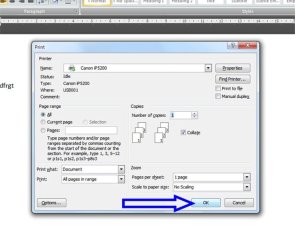
But in the last step for Word 2007 it says in the print dialog box & am not getting to see this dialog box.
Word 2007

  1. Close all Word 2007 documents.
  2. Click the Microsoft Office Button, and then click New.
  3. Under Blank and recent, click Blank document, and then click Create.
  4. Type some text in the new document.
  5. Click the Microsoft Office Button, point to Print, and then click Print.
  6. In the Print dialog box, click OK.
 

My Computer My Computer

At a glance

XP Pro SP3 | Vista Home Premium x86 | Windows...
OS
XP Pro SP3 | Vista Home Premium x86 | Windows 7 Pro x86
wordnew.jpg

they mean here..
 

My Computer My Computer

At a glance

Windows10 Pro - 64Bit vs.10547i7-965 Extreme Edition (8 Cores) at 3.3GHz (n...12G Corsair Dominator DDR3 - tripled2xAMD SapphireNITRO R9 380(4G) crossfire
Computer type
PC/Desktop
Computer Manufacturer/Model Number
benchtec, built to personal specs
OS
Windows10 Pro - 64Bit vs.10547
CPU
i7-965 Extreme Edition (8 Cores) at 3.3GHz (no OC)
Motherboard
BloodRageX58 (Socket1366)
Memory
12G Corsair Dominator DDR3 - tripled
Graphics Card(s)
2xAMD SapphireNITRO R9 380(4G) crossfire
Sound Card
Sonar(SB)X-Fi onboard
Monitor(s) Displays
SyncMaster P2050 20"
Screen Resolution
1600x900 (widescreen)
Hard Drives
480G\OCZSolid3SSD, 64G\OCZVertex3SSD,60G\OCZVertex2SSD, 1TB\spinpointF1SATAHDD
PSU
1200w Power Station Gold
Case
ANTEC 900/2 all blue lights, etc..
Cooling
Noctua SE1366 NH-U12P - a tight fit, but a monster cooler!!
Keyboard
Logitech G19 (wired)
Mouse
Logitech G9 Laser (wired)
Internet Speed
150mb unlimited
Browser
IE11(RP)
Other Info
Xbox One, Nokia735 Windows10 mobile, LG HD/DVD/Blu-Ray r/w, CyberlinkPowerDVD15, LogitechZ5500-SS(5.1), LogitechG35Phones-SS(7.1),MSOffice 2007,CorelDrawX7,Painter2016, Wacom Intuos Pro-SE
Exactly & it this print dialog box that is not opening up either by CTRL+P or by pressing 'Print' from the office button.
 

My Computer My Computer

At a glance

XP Pro SP3 | Vista Home Premium x86 | Windows...
OS
XP Pro SP3 | Vista Home Premium x86 | Windows 7 Pro x86
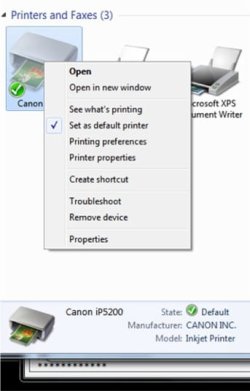
is your printer showing in the Start Menu option for Devices and Printers..?
if so, it might be worth checking its "Properties" via a right-click..
 

My Computer My Computer

At a glance

Windows10 Pro - 64Bit vs.10547i7-965 Extreme Edition (8 Cores) at 3.3GHz (n...12G Corsair Dominator DDR3 - tripled2xAMD SapphireNITRO R9 380(4G) crossfire
Computer type
PC/Desktop
Computer Manufacturer/Model Number
benchtec, built to personal specs
OS
Windows10 Pro - 64Bit vs.10547
CPU
i7-965 Extreme Edition (8 Cores) at 3.3GHz (no OC)
Motherboard
BloodRageX58 (Socket1366)
Memory
12G Corsair Dominator DDR3 - tripled
Graphics Card(s)
2xAMD SapphireNITRO R9 380(4G) crossfire
Sound Card
Sonar(SB)X-Fi onboard
Monitor(s) Displays
SyncMaster P2050 20"
Screen Resolution
1600x900 (widescreen)
Hard Drives
480G\OCZSolid3SSD, 64G\OCZVertex3SSD,60G\OCZVertex2SSD, 1TB\spinpointF1SATAHDD
PSU
1200w Power Station Gold
Case
ANTEC 900/2 all blue lights, etc..
Cooling
Noctua SE1366 NH-U12P - a tight fit, but a monster cooler!!
Keyboard
Logitech G19 (wired)
Mouse
Logitech G9 Laser (wired)
Internet Speed
150mb unlimited
Browser
IE11(RP)
Other Info
Xbox One, Nokia735 Windows10 mobile, LG HD/DVD/Blu-Ray r/w, CyberlinkPowerDVD15, LogitechZ5500-SS(5.1), LogitechG35Phones-SS(7.1),MSOffice 2007,CorelDrawX7,Painter2016, Wacom Intuos Pro-SE
Yes its there in the Printer & Faxes.
 

My Computer My Computer

At a glance

XP Pro SP3 | Vista Home Premium x86 | Windows...
OS
XP Pro SP3 | Vista Home Premium x86 | Windows 7 Pro x86
Prin.jpg

- have you set it as the default printer..?
 

My Computer My Computer

At a glance

Windows10 Pro - 64Bit vs.10547i7-965 Extreme Edition (8 Cores) at 3.3GHz (n...12G Corsair Dominator DDR3 - tripled2xAMD SapphireNITRO R9 380(4G) crossfire
Computer type
PC/Desktop
Computer Manufacturer/Model Number
benchtec, built to personal specs
OS
Windows10 Pro - 64Bit vs.10547
CPU
i7-965 Extreme Edition (8 Cores) at 3.3GHz (no OC)
Motherboard
BloodRageX58 (Socket1366)
Memory
12G Corsair Dominator DDR3 - tripled
Graphics Card(s)
2xAMD SapphireNITRO R9 380(4G) crossfire
Sound Card
Sonar(SB)X-Fi onboard
Monitor(s) Displays
SyncMaster P2050 20"
Screen Resolution
1600x900 (widescreen)
Hard Drives
480G\OCZSolid3SSD, 64G\OCZVertex3SSD,60G\OCZVertex2SSD, 1TB\spinpointF1SATAHDD
PSU
1200w Power Station Gold
Case
ANTEC 900/2 all blue lights, etc..
Cooling
Noctua SE1366 NH-U12P - a tight fit, but a monster cooler!!
Keyboard
Logitech G19 (wired)
Mouse
Logitech G9 Laser (wired)
Internet Speed
150mb unlimited
Browser
IE11(RP)
Other Info
Xbox One, Nokia735 Windows10 mobile, LG HD/DVD/Blu-Ray r/w, CyberlinkPowerDVD15, LogitechZ5500-SS(5.1), LogitechG35Phones-SS(7.1),MSOffice 2007,CorelDrawX7,Painter2016, Wacom Intuos Pro-SE
Yes, its my default printer.
I guess its nothing to do with the printer settings its Word 2007.
 

My Computer My Computer

At a glance

XP Pro SP3 | Vista Home Premium x86 | Windows...
OS
XP Pro SP3 | Vista Home Premium x86 | Windows 7 Pro x86
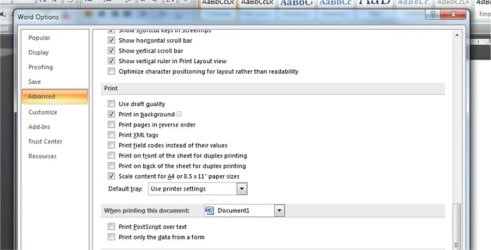
these are my own settings via Word Options:
Prin2.jpg

- do you have something similar..?
 

My Computer My Computer

At a glance

Windows10 Pro - 64Bit vs.10547i7-965 Extreme Edition (8 Cores) at 3.3GHz (n...12G Corsair Dominator DDR3 - tripled2xAMD SapphireNITRO R9 380(4G) crossfire
Computer type
PC/Desktop
Computer Manufacturer/Model Number
benchtec, built to personal specs
OS
Windows10 Pro - 64Bit vs.10547
CPU
i7-965 Extreme Edition (8 Cores) at 3.3GHz (no OC)
Motherboard
BloodRageX58 (Socket1366)
Memory
12G Corsair Dominator DDR3 - tripled
Graphics Card(s)
2xAMD SapphireNITRO R9 380(4G) crossfire
Sound Card
Sonar(SB)X-Fi onboard
Monitor(s) Displays
SyncMaster P2050 20"
Screen Resolution
1600x900 (widescreen)
Hard Drives
480G\OCZSolid3SSD, 64G\OCZVertex3SSD,60G\OCZVertex2SSD, 1TB\spinpointF1SATAHDD
PSU
1200w Power Station Gold
Case
ANTEC 900/2 all blue lights, etc..
Cooling
Noctua SE1366 NH-U12P - a tight fit, but a monster cooler!!
Keyboard
Logitech G19 (wired)
Mouse
Logitech G9 Laser (wired)
Internet Speed
150mb unlimited
Browser
IE11(RP)
Other Info
Xbox One, Nokia735 Windows10 mobile, LG HD/DVD/Blu-Ray r/w, CyberlinkPowerDVD15, LogitechZ5500-SS(5.1), LogitechG35Phones-SS(7.1),MSOffice 2007,CorelDrawX7,Painter2016, Wacom Intuos Pro-SE
Installed Office 2007 Ultimate & am able to print.
 

My Computer My Computer

At a glance

XP Pro SP3 | Vista Home Premium x86 | Windows...
OS
XP Pro SP3 | Vista Home Premium x86 | Windows 7 Pro x86
Back
Top