
Hi all,
I recently tried installing a very old animated wallpaper application but unfortunately I can't seem to get rid off it as it did not come with an uninstaller app. I've deleted the reg entries and the pictures and everything else related to it and while most of it appears to have gone, Windows 7 continues to give me the option of selecting it when I select my desktop background.
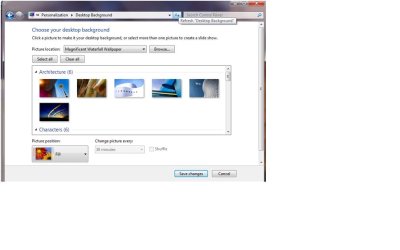
Please see the attached pic. The 'Magnificent Waterfall Wallpaper', under Picture Location is the culprit.
It's not a huge problem but it's just bugging me that Windows still seems to think it's available to choose when everything related to it has gone! Any ideas how to remove this 'rogue' wallpaper from the available selection?
Thanks in advance for any help.
I recently tried installing a very old animated wallpaper application but unfortunately I can't seem to get rid off it as it did not come with an uninstaller app. I've deleted the reg entries and the pictures and everything else related to it and while most of it appears to have gone, Windows 7 continues to give me the option of selecting it when I select my desktop background.
Please see the attached pic. The 'Magnificent Waterfall Wallpaper', under Picture Location is the culprit.
It's not a huge problem but it's just bugging me that Windows still seems to think it's available to choose when everything related to it has gone! Any ideas how to remove this 'rogue' wallpaper from the available selection?
Thanks in advance for any help.
Attachments
My Computer
- OS
- Windows 7
