
Solved unable to 'safely eject' my new external drive.

Lykho

New member
Member
VIP
Local time
4:30 PM
Messages
115
Location
New Zealand
I've recently installed a USB3.0 PCI-e for a USB3.0 external drive. I'm not sure if that is part of the problem.

I cease using the drive, and wish to eject it safely, but I receive 'in use' messages...no matter how long I wait, no matter what programs I close.

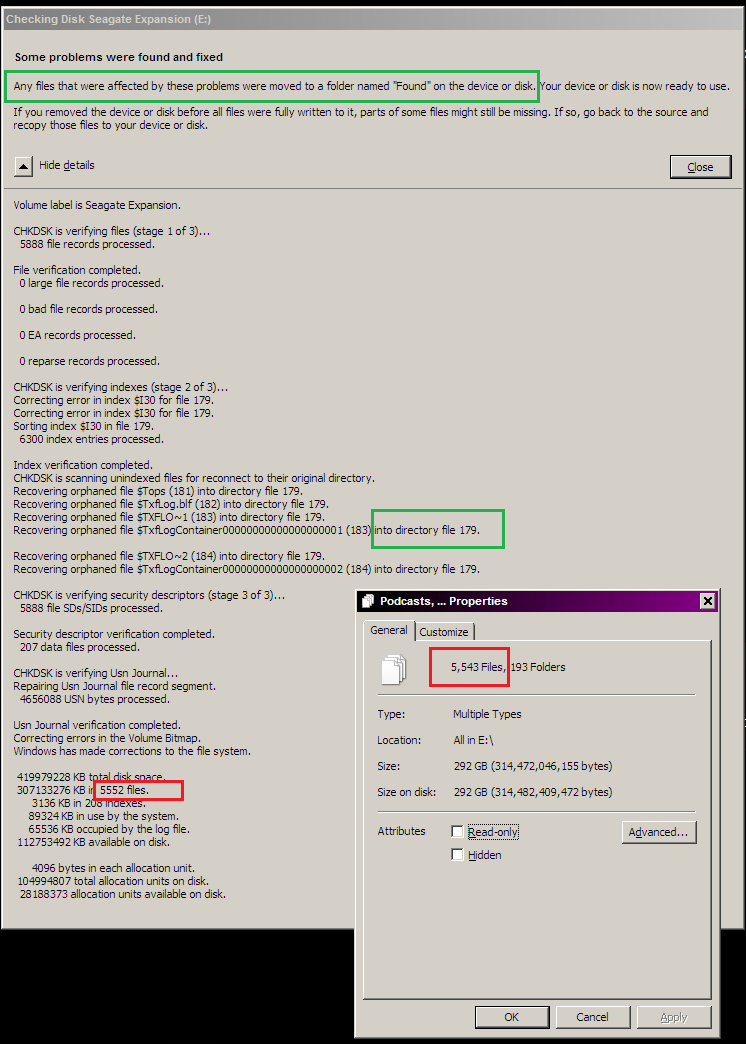
I do have Windows set to the default where you apparently don't have to worry about safely ejecting. However, when I booted the drive today I received an error/improper disconnect message from the last use, and it had to scan and [apparently*] move some files, which is why I'm concerned about this drive not responding properly.

the drive is the USB3.0 Samsung 2TB expansion.
its second partition is encrypted with TrueCrypt, and I dismount it before attempting to disconnect the device.

not sure what other information might be relevant.

EDIT: after a restart, a bunch of explorer windows were re-opened -- these had been "closed" in an explorer crash while using the encrypted partition on the external drive (though the encryption program was successfully closed, suggesting that shouldn't have been the reason I couldn't disconnect safely). while closing apps in attempts to get Windows to allow a safe removal, I encountered a few instances of desktop icons not responding, and explorer needing to be restarted in task manager.

any insight would be appreciated.


*it said some were moved to a new folder it created...but this folder could not be found (there remains a discrepancy between the chkdsk report of how many files are on it and how many files right-click/properties says are on it. here's a screencap on this secondary concern, if anyone can make sense of it:
WCKdL.png
 
Last edited:

My Computer My Computer

Computer type
PC/Desktop
Computer Manufacturer/Model Number
custom
OS
Windows 7 Home Premium 32bit
CPU
AMD Athlon II X2 250 Processor 3.00 GHz
Motherboard
Gigabyte
Memory
2Gb DDR2
Graphics Card(s)
onboard
Sound Card
onboard
Monitor(s) Displays
Viewsonic VA2448m-LED 23.6" LED
Screen Resolution
1920 x 1080
Hard Drives
internal: 1.5 TB Samsung Spinpoint
external: Samsung 2TB USB3.0; 1.5TB Samsung G3 Station
PSU
350w
Case
CoolerMaster
Keyboard
Microsoft Desktop 800
Mouse
Microsoft Desktop 800
Internet Speed
1Mbps
Antivirus
MSE
Browser
Firefox
Other Info
3.4 rating on the "Windows Experience Index"
We have seen this issue many times over the years on this forum. It seems to affect some systems constantly and all systems occasionally.

My best guess is that it is due to poorly written software that starts a service or process and then does not release it or shut it down when you close the program. The system thinks the drive is still active because the process/service is still running.

The easiest is a work-around: restart the computer. Windows does a good job in closing the processes and services and "safely removing" the drive before it will shut down.

Otherwise you would need to track down the offending process or service and manually close it before you can safely remove. Complicating the matter in your case is the fact that the drive actually is still busy - otherwise you would not lose/shuffle data.
 

My Computer My Computer

Computer type
PC/Desktop
Computer Manufacturer/Model Number
Home Built - Jan 2013
OS
Windows 7 64 Bit Home Premium SP1
CPU
i7-3820
Motherboard
Asus P9X79-PRO - Bios 4608
Memory
GSkill F3-14900CL9Q - 16GB
Graphics Card(s)
EVGA GeForce GTX660 - Driver 352.86
Sound Card
On board Realtek ALC898
Monitor(s) Displays
Acer S271HL
Screen Resolution
1920 x 1080
Hard Drives
#1- Samsung 840 Pro Series
#2- Western Digital WD1002FAEX Sata3 Black
#3- Western Digital WD1002FAEX Sata3 Black
PSU
Corsair CMPSU-850TX-V2 - 850 watt (by Seasonic)
Case
Corsair Obsidian 550D
Cooling
Standard 3 120mm case fans, Cooler Master Hyper 212 EVO
Keyboard
MS KC-0405
Mouse
Intellimouse 5-button
Internet Speed
56 Mbits/Sec (on a good day)
Antivirus
Avast & Malwarebytes
Browser
Firefox
Other Info
Asus DVD - DRW-24B1ST 24X
It happens to me every once in a while with my external USB hard drive. After a shutdown or reboot its fine again. It happens so seldom for me that I didn't bother trying to figure out why. You could try turning of indexing and system restore "for that drive", if enabled, and see if that improves things.
 

My Computer My Computer

Computer type
PC/Desktop
Computer Manufacturer/Model Number
Home Built
OS
Windows 10 Education 64 bit
CPU
AMD Phenom II X4 980 Black Edition Deneb 3.7GHz
Motherboard
Asus M4N68T-M V2 µATX Motherboard
Memory
8GB 4GBx2 Kingston PC10600 DDR3 1333 Memory
Graphics Card(s)
Zotac NVIDIA Geforce GT640 2 Gig DDR3 PCIe
Sound Card
VIA VT1708s High Definition Audio 8-channel Onboard
Monitor(s) Displays
22" LG E2242 1080p and 2 19" I-INC AG191D
Screen Resolution
1280x1024 - 1920x1080 - 1280x1024
Hard Drives
Crucial M100 256 GB SSD and 500 GB WD Blue SATA
PSU
Thermaltake TR 620
Case
Power Up Black ATX Mid-Tower Case
Cooling
Stock heatsink and fan
Keyboard
Logitech Wireless K350 Wave
Mouse
Logitech Wireless M570 Trackman Wheel
Internet Speed
80 Mbps Down 30 Mbps Up
Antivirus
Windows Defender
Browser
Internet Explorer 11
Other Info
HP DVD1040e Lightscribe - External USB2
The easiest is a work-around: restart the computer. Windows does a good job in closing the processes and services and "safely removing" the drive before it will shut down.

aaah, great. I was wondering if that was the case (if that was better or worse than simply unplugging the USB, hearing it spin down, and then pulling the power).
thanks.

Complicating the matter in your case is the fact that the drive actually is still busy - otherwise you would not lose/shuffle data.

yea. at least, I think that's the case (it's pretty new, but I'm fairly sure that it should go into a quieter green/stand-by mode, rather than whizzing around incessantly as it was.
 

My Computer My Computer

Computer type
PC/Desktop
Computer Manufacturer/Model Number
custom
OS
Windows 7 Home Premium 32bit
CPU
AMD Athlon II X2 250 Processor 3.00 GHz
Motherboard
Gigabyte
Memory
2Gb DDR2
Graphics Card(s)
onboard
Sound Card
onboard
Monitor(s) Displays
Viewsonic VA2448m-LED 23.6" LED
Screen Resolution
1920 x 1080
Hard Drives
internal: 1.5 TB Samsung Spinpoint
external: Samsung 2TB USB3.0; 1.5TB Samsung G3 Station
PSU
350w
Case
CoolerMaster
Keyboard
Microsoft Desktop 800
Mouse
Microsoft Desktop 800
Internet Speed
1Mbps
Antivirus
MSE
Browser
Firefox
Other Info
3.4 rating on the "Windows Experience Index"
It happens to me every once in a while with my external USB hard drive. After a shutdown or reboot its fine again. It happens so seldom for me that I didn't bother trying to figure out why. You could try turning of indexing and system restore "for that drive", if enabled, and see if that improves things.

I think I tried that at some point (before I started closing everything Task Manager showed) ... presumably it didn't help at the time, but I guess I'll soon find out if it will prevent this occurring in the future. (it mounts to E, which until a week or so ago was a local partition, so it's possible that indexing was enabled on it).
 

My Computer My Computer

Computer type
PC/Desktop
Computer Manufacturer/Model Number
custom
OS
Windows 7 Home Premium 32bit
CPU
AMD Athlon II X2 250 Processor 3.00 GHz
Motherboard
Gigabyte
Memory
2Gb DDR2
Graphics Card(s)
onboard
Sound Card
onboard
Monitor(s) Displays
Viewsonic VA2448m-LED 23.6" LED
Screen Resolution
1920 x 1080
Hard Drives
internal: 1.5 TB Samsung Spinpoint
external: Samsung 2TB USB3.0; 1.5TB Samsung G3 Station
PSU
350w
Case
CoolerMaster
Keyboard
Microsoft Desktop 800
Mouse
Microsoft Desktop 800
Internet Speed
1Mbps
Antivirus
MSE
Browser
Firefox
Other Info
3.4 rating on the "Windows Experience Index"
update/new information:

I think it's _possible_ that I might have forgotten to plug in the right AC power cord. ...they can run purely on USB power, right? and USB3.0 has a little more power than 2.0, right? (apparently USB3.0 ports can charge devices faster?)

so, is it possible that I was only powering the device by USB and that's why it wouldn't safely eject?
 

My Computer My Computer

Computer type
PC/Desktop
Computer Manufacturer/Model Number
custom
OS
Windows 7 Home Premium 32bit
CPU
AMD Athlon II X2 250 Processor 3.00 GHz
Motherboard
Gigabyte
Memory
2Gb DDR2
Graphics Card(s)
onboard
Sound Card
onboard
Monitor(s) Displays
Viewsonic VA2448m-LED 23.6" LED
Screen Resolution
1920 x 1080
Hard Drives
internal: 1.5 TB Samsung Spinpoint
external: Samsung 2TB USB3.0; 1.5TB Samsung G3 Station
PSU
350w
Case
CoolerMaster
Keyboard
Microsoft Desktop 800
Mouse
Microsoft Desktop 800
Internet Speed
1Mbps
Antivirus
MSE
Browser
Firefox
Other Info
3.4 rating on the "Windows Experience Index"
An external drive that has it's own power supply should always be used with that (external) power supply.

It never occurred to me to try to use my desk externals without plugging in the A/C first. I always assumed they would not run at all without it. I will need to experiment to see what happens when you don't.

So, I assume you have now connected the drive with it's power supply connected. Any improvement?
 

My Computer My Computer

Computer type
PC/Desktop
Computer Manufacturer/Model Number
Home Built - Jan 2013
OS
Windows 7 64 Bit Home Premium SP1
CPU
i7-3820
Motherboard
Asus P9X79-PRO - Bios 4608
Memory
GSkill F3-14900CL9Q - 16GB
Graphics Card(s)
EVGA GeForce GTX660 - Driver 352.86
Sound Card
On board Realtek ALC898
Monitor(s) Displays
Acer S271HL
Screen Resolution
1920 x 1080
Hard Drives
#1- Samsung 840 Pro Series
#2- Western Digital WD1002FAEX Sata3 Black
#3- Western Digital WD1002FAEX Sata3 Black
PSU
Corsair CMPSU-850TX-V2 - 850 watt (by Seasonic)
Case
Corsair Obsidian 550D
Cooling
Standard 3 120mm case fans, Cooler Master Hyper 212 EVO
Keyboard
MS KC-0405
Mouse
Intellimouse 5-button
Internet Speed
56 Mbits/Sec (on a good day)
Antivirus
Avast & Malwarebytes
Browser
Firefox
Other Info
Asus DVD - DRW-24B1ST 24X
I have a WD 400Gb ext drive with similar issues. The drive was originally formatted on an XP machine, but has since been reformatted (wipe entire with 0s) and data restored. There was an oddity when I reformatted only a portion of the drive before wiping - some parts "defaulted" to FAT32.

I tried turning off all of the background Windows crawls (indexing, WM library, etc) that I could think of, but still no eject - disk busy, wait..... and wait..... and wait - until I shut down to end whatever was accessing the drive.

There were a number of issues that I did not and still do not understand.
1) chkdsk still prompts, runs, then reports no problems
2) 30+ Gb not available - awfully large for disk overhead methinks
3) eject still a problem - regardless of removal policy

I've tried WD utilities - all report fine. Anyway, I just shut down the machine and can remove the drive w/o problem.

I'll try to track down more information and post if I find a definitive "solution". I think I'll have to move the data again and use the WD restore disk to factory condition option.
 

My Computer My Computer

Computer type
Laptop
Computer Manufacturer/Model Number
HP Pavilion dv6-6c10us
OS
x64 (6.3.9600) Win8.1 Pro & soon dual boot x64 (6.1.7601) Win7_SP1 HomePrem
CPU
AMD A6-3420M APU with Radeon(tm) HD Graphics
Motherboard
Hewlett-Packard 1805
Memory
6.00 GB
Graphics Card(s)
AMD Radeon(TM) HD 6520G
Sound Card
(1) AMD High Definition Audio Device (2) IDT High Definiti
Monitor(s) Displays
HP W2072a 20" LCD (1600 x 900) @ 60 Hz
Screen Resolution
1366 x 768 x 32 bits (4294967296 colors) @ 60 Hz
Hard Drives
ST640LM0 00 HM641JI SATA Disk Device
Keyboard
Logitech k520 wireless KB
Mouse
Logitech m320 wireless mouse (bundled with KB)
Internet Speed
15/5 | 54 MB Wireless 'n'
Antivirus
Realtime: Defender or Avast | On-demand: Malwarebytes, ESET
Browser
IE 11 on Win8, IE 10 on win 7
Other Info
Media: [Gimp, Audacity, VLC] || Comm: [WEmail 2012, Skype] || Productivity: [OpenOffice,| Textpad] || Utils: [Sysinternals, cCleaner, Speccy, Defraggler]
I will need to experiment to see what happens when you don't.

how much power does it provide?
isn't it considered bad for hardware longevity to run it without the right power supply?

So, I assume you have now connected the drive with it's power supply connected. Any improvement?

it safely removed as it should, no delay, no issue.
 

My Computer My Computer

Computer type
PC/Desktop
Computer Manufacturer/Model Number
custom
OS
Windows 7 Home Premium 32bit
CPU
AMD Athlon II X2 250 Processor 3.00 GHz
Motherboard
Gigabyte
Memory
2Gb DDR2
Graphics Card(s)
onboard
Sound Card
onboard
Monitor(s) Displays
Viewsonic VA2448m-LED 23.6" LED
Screen Resolution
1920 x 1080
Hard Drives
internal: 1.5 TB Samsung Spinpoint
external: Samsung 2TB USB3.0; 1.5TB Samsung G3 Station
PSU
350w
Case
CoolerMaster
Keyboard
Microsoft Desktop 800
Mouse
Microsoft Desktop 800
Internet Speed
1Mbps
Antivirus
MSE
Browser
Firefox
Other Info
3.4 rating on the "Windows Experience Index"
I will need to experiment to see what happens when you don't.

how much power does it provide?
isn't it considered bad for hardware longevity to run it without the right power supply?
Not sure what you mean.
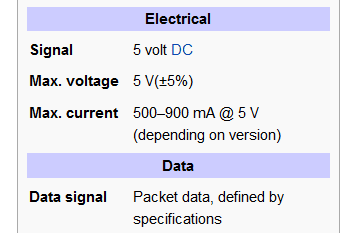
How much power does the USB cable supply? The USB standard is 5v. My external's A/C power supply has a 12v - 2A output. So I can't see how it could run on just USB power.

So, I assume you have now connected the drive with it's power supply connected. Any improvement?

it safely removed as it should, no delay, no issue.

So the problem is solved?
 

My Computer My Computer

Computer type
PC/Desktop
Computer Manufacturer/Model Number
Home Built - Jan 2013
OS
Windows 7 64 Bit Home Premium SP1
CPU
i7-3820
Motherboard
Asus P9X79-PRO - Bios 4608
Memory
GSkill F3-14900CL9Q - 16GB
Graphics Card(s)
EVGA GeForce GTX660 - Driver 352.86
Sound Card
On board Realtek ALC898
Monitor(s) Displays
Acer S271HL
Screen Resolution
1920 x 1080
Hard Drives
#1- Samsung 840 Pro Series
#2- Western Digital WD1002FAEX Sata3 Black
#3- Western Digital WD1002FAEX Sata3 Black
PSU
Corsair CMPSU-850TX-V2 - 850 watt (by Seasonic)
Case
Corsair Obsidian 550D
Cooling
Standard 3 120mm case fans, Cooler Master Hyper 212 EVO
Keyboard
MS KC-0405
Mouse
Intellimouse 5-button
Internet Speed
56 Mbits/Sec (on a good day)
Antivirus
Avast & Malwarebytes
Browser
Firefox
Other Info
Asus DVD - DRW-24B1ST 24X
The standard USB 2 port is limited to 500ma per port. If the external drive requires more than that it will often come with power pack, a second USB power cable, or the main cable will have two USB plugs on it. One power and DATA and one power only. My laptop drive enclosure came with the two cables. If I don't plug the power only cable in before the DATA and power cable the drive doesn't get detected properly and or acts erratic.
 

My Computer My Computer

Computer type
PC/Desktop
Computer Manufacturer/Model Number
Home Built
OS
Windows 10 Education 64 bit
CPU
AMD Phenom II X4 980 Black Edition Deneb 3.7GHz
Motherboard
Asus M4N68T-M V2 µATX Motherboard
Memory
8GB 4GBx2 Kingston PC10600 DDR3 1333 Memory
Graphics Card(s)
Zotac NVIDIA Geforce GT640 2 Gig DDR3 PCIe
Sound Card
VIA VT1708s High Definition Audio 8-channel Onboard
Monitor(s) Displays
22" LG E2242 1080p and 2 19" I-INC AG191D
Screen Resolution
1280x1024 - 1920x1080 - 1280x1024
Hard Drives
Crucial M100 256 GB SSD and 500 GB WD Blue SATA
PSU
Thermaltake TR 620
Case
Power Up Black ATX Mid-Tower Case
Cooling
Stock heatsink and fan
Keyboard
Logitech Wireless K350 Wave
Mouse
Logitech Wireless M570 Trackman Wheel
Internet Speed
80 Mbps Down 30 Mbps Up
Antivirus
Windows Defender
Browser
Internet Explorer 11
Other Info
HP DVD1040e Lightscribe - External USB2
My best guess is that it is due to poorly written software that starts a service or process and then does not release it or shut it down when you close the program. The system thinks the drive is still active because the process/service is still running.

According to "Process Explorer" the offending process is usually Windows Explorer (on my PC anyway).
 
Last edited:

My Computer My Computer

Computer type
PC/Desktop
Computer Manufacturer/Model Number
n/a
OS
W7 Ultimate SP1, LM19.2 MATE, W10 Home 1703, W10 Pro 1703 VM, #All 64 bit
CPU
AMD Phenom II x6 1100T, 3.3 GHz
Motherboard
ASUS M4A88T-M/USB3 (AM3)
Memory
12GB DDR3 1333 G-Skill (4GB x 2), G-Skill (2GB x 2)
Graphics Card(s)
NVIDIA GeForce GTX 660
Sound Card
Realtek?
Monitor(s) Displays
Samsung S23B350
Screen Resolution
1920x1080
Hard Drives
WD Green 2TB (SATA), WD Green 3TB (SATA), WD Blue 4TB (SATA), WD Blue 6TB (SATA)
PSU
Cooler Master
Case
Antec GX300 Tower
Cooling
3x Antec TRICOOL 120mm Fans
Mouse
Wired Optical
Internet Speed
DSL
Antivirus
Avast
Browser
Pale Moon (64 bit)
Other Info
2018-12-27 Upgraded HDDs
2015-12-10 Upgraded case, graphics card, storage
2015-08-15 Upgraded motherboard & RAM
2015-07-15 Upgraded LM17.1 to LM17.2

Attachments

  • USB 2.PNG
    USB 2.PNG
    3.8 KB · Views: 4
  • USB 3.PNG
    USB 3.PNG
    7.4 KB · Views: 5

My Computer My Computer

Computer type
PC/Desktop
Computer Manufacturer/Model Number
Home Built - Jan 2013
OS
Windows 7 64 Bit Home Premium SP1
CPU
i7-3820
Motherboard
Asus P9X79-PRO - Bios 4608
Memory
GSkill F3-14900CL9Q - 16GB
Graphics Card(s)
EVGA GeForce GTX660 - Driver 352.86
Sound Card
On board Realtek ALC898
Monitor(s) Displays
Acer S271HL
Screen Resolution
1920 x 1080
Hard Drives
#1- Samsung 840 Pro Series
#2- Western Digital WD1002FAEX Sata3 Black
#3- Western Digital WD1002FAEX Sata3 Black
PSU
Corsair CMPSU-850TX-V2 - 850 watt (by Seasonic)
Case
Corsair Obsidian 550D
Cooling
Standard 3 120mm case fans, Cooler Master Hyper 212 EVO
Keyboard
MS KC-0405
Mouse
Intellimouse 5-button
Internet Speed
56 Mbits/Sec (on a good day)
Antivirus
Avast & Malwarebytes
Browser
Firefox
Other Info
Asus DVD - DRW-24B1ST 24X
So the problem is solved?

unless it happens again, it looks like this was probably the cause.
probably fair to mark it as solved since it probably has nothing to do with Windows 7 :)
 

My Computer My Computer

Computer type
PC/Desktop
Computer Manufacturer/Model Number
custom
OS
Windows 7 Home Premium 32bit
CPU
AMD Athlon II X2 250 Processor 3.00 GHz
Motherboard
Gigabyte
Memory
2Gb DDR2
Graphics Card(s)
onboard
Sound Card
onboard
Monitor(s) Displays
Viewsonic VA2448m-LED 23.6" LED
Screen Resolution
1920 x 1080
Hard Drives
internal: 1.5 TB Samsung Spinpoint
external: Samsung 2TB USB3.0; 1.5TB Samsung G3 Station
PSU
350w
Case
CoolerMaster
Keyboard
Microsoft Desktop 800
Mouse
Microsoft Desktop 800
Internet Speed
1Mbps
Antivirus
MSE
Browser
Firefox
Other Info
3.4 rating on the "Windows Experience Index"
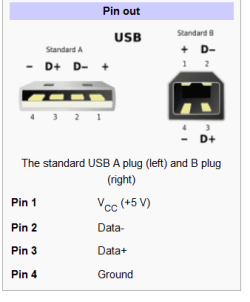
I stand corrected, the old standard was 500ma. There are some high powered ports that will give out more. Still, I think you'll find that most external drives are designed with the 500ma limit in mind. The higher current output is a good thing if you're recharging a phone or MP3 player though. Technology marches on.
 

My Computer My Computer

Computer type
PC/Desktop
Computer Manufacturer/Model Number
Home Built
OS
Windows 10 Education 64 bit
CPU
AMD Phenom II X4 980 Black Edition Deneb 3.7GHz
Motherboard
Asus M4N68T-M V2 µATX Motherboard
Memory
8GB 4GBx2 Kingston PC10600 DDR3 1333 Memory
Graphics Card(s)
Zotac NVIDIA Geforce GT640 2 Gig DDR3 PCIe
Sound Card
VIA VT1708s High Definition Audio 8-channel Onboard
Monitor(s) Displays
22" LG E2242 1080p and 2 19" I-INC AG191D
Screen Resolution
1280x1024 - 1920x1080 - 1280x1024
Hard Drives
Crucial M100 256 GB SSD and 500 GB WD Blue SATA
PSU
Thermaltake TR 620
Case
Power Up Black ATX Mid-Tower Case
Cooling
Stock heatsink and fan
Keyboard
Logitech Wireless K350 Wave
Mouse
Logitech Wireless M570 Trackman Wheel
Internet Speed
80 Mbps Down 30 Mbps Up
Antivirus
Windows Defender
Browser
Internet Explorer 11
Other Info
HP DVD1040e Lightscribe - External USB2
Back
Top