unable to scan to computer ,

Bosslady

Member
Member
Local time
10:37 PM
Messages
63
Location
near sherwood forest nottinghamshire
Hi . i have just started with this problem i have tried everything to fix it uninstalled and installed numerous times . i have an Hp B110a wireless all in one printer ,when i go to use windows fax and scan an error message say cannot complete scan 2 printers show up for some unknown reason both hp i ve tried both , i am able to print with no problem , could someone advise me please as what to do , it would be appreciated .
 

My Computer

Computer type
Laptop
Computer Manufacturer/Model Number
acer aspire model number 5532
OS
win 7 x64 bit
Memory
4 gb
Other Info
windows 8 laptop +
samsung tablet
bosslady, I could be mistaken but scanning via wireless connection to your allinone printer doesn't work. I have always had to connect via usb in order to install the scanning software to be able to fax. But then I could be wrong in your case.
Check out the documentation to make sure that scanning is available via wireless..
Rich
 

My Computer

Computer type
Laptop
Computer Manufacturer/Model Number
Toshiba Laptop Qosimo X870
OS
Windows 7 Pro x64 SP1
CPU
Intel Core I7
Motherboard
Toshiba Qosmio
Memory
16 Gigs
Graphics Card(s)
NVIDIA GeForce GTX 670M
Monitor(s) Displays
17.7" laptop
Screen Resolution
1600 x 900
Hard Drives
256 Gig SanDisk SSD for C
256 Gig Intel SSD for D
Internet Speed
50/25 FIOS
Antivirus
Vipre (all you can eat for 10 machines)
Browser
IE and FF
Other Info
I have dos 6.22, wfwg 3.11, win98, 2000 and xp VHD's available for testing. MS's Virtual PC works great.
Have you installed the full software package for your all-in-one? It is available at www.hp.com. (For Win7 X64, it's a 145MB download.)

I'm not familiar with all-in-ones, but I think that the print and scan functions would appear as separate devices in Devices and Printers.

Looking at the documentation available for the machine, there's no mention of a need to have a USB connection to scan.
 

My Computer

Computer Manufacturer/Model Number
homegrown
OS
Windows 7 Pro X64 SP1
CPU
Intel Core I7-3930k
Motherboard
Asus P9X79 Pro
Memory
16 GB Gskill DDR3-2133
Graphics Card(s)
eVGA GTX680
Sound Card
Creative X-Fi Titanium
Monitor(s) Displays
As PA246Q
Screen Resolution
1920 X 1200
Hard Drives
Corsair Force GT, 120 GB
WDC 1.5TB Caviar Black
PSU
PCP&C Silencer 750 Crossfire
Case
Silverstone FT02
Cooling
Noctua NH-D14
Keyboard
cheap Logitech USB
Mouse
Microsoft Intellimouse Explorer (old optical) USB
Internet Speed
6Mb cable
Other Info
Pioneer BDR-205
Samsung SH-203B
Monsoon 5.1 speakers
You shouldn't need to connect directly via USB in order to scan documents. I have an HP LaserJet M1212nf it's connected via Ethernet cable to my network switch. As long as you have the full driver package it should work. If it doesn't work have you though of the possibility of being a hardware problem (meaning mechanical failure?)

Can you please go to
Start - Control Panel - Device and Printers

In this screen I need you to take a picture of it and upload it. It's easier for us to understand what you mean with a clear picture.


http://www.sevenforums.com/tutorials/9733-screenshots-files-upload-post-seven-forums.html
 

My Computer

Computer type
PC/Desktop
Computer Manufacturer/Model Number
Gateway / Slight Modifications
OS
Windows 8 64 bit PRO
CPU
AMD Phenom X4 9100e
Motherboard
Gateway RS780
Memory
2GB X2 DDR2
Graphics Card(s)
Sapphire HD 6850
Sound Card
Integrated
Monitor(s) Displays
Gateway 19" + Dell 19"
Screen Resolution
1440X900 sometimes 2880 by 900
Hard Drives
WD 80GB
WD 640GB
WD 1,000GB
PSU
Antec BP 550watts
Case
Antec 300
Cooling
Stock Cooling
Keyboard
Saitek Eclipse II
Mouse
Gigabyte GM-M6800
Internet Speed
D: 30Mbps U:4Mbps
Antivirus
Avast version 8
Browser
Internet Explorer ver 10 64 bit
Other Info
This is my work computer.
I have another laptop running Windows 7 64 bit.
Another PC running Windows 8 64 bit pro.
Total of 3
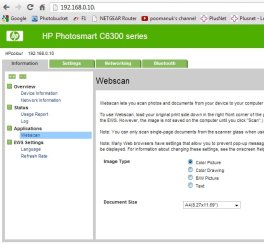
Yeah you should be able to scan from your wireless HP printer with no probs ... if you put in your printers IP address into you web browser what results do you get ?

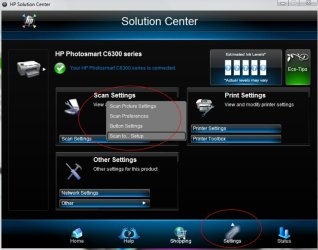
But if you goto the HP solution center you should be able to change the settings etc. (image 2)
 

Attachments

  • online.jpg
    online.jpg
    48 KB · Views: 9
  • hp soloution center.jpg
    hp soloution center.jpg
    79.3 KB · Views: 8

My Computer

Computer type
PC/Desktop
Computer Manufacturer/Model Number
Self Built
OS
Windows 7 Ultimate 64bit
CPU
AMD Phenom Quad core 9950 black edition
Motherboard
Gigabyte
Memory
16Gb
Graphics Card(s)
2x XFX Radeon 5850
Sound Card
PCI Express X-Fi Titanium / Logitech G35
Monitor(s) Displays
2x HP 2410i
Screen Resolution
1920x1080
Hard Drives
2x 500Gb Seagate
1x 300Gb Seagate
1x 1Tb Seagate
2x 1Tb Hitatchi
PSU
Jean Tech Storm 700W
Case
Cooler Master COSMOS S
Cooling
Akasa Evo Blue Pro
Keyboard
Logitech G15
Mouse
Mad Catz M.M.O. 7
Internet Speed
12mb
i have not tried anything yet regarding scan problem i will be back later , thanks
 

My Computer

Computer type
Laptop
Computer Manufacturer/Model Number
acer aspire model number 5532
OS
win 7 x64 bit
Memory
4 gb
Other Info
windows 8 laptop +
samsung tablet
im back . I have had look at different things regarding my problem not able to scan to the computer with windows fax and scan i have seen somewhere along the way a problem with driver SD standard complaint SD host controller. .i tried to update it but it doesn't do it . error message comes up .it will scan to a sd card in the computer im dizzy with looking . the scan to pc was working before never had problems any help would be appreciated thanks
i have also gone into the hp solution centre nothing doing there . i have a hp (hewlet Packard ), printer and also a hp computer . what is the difference with HP and Hewlett Packard .
 
Last edited:

My Computer

Computer type
Laptop
Computer Manufacturer/Model Number
acer aspire model number 5532
OS
win 7 x64 bit
Memory
4 gb
Other Info
windows 8 laptop +
samsung tablet

My Computer

Computer Manufacturer/Model Number
homegrown
OS
Windows 7 Pro X64 SP1
CPU
Intel Core I7-3930k
Motherboard
Asus P9X79 Pro
Memory
16 GB Gskill DDR3-2133
Graphics Card(s)
eVGA GTX680
Sound Card
Creative X-Fi Titanium
Monitor(s) Displays
As PA246Q
Screen Resolution
1920 X 1200
Hard Drives
Corsair Force GT, 120 GB
WDC 1.5TB Caviar Black
PSU
PCP&C Silencer 750 Crossfire
Case
Silverstone FT02
Cooling
Noctua NH-D14
Keyboard
cheap Logitech USB
Mouse
Microsoft Intellimouse Explorer (old optical) USB
Internet Speed
6Mb cable
Other Info
Pioneer BDR-205
Samsung SH-203B
Monsoon 5.1 speakers
bobkn. I have down loaded that software package , what im stuggling with is it has extracted files , then im not sure for some reason I don't know what it do from there ,has it installed ???? im not sure , somewhere along the line I can remember an error code 31 ive tried to get a screen shot but I must have done something wrong cos its not worked ,it seems to be a driver problem when I done the print and scan doctor this is what it is saying I have tried to get new drivers but not managed it
 
Last edited:

My Computer

Computer type
Laptop
Computer Manufacturer/Model Number
acer aspire model number 5532
OS
win 7 x64 bit
Memory
4 gb
Other Info
windows 8 laptop +
samsung tablet
Yeah you should be able to scan from your wireless HP printer with no probs ... if you put in your printers IP address into you web browser what results do you get ?

But if you goto the HP solution center you should be able to change the settings etc. (image 2)

I am able to scan now to computer ,I put the IP address in as you said PooMan . I still cannot get it to scan through windows fax and scan , at least I can scan to computer so that is good :D
many thanks for helping me .much appreciated
 

My Computer

Computer type
Laptop
Computer Manufacturer/Model Number
acer aspire model number 5532
OS
win 7 x64 bit
Memory
4 gb
Other Info
windows 8 laptop +
samsung tablet
Back
Top