I have 2 new Lenovo X200's. We use static address in our environment. Both machines have IP addresses that are assigned only to them.
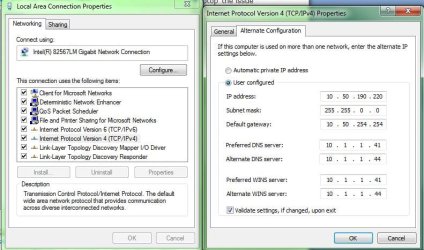
I have always assigned Alternate Configurations to laptops incase the user used LAN connection while traveling and such. Windows XP never had an issues with this.
Here is what is happening. The users go to a meeting. I can setup a constant ping to the machine. Whether it be 20-2 hours in length, the ping drops as soon as the user hits space bar, moves mouse and wakes Monitor up. Laptop is set to never sleep when plugged in.
As soon as the keyboard or something is moved to wake Monitor it drops network connection. If I setup the connection as a static/non alternate IP it doesn't disconnect.
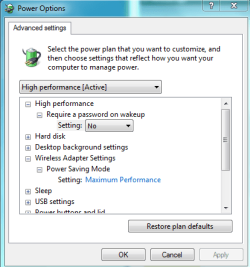
It sounds like your network adaptor settings might need to be adjusted to maximum performace. You mentioned that you turned off sleep setting but what about the wireless adaptor settings in Advanced Power options? Picture below.
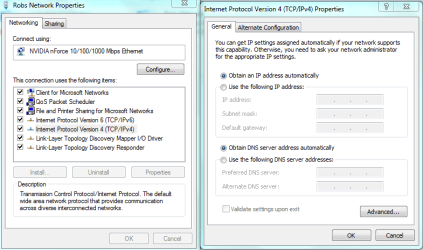
As for the static IP's changing, you should be able to keep those static IP's by shutting off DHCP and setting the static IP's under network properties by clicking on IPv4 then choose properties and then select "Use the Following IP address" and set the static IP's to what ever the router is using for static IP's. You should also fill in the subnet mask and the default gateway as well. You can get that info from the routers set up page.
Attachments
power plan network adaptor settings.PNG
13.3 KB
· Views: 83
DHCP turn to static IP's.PNG
24.7 KB
· Views: 156
My Computer
At a glance
Windows 7 Ult, Windows 8.1 Pro,Q9650-4.275GHz, E8600 4.5GHz, E6750-3.8GHzG.Skill PC2 9600 1200Mhz 5 5 5 15 2TGTX480
Thanks for the reply. Those settings are all set. Also removed the Lenovo power management software. The wireless adapter is completely disabled because they user doesn't use it. (Trying to eliminate as much as possible.) The same information set in the alternative configuration is setup in the static configuration. Also disabled IP6 in registry to eliminate the issue that Vista had with it.
All settings work properly when setup in the TCP/IP Properties window you show. The issue is that the user travels and needs to use a LAN connection overseas. This is why we always set alternate configuration. We have never seen this issue. Also on my HP laptop the issue doesn't happen. I have my settings setup as alternative and never have any issues.