Unable to set up ICS

ajabghajab

New member
Local time
1:10 PM
Messages
17
I searched the forums, but didn't find a post similar to the scenario I have, all of them mentioned a set up with ethernet cables alone, whereas I have a Bluetooth adapter.

I have a desktop running Windows 7, which has an internet connection via modem. I need to share this connection over a Bluetooth dongle running on a USB port, so that I can use it from my phone.

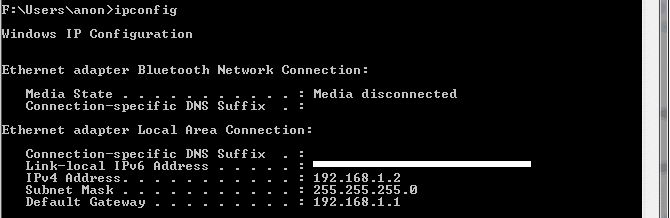
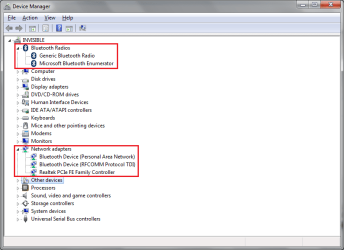
However, I don't even get the sharing tab under the adapter settings. I see the Bluetooth adapter installed fine, but then it says 'Not connected'. I have posted the relevant screenshots below. Any help is appreciated.
 

Attachments
  • 01.png
    01.png
    20.4 KB · Views: 109
  • 02.png
    02.png
    3 KB · Views: 69
  • 03.png
    03.png
    47.3 KB · Views: 97

My Computer

OS
Windows 7
I don't think Windows's native tools able to share a network connection over bluetooth...

zzz2496
 

My Computer

Computer Manufacturer/Model Number
Self Built
OS
Windows7 Ultimate 64bit
CPU
Intel Core 2 Quad Q6600
Motherboard
Abit IN9-32X-MMAX
Memory
DDR2 Adata 4GB
Graphics Card(s)
Nvidia GeForce GTX 285 1024 and Nvidia GeForce 8800GT 512
Sound Card
Asus Xonar HDAV 1.3
Monitor(s) Displays
Dell 2407WFP and BenQ 2400v and Philips 150v3
Screen Resolution
3840x1200 and 1024x768
Hard Drives
2 WDC 1TB
1 WDC 1.5TB
1 WDC 640GB
1 WDC 320GB
1 Seagate 200GB
PSU
Corsair TX 850W
Case
Cooler Master HAF932
Cooling
Arctic Cooling Freezer Extreme and plenty of fans...
Keyboard
MicrosoftNaturalKeyboard 4000/Apple Alu keyboard/Dinovo mini
Mouse
Logitech G5/MarbleMouseTrackball/PerformanceMX/SpacePilotPRO
Internet Speed
1.5Mbps down/384Kbps up
Other Info
APC SURT 1000XL
Logitech Z-560
Wiimote
Mikrotik Router
Linksys (now Cisco) SD2008 8 port Gigabit switch
Linksys WRT54G (acting as AP)
Apple wireless Aluminium keyboard
Apple Magic Mouse
Xbox360 wired controller
What alternatives are available? May be some third party software?
 

My Computer

OS
Windows 7
Is this question so strange that no one seems to be answering? :(
 

My Computer

OS
Windows 7
Actually it is possible....

it is just a pain in the *** you need to learn a little bit about how the bluetooth works....

you need to establishe a network access point with yoru phone.

as long as your not using toshiba computer *lol* that thing is worth less.

I am only familar with Windows 6.1 and my HTC touch pro came with a internet sharing programon it for teethering but i had to hack the registry so that i can use sprints network for free.
 

My Computer

Computer Manufacturer/Model Number
HP Pavilion Elite HPE-410f
OS
Windows 7 Ultimate x64
CPU
AMD Phenom x6 1045t
Motherboard
N/A
Memory
8 GB
Graphics Card(s)
ATI Radeon HD 5570
Sound Card
Realtek Highdefinition Audio / 5.1 Dolby Setup
Monitor(s) Displays
HP w2207h Widescreen
Screen Resolution
1680*1050
Hard Drives
1 TB (fixed), 320 Portable maxtor, Server Hard drives
PSU
350 Watt
Case
HP CASE
Cooling
Bass
Keyboard
Logitech MX 5500
Mouse
Logitech MX 5500
Internet Speed
ROAD RUNNER 16MB D/512 U
you need to learn a little bit about how the bluetooth works....

you need to establishe a network access point with yoru phone.

Can you shed a bit more light please? Or may be point to some online resource which does? When you mention establishing an access point, what exactly are you referring to? I mean, I know how to set up one, but should it be 'data' or 'wireless'?
 

My Computer

OS
Windows 7
Ok lets type this out.

You have an internet connection with your W7, you also have a BT dongle attached to the W7 and ouy want to ICS the two?

Why not use bridge connections?
 

My Computer

Computer Manufacturer/Model Number
Lenovo ThinkPad T60
OS
Windows 7 Ultimate 64Bit
CPU
GenuineIntel Intel(R) Core(TM) DuoCore T2400 @ 1.83GHz
Motherboard
Intel(R) 82801G (ICH7 Family)
Memory
2.00 GB
Graphics Card(s)
Mobile Intel(R) 945 Express Chipset
Sound Card
SoundMAX Integrated Digital HD Audio
Monitor(s) Displays
ThinkPad Display
Screen Resolution
1400x1050
Hard Drives
100Gb SATA
Keyboard
Standard Keyboard
Mouse
HID-compliant Mouse
Internet Speed
Cable Broadband - 54Mbps
Other Info
Intel(R) PRO/1000 PL Network Connection
11a/b/g Wireless LAN Mini PCI Express Adapter
ANything is fine, I just need to be able to connect. But if you see the screenshot I posted in the first pic, it shows that the Bluetooth Network is 'Not connected'. Can you please guide a little more?

I right clicked on my primary connection on the Windows 7, selected 'Bridge Connections', and got the following error:

30u9unc.png
 

My Computer

OS
Windows 7
Okay first you would have to establish the connection to the computer.

So of corse with blue tooth you have to make sure that PAN activated.

This is what I do...

usually when i am sharing off the phone. I just use the data cable....

usually you will find the PAN activation in the software for your bluetooth adapter. Make sure its activated.

Establish the PAN on the phone with the computer. You will have to use some sort of Teethering or ICS that is built into Windows Mobile 6.1 which s what I have.

If you dont mind me asking the make and model ofyour phone i can seewhat I can pull up for your phone.

then in your network adapters that if you established the connection right. then you can into that adapter bluetooth setting and establish the ICS
 

My Computer

Computer Manufacturer/Model Number
HP Pavilion Elite HPE-410f
OS
Windows 7 Ultimate x64
CPU
AMD Phenom x6 1045t
Motherboard
N/A
Memory
8 GB
Graphics Card(s)
ATI Radeon HD 5570
Sound Card
Realtek Highdefinition Audio / 5.1 Dolby Setup
Monitor(s) Displays
HP w2207h Widescreen
Screen Resolution
1680*1050
Hard Drives
1 TB (fixed), 320 Portable maxtor, Server Hard drives
PSU
350 Watt
Case
HP CASE
Cooling
Bass
Keyboard
Logitech MX 5500
Mouse
Logitech MX 5500
Internet Speed
ROAD RUNNER 16MB D/512 U
Re: Connecting nokia 5800 to pc internet !!

i found an easy way to do this..

1. disable internet connection sharing
2. bridge your ethernet and wireless cards together
3. create an ad-hoc network on the wireless card
4. connect to the wireless ad-hoc network
5. test connection

bridge :
A network bridge is software or hardware that connects two or more networks so that they can communicate. You can create only one network bridge on a computer, but one bridge can handle any number of network connections.


1. Open Network Connections by clicking the Start button , clicking [COLOR=blue !important][COLOR=blue !important]Control [COLOR=blue !important]Panel[/COLOR][/COLOR][/COLOR], clicking Network and Internet, clicking Network and Sharing Center, and then clicking [COLOR=blue !important][COLOR=blue !important]Manage [COLOR=blue !important]network[/COLOR][/COLOR][/COLOR] connections.
2. Hold down CTRL and select each network connection that you want to add to the bridge.
3. Right-click one of the selected network connections, and then click Bridge Connections. If you are prompted for an administrator password or confirmation, type the password or provide confirmation.


this was posted from webpage:
Connecting nokia 5800 to pc internet !!-!!
 

My Computer

Computer Manufacturer/Model Number
HP Pavilion Elite HPE-410f
OS
Windows 7 Ultimate x64
CPU
AMD Phenom x6 1045t
Motherboard
N/A
Memory
8 GB
Graphics Card(s)
ATI Radeon HD 5570
Sound Card
Realtek Highdefinition Audio / 5.1 Dolby Setup
Monitor(s) Displays
HP w2207h Widescreen
Screen Resolution
1680*1050
Hard Drives
1 TB (fixed), 320 Portable maxtor, Server Hard drives
PSU
350 Watt
Case
HP CASE
Cooling
Bass
Keyboard
Logitech MX 5500
Mouse
Logitech MX 5500
Internet Speed
ROAD RUNNER 16MB D/512 U
That's precisely the problem I have. I keep getting the 'Not connected' message on my Bluetooth adapter, though I am able to use it perfectly well for transferring files to and from my phone. Due to this, I am not able to set up a bridge with my primary connection.
 

My Computer

OS
Windows 7
Umm where did you get this bluetooth donger?


I have been having issues hooking my cell phone to toshiba stacks... and pan doesn't work either.

is there anyway that you can use the data cable. what is the main reason for using bluetooth? maybe we can make it easier for you.
 

My Computer

Computer Manufacturer/Model Number
HP Pavilion Elite HPE-410f
OS
Windows 7 Ultimate x64
CPU
AMD Phenom x6 1045t
Motherboard
N/A
Memory
8 GB
Graphics Card(s)
ATI Radeon HD 5570
Sound Card
Realtek Highdefinition Audio / 5.1 Dolby Setup
Monitor(s) Displays
HP w2207h Widescreen
Screen Resolution
1680*1050
Hard Drives
1 TB (fixed), 320 Portable maxtor, Server Hard drives
PSU
350 Watt
Case
HP CASE
Cooling
Bass
Keyboard
Logitech MX 5500
Mouse
Logitech MX 5500
Internet Speed
ROAD RUNNER 16MB D/512 U
Purchased the dongle online. Got one for $4, though it isn't any brand that I am aware of. It is plug and play, and has no separate drivers. My internet connection is through ethernet and my computer doesn't have a Wireless LAN card, and hence I have been using Bluetooth over USB to set up my connection. I was planning to use this from a different corner of the room [house if possible, but that's for later] without having to sit on my computer. The supplied data cable is barely 20 cms in length and so cumbersome to use.
 

My Computer

OS
Windows 7

My Computer

Computer Manufacturer/Model Number
HP Pavilion Elite HPE-410f
OS
Windows 7 Ultimate x64
CPU
AMD Phenom x6 1045t
Motherboard
N/A
Memory
8 GB
Graphics Card(s)
ATI Radeon HD 5570
Sound Card
Realtek Highdefinition Audio / 5.1 Dolby Setup
Monitor(s) Displays
HP w2207h Widescreen
Screen Resolution
1680*1050
Hard Drives
1 TB (fixed), 320 Portable maxtor, Server Hard drives
PSU
350 Watt
Case
HP CASE
Cooling
Bass
Keyboard
Logitech MX 5500
Mouse
Logitech MX 5500
Internet Speed
ROAD RUNNER 16MB D/512 U
I got the following. Some CSR plc. On checking further it says Cambridge Silicon Radio
 

Attachments

  • 1.PNG
    1.PNG
    3 KB · Views: 21

My Computer

OS
Windows 7
You know i was looking that up and ever driver i run into doesn't support windows vista nor windows 7. I think that bluetooth is outdated man..... i will tell you a very good one that I just bought from walmart.


It is the 1/4 inch one that sticks out.....
and its 20 dollars but that things work so good in windows 7. I have had no problems with it at all. I got it for my desktop to connect my htc touch pro to it.... and all functions works very well

i hate to tell you this but you may have to just cut your losses, seems that its just a very very old adapter.
 

My Computer

Computer Manufacturer/Model Number
HP Pavilion Elite HPE-410f
OS
Windows 7 Ultimate x64
CPU
AMD Phenom x6 1045t
Motherboard
N/A
Memory
8 GB
Graphics Card(s)
ATI Radeon HD 5570
Sound Card
Realtek Highdefinition Audio / 5.1 Dolby Setup
Monitor(s) Displays
HP w2207h Widescreen
Screen Resolution
1680*1050
Hard Drives
1 TB (fixed), 320 Portable maxtor, Server Hard drives
PSU
350 Watt
Case
HP CASE
Cooling
Bass
Keyboard
Logitech MX 5500
Mouse
Logitech MX 5500
Internet Speed
ROAD RUNNER 16MB D/512 U
ANything is fine, I just need to be able to connect. But if you see the screenshot I posted in the first pic, it shows that the Bluetooth Network is 'Not connected'. Can you please guide a little more?

I right clicked on my primary connection on the Windows 7, selected 'Bridge Connections', and got the following error:

30u9unc.png

The message there is defining. You need Lan or High Speed Internet connection. I tried with my Wireless & Bluetooth, but it doesn't give me the bridging function. I have a device driver issue for the bluetooth device so that won't help (it's an iphone).

Btw, you select 2 connections to bridge.
 

My Computer

Computer Manufacturer/Model Number
Lenovo ThinkPad T60
OS
Windows 7 Ultimate 64Bit
CPU
GenuineIntel Intel(R) Core(TM) DuoCore T2400 @ 1.83GHz
Motherboard
Intel(R) 82801G (ICH7 Family)
Memory
2.00 GB
Graphics Card(s)
Mobile Intel(R) 945 Express Chipset
Sound Card
SoundMAX Integrated Digital HD Audio
Monitor(s) Displays
ThinkPad Display
Screen Resolution
1400x1050
Hard Drives
100Gb SATA
Keyboard
Standard Keyboard
Mouse
HID-compliant Mouse
Internet Speed
Cable Broadband - 54Mbps
Other Info
Intel(R) PRO/1000 PL Network Connection
11a/b/g Wireless LAN Mini PCI Express Adapter
I googled a bit from the link acurasd provided, and ended up with the following youtube link:

http://www.youtube.com/watch?v=r5nmObIZI5U

Awesome stuff. I have almost set up the proxy BUT now I get this error: "Web: No gateway reply". I therefore have reason to believe the adapter isn't outdated :)

Another interesting thing is when I followed all the instructions given there, my network devices actually showed 2 connections, and I was able to bridge them too! This is much different from what I was facing earlier.
 

My Computer

OS
Windows 7
yeah it wasjust alot of the drivers that i was seeing for that device was XP and below OS..... I thought they stopped writing drivers for OS higher than that....

but i am glad that your getting somewhere.
 

My Computer

Computer Manufacturer/Model Number
HP Pavilion Elite HPE-410f
OS
Windows 7 Ultimate x64
CPU
AMD Phenom x6 1045t
Motherboard
N/A
Memory
8 GB
Graphics Card(s)
ATI Radeon HD 5570
Sound Card
Realtek Highdefinition Audio / 5.1 Dolby Setup
Monitor(s) Displays
HP w2207h Widescreen
Screen Resolution
1680*1050
Hard Drives
1 TB (fixed), 320 Portable maxtor, Server Hard drives
PSU
350 Watt
Case
HP CASE
Cooling
Bass
Keyboard
Logitech MX 5500
Mouse
Logitech MX 5500
Internet Speed
ROAD RUNNER 16MB D/512 U
Back
Top