Unable to share any folders in Windows 7 x64

sinivasan

New member
Local time
6:39 AM
Messages
3
Hello All,

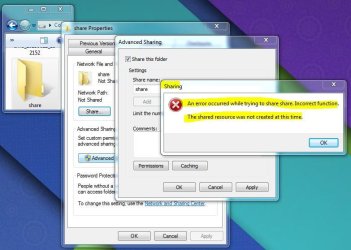
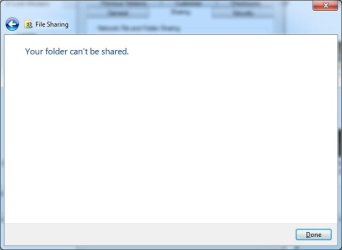
I'm unable to share any folders in Windows 7 Ultimate x64. Could someone help to fix this problem please...

Additional notes:
1. I'm still able to access the folders which I shared earlier from other systems
2. When I unshare the folder which I already shared, I can't able to share them again
3. I'm able to share any folders from Desktop without any issues
4. Account type used : Administrator(password protected)

Below provided are the error screenshots.

Thank you
 

Attachments
  • your_folder_cant_be_shared.jpg
    your_folder_cant_be_shared.jpg
    12.8 KB · Views: 22
  • sharing.JPG
    sharing.JPG
    63.1 KB · Views: 2

My Computer My Computer

At a glance

Windows 7 Ultimate x64 SP1Intel i3 4030U @ 1.9GHz4GB DDR3
Computer type
Laptop
Computer Manufacturer/Model Number
Lenovo
OS
Windows 7 Ultimate x64 SP1
CPU
Intel i3 4030U @ 1.9GHz
Memory
4GB DDR3
Hard Drives
1TB
Antivirus
Avast Free
Browser
Google Chrome
Are you trying to share folders and files amongst your computers in your home? And, perhaps, with certain specific others "across The Net"? I'm familiar with Windows 7 Pro 64-bit.
I do know certain folders that are named in the left side menu of Explorer.exe cannot be accessed, seen or shared.
From experience, I do not "tree-climb" through Libraries or even My Documents. I only "tree-climb," view, share folders that are listed underneath Explorer's Computer break out.
 

My Computer My Computer

At a glance

Windows 7 Professional 64-bitDesktop i5; Acers i5 & i7desktop 16GB; 1 Acer 8GB & 1 Acer 16GB
Computer type
PC/Desktop
Computer Manufacturer/Model Number
Antec desktop; Acer Aspire laptops
OS
Windows 7 Professional 64-bit
CPU
Desktop i5; Acers i5 & i7
Memory
desktop 16GB; 1 Acer 8GB & 1 Acer 16GB
Hard Drives
1TB split into 2 equal partitions [OS and data] usable by RJS
Internet Speed
AT&T DSL
Browser
FF, GChrome, msIE
Other Info
Windows 7 Firewall, Emsisoft AM/AV, MSE [scan-only], SpywareBlaster, Ruiware/BillP combine
Thank you RolandJS.

I just want to share few folders from d: drive to access those from my mobile(using ES file explorer). I have only one PC in my home and I'm accessing shared folders over WiFi. And I'm not trying to share any folders under Libraries in windows explorer tree menu.:confused:

"I'm aware that I can share any folder if re-install windows, but I do not want to install windows again:("
 

My Computer My Computer

At a glance

Windows 7 Ultimate x64 SP1Intel i3 4030U @ 1.9GHz4GB DDR3
Computer type
Laptop
Computer Manufacturer/Model Number
Lenovo
OS
Windows 7 Ultimate x64 SP1
CPU
Intel i3 4030U @ 1.9GHz
Memory
4GB DDR3
Hard Drives
1TB
Antivirus
Avast Free
Browser
Google Chrome
I hope others who are familiar with computer-mobile device sharing will enter and give solutions, I have none.
 

My Computer My Computer

At a glance

Windows 7 Professional 64-bitDesktop i5; Acers i5 & i7desktop 16GB; 1 Acer 8GB & 1 Acer 16GB
Computer type
PC/Desktop
Computer Manufacturer/Model Number
Antec desktop; Acer Aspire laptops
OS
Windows 7 Professional 64-bit
CPU
Desktop i5; Acers i5 & i7
Memory
desktop 16GB; 1 Acer 8GB & 1 Acer 16GB
Hard Drives
1TB split into 2 equal partitions [OS and data] usable by RJS
Internet Speed
AT&T DSL
Browser
FF, GChrome, msIE
Other Info
Windows 7 Firewall, Emsisoft AM/AV, MSE [scan-only], SpywareBlaster, Ruiware/BillP combine
Back
Top