unable to start media player

bhar

New member
Local time
5:05 PM
Messages
30
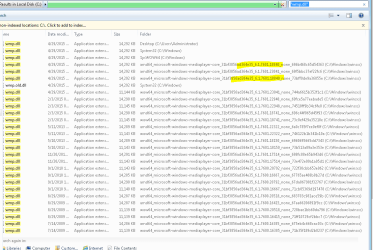
i am unable to start media player get teh attached error .couple of runs of sfc found corrpt files but couldnt repair .please help. screenshot and cbs.log file attached. :o

removed media playe from programs and features . .and rebooted and installed and rebooted. checked no luck .same error.
 

Attachments

  • wmp.dll corrupt.PNG
    wmp.dll corrupt.PNG
    2.8 KB · Views: 23

My Computer My Computer

Computer type
PC/Desktop
OS
Windows 7 32 Bit
that means that media player is corrupt, you shoolud be able to download a new media player through microsoft.com.
 

My Computer My Computer

Computer type
Laptop
Computer Manufacturer/Model Number
Dell
OS
Windows 7 Enterprise x64
CPU
Intel i5 Dual Core
Screen Resolution
1366x768
Keyboard
built in Keyboard
Antivirus
System Centre Endpoint Protection
Browser
Google Chrome, Firefox and Internet Explorer
i am unable to start media player get teh attached error .couple of runs of sfc found corrpt files but couldnt repair .please help. screenshot and cbs.log file attached. :o

removed media playe from programs and features . .and rebooted and installed and rebooted. checked no luck .same error.

Hey,I think the version of wmp.dll can't go with Windows Media Player. You'll need to upgrade the wmp.dll
version to make it compatible with Windows.
To upgrade the version,open CMD and type UNREGMP2.EXE /UPDATEWMPVERSION,then press enter
and wait untill it gets upgraded.

If the solution doesn't work for you,then you gotta reset&reinstall Media Player but ,not from Programs and Features.Just go to "Turn windows features on or off" and uncheck the mark next to "Media" then reboot your computer and see what happens.Good luck!
 

My Computer My Computer

Computer type
PC/Desktop
OS
Win7 Ultimate/X84
CPU
Intel Celeron 336/2.8Ghz
Motherboard
MS-7592
Memory
DDR3/2GB
Hard Drives
ATA-100/160GB
Browser
FirefoX
i am unable to start media player get teh attached error .couple of runs of sfc found corrpt files but couldnt repair .please help. screenshot and cbs.log file attached. :o

removed media playe from programs and features . .and rebooted and installed and rebooted. checked no luck .same error.

Hey,I think the version of wmp.dll can't go with Windows Media Player. You'll need to upgrade the wmp.dll
version to make it compatible with Windows.
To upgrade the version,open CMD and type UNREGMP2.EXE /UPDATEWMPVERSION,then press enter
and wait untill it gets upgraded.

If the solution doesn't work for you,then you gotta reset&reinstall Media Player but ,not from Programs and Features.Just go to "Turn windows features on or off" and uncheck the mark next to "Media" then reboot your computer and see what happens.Good luck!
I had already tried uninstalling from turn windows features on and off as that is the only option for doing so. It's not available in programs and features menu. Sorry of my previous message was not that much clear.

This system is already using latest patches and sp1.

I will try the other option that you suggested.
 

My Computer My Computer

Computer type
PC/Desktop
OS
Windows 7 32 Bit
I had already tried uninstalling from turn windows features on and off as that is the only option for doing so. It's not available in programs and features menu. Sorry of my previous message was not that much clear.

This system is already using latest patches and sp1.

I will try the other option that you suggested.
Ok,try that ,hope you'll solve the problem,I had been suffering from the same problem for a long time
 

My Computer My Computer

Computer type
PC/Desktop
OS
Win7 Ultimate/X84
CPU
Intel Celeron 336/2.8Ghz
Motherboard
MS-7592
Memory
DDR3/2GB
Hard Drives
ATA-100/160GB
Browser
FirefoX
I had already tried uninstalling from turn windows features on and off as that is the only option for doing so. It's not available in programs and features menu. Sorry of my previous message was not that much clear.

This system is already using latest patches and sp1.

I will try the other option that you suggested.
Ok,try that ,hope you'll solve the problem,I had been suffering from the same problem for a long time
No luck with that update commands
 

My Computer My Computer

Computer type
PC/Desktop
OS
Windows 7 32 Bit
No luck with that update commands
That's too bad but there are some solutions that can be useful for your problem.But before that,let me ask, when you first came across the problem? You just turn the computer on and see that media player had stopped working? Or the problem came with a new OS?
 

My Computer My Computer

Computer type
PC/Desktop
OS
Win7 Ultimate/X84
CPU
Intel Celeron 336/2.8Ghz
Motherboard
MS-7592
Memory
DDR3/2GB
Hard Drives
ATA-100/160GB
Browser
FirefoX
I had already tried uninstalling from turn windows features on and off as that is the only option for doing so. It's not available in programs and features menu. Sorry of my previous message was not that much clear.

This system is already using latest patches and sp1.

I will try the other option that you suggested.
Ok,try that ,hope you'll solve the problem,I had been suffering from the same problem for a long time
No luck with that update commands
Also tried the guide at ms site which says to take ownership and then give full rights to admin. I replaced wmp. Dll from another system.

Sfc still says this file is corrupt. Sfc on that system returned no problem found.

Both source and destination systems are windows 7 Enterprises 64 bit with sp1 and all latest updates installed.
 

My Computer My Computer

Computer type
PC/Desktop
OS
Windows 7 32 Bit
Also tried the guide at ms site which says to take ownership and then give full rights to admin. I replaced wmp. Dll from another system.

Sfc still says this file is corrupt. Sfc on that system returned no problem found.

Both source and destination systems are windows 7 Enterprises 64 bit with sp1 and all latest updates installed.
Did not you try System Restore? There are serious chances of getting access to Media Player with system restore
 

My Computer My Computer

Computer type
PC/Desktop
OS
Win7 Ultimate/X84
CPU
Intel Celeron 336/2.8Ghz
Motherboard
MS-7592
Memory
DDR3/2GB
Hard Drives
ATA-100/160GB
Browser
FirefoX
system restore is disabled from day one.
this system is running from past few months .. just felt the need to use media player . and got the problem .dont konw if it wrked earlier..


i followed below guide.
https://support.microsoft.com/en-us/kb/929833

copied file form another version of same os (version of wmp.dll is also same) and still no luck.though this time erro rwas media player is not properly installed and it offered me to download media player and install it form ms site . there at that site it had no setup files..

so i removed form turn windows features on and off and rebooted ..then did sfc and it found no problems.
then enabeld media player and same wmp err and sfc also found wmp.dll file corrupt but couldnt repair.

2015-08-05 21:49:00, Info CSI 00000359 [SR] Repairing 1 components
2015-08-05 21:49:00, Info CSI 0000035a [SR] Beginning Verify and Repair transaction
2015-08-05 21:49:00, Info CSI 0000035c [SR] Cannot repair member file [l:14{7}]"wmp.dll" of Microsoft-Windows-MediaPlayer-Core, Version = 6.1.7601.18840, pA = PROCESSOR_ARCHITECTURE_IA32_ON_WIN64 (10), Culture neutral, VersionScope = 1 nonSxS, PublicKeyToken = {l:8 b:31bf3856ad364e35}, Type neutral, TypeName neutral, PublicKey neutral in the store, hash mismatch
2015-08-05 21:49:01, Info CSI 0000035e [SR] Cannot repair member file [l:14{7}]"wmp.dll" of Microsoft-Windows-MediaPlayer-Core, Version = 6.1.7601.18840, pA = PROCESSOR_ARCHITECTURE_IA32_ON_WIN64 (10), Culture neutral, VersionScope = 1 nonSxS, PublicKeyToken = {l:8 b:31bf3856ad364e35}, Type neutral, TypeName neutral, PublicKey neutral in the store, hash mismatch
2015-08-05 21:49:01, Info CSI 0000035f [SR] This component was referenced by [l:154{77}]"Package_1_for_KB3033890~31bf3856ad364e35~amd64~~6.1.1.0.3033890-2_neutral_GDR"
2015-08-05 21:49:01, Info CSI 00000362 [SR] Could not reproject corrupted file [ml:48{24},l:46{23}]"\??\C:\Windows\SysWOW64"\[l:14{7}]"wmp.dll"; source file in store is also corrupted
2015-08-05 21:49:01, Info CSI 00000364 [SR] Repair complete
2015-08-05 21:49:01, Info CSI 00000365 [SR] Committing transaction
2015-08-05 21:49:01, Info CSI 00000369 [SR] Verify and Repair Transaction completed. All files and registry keys listed in this transaction have been successfully repaired

 

My Computer My Computer

Computer type
PC/Desktop
OS
Windows 7 32 Bit
system restore is disabled from day one.
this system is running from past few months .. just felt the need to use media player . and got the problem .dont konw if it wrked earlier..


i followed below guide.
https://support.microsoft.com/en-us/kb/929833

copied file form another version of same os (version of wmp.dll is also same) and still no luck.though this time erro rwas media player is not properly installed and it offered me to download media player and install it form ms site . there at that site it had no setup files..

so i removed form turn windows features on and off and rebooted ..then did sfc and it found no problems.
then enabeld media player and same wmp err and sfc also found wmp.dll file corrupt but couldnt repair.

2015-08-05 21:49:00, Info CSI 00000359 [SR] Repairing 1 components
2015-08-05 21:49:00, Info CSI 0000035a [SR] Beginning Verify and Repair transaction
2015-08-05 21:49:00, Info CSI 0000035c [SR] Cannot repair member file [l:14{7}]"wmp.dll" of Microsoft-Windows-MediaPlayer-Core, Version = 6.1.7601.18840, pA = PROCESSOR_ARCHITECTURE_IA32_ON_WIN64 (10), Culture neutral, VersionScope = 1 nonSxS, PublicKeyToken = {l:8 b:31bf3856ad364e35}, Type neutral, TypeName neutral, PublicKey neutral in the store, hash mismatch
2015-08-05 21:49:01, Info CSI 0000035e [SR] Cannot repair member file [l:14{7}]"wmp.dll" of Microsoft-Windows-MediaPlayer-Core, Version = 6.1.7601.18840, pA = PROCESSOR_ARCHITECTURE_IA32_ON_WIN64 (10), Culture neutral, VersionScope = 1 nonSxS, PublicKeyToken = {l:8 b:31bf3856ad364e35}, Type neutral, TypeName neutral, PublicKey neutral in the store, hash mismatch
2015-08-05 21:49:01, Info CSI 0000035f [SR] This component was referenced by [l:154{77}]"Package_1_for_KB3033890~31bf3856ad364e35~amd64~~6.1.1.0.3033890-2_neutral_GDR"
2015-08-05 21:49:01, Info CSI 00000362 [SR] Could not reproject corrupted file [ml:48{24},l:46{23}]"\??\C:\Windows\SysWOW64"\[l:14{7}]"wmp.dll"; source file in store is also corrupted
2015-08-05 21:49:01, Info CSI 00000364 [SR] Repair complete
2015-08-05 21:49:01, Info CSI 00000365 [SR] Committing transaction
2015-08-05 21:49:01, Info CSI 00000369 [SR] Verify and Repair Transaction completed. All files and registry keys listed in this transaction have been successfully repaired

Dont't you want to use any other player? I know you feel need to use Media player,but if you tell me what do you need it for,then I might be able to suggest you other player. There are many softwares that do the same type job but much better than Media player. I'm not saying that your problem can't be fixed,but using another player software will take much less time that fixing Media player problem
 

My Computer My Computer

Computer type
PC/Desktop
OS
Win7 Ultimate/X84
CPU
Intel Celeron 336/2.8Ghz
Motherboard
MS-7592
Memory
DDR3/2GB
Hard Drives
ATA-100/160GB
Browser
FirefoX
system restore is disabled from day one.
this system is running from past few months .. just felt the need to use media player . and got the problem .dont konw if it wrked earlier..


i followed below guide.
https://support.microsoft.com/en-us/kb/929833

copied file form another version of same os (version of wmp.dll is also same) and still no luck.though this time erro rwas media player is not properly installed and it offered me to download media player and install it form ms site . there at that site it had no setup files..

so i removed form turn windows features on and off and rebooted ..then did sfc and it found no problems.
then enabeld media player and same wmp err and sfc also found wmp.dll file corrupt but couldnt repair.

2015-08-05 21:49:00, Info CSI 00000359 [SR] Repairing 1 components
2015-08-05 21:49:00, Info CSI 0000035a [SR] Beginning Verify and Repair transaction
2015-08-05 21:49:00, Info CSI 0000035c [SR] Cannot repair member file [l:14{7}]"wmp.dll" of Microsoft-Windows-MediaPlayer-Core, Version = 6.1.7601.18840, pA = PROCESSOR_ARCHITECTURE_IA32_ON_WIN64 (10), Culture neutral, VersionScope = 1 nonSxS, PublicKeyToken = {l:8 b:31bf3856ad364e35}, Type neutral, TypeName neutral, PublicKey neutral in the store, hash mismatch
2015-08-05 21:49:01, Info CSI 0000035e [SR] Cannot repair member file [l:14{7}]"wmp.dll" of Microsoft-Windows-MediaPlayer-Core, Version = 6.1.7601.18840, pA = PROCESSOR_ARCHITECTURE_IA32_ON_WIN64 (10), Culture neutral, VersionScope = 1 nonSxS, PublicKeyToken = {l:8 b:31bf3856ad364e35}, Type neutral, TypeName neutral, PublicKey neutral in the store, hash mismatch
2015-08-05 21:49:01, Info CSI 0000035f [SR] This component was referenced by [l:154{77}]"Package_1_for_KB3033890~31bf3856ad364e35~amd64~~6.1.1.0.3033890-2_neutral_GDR"
2015-08-05 21:49:01, Info CSI 00000362 [SR] Could not reproject corrupted file [ml:48{24},l:46{23}]"\??\C:\Windows\SysWOW64"\[l:14{7}]"wmp.dll"; source file in store is also corrupted
2015-08-05 21:49:01, Info CSI 00000364 [SR] Repair complete
2015-08-05 21:49:01, Info CSI 00000365 [SR] Committing transaction
2015-08-05 21:49:01, Info CSI 00000369 [SR] Verify and Repair Transaction completed. All files and registry keys listed in this transaction have been successfully repaired
Dont't you want to use any other player? I know you feel need to use Media player,but if you tell me what do you need it for,then I might be able to suggest you other player. There are many softwares that do the same type job but much better than Media player. I'm not saying that your problem can't be fixed,but using another player software will take much less time that fixing Media player problem
Other media players already installed but I need to get it to work..

Without reinstalling windows.
 

My Computer My Computer

Computer type
PC/Desktop
OS
Windows 7 32 Bit
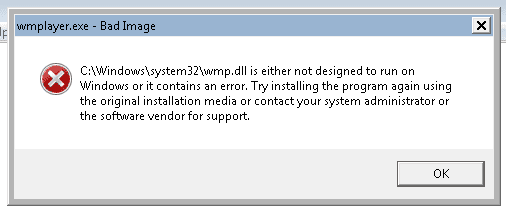
i replaced the file only at one location at c windows sysmte32
but when i searched it it seems to exits at a lot of other locations as shown in below screen shot ..
further more the sfc found corrutp file wht below details.
[l:14{7}]"wmp.dll" of Microsoft-Windows-MediaPlayer-Core, Version = 6.1.7601.18840, pA
any idea ?
 

Attachments

  • wmp.dll at other locations.PNG
    wmp.dll at other locations.PNG
    20.9 KB · Views: 1

My Computer My Computer

Computer type
PC/Desktop
OS
Windows 7 32 Bit
Bump..

1: after taking ownership and granting admin full rights does any thing needs to be reverted?

2: when I searched the file in c drive as shown in above post it's shown at a lot of places. Which one to repair each one is in a bit different place.
 

My Computer My Computer

Computer type
PC/Desktop
OS
Windows 7 32 Bit
Bump 2 ampersand
 

My Computer My Computer

Computer type
PC/Desktop
OS
Windows 7 32 Bit
Back
Top