Unable to upgrade to windows 7

Wellsdog

New member
Local time
12:06 AM
Messages
5
Hi,

I am trying to upgrade from Windows Vista 32 bit to Windows 7 32 bit but when booting from the upgrade disk it has problems finding my HDD's and says that windows cannot be installed on them once found.

When choosing a clean install from loading the disk from within Vista it starts to install and then when it restarts it brings up a blue screen saying that windows cannot be installed and is I have installed any new HDD's or controllers then on uninstall them.

When trying to upgrade at first it was complaining about the ATI ACHI Compatable RAID controller not being compatable but now it starts to do the install and then on restart it does the same as the clean install.

HELP!!!!!!!!!!!!!!!
 

My Computer My Computer

Computer Manufacturer/Model Number
Dell Inspiron 1721
OS
Vista 32-bit

My Computer My Computer

Computer Manufacturer/Model Number
Dell XPS 15 L502x
OS
Windows 7 Ultimate x64 SP1
CPU
Core i7-2670QM
Memory
8GB DDR3 PC3-10600
Graphics Card(s)
Intel HD Graphics 3000 + GeForce GT 540M
Screen Resolution
1920x1080
Hard Drives
1TB 5400RPM Seagate
First Try this:
I would try booting into the CD.. Just insert the CD and Restart your computer..
it then will boot into the CD and then you will be able to install Windows 7..

If that does not work you need to check to see if Dell Supports Windows 7 on your computer..I see you have a Dell Inspiron 1721 I looked at the BIOS update and it does not have a recent update. That is why I ask to check with Dell about this model and see if they support Windows 7 on it..

Hope this Helps..

EDIT: I just checked online with Dell and to what I am seeing (according to Dell) is that they do not support Windows 7 on your current laptop sorry :(.. Here is the Link.. Dell Inspiron 1721 I would still contact them about this issue and see what they can do..
 

My Computer My Computer

Computer Manufacturer/Model Number
HP Pavilion dv5 Notebook PC
OS
Windows Seven x64
CPU
2.2 GHz Dual Core
Motherboard
Quanta 3600
Memory
4GB
Graphics Card(s)
ATI Mobility RADEON HD 3470
Sound Card
ATI
Monitor(s) Displays
Laptop
Hard Drives
ATA Hitachi HTS543215 (5400RPM)
Case
Laptop
Cooling
Fan
Internet Speed
Basic DSL 1.5 up and Down
Just had a look and thats annoying... Might give Dell a ring and find out when it will be supported! Thanks mate.

Also now when startin windows it asks if I want to boot into Vista or Microsoft setup, anyway of stopping this?
 

My Computer My Computer

Computer Manufacturer/Model Number
Dell Inspiron 1721
OS
Vista 32-bit
Where do I check for BIOS updates?

Thanks again
 

My Computer My Computer

Computer Manufacturer/Model Number
Dell Inspiron 1721
OS
Vista 32-bit
Dell didn't provide any Windows 7 drivers for my e1705, but I didn't have any issues installing the OS. Don't give up just yet - review those links I posted and start troubleshooting!

You can visit the Dell website and download drivers and BIOS updates.
 

My Computer My Computer

Computer Manufacturer/Model Number
Dell XPS 15 L502x
OS
Windows 7 Ultimate x64 SP1
CPU
Core i7-2670QM
Memory
8GB DDR3 PC3-10600
Graphics Card(s)
Intel HD Graphics 3000 + GeForce GT 540M
Screen Resolution
1920x1080
Hard Drives
1TB 5400RPM Seagate
Try installing twice. If you've performed a clean install from an upgrade disk then setup will not have recognised any legitimate existing OS being present.

Start Setup again, from within your unactivated W7 installation. When it has run it will have created a folder in your C:\ partition called 'Windows.old' and should activate second time over.

After it has activated you can delete 'Windows.old' and that's all there is to it, lots of people have discovered this works.
 

My Computer My Computer

Computer Manufacturer/Model Number
Custom built machine
OS
W7 x64
CPU
Intel Q9300 2.5Ghz Quad LGA775 (Would like Q9650)
Motherboard
Gigabyte GA-EP45T-UD3R (F6 Bios)
Memory
4Gb OCZ Gold 1,333Mhz
Graphics Card(s)
Palit HD4850 O/C Sonic 512Mb DDR3, Dual DViD's
Sound Card
Azalia to twin Samson 50w Studio Monitors
Monitor(s) Displays
Twin Dell (E-IPS) U2311H 23.6" Screens
Screen Resolution
1920 x 1080 @ 60Hz
Hard Drives
Crucial M4 SSD, archives on twin Western Digital Caviar Black WD2002FAEX, 2TB, 7200rpm HDD's, Samsung Ritemaster CD/DVD Burner...
PSU
OCZ 600w
Case
Lian-Li PC8 acoustifoamed' aluminium tower
Cooling
Scythe 140mm Zipang
Keyboard
Cherry PS/2 custom model
Mouse
Lenovo USB laser "Thinkpad" Mouse
Internet Speed
ADSL2+ @14Mbps downstream & Cat6 Gigabit Ethernet
Antivirus
NOD32
Browser
Opera
Other Info
Silicon Dust HD Homerun Dual FTA (Ethernet) TV Tuners, Dray Tek Vigor 2850Vn router and 8x HP Gigabit Switch. Lian-Li CR26 Card Reader, Canon MF4430 iSensys laser printer/scanner.
Just had a look and thats annoying... Might give Dell a ring and find out when it will be supported! Thanks mate.

Also now when startin windows it asks if I want to boot into Vista or Microsoft setup, anyway of stopping this?


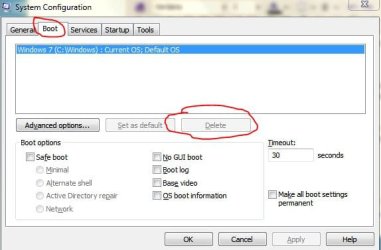
About your Boot configuration go into Vista and click start and search msconfig and see if you have that in the boot tab and select it and delete it.

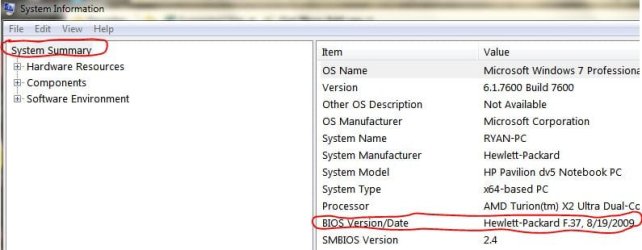
And to check your BIOS update here (LINK TO DELL)..although it has not been updated for a while..you might acually have it already.. To check click start and type System Information

Hope this Helps..
 

Attachments

  • msconfig.JPG
    msconfig.JPG
    33.2 KB · Views: 49
  • system info.JPG
    system info.JPG
    39.1 KB · Views: 27

My Computer My Computer

Computer Manufacturer/Model Number
HP Pavilion dv5 Notebook PC
OS
Windows Seven x64
CPU
2.2 GHz Dual Core
Motherboard
Quanta 3600
Memory
4GB
Graphics Card(s)
ATI Mobility RADEON HD 3470
Sound Card
ATI
Monitor(s) Displays
Laptop
Hard Drives
ATA Hitachi HTS543215 (5400RPM)
Case
Laptop
Cooling
Fan
Internet Speed
Basic DSL 1.5 up and Down
Thanks Ryan, I didn't have the latest BIOS but I have now. Still unable to install, will get onto dell ASAP.

Thanks again all...
 

My Computer My Computer

Computer Manufacturer/Model Number
Dell Inspiron 1721
OS
Vista 32-bit
I would try what kegobeer suggested.

All of your vista 32bit drivers will work in Win7.

Once you get it installed, let it run for a while, Win7 will install drivers but you may need to change a couple. I think I changed two.

I wouldn't hold my breath waiting for Dell to come up with the Win7 drivers for your computer.

Dell doesn't support Win7 for mine either, I've been running the RC x64 since May and now Ult x64, both clean installs. No driver problems.
If the Dell ACHI/RAID controller doesn't work, get your ACHI RAID controller from Intel.

If you want to do an Upgrade install, get the latest Vista drivers from Dell and install all of them. Install the BIOS update.
Then try the upgrade again.

Put the AHCI/RAID controller on a USB stick and add them during the install, you will need to do a Custom/Clean install to do this. Boot the DVD and choose Custom.

Let us know if you have any questions.
 

My Computer My Computer

Computer type
PC/Desktop
Computer Manufacturer/Model Number
76~2.0
OS
Windows 7 Ult x64 - SP1/ Windows 8 Pro x64
CPU
Intel Core i5-3570K 4.6GHz
Motherboard
Gigabyte GA-Z77X UD3H, f18
Memory
8GB (2X4GB) DDR3 1600 Corsair Vengeance CL8 1.5v
Graphics Card(s)
Sapphire HD 7770 Vapor-X OC 1GB DDR5
Sound Card
Onboard VIA VT2021
Monitor(s) Displays
22" LCD Dell
Screen Resolution
1680x1050
Hard Drives
Samsung 840Pro 128GB SSD,
Seagate Barracuda 500GB SATA2 7200rpm 32MB cache, Seagate Barracuda 1TB SATA2 7200rpm 32MB cache,
PSU
Corsair HX650W
Case
Cooler Master Storm Scout
Cooling
Corsair H80 2x12cm Noctua NF P12 , 2x14cm case fans
Keyboard
Logitech Wave
Mouse
CM Sentinel
Internet Speed
Dismal
Antivirus
Avast
Browser
Opera Next
Other Info
Haswell laptop: HP Envy 17t-j, i7-4700MQ, GeForce 740M 2GB DDR3, 17.3" Full HD 1920x1080, 16GB RAM, Samsung 840 Pro 128GB, 1TB Hitachi 7200 HDD,
Desktop: eSATA ports,
External eSATA Seagate 500GB SATA2 7200rpm,
External WD USB 500GB
I
Put the AHCI/RAID controller on a USB stick and add them during the install, you will need to do a Custom/Clean install to do this. Boot the DVD and choose Custom.

Or, you can make a bootable USB flash drive and copy the DVD contents over - then boot from USB and install that way. You should be able to bypass all of the problems and get 7 installed.
 

My Computer My Computer

Computer Manufacturer/Model Number
Dell XPS 15 L502x
OS
Windows 7 Ultimate x64 SP1
CPU
Core i7-2670QM
Memory
8GB DDR3 PC3-10600
Graphics Card(s)
Intel HD Graphics 3000 + GeForce GT 540M
Screen Resolution
1920x1080
Hard Drives
1TB 5400RPM Seagate
Hi all,

Thanks for your help, I have tried all of the above, eventually I just disabled RAID and am running the two HDD's independantly for now and have windows 7 installed. Will sort out the RAID at a later date.

thanks

again
 

My Computer My Computer

Computer Manufacturer/Model Number
Dell Inspiron 1721
OS
Vista 32-bit
Back
Top