Solved unable to use Windows 7 System repair Disc

Digitals

New member
Member
Local time
10:17 AM
Messages
28
Hi mates,

I have a PC Fujitsu Esprimo desktop and I went to install windows 8 after formatting only the primary drive C:

Windows 8 wasn't what I expected so I decided to go back to windows 7. When I tried to rest the PC to factory settings using the repair disc I made before on windows 7, it shows an error that prevent from using the CD " there are no drives installed". so I went to use the USB boot and also got similar error "disk error, please restart your PC".

I got my Desktop from Japan and tried to contact the support for this issue, but it seems that I have to pay around $20 bucks to ask a specialist for help. so I decided to discuss this issue here before doing that...

Now I could install windows 7, but using Microsoft ISO home premium version and activating it with my product key. The issue is still there and being unable to rest things back as original. If you want to ask me why I want to do that!! Then the answer is: I want windows 7 to run correctly since there are a lot of incompatibility issues with the hardware; sounds, network adapter, Audio system, and etc,...

Any help is appreciated!

Thanks a lot, and sorry for my bad English

Cheers

P.S: I believe I have deleted the recovery partition on my hard disk by mistake which didn't have a letter...
 

My Computer My Computer

At a glance

Windows 7 Home Premium x64intel ® Core ™ i5-2520M processor (supports H...DDR3 Dual 8192 MBytesIntel HD Graphics 3000 (GT2+)
Computer type
PC/Desktop
Computer Manufacturer/Model Number
Fujitsu FMVF56EDW
OS
Windows 7 Home Premium x64
CPU
intel ® Core ™ i5-2520M processor (supports HT Technology)
Motherboard
FUJITSU FJNB04F
Memory
DDR3 Dual 8192 MBytes
Graphics Card(s)
Intel HD Graphics 3000 (GT2+)
Sound Card
High Definition Audio codec chipset built (192kHz/24 maximum
Monitor(s) Displays
442 × 249mm, 16.77 million colors 1600 × 900 dots
Screen Resolution
800 × 600 pixels, 1024 × 768 dots, 1600 × 900 dots
Keyboard
M#:Y-R0025-O, Wireless keyboard with one-touch button with b
Mouse
M#:M-R0029-O
Internet Speed
DW:71.90 Mbps, UP:30.5 Mbps
Antivirus
None
Browser
Chrome
Other Info
Chipset: Mobile Intel ® HM65 Express Chipset
You should have made a disk image of 7 before you started. You don`t use a repair disc to get back to where you were, you would use your Recovery discs. Did you make them before you started ? A repair disc only repairs your Windows 7 install, hence the name repair disc.

Did you try to run factory restore from the manufacturers bios screen ? Does it still show up ?
 

My Computer My Computer

At a glance

Windows 10 Pro x64Intel Core i7 6700KGSkill TridentZ RGB 16GB 3600 16-16-16-36EVGA GTX 980 Ti SC x2
Computer type
PC/Desktop
Computer Manufacturer/Model Number
Skylake Special #666
OS
Windows 10 Pro x64
CPU
Intel Core i7 6700K
Motherboard
Asus Sabertooth Z170 Mark 1
Memory
GSkill TridentZ RGB 16GB 3600 16-16-16-36
Graphics Card(s)
EVGA GTX 980 Ti SC x2
Sound Card
Realtek High Definition
Monitor(s) Displays
AOC G2460PG
Screen Resolution
1920 x 1080 144Hz
Hard Drives
Samsung 860 Pro 256GB, Seagate Barracuda 4TB x2
PSU
EVGA 1000 P2, EVGA White Custom Braided Cables
Case
Corsair Vengeance C70 Gunmetal Black
Cooling
Corsair H100i v2, Corsair ML120 x2, Thermal Grizzly Kryonaut
Keyboard
Logitech G910 Orion Spectrum
Mouse
Logitech G700s
Internet Speed
Verizon Fios Quantum Gateway 75/75
Antivirus
Windows Defender, Malwarebytes Free 3.8.3
Browser
Chrome
Other Info
Corsair SP120 x4, LG Blu-ray Drive, Durabrand HT-395 100 Watt Dolby Digital Amp, Corsair H2100 Wireless 7.1 Headset
You should have made a disk image of 7 before you started. You don`t use a repair disc to get back to where you were, you would use your Recovery discs. Did you make them before you started ? A repair disc only repairs your Windows 7 install, hence the name repair disc.

Did you try to run factory restore from the manufacturers bios screen ? Does it still show up ?

Hi addRAM,

Thanks for the comments. :) to be honest with you, I forgot to make a disk image of my win7... You are right, thanks for the reminder about repair disk meaning :p think I was too tired when I posted this thread.

my pc came without recovery dvd/cd, sadly. I made only a backup though.

I tried to run factory restore using f8, but f8 itself doesn't work anymore. Also, I have to use win7 iso burned dvd to go to repair your pc option. The other thing is that when I go to recovery option, it gives an error. I will take a screenshot and post it here soon. also other options for the repair doesn't work...

be back with more details soon.

Cheers
 

My Computer My Computer

At a glance

Windows 7 Home Premium x64intel ® Core ™ i5-2520M processor (supports H...DDR3 Dual 8192 MBytesIntel HD Graphics 3000 (GT2+)
Computer type
PC/Desktop
Computer Manufacturer/Model Number
Fujitsu FMVF56EDW
OS
Windows 7 Home Premium x64
CPU
intel ® Core ™ i5-2520M processor (supports HT Technology)
Motherboard
FUJITSU FJNB04F
Memory
DDR3 Dual 8192 MBytes
Graphics Card(s)
Intel HD Graphics 3000 (GT2+)
Sound Card
High Definition Audio codec chipset built (192kHz/24 maximum
Monitor(s) Displays
442 × 249mm, 16.77 million colors 1600 × 900 dots
Screen Resolution
800 × 600 pixels, 1024 × 768 dots, 1600 × 900 dots
Keyboard
M#:Y-R0025-O, Wireless keyboard with one-touch button with b
Mouse
M#:M-R0029-O
Internet Speed
DW:71.90 Mbps, UP:30.5 Mbps
Antivirus
None
Browser
Chrome
Other Info
Chipset: Mobile Intel ® HM65 Express Chipset
Update:
my PC can now point to recovery partition (partition E), but I deleted my files there accidentally and started using Recuva to recover the deleted partition....

I don't know if there is better way to restore the lost partition....!! please suggest any software...

Thanks
 

My Computer My Computer

At a glance

Windows 7 Home Premium x64intel ® Core ™ i5-2520M processor (supports H...DDR3 Dual 8192 MBytesIntel HD Graphics 3000 (GT2+)
Computer type
PC/Desktop
Computer Manufacturer/Model Number
Fujitsu FMVF56EDW
OS
Windows 7 Home Premium x64
CPU
intel ® Core ™ i5-2520M processor (supports HT Technology)
Motherboard
FUJITSU FJNB04F
Memory
DDR3 Dual 8192 MBytes
Graphics Card(s)
Intel HD Graphics 3000 (GT2+)
Sound Card
High Definition Audio codec chipset built (192kHz/24 maximum
Monitor(s) Displays
442 × 249mm, 16.77 million colors 1600 × 900 dots
Screen Resolution
800 × 600 pixels, 1024 × 768 dots, 1600 × 900 dots
Keyboard
M#:Y-R0025-O, Wireless keyboard with one-touch button with b
Mouse
M#:M-R0029-O
Internet Speed
DW:71.90 Mbps, UP:30.5 Mbps
Antivirus
None
Browser
Chrome
Other Info
Chipset: Mobile Intel ® HM65 Express Chipset
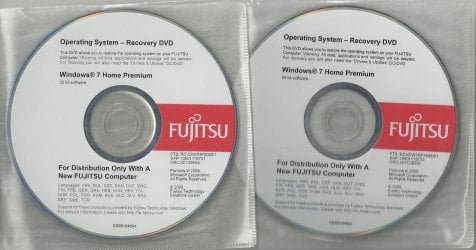
Why not use the Fujitsu Reinstall DVD?

Fujitsu 1.jpg
 

My Computer My Computer

At a glance

ME/XP/Vista/Win7
OS
ME/XP/Vista/Win7
No gots.
 

My Computer My Computer

At a glance

Windows 10 Pro x64Intel Core i7 6700KGSkill TridentZ RGB 16GB 3600 16-16-16-36EVGA GTX 980 Ti SC x2
Computer type
PC/Desktop
Computer Manufacturer/Model Number
Skylake Special #666
OS
Windows 10 Pro x64
CPU
Intel Core i7 6700K
Motherboard
Asus Sabertooth Z170 Mark 1
Memory
GSkill TridentZ RGB 16GB 3600 16-16-16-36
Graphics Card(s)
EVGA GTX 980 Ti SC x2
Sound Card
Realtek High Definition
Monitor(s) Displays
AOC G2460PG
Screen Resolution
1920 x 1080 144Hz
Hard Drives
Samsung 860 Pro 256GB, Seagate Barracuda 4TB x2
PSU
EVGA 1000 P2, EVGA White Custom Braided Cables
Case
Corsair Vengeance C70 Gunmetal Black
Cooling
Corsair H100i v2, Corsair ML120 x2, Thermal Grizzly Kryonaut
Keyboard
Logitech G910 Orion Spectrum
Mouse
Logitech G700s
Internet Speed
Verizon Fios Quantum Gateway 75/75
Antivirus
Windows Defender, Malwarebytes Free 3.8.3
Browser
Chrome
Other Info
Corsair SP120 x4, LG Blu-ray Drive, Durabrand HT-395 100 Watt Dolby Digital Amp, Corsair H2100 Wireless 7.1 Headset
Why not use the Fujitsu Reinstall DVD?

View attachment 261149

I don't have any!! The PC didn't come with any cd/dvd at all. Besides, my original win7 home premium is Japanese and some drivers like the ambient light sensor works with the japanese version, sadly.

I wish I could get a copy of the Japanese version. :(
 

My Computer My Computer

At a glance

Windows 7 Home Premium x64intel ® Core ™ i5-2520M processor (supports H...DDR3 Dual 8192 MBytesIntel HD Graphics 3000 (GT2+)
Computer type
PC/Desktop
Computer Manufacturer/Model Number
Fujitsu FMVF56EDW
OS
Windows 7 Home Premium x64
CPU
intel ® Core ™ i5-2520M processor (supports HT Technology)
Motherboard
FUJITSU FJNB04F
Memory
DDR3 Dual 8192 MBytes
Graphics Card(s)
Intel HD Graphics 3000 (GT2+)
Sound Card
High Definition Audio codec chipset built (192kHz/24 maximum
Monitor(s) Displays
442 × 249mm, 16.77 million colors 1600 × 900 dots
Screen Resolution
800 × 600 pixels, 1024 × 768 dots, 1600 × 900 dots
Keyboard
M#:Y-R0025-O, Wireless keyboard with one-touch button with b
Mouse
M#:M-R0029-O
Internet Speed
DW:71.90 Mbps, UP:30.5 Mbps
Antivirus
None
Browser
Chrome
Other Info
Chipset: Mobile Intel ® HM65 Express Chipset

I don't think it would work if I used US version of win7 home premium because the Japanese pre-installed softwares won't be there in addition to incompatibility of some drivers.
 

My Computer My Computer

At a glance

Windows 7 Home Premium x64intel ® Core ™ i5-2520M processor (supports H...DDR3 Dual 8192 MBytesIntel HD Graphics 3000 (GT2+)
Computer type
PC/Desktop
Computer Manufacturer/Model Number
Fujitsu FMVF56EDW
OS
Windows 7 Home Premium x64
CPU
intel ® Core ™ i5-2520M processor (supports HT Technology)
Motherboard
FUJITSU FJNB04F
Memory
DDR3 Dual 8192 MBytes
Graphics Card(s)
Intel HD Graphics 3000 (GT2+)
Sound Card
High Definition Audio codec chipset built (192kHz/24 maximum
Monitor(s) Displays
442 × 249mm, 16.77 million colors 1600 × 900 dots
Screen Resolution
800 × 600 pixels, 1024 × 768 dots, 1600 × 900 dots
Keyboard
M#:Y-R0025-O, Wireless keyboard with one-touch button with b
Mouse
M#:M-R0029-O
Internet Speed
DW:71.90 Mbps, UP:30.5 Mbps
Antivirus
None
Browser
Chrome
Other Info
Chipset: Mobile Intel ® HM65 Express Chipset
Make sure you're using the correct key for running Factory Recovery. If in doubt check on the first screen or in your Manual for your exact model which you'll find on the Fujitsu Support Downloads webpage for that model.

If the key is definitely F8 then it is wiped out when you reinstalled C since the F8 options are installed with the OS. You should have shrunk C to do a Dual Boot to try Win8.

If you can't run Recovery and didn't make your disks or a backup image, then your options are to either order Recovery Disks from Fujitsu Support, or get the superior Clean Reinstall - Factory OEM Windows 7.

The ISO provided in Step 1 to burn to DVD or write to flash stick doesn't appear to be available in Japanese, so you may have to search further on the internet to find your licensed version to reinstall.
http://www.sevenforums.com/tutorials/219487-clean-reinstall-factory-oem-windows-7-a.html#post1839164
 

I don't think it would work if I used US version of win7 home premium because the Japanese pre-installed softwares won't be there in addition to incompatibility of some drivers.

Fujitsu PC's come with Reinstall DVD, Drivers DVD, & software DVD.
 

My Computer My Computer

At a glance

ME/XP/Vista/Win7
OS
ME/XP/Vista/Win7
Yes, I checked that and models are matching exact. The problem is that only windows 7 Japanese version from Fujitsu Japan doesn't provide any dvd recovery, but each license holder has to create his own recovery dvd/cd, which I believe is so stupid.

I checked again the f8 key, and yes it works after installing new version of win 7 home premium. Sadly, the Japanese version is no longer on my PC and some hardware can't be identified...

Look like now I have only two options left for me:

1- install windows 7 from the iso link you provided

2- buying a recovery dvd from Fujitsu japan since they are the only ones who have it with the pre-installed softwares and drivers...

so I guess I will try the first option and see how things go.

BTW, I searched for a Japanese version for Fujitsu windows 7 home premium and couldn't find any... The installation DVD is being on sale on some JP sites for almost $93 bucks, but I won't buy it because it is none sense to do such thing since I have a license anyways...:confused:

I tired to recover the lost partition for the recovery system, but no software did the work after long hours of waiting...

Thanks

Make sure you're using the correct key for running Factory Recovery. If in doubt check on the first screen or in your Manual for your exact model which you'll find on the Fujitsu Support Downloads webpage for that model.

If the key is definitely F8 then it is wiped out when you reinstalled C since the F8 options are installed with the OS. You should have shrunk C to do a Dual Boot to try Win8.

If you can't run Recovery and didn't make your disks or a backup image, then your options are to either order Recovery Disks from Fujitsu Support, or get the superior Clean Reinstall - Factory OEM Windows 7.

The ISO provided in Step 1 to burn to DVD or write to flash stick doesn't appear to be available in Japanese, so you may have to search further on the internet to find your licensed version to reinstall.
http://www.sevenforums.com/tutorials/219487-clean-reinstall-factory-oem-windows-7-a.html#post1839164
 

My Computer My Computer

At a glance

Windows 7 Home Premium x64intel ® Core ™ i5-2520M processor (supports H...DDR3 Dual 8192 MBytesIntel HD Graphics 3000 (GT2+)
Computer type
PC/Desktop
Computer Manufacturer/Model Number
Fujitsu FMVF56EDW
OS
Windows 7 Home Premium x64
CPU
intel ® Core ™ i5-2520M processor (supports HT Technology)
Motherboard
FUJITSU FJNB04F
Memory
DDR3 Dual 8192 MBytes
Graphics Card(s)
Intel HD Graphics 3000 (GT2+)
Sound Card
High Definition Audio codec chipset built (192kHz/24 maximum
Monitor(s) Displays
442 × 249mm, 16.77 million colors 1600 × 900 dots
Screen Resolution
800 × 600 pixels, 1024 × 768 dots, 1600 × 900 dots
Keyboard
M#:Y-R0025-O, Wireless keyboard with one-touch button with b
Mouse
M#:M-R0029-O
Internet Speed
DW:71.90 Mbps, UP:30.5 Mbps
Antivirus
None
Browser
Chrome
Other Info
Chipset: Mobile Intel ® HM65 Express Chipset

I don't think it would work if I used US version of win7 home premium because the Japanese pre-installed softwares won't be there in addition to incompatibility of some drivers.

Fujitsu PC's come with Reinstall DVD, Drivers DVD, & software DVD.

well, maybe other Fujitsu country based, but not Fujitsu Japan... which I find it none sense...:confused:

if you don't mind, you can kindly share with us your ISO version or the DVD you posted to install the windows 7 Home Premium...

It is your choice anyways.

Thanks
 

My Computer My Computer

At a glance

Windows 7 Home Premium x64intel ® Core ™ i5-2520M processor (supports H...DDR3 Dual 8192 MBytesIntel HD Graphics 3000 (GT2+)
Computer type
PC/Desktop
Computer Manufacturer/Model Number
Fujitsu FMVF56EDW
OS
Windows 7 Home Premium x64
CPU
intel ® Core ™ i5-2520M processor (supports HT Technology)
Motherboard
FUJITSU FJNB04F
Memory
DDR3 Dual 8192 MBytes
Graphics Card(s)
Intel HD Graphics 3000 (GT2+)
Sound Card
High Definition Audio codec chipset built (192kHz/24 maximum
Monitor(s) Displays
442 × 249mm, 16.77 million colors 1600 × 900 dots
Screen Resolution
800 × 600 pixels, 1024 × 768 dots, 1600 × 900 dots
Keyboard
M#:Y-R0025-O, Wireless keyboard with one-touch button with b
Mouse
M#:M-R0029-O
Internet Speed
DW:71.90 Mbps, UP:30.5 Mbps
Antivirus
None
Browser
Chrome
Other Info
Chipset: Mobile Intel ® HM65 Express Chipset
How much does Fujitsu want for the Recovery disks there? It may be your best choice if you want Japanese Win7.

I don't know why the ISO isn't available in Japanese. Perhaps a deeper web search will turn it up, or someone here will know where to find it.

Be sure to rely on drivers from Windows Updates first as per the tutorial during Clean Reinstall, before importing any from the Fujitsu Support Downloads webpage. Then I would not reimport any of the software that isn't absolutely needed for a function you use or is missing in Device Manager. Look for hotfixes and patches that may solve any issues present after reinstall. We can help advise you and are interested in hearing how it goes to add to the tutorial if necessary.
 
Thanks, mate for the great comments.

well, the recovery disc cost about $55 bucks more or less, but they support want to ask me billion question before they proceed my order just to make sure that I need the disc or not... I explained to them many time, but they insist on following up with me step by step on the PC, which I don't have time to afford.

Anyways, I skipped the recovery disc and just now installed new version of win7 , but as usual the installation is unable to find some drives. I opened a thread here: http://www.sevenforums.com/drivers/283990-fujitsu-drivers-missing.html#post2340474

well, the ISO is available in English as posted in Lifehacker site, but they say the language can be switched after all from the language packs.

Yes, you are right about Fujitsu support download.

Thanks again for the useful advise. Now I guess I need to take care of the drivers as my network in the new installation doesn't work...

Cheers

How much does Fujitsu want for the Recovery disks there? It may be your best choice if you want Japanese Win7.

I don't know why the ISO isn't available in Japanese. Perhaps a deeper web search will turn it up, or someone here will know where to find it.

Be sure to rely on drivers from Windows Updates first as per the tutorial during Clean Reinstall, before importing any from the Fujitsu Support Downloads webpage. Then I would not reimport any of the software that isn't absolutely needed for a function you use or is missing in Device Manager. Look for hotfixes and patches that may solve any issues present after reinstall. We can help advise you and are interested in hearing how it goes to add to the tutorial if necessary.
 

My Computer My Computer

At a glance

Windows 7 Home Premium x64intel ® Core ™ i5-2520M processor (supports H...DDR3 Dual 8192 MBytesIntel HD Graphics 3000 (GT2+)
Computer type
PC/Desktop
Computer Manufacturer/Model Number
Fujitsu FMVF56EDW
OS
Windows 7 Home Premium x64
CPU
intel ® Core ™ i5-2520M processor (supports HT Technology)
Motherboard
FUJITSU FJNB04F
Memory
DDR3 Dual 8192 MBytes
Graphics Card(s)
Intel HD Graphics 3000 (GT2+)
Sound Card
High Definition Audio codec chipset built (192kHz/24 maximum
Monitor(s) Displays
442 × 249mm, 16.77 million colors 1600 × 900 dots
Screen Resolution
800 × 600 pixels, 1024 × 768 dots, 1600 × 900 dots
Keyboard
M#:Y-R0025-O, Wireless keyboard with one-touch button with b
Mouse
M#:M-R0029-O
Internet Speed
DW:71.90 Mbps, UP:30.5 Mbps
Antivirus
None
Browser
Chrome
Other Info
Chipset: Mobile Intel ® HM65 Express Chipset

My Computer My Computer

At a glance

Windows 7 Home Premium x64intel ® Core ™ i5-2520M processor (supports H...DDR3 Dual 8192 MBytesIntel HD Graphics 3000 (GT2+)
Computer type
PC/Desktop
Computer Manufacturer/Model Number
Fujitsu FMVF56EDW
OS
Windows 7 Home Premium x64
CPU
intel ® Core ™ i5-2520M processor (supports HT Technology)
Motherboard
FUJITSU FJNB04F
Memory
DDR3 Dual 8192 MBytes
Graphics Card(s)
Intel HD Graphics 3000 (GT2+)
Sound Card
High Definition Audio codec chipset built (192kHz/24 maximum
Monitor(s) Displays
442 × 249mm, 16.77 million colors 1600 × 900 dots
Screen Resolution
800 × 600 pixels, 1024 × 768 dots, 1600 × 900 dots
Keyboard
M#:Y-R0025-O, Wireless keyboard with one-touch button with b
Mouse
M#:M-R0029-O
Internet Speed
DW:71.90 Mbps, UP:30.5 Mbps
Antivirus
None
Browser
Chrome
Other Info
Chipset: Mobile Intel ® HM65 Express Chipset
Did you follow the steps in Clean Reinstall - Factory OEM Windows 7 to first install all Important and Optional Updates after enabling Automatically deliver drivers via Windows Update (Step 3)? You may need to import your LAN driver to get online to do this.

Only after all rounds of Updates are done should you import any drivers. This is why I gave you tutorial, so you'd know how all of this is handled in Win7, which is not XP and handles drivers differently during install.

Yes, mate. I did all steps, but maybe because my PC originally Japanese so the drivers are identified in Japanese only. I tried English version drivers on the Japanese ones, but there is some bug going on so I uninstalled all I did...

but I found the rest of the stuff I'm after here: http://www.sevenforums.com/drivers/283990-fujitsu-drivers-missing.html and there is no need to recovery anymore.

That was very helpful

Cheers
 

My Computer My Computer

At a glance

Windows 7 Home Premium x64intel ® Core ™ i5-2520M processor (supports H...DDR3 Dual 8192 MBytesIntel HD Graphics 3000 (GT2+)
Computer type
PC/Desktop
Computer Manufacturer/Model Number
Fujitsu FMVF56EDW
OS
Windows 7 Home Premium x64
CPU
intel ® Core ™ i5-2520M processor (supports HT Technology)
Motherboard
FUJITSU FJNB04F
Memory
DDR3 Dual 8192 MBytes
Graphics Card(s)
Intel HD Graphics 3000 (GT2+)
Sound Card
High Definition Audio codec chipset built (192kHz/24 maximum
Monitor(s) Displays
442 × 249mm, 16.77 million colors 1600 × 900 dots
Screen Resolution
800 × 600 pixels, 1024 × 768 dots, 1600 × 900 dots
Keyboard
M#:Y-R0025-O, Wireless keyboard with one-touch button with b
Mouse
M#:M-R0029-O
Internet Speed
DW:71.90 Mbps, UP:30.5 Mbps
Antivirus
None
Browser
Chrome
Other Info
Chipset: Mobile Intel ® HM65 Express Chipset
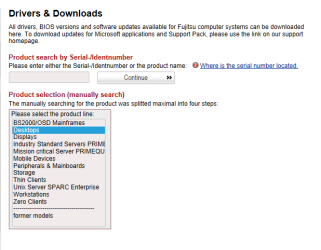
Did type in your SERIAL No?

Fujitsu 002.PNG
 

My Computer My Computer

At a glance

ME/XP/Vista/Win7
OS
ME/XP/Vista/Win7

My Computer My Computer

At a glance

Windows 10 Pro x64Intel Core i7 6700KGSkill TridentZ RGB 16GB 3600 16-16-16-36EVGA GTX 980 Ti SC x2
Computer type
PC/Desktop
Computer Manufacturer/Model Number
Skylake Special #666
OS
Windows 10 Pro x64
CPU
Intel Core i7 6700K
Motherboard
Asus Sabertooth Z170 Mark 1
Memory
GSkill TridentZ RGB 16GB 3600 16-16-16-36
Graphics Card(s)
EVGA GTX 980 Ti SC x2
Sound Card
Realtek High Definition
Monitor(s) Displays
AOC G2460PG
Screen Resolution
1920 x 1080 144Hz
Hard Drives
Samsung 860 Pro 256GB, Seagate Barracuda 4TB x2
PSU
EVGA 1000 P2, EVGA White Custom Braided Cables
Case
Corsair Vengeance C70 Gunmetal Black
Cooling
Corsair H100i v2, Corsair ML120 x2, Thermal Grizzly Kryonaut
Keyboard
Logitech G910 Orion Spectrum
Mouse
Logitech G700s
Internet Speed
Verizon Fios Quantum Gateway 75/75
Antivirus
Windows Defender, Malwarebytes Free 3.8.3
Browser
Chrome
Other Info
Corsair SP120 x4, LG Blu-ray Drive, Durabrand HT-395 100 Watt Dolby Digital Amp, Corsair H2100 Wireless 7.1 Headset
Back
Top