Unaccesible shortcuts created by the system in user & system folders

madasco

New member
Local time
11:19 PM
Messages
11
Unaccesible shortcuts created by the system in user & system folders

Hello All:

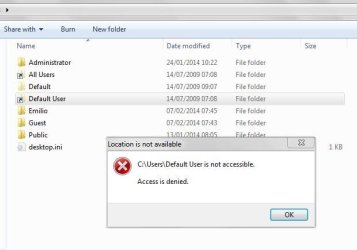
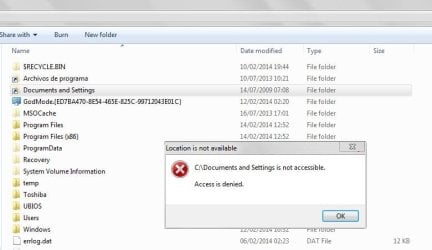
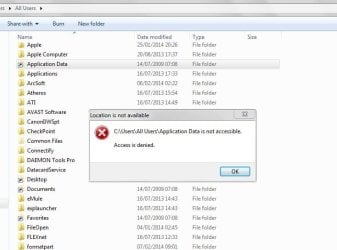
Browsing the folders on my hard drive I have found a series of shortcuts (to default users, application data, "archivos de programas" (program files in English language) that I didn't create and that I can neither access nor delete.

I have two administrator accounts in the computer, yet can't operate on these shortcuts.

Any ideas on how to access this folders and eventually deleting them?

I am attaching some screenshots on the matter.

Thank you for your help!
Madasco
 

Attachments
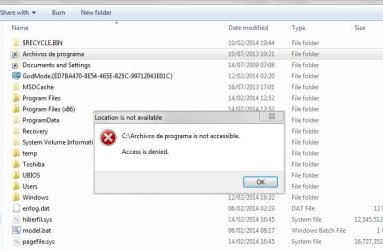
  • archivos de programa not accesible.JPG
    archivos de programa not accesible.JPG
    49.1 KB · Views: 1
  • Default User not accesible.JPG
    Default User not accesible.JPG
    31.5 KB · Views: 24
  • docs and settings not accesible.JPG
    docs and settings not accesible.JPG
    43 KB · Views: 0
  • Application Data not accesible.JPG
    Application Data not accesible.JPG
    48.7 KB · Views: 1

My Computer My Computer

At a glance

Windows Ultimate x64
OS
Windows Ultimate x64

My Computer My Computer

At a glance

Windows 7 ultimate 64-bitIntel I7 2600K 3.4ghzCorsair 16gb ddr3 1600mhzNvidia Geforce gt 430
Computer type
PC/Desktop
Computer Manufacturer/Model Number
custom built
OS
Windows 7 ultimate 64-bit
CPU
Intel I7 2600K 3.4ghz
Motherboard
Asus Evo P8P67
Memory
Corsair 16gb ddr3 1600mhz
Graphics Card(s)
Nvidia Geforce gt 430
Sound Card
Sound Blaster Titanium x-fi pci express
Monitor(s) Displays
Dell E198WFP
Hard Drives
1 western digital 2TB drive.
PSU
Antec 1200 watt
Case
Inwin Dragon Rider
Cooling
6 case supplied cooling fans
Keyboard
logitech mk700
Mouse
logitech m705
Internet Speed
25-50mbps download; 10mbps upload(i think)
Antivirus
avg free 2014
Browser
mozilla firefox
Other Info
Also have a pretty bad speaker setup which is a klipsch promedia 5.1 surround speaker setup with huge subwoofer and lg blu ray player/writer. Also a hp officejet pro 8600 plus wireless all in one and a logitech s7500 webcam.
Is this a Windows 7 upgraded from XP ?
 

My Computer My Computer

At a glance

Vista, Windows7, Mint Mate, Zorin, Windows 8from 1.6GHz Duo to i7
Computer Manufacturer/Model Number
HP, Dell, Gateway, Toshiba - 4 laptops and 2 desktops
OS
Vista, Windows7, Mint Mate, Zorin, Windows 8
CPU
from 1.6GHz Duo to i7
Monitor(s) Displays
2x HP w2207
Hard Drives
5x HDD, 7x SSD, 12x Externals
Keyboard
with trackball - no mices
Mouse
Trackball mice
Internet Speed
DSL 6000
The folder named Application Data shown in your first screenshot was created by the Windows OS. Look at the date & time stamp. Just leave it alone.

The same is true for the folder named Documents and Settings shown in your 3rd screenshot.

The same is true for the folder named Default User shown in your 4th screenshot.

Do not take ownership of those folders.

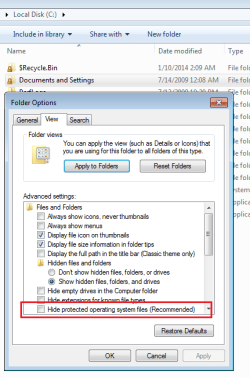
If you don't want to see these folders, then put a check by this folder option:

FO.png

The folders are there so that older programs can make use of them. They are not meant for you to see/open.

The only folder that is not "normal" is the one to the Program Files folder. Just leave it alone too. Some app might have created it. Some app might need it.

:-)

edit:
Here is an old thread for you to read:
http://www.sevenforums.com/general-discussion/169246-how-get-access-document-settings.html
and this:
http://msdn.microsoft.com/en-us/library/windows/desktop/bb968829(v=vs.85).aspx
 

My Computer My Computer

At a glance

W7 Pro SP1 64biti78GBIntel HD Graphics
Computer type
Laptop
Computer Manufacturer/Model Number
Employer provided Dell Latitude
OS
W7 Pro SP1 64bit
CPU
i7
Memory
8GB
Graphics Card(s)
Intel HD Graphics
Hard Drives
crappy SSD
Antivirus
Employer mandated Symantec Endpoint Protection
Browser
Pale Moon 64bit, IE11 64bit & Chrome 64bit
The only folder that is not "normal" is the one to the Program Files folder. Just leave it alone too. Some app might have created it. Some app might need it.

In all 35 language versions of Windows, the system file and folder names are in English but localized junctions are used to show user the names in his language.

An example: in a Finnish Windows 7 the user sees folder Ohjelmatiedostot but when the properties of this folder is checked, they reveal that it's not a folder but a junction that points to folder Program Files. A localized Finnish name (junction) to "fool" user to think the folder has a Finnish name. Same thing in user folders, a junction with a Finnish name Kuvat opens a folder named Pictures , Musiikki opens Music and so on.

Archivos de programa is the Spanish localized junction for Program Files. Your screenshots show an English Windows so my guess is you have installed some Spanish application which is coded using absolute Spanish localized junction name as install location instead of relative variable %ProgramFiles%.

Kari
 
Last edited:

My Computer My Computer

At a glance

Windows 10 Pro x64 EN-GB1.6 GHz Intel Core i7-720QM Processor6 GBATI Mobility Radeon HD 5850 Graphics
Computer type
Laptop
Computer Manufacturer/Model Number
HP ENVY 17-1150eg
OS
Windows 10 Pro x64 EN-GB
CPU
1.6 GHz Intel Core i7-720QM Processor
Memory
6 GB
Graphics Card(s)
ATI Mobility Radeon HD 5850 Graphics
Sound Card
Beats sound system with integrated subwoofer
Monitor(s) Displays
17" laptop display, 22" LED and 32" Full HD TV through HDMI
Screen Resolution
1600*900 (1), 1920*1080 (2&3)
Hard Drives
Internal: 2 x 500 GB SATA Hard Disk Drive 7200 rpm
External: 2TB for backups, 3TB USB3 network drive for media
Cooling
As Envy runs a bit warm, I have it on a Cooler Master pad
Keyboard
Logitech diNovo Media Desktop Laser (bluetooth)
Mouse
Logitech Performance Mouse MX
Internet Speed
50/10 Mbps VDSL
Antivirus
Windows Defender 4.3.9431.0
Browser
Maxthon 3.5.2., IE11
Thanks Kari for the info :-)
 

My Computer My Computer

At a glance

W7 Pro SP1 64biti78GBIntel HD Graphics
Computer type
Laptop
Computer Manufacturer/Model Number
Employer provided Dell Latitude
OS
W7 Pro SP1 64bit
CPU
i7
Memory
8GB
Graphics Card(s)
Intel HD Graphics
Hard Drives
crappy SSD
Antivirus
Employer mandated Symantec Endpoint Protection
Browser
Pale Moon 64bit, IE11 64bit & Chrome 64bit

My Computer My Computer

At a glance

Windows 10 Education 64 bitAMD Phenom II X4 980 Black Edition Deneb 3.7GHz8GB 4GBx2 Kingston PC10600 DDR3 1333 MemoryZotac NVIDIA Geforce GT640 2 Gig DDR3 PCIe
Computer type
PC/Desktop
Computer Manufacturer/Model Number
Home Built
OS
Windows 10 Education 64 bit
CPU
AMD Phenom II X4 980 Black Edition Deneb 3.7GHz
Motherboard
Asus M4N68T-M V2 µATX Motherboard
Memory
8GB 4GBx2 Kingston PC10600 DDR3 1333 Memory
Graphics Card(s)
Zotac NVIDIA Geforce GT640 2 Gig DDR3 PCIe
Sound Card
VIA VT1708s High Definition Audio 8-channel Onboard
Monitor(s) Displays
22" LG E2242 1080p and 2 19" I-INC AG191D
Screen Resolution
1280x1024 - 1920x1080 - 1280x1024
Hard Drives
Crucial M100 256 GB SSD and 500 GB WD Blue SATA
PSU
Thermaltake TR 620
Case
Power Up Black ATX Mid-Tower Case
Cooling
Stock heatsink and fan
Keyboard
Logitech Wireless K350 Wave
Mouse
Logitech Wireless M570 Trackman Wheel
Internet Speed
80 Mbps Down 30 Mbps Up
Antivirus
Windows Defender
Browser
Internet Explorer 11
Other Info
HP DVD1040e Lightscribe - External USB2
Thank you all for your interest and information, matts6887, whs, Usernameissues, Kari and alphanumeric.
I've learnt a lot from your replies.
whs, my Windows 7 it's a clean install, not an upgrade from XP

Cheers!
 

My Computer My Computer

At a glance

Windows Ultimate x64
OS
Windows Ultimate x64
Thanks for the feedback.
 

My Computer My Computer

At a glance

Vista, Windows7, Mint Mate, Zorin, Windows 8from 1.6GHz Duo to i7
Computer Manufacturer/Model Number
HP, Dell, Gateway, Toshiba - 4 laptops and 2 desktops
OS
Vista, Windows7, Mint Mate, Zorin, Windows 8
CPU
from 1.6GHz Duo to i7
Monitor(s) Displays
2x HP w2207
Hard Drives
5x HDD, 7x SSD, 12x Externals
Keyboard
with trackball - no mices
Mouse
Trackball mice
Internet Speed
DSL 6000
Back
Top