Unaccountable Space on SSD

garuda

New member
Power User
Local time
2:16 AM
Messages
89
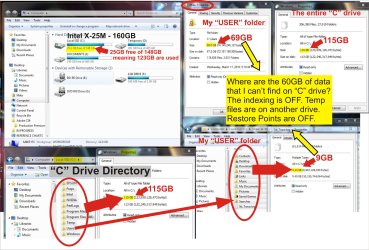
My Intel 160 SSD is over 80% full and filling. When I check space used on SSD, the numbers don't add up. When I "rt-click > Properties" on my User Folder, I get 69GB. But when I open my user folder, highlight all folders in that directory, I get 9GB; a 60GB difference. Can hidden files be that big?

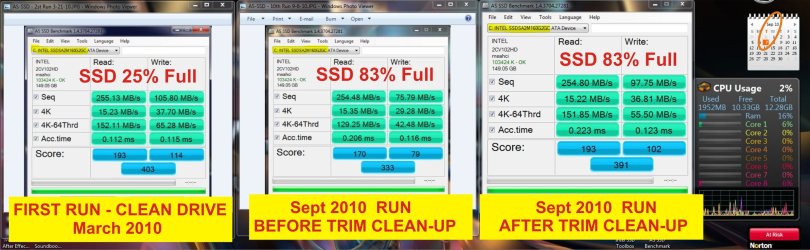
And why does SSD continue to fill? Index is OFF, TEMPs on differ drive, Restore pts OFF, Norton Internet is OFF, etc. All user data is on a diff spin drive. Only Apps are on SSD. Performance is still fine, but eventually the extra empty TRIM space will be gone.

So why does it continue to fill when no more appls are being added? And where is the 60GB discrepancy, or am I doing something wrong in checking sizes? :confused:

See attachments for details. Thanks!
 

Attachments

  • SSD Space.jpg
    SSD Space.jpg
    620.7 KB · Views: 34
  • SSD Bench.jpg
    SSD Bench.jpg
    371.1 KB · Views: 15

My Computer

Computer type
PC/Desktop
Computer Manufacturer/Model Number
Homemade with cube tower
OS
Windows 7 Ultimate x64
CPU
2x - Xeon E5-2687W
Motherboard
ASUS Z9PE-D8 WS
Memory
128GB Kingston - (2ea kits – 4x16GB)
Graphics Card(s)
Gigabyte GTX-680 & EVGA GTX-Titan
Sound Card
Realtek ALC898 8-chan audio
Monitor(s) Displays
2ea - Samsung T260HD 25.5-Inch LCD HDTV / Monitors
Screen Resolution
1920x1200
Hard Drives
8 ea. Crucial & Samsung EVO 2TB SSDs; misc 4ea. 8TB external Seagate spinners.
PSU
Corsair AX-1200
Case
Lian-Li cube custom
Cooling
2x Dynatron R-17 - CPU Air sinks (160watts TDP)
Keyboard
HP slimline wireless
Mouse
Microsoft ARC
Internet Speed
Faster than a speeding bullet.
Antivirus
Norton Security 360 - 2020
Could you run something like TreeSizeFree or WinDirStat against the drive so that we can see the space being consumed?

If you suspect it's hidden files, you can always change your explorer view settings to show you hidden files.
 

My Computer

Computer Manufacturer/Model Number
Self-Built in July 2009
OS
Windows 7 Ultimate x64
CPU
Intel Q9550 2.83Ghz OC'd to 3.40Ghz
Motherboard
Gigabyte GA-EP45-UD3R rev. 1.1, F12 BIOS
Memory
8GB G.Skill PI DDR2-800, 4-4-4-12 timings
Graphics Card(s)
EVGA 1280MB Nvidia GeForce GTX570
Sound Card
Realtek ALC899A 8 channel onboard audio
Monitor(s) Displays
23" Acer x233H
Screen Resolution
1920x1080
Hard Drives
Intel X25-M 80GB Gen 2 SSD
Western Digital 1TB Caviar Black, 32MB cache. WD1001FALS
PSU
Corsair 620HX modular
Case
Antec P182
Cooling
stock
Keyboard
ABS M1 Mechanical
Mouse
Logitech G9 Laser Mouse
Internet Speed
15/2 cable modem
Other Info
Windows and Linux enthusiast. Logitech G35 Headset.

Could you run something like TreeSizeFree or WinDirStat against the drive so that we can see the space being consumed?

Thanks pparks!
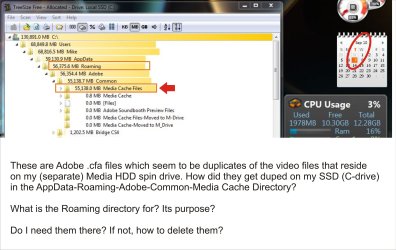
TreeSizeFree revealed the problem, but how to fix?
Does any one know the purpose of the "Roaming" and "Media Cache" directories?

It seems that more or all of my video files (60GBs) which reside on my separate MEDIA hdd spin drive, are being duplicated in the Roaming and Media Cache dir's on the SSD C-drive.

Can these be deleted from Roaming or Cache directories without any problems? What purpose is the Roaming and Media Cache functions? Help! See attacment for detail.
 

Attachments

  • TreeSize Scan SSD.jpg
    TreeSize Scan SSD.jpg
    391 KB · Views: 50

My Computer

Computer type
PC/Desktop
Computer Manufacturer/Model Number
Homemade with cube tower
OS
Windows 7 Ultimate x64
CPU
2x - Xeon E5-2687W
Motherboard
ASUS Z9PE-D8 WS
Memory
128GB Kingston - (2ea kits – 4x16GB)
Graphics Card(s)
Gigabyte GTX-680 & EVGA GTX-Titan
Sound Card
Realtek ALC898 8-chan audio
Monitor(s) Displays
2ea - Samsung T260HD 25.5-Inch LCD HDTV / Monitors
Screen Resolution
1920x1200
Hard Drives
8 ea. Crucial & Samsung EVO 2TB SSDs; misc 4ea. 8TB external Seagate spinners.
PSU
Corsair AX-1200
Case
Lian-Li cube custom
Cooling
2x Dynatron R-17 - CPU Air sinks (160watts TDP)
Keyboard
HP slimline wireless
Mouse
Microsoft ARC
Internet Speed
Faster than a speeding bullet.
Antivirus
Norton Security 360 - 2020

My Computer

Computer Manufacturer/Model Number
HP, Dell, Gateway, Toshiba - 4 laptops and 2 desktops
OS
Vista, Windows7, Mint Mate, Zorin, Windows 8
CPU
from 1.6GHz Duo to i7
Monitor(s) Displays
2x HP w2207
Hard Drives
5x HDD, 7x SSD, 12x Externals
Keyboard
with trackball - no mices
Mouse
Trackball mice
Internet Speed
DSL 6000
Thanks to both contributors for your comments, it helped with my diagnosis. I did in fact relocate the Adobe\Common\MediaCacheFiles to a spin drive. But what I failed to do was to always turn-on/connect the external spin-drive when using the Adobe applications. Without the relocation drive connected, Adobe defaults to writing the cache files to the C-drive (SSD) -- which accounts for the increase in C-drive size. And "whs" you are correct; I simply moved the files to the spin-drive, freeing up space of the SSD.
Problems solved, Thanks again to both posts. :)
 

My Computer

Computer type
PC/Desktop
Computer Manufacturer/Model Number
Homemade with cube tower
OS
Windows 7 Ultimate x64
CPU
2x - Xeon E5-2687W
Motherboard
ASUS Z9PE-D8 WS
Memory
128GB Kingston - (2ea kits – 4x16GB)
Graphics Card(s)
Gigabyte GTX-680 & EVGA GTX-Titan
Sound Card
Realtek ALC898 8-chan audio
Monitor(s) Displays
2ea - Samsung T260HD 25.5-Inch LCD HDTV / Monitors
Screen Resolution
1920x1200
Hard Drives
8 ea. Crucial & Samsung EVO 2TB SSDs; misc 4ea. 8TB external Seagate spinners.
PSU
Corsair AX-1200
Case
Lian-Li cube custom
Cooling
2x Dynatron R-17 - CPU Air sinks (160watts TDP)
Keyboard
HP slimline wireless
Mouse
Microsoft ARC
Internet Speed
Faster than a speeding bullet.
Antivirus
Norton Security 360 - 2020
Thanks pparks!
TreeSizeFree revealed the problem, but how to fix?

No problem, glad that helped to isolate the issue. TreeSizeFree is one of my favorite bag of tricks utilities as it does it's just well, and doesn't need to be installed...you just run the EXE when you need it.
 

My Computer

Computer Manufacturer/Model Number
Self-Built in July 2009
OS
Windows 7 Ultimate x64
CPU
Intel Q9550 2.83Ghz OC'd to 3.40Ghz
Motherboard
Gigabyte GA-EP45-UD3R rev. 1.1, F12 BIOS
Memory
8GB G.Skill PI DDR2-800, 4-4-4-12 timings
Graphics Card(s)
EVGA 1280MB Nvidia GeForce GTX570
Sound Card
Realtek ALC899A 8 channel onboard audio
Monitor(s) Displays
23" Acer x233H
Screen Resolution
1920x1080
Hard Drives
Intel X25-M 80GB Gen 2 SSD
Western Digital 1TB Caviar Black, 32MB cache. WD1001FALS
PSU
Corsair 620HX modular
Case
Antec P182
Cooling
stock
Keyboard
ABS M1 Mechanical
Mouse
Logitech G9 Laser Mouse
Internet Speed
15/2 cable modem
Other Info
Windows and Linux enthusiast. Logitech G35 Headset.
Back
Top