
Solved Unallocated 25GB on new SSD; Want to emerge/use it

SharpGeico

New member
Local time
2:11 PM
Messages
3
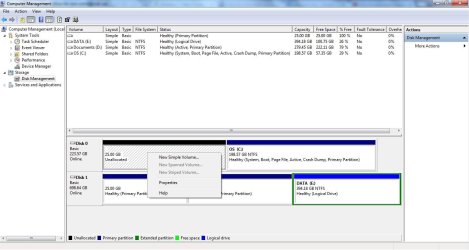
Unallocated 25GB on new SSD; Want to merge/use it

I recently installed a new SSD and cloned the partition with the OS from my old HDD to the SSD. I used Macrium Reflect to migrate the partition however, the SSD somehow reserved 25GB by itself. The options I have for the partition is "delete volume" or "new simple volume" in Computer Management. What should I do? Does using the delete option in computer management allow me to merge the 25GB with the rest of my SSD?


Additional information:
I don't know whether this is relevant but my computer's brand is Asus and it came with a built-in recovery partition which is also 25GB. I don't know whether the migration process reserved space for that.

The SSD is a OCZ ARC 100 Series 240 GB.

Thank you for reading this!
 

Attachments
  • computer management.jpg
    computer management.jpg
    90.3 KB · Views: 2
Last edited:

My Computer My Computer

At a glance

Windows 7 Home PremiumIntel i5-2410M @ 2.30 GHz8 GBsNvidia GT 540M 1GB VRam
Computer type
Laptop
Computer Manufacturer/Model Number
Asus
OS
Windows 7 Home Premium
CPU
Intel i5-2410M @ 2.30 GHz
Memory
8 GBs
Graphics Card(s)
Nvidia GT 540M 1GB VRam
Hard Drives
OCZ ARC 100 Series 240GB | WDC 750GB
My experience with Macrium is minimal, however it seems the space was reserved for recovery partition. If you do not want this space for recovery, then you can use Partition Wizard free bootable media to "Move/Resize" C into unallocated. Disk Management can't extend to unallocated to the left side.
 

My Computer My Computer

At a glance

Windows 7 Ultimate x64 SP1AMD Phenom 2 1090T2x8GB Kingston HyperX Fury Black 1600Mhz Unga...MSI GTX 970 Gaming 4G
Computer type
PC/Desktop
Computer Manufacturer/Model Number
Custom Build
OS
Windows 7 Ultimate x64 SP1
CPU
AMD Phenom 2 1090T
Motherboard
Gigabyte GA-890FXA-UD5
Memory
2x8GB Kingston HyperX Fury Black 1600Mhz Unganged
Graphics Card(s)
MSI GTX 970 Gaming 4G
Sound Card
Realtek On-Board HD 7.1 Audio / Logitech G35
Monitor(s) Displays
3xAcer GD245HQ
Screen Resolution
1920x1080
Hard Drives
Samsung 850 Pro 512GB SSD - OS /
WD Caviar Black SATA 3 - 1 TBx2 - Dynamic RAID 0 /
WD Caviar Green SATA 2 - 640GBx2 - Dynamic RAID 0 /
WD Caviar Green SATA 2 - 640GB - Internal Backup /
Seagate Barracude SATA 3 - 3TB - External Backup/ Sync
PSU
HighPower 1000W
Case
Cooler Master HAF 932
Cooling
Noctua NH-D14
Keyboard
Logitech G19
Mouse
Logitech G500
Internet Speed
100/4 Mbit Cable (100GB quota)
Antivirus
ZoneAlarm Extreme Security / MBAM Pro / MBAE Free / SAS Free
Browser
IE 11 - Firefox - Chrome
Other Info
Logitech F710/ G27/ G940/ Z5500 // TrackIR 5 // Nvidia 3D Surround Vision
The Partition Wizard free bootable media allowed me to "take" the 25GB but it messed up the windows boot. Anyways, I should have created an image before doing this. I had to reformat and re-partition the whole ssd through Partition Wizard free bootable media. I copied the recovery partition onto the ssd and did a factory reset. I'm not butt hurt but it did give me an heart attack fixing the boot. Good thing I had all my documents on a second HDD.

Thanks for the help tho.
 

My Computer My Computer

At a glance

Windows 7 Home PremiumIntel i5-2410M @ 2.30 GHz8 GBsNvidia GT 540M 1GB VRam
Computer type
Laptop
Computer Manufacturer/Model Number
Asus
OS
Windows 7 Home Premium
CPU
Intel i5-2410M @ 2.30 GHz
Memory
8 GBs
Graphics Card(s)
Nvidia GT 540M 1GB VRam
Hard Drives
OCZ ARC 100 Series 240GB | WDC 750GB
All you had to do was add the space to C by using the slider, you must have done something else to mess up windows.
 

My Computer My Computer

At a glance

Windows 10 Pro x64Intel Core i7 6700KGSkill TridentZ RGB 16GB 3600 16-16-16-36EVGA GTX 980 Ti SC x2
Computer type
PC/Desktop
Computer Manufacturer/Model Number
Skylake Special #666
OS
Windows 10 Pro x64
CPU
Intel Core i7 6700K
Motherboard
Asus Sabertooth Z170 Mark 1
Memory
GSkill TridentZ RGB 16GB 3600 16-16-16-36
Graphics Card(s)
EVGA GTX 980 Ti SC x2
Sound Card
Realtek High Definition
Monitor(s) Displays
AOC G2460PG
Screen Resolution
1920 x 1080 144Hz
Hard Drives
Samsung 860 Pro 256GB, Seagate Barracuda 4TB x2
PSU
EVGA 1000 P2, EVGA White Custom Braided Cables
Case
Corsair Vengeance C70 Gunmetal Black
Cooling
Corsair H100i v2, Corsair ML120 x2, Thermal Grizzly Kryonaut
Keyboard
Logitech G910 Orion Spectrum
Mouse
Logitech G700s
Internet Speed
Verizon Fios Quantum Gateway 75/75
Antivirus
Windows Defender, Malwarebytes Free 3.8.3
Browser
Chrome
Other Info
Corsair SP120 x4, LG Blu-ray Drive, Durabrand HT-395 100 Watt Dolby Digital Amp, Corsair H2100 Wireless 7.1 Headset
All you had to do was add the space to C by using the slider, you must have done something else to mess up windows.

Looks like I messed something up when I did it the first time. I did it again and it worked. The steps were the same lol. Of course, I imaged the partition with windows on it before I went ahead! Thanks for all the info everyone!
 

My Computer My Computer

At a glance

Windows 7 Home PremiumIntel i5-2410M @ 2.30 GHz8 GBsNvidia GT 540M 1GB VRam
Computer type
Laptop
Computer Manufacturer/Model Number
Asus
OS
Windows 7 Home Premium
CPU
Intel i5-2410M @ 2.30 GHz
Memory
8 GBs
Graphics Card(s)
Nvidia GT 540M 1GB VRam
Hard Drives
OCZ ARC 100 Series 240GB | WDC 750GB
Accidents do happen, glad you sorted it. :)
 

My Computer My Computer

At a glance

Windows 7 Ultimate x64 SP1AMD Phenom 2 1090T2x8GB Kingston HyperX Fury Black 1600Mhz Unga...MSI GTX 970 Gaming 4G
Computer type
PC/Desktop
Computer Manufacturer/Model Number
Custom Build
OS
Windows 7 Ultimate x64 SP1
CPU
AMD Phenom 2 1090T
Motherboard
Gigabyte GA-890FXA-UD5
Memory
2x8GB Kingston HyperX Fury Black 1600Mhz Unganged
Graphics Card(s)
MSI GTX 970 Gaming 4G
Sound Card
Realtek On-Board HD 7.1 Audio / Logitech G35
Monitor(s) Displays
3xAcer GD245HQ
Screen Resolution
1920x1080
Hard Drives
Samsung 850 Pro 512GB SSD - OS /
WD Caviar Black SATA 3 - 1 TBx2 - Dynamic RAID 0 /
WD Caviar Green SATA 2 - 640GBx2 - Dynamic RAID 0 /
WD Caviar Green SATA 2 - 640GB - Internal Backup /
Seagate Barracude SATA 3 - 3TB - External Backup/ Sync
PSU
HighPower 1000W
Case
Cooler Master HAF 932
Cooling
Noctua NH-D14
Keyboard
Logitech G19
Mouse
Logitech G500
Internet Speed
100/4 Mbit Cable (100GB quota)
Antivirus
ZoneAlarm Extreme Security / MBAM Pro / MBAE Free / SAS Free
Browser
IE 11 - Firefox - Chrome
Other Info
Logitech F710/ G27/ G940/ Z5500 // TrackIR 5 // Nvidia 3D Surround Vision
Back
Top