
SharpGeico
New member
- Local time
- 4:42 PM
- Messages
- 3
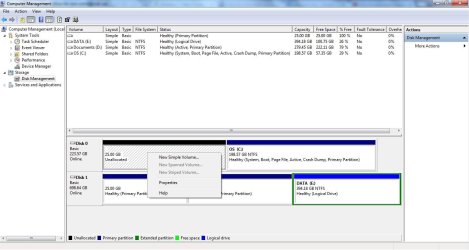
Unallocated 25GB on new SSD; Want to merge/use it
I recently installed a new SSD and cloned the partition with the OS from my old HDD to the SSD. I used Macrium Reflect to migrate the partition however, the SSD somehow reserved 25GB by itself. The options I have for the partition is "delete volume" or "new simple volume" in Computer Management. What should I do? Does using the delete option in computer management allow me to merge the 25GB with the rest of my SSD?
Additional information:
I don't know whether this is relevant but my computer's brand is Asus and it came with a built-in recovery partition which is also 25GB. I don't know whether the migration process reserved space for that.
The SSD is a OCZ ARC 100 Series 240 GB.
Thank you for reading this!
I recently installed a new SSD and cloned the partition with the OS from my old HDD to the SSD. I used Macrium Reflect to migrate the partition however, the SSD somehow reserved 25GB by itself. The options I have for the partition is "delete volume" or "new simple volume" in Computer Management. What should I do? Does using the delete option in computer management allow me to merge the 25GB with the rest of my SSD?
Additional information:
I don't know whether this is relevant but my computer's brand is Asus and it came with a built-in recovery partition which is also 25GB. I don't know whether the migration process reserved space for that.
The SSD is a OCZ ARC 100 Series 240 GB.
Thank you for reading this!
Attachments
Last edited:
My Computer
At a glance
Windows 7 Home PremiumIntel i5-2410M @ 2.30 GHz8 GBsNvidia GT 540M 1GB VRam
- Computer type
- Laptop
- Computer Manufacturer/Model Number
- Asus
- OS
- Windows 7 Home Premium
- CPU
- Intel i5-2410M @ 2.30 GHz
- Memory
- 8 GBs
- Graphics Card(s)
- Nvidia GT 540M 1GB VRam
- Hard Drives
- OCZ ARC 100 Series 240GB | WDC 750GB


