
SamuelParent
New member
- Local time
- 7:49 PM
- Messages
- 10
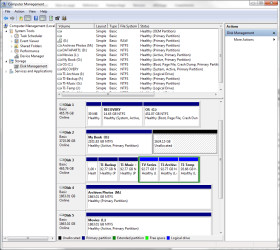
see attached. I've just bought this new 4TB HDD (disk 2) to replace other 500GB (disk 3).
After having viewed a few tutorials on YouTube I did "Shrink Volume" on the primary partition (when that's all there was) and created the 1.6GB space.
When right clicking on the Unallocated space, all options except Parameters and Help are greyed, so I cannot click on New Simple Volume which all tutorials indicate I must do to give it a drive letter.
If I try to Extend Volume on the primpary partition, I get the following error message:
Only the first 2TB are usable on large MBR disks.
Cannot create partitions beyond the 2TB mark, nor convert the disk to dynamic.
Does this mean the 1.6GB unallocated space is lost?
please help.
After having viewed a few tutorials on YouTube I did "Shrink Volume" on the primary partition (when that's all there was) and created the 1.6GB space.
When right clicking on the Unallocated space, all options except Parameters and Help are greyed, so I cannot click on New Simple Volume which all tutorials indicate I must do to give it a drive letter.
If I try to Extend Volume on the primpary partition, I get the following error message:
Only the first 2TB are usable on large MBR disks.
Cannot create partitions beyond the 2TB mark, nor convert the disk to dynamic.
Does this mean the 1.6GB unallocated space is lost?
please help.
Attachments
My Computer
At a glance
Windows 7 home premium 64biti7 Q7208Gb
- Computer type
- PC/Desktop
- Computer Manufacturer/Model Number
- Dell Studio 1747
- OS
- Windows 7 home premium 64bit
- CPU
- i7 Q720
- Memory
- 8Gb
- Hard Drives
- 2x 465.76 GB NTSF internal
1x 3,725.99 GB external
1x 465.76 GB external
2x 1,863 GB external
- Antivirus
- Avast
- Browser
- Chrome

