
unallocated space

mjunaiddar

New member
Local time
11:02 PM
Messages
2
Hi all,

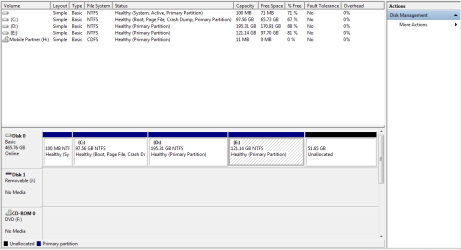
i wanted to install ubuntu 10 dual boot with windows 7, for that i used disk manager to shirnk my e:. all went fine but the new partition is unallocated and m unable to install over it ubuntu nor can format or do anything with it.

i want to install ubuntu on this and for that need help.

attaching the disk manager screen


Regards
JD
 

Attachments
  • disk.png
    disk.png
    15.1 KB · Views: 183

My Computer

Computer Manufacturer/Model Number
HP Compaq
OS
Windows 7 Ultimate 32 bit
CPU
2.13 GHz Core i3
Motherboard
-
Memory
2 GB
Graphics Card(s)
nil
Sound Card
-
Monitor(s) Displays
-
Hard Drives
500 GB

My Computer

Computer type
PC/Desktop
Computer Manufacturer/Model Number
Custom Build
OS
Windows 10 Pro x64
CPU
Intel Core i5 4440 @Stock
Motherboard
Gigabyte Z97 D3H
Memory
4 x 4GB HyperX Fury DDR3
Graphics Card(s)
Gigabyte GTX 1050Ti O4G
Sound Card
Integrated
Monitor(s) Displays
Dell P2417H
Screen Resolution
1920 x 1080
Hard Drives
Samsung EVO 850 120GB / Toshiba DT01ACA050 1TB 7200prm 32MB
PSU
Riotoro Onyx 750W
Case
NZXT H500 Black-Red
Cooling
Stock CPU + NZXT 120mm + 2x120mm red fans
Keyboard
Modecom Volcano Lanparty
Mouse
Asus ROG Gladius / DeepCool E-Pad Plus
Internet Speed
DOCSIS 50/3 Mbit
Browser
Google Chrome
Other Info
Asus K55VJ(i5 3210M, GT635M / 2GB, 8GB DDR3, 500GB HDD)
thanks stalker for ur reply.. i seen the tutorial its good but not for me.. it is saying that system already have free space... my issue is that the unallocated space is not assumed as free space by ubuntu installer and its not letting me install it over that one..

i do remember i managed to fix same issue with my old laptop when i installed MAC over it. the mac installer was able to remove the unallocated space and used it for itself.

I need some more help :S
 

My Computer

Computer Manufacturer/Model Number
HP Compaq
OS
Windows 7 Ultimate 32 bit
CPU
2.13 GHz Core i3
Motherboard
-
Memory
2 GB
Graphics Card(s)
nil
Sound Card
-
Monitor(s) Displays
-
Hard Drives
500 GB
Partition Wizard Bootable CD should easily enable you to extend your last primary partition into the unallocated.

Ever thought of putting Ubuntu on a separate disk and BIOS booting, making a clean separation from Windows 7? Just that many people seem to end having problems with W7 Ubuntu dual boots. But the tutorial referred to provides good guidance for what you're planning.
 

My Computer

Computer type
PC/Desktop
Computer Manufacturer/Model Number
Own build
OS
Windows 7x64 Home Premium SP1
CPU
Intel i7 2600k
Motherboard
ASUS P8Z68 Deluxe
Memory
G.Skill Ripjaws (DDR3-1600) 2x4GB
Graphics Card(s)
Nvidia GeForce GTS 450; Intel HD Graphics 3000(GT2+)
Monitor(s) Displays
Dell Ultrasharp IPS panel U2311H, Samsung SyncMaster P2350
Screen Resolution
1920x1080
Hard Drives
Samsung 850 Pro SSD 256GB, Samsung SSD 840 120GB, Seagates 1TB Barracuda ST31000528AS x2
PSU
Seasonic M12II 520W
Case
Lian Li Lancool PC-K60
Cooling
Case: 1x120mm, 3x140mm CPU: Hyper 212+
Keyboard
Logitech MK520 (wireless)
Mouse
Logitech MK520
Internet Speed
6-7 Mbps
Antivirus
Norton Security Premium, Malwarebytes on 2 (MSE on 3rd PC)
Browser
FireFox
Other Info
Audio: Logitech Z523 2.1
Hello mjunaiddar, welcome to Seven Forums!


There is a MBR partition limit imposed by Windows of 4 Primary partitions total or 3 Primary and a single Extended partition, inside the Extended partition there can be as many Logical drives as there are available drive letters.

The only real way to get around your situation would be to delete the first Primary, the 100MB "System Active" partition and then you could use the 51.65GB unallocated space to install Linux to.

If it were my system I would not do it as you would be asking for all kinds of trouble with booting between Windows and Linux but if you want to have a go it is possible to do.

Start by following Option Two of this tutorial at the link below exactly and do everything the same and in order to delete the 100MB partition and reclaim the space into the C: partition; when you have accomplished all that and Windows 7 is booting, post back another snip of Windows disk management and we'll pick it up there again to help you finish up.

Partition Wizard : Use the Bootable CD
 

My Computer

Computer Manufacturer/Model Number
* BFK Customs *
OS
W 7 64-bit Ultimate
CPU
Intel Q9550 Yorkfield
Motherboard
ASUS P5Q Pro
Memory
8GB Dominator 8500C5D
Graphics Card(s)
ATI : XFX 5870
Sound Card
Realtek HD Audio 7-1
Monitor(s) Displays
1x 47" LCD HDMI & 3x 26" LCD HDMI
Screen Resolution
1920x1080P & 1920x1200
Hard Drives
1x 80GB Intel X25-M G2 SSD : 1x 500GB & 1x 640GB WD Caviar Black(s)
PSU
Corsair 620HX
Case
Cooler Master RC-690
Cooling
Tuniq Tower 120, 2x 140mm and 3x 120mm case fans
Keyboard
Microsoft 500
Mouse
Razer Diamondback 3G
Internet Speed
14 Mb/s
Other Info
1x Koutech 3Gb/s SATA HDD Hot Swap Rack
There is a MBR partition limit imposed by Windows of 4 Primary partitions total or 3 Primary and a single Extended partition, inside the Extended partition there can be as many Logical drives as there are available drive letters.
I may have been uncertain what the OP wanted. I thought he simply wanted to recover the unallocated. If he wants another partition out of the unallocated then I go along with your comments.

I already advised him about the risks of dual booting Ubuntu.
 
Last edited:

My Computer

Computer type
PC/Desktop
Computer Manufacturer/Model Number
Own build
OS
Windows 7x64 Home Premium SP1
CPU
Intel i7 2600k
Motherboard
ASUS P8Z68 Deluxe
Memory
G.Skill Ripjaws (DDR3-1600) 2x4GB
Graphics Card(s)
Nvidia GeForce GTS 450; Intel HD Graphics 3000(GT2+)
Monitor(s) Displays
Dell Ultrasharp IPS panel U2311H, Samsung SyncMaster P2350
Screen Resolution
1920x1080
Hard Drives
Samsung 850 Pro SSD 256GB, Samsung SSD 840 120GB, Seagates 1TB Barracuda ST31000528AS x2
PSU
Seasonic M12II 520W
Case
Lian Li Lancool PC-K60
Cooling
Case: 1x120mm, 3x140mm CPU: Hyper 212+
Keyboard
Logitech MK520 (wireless)
Mouse
Logitech MK520
Internet Speed
6-7 Mbps
Antivirus
Norton Security Premium, Malwarebytes on 2 (MSE on 3rd PC)
Browser
FireFox
Other Info
Audio: Logitech Z523 2.1
Back
Top