
You are using an out of date browser. It may not display this or other websites correctly.
You should upgrade or use an alternative browser.
You should upgrade or use an alternative browser.
unalocated disk space after install.
- Thread starter Rosco997
- Start date


- Local time
- 4:42 AM
- Messages
- 16,784
Depends where the unallocated space is - is it on the Left in the Disk Management window?
If you post a screenshot of Disk Management, it would help.
If you post a screenshot of Disk Management, it would help.
My Computers
System One System Two
-
- Computer type
- PC/Desktop
- OS
- 7 X64
- CPU
- i5 8400
- Motherboard
- gigabyte b365m ds3h
- Memory
- 2x8gb 3200mhz
- Hard Drives
- various
- PSU
- pure power 11 400w cm
- Case
- Coolermaster
- Cooling
- cryorig m9i
-
- Computer type
- PC/Desktop
- OS
- 7x64
- CPU
- g5400
- Motherboard
- ga b365m ds3h
- Memory
- 8gb ddr4 2400
- PSU
- xfx pro 450w
Is it the whole of that drive? Theres no other partitions, just that one?
If so then select that partition in the windows 7 installer and the installer will set up the partition and format it for you.
If so then select that partition in the windows 7 installer and the installer will set up the partition and format it for you.
My Computer
- Computer Manufacturer/Model Number
- self built
- OS
- Windows 7 Professional 64-bit
- CPU
- Intel E8400 3GHz
- Motherboard
- Intel DX48BT2
- Memory
- Kingston PC3-10700H 4Gb
- Graphics Card(s)
- XFX Radeon HD 5850 BlackEd.
- Sound Card
- Asus Xonar DG
- Monitor(s) Displays
- 2x Samsung SM-T220HD 22"
- Screen Resolution
- 1680x1050 on two monitors
- Hard Drives
- OCZ Vertex 2 120gb 3.5" (OS)
Seagate Momentus XT 500gb
Samsung F3 1Tb (games)
2x Samsung F1 1Tb
- PSU
- Thermaltake ToughPower 850w
- Case
- Thermaltake Armor
- Cooling
- Scythe Mugen II
- Keyboard
- Microsoft Comfort Curve USB
- Mouse
- Razer Diamondback 3G
- Internet Speed
- 8128/443
Depends where the unallocated space is - is it on the Left in the Disk Management window?
If you post a screenshot of Disk Management, it would help.
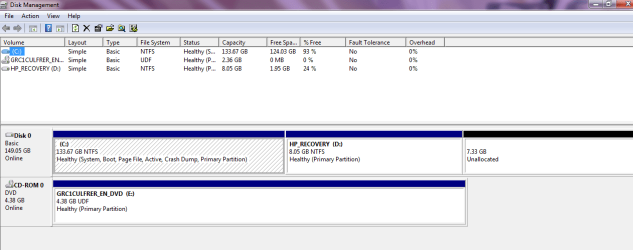
Here...

My Computer
- OS
- Windows 7
- Local time
- 4:42 AM
- Messages
- 16,784
You need a 3rd party partitioner to move the unallocated space to the left of the Recovery partition before including it in C.
Normally, I wouldn't suggest doing that as it might make it difficult to access the recovery partition in the normal way - if you ever need to.
Was the recovery partition always where it is now?
Normally, I wouldn't suggest doing that as it might make it difficult to access the recovery partition in the normal way - if you ever need to.
Was the recovery partition always where it is now?
My Computers
System One System Two
-
- Computer type
- PC/Desktop
- OS
- 7 X64
- CPU
- i5 8400
- Motherboard
- gigabyte b365m ds3h
- Memory
- 2x8gb 3200mhz
- Hard Drives
- various
- PSU
- pure power 11 400w cm
- Case
- Coolermaster
- Cooling
- cryorig m9i
-
- Computer type
- PC/Desktop
- OS
- 7x64
- CPU
- g5400
- Motherboard
- ga b365m ds3h
- Memory
- 8gb ddr4 2400
- PSU
- xfx pro 450w

Hello Rosco,
You might see if you are able to use METHOD TWO with step 6 in this tutorial to extend the C: drive into all of that unallocated space.
Hope this helps,
Shawn
You might see if you are able to use METHOD TWO with step 6 in this tutorial to extend the C: drive into all of that unallocated space.
Hope this helps,
Shawn
My Computer
- Computer type
- PC/Desktop
- Computer Manufacturer/Model Number
- Self built custom
- OS
- 64-bit Windows 11 Pro for Workstations
- CPU
- Intel i7-8700K OC'd to 5 GHz
- Motherboard
- ASUS ROG Maximus XI Formula Z390
- Memory
- 64 GB (4x16GB) G.SKILL TridentZ RGB DDR4 3600 MHz
- Graphics Card(s)
- ASUS ROG-STRIX-GTX1080TI-O11G-GAMING
- Sound Card
- Integrated
- Monitor(s) Displays
- 2 x Samsung Odyssey G7 27"
- Screen Resolution
- 2560x1440
- Hard Drives
- 1TB Samsung 990 PRO M.2,
4TB Samsung 990 PRO PRO M.2,
TerraMaster F8 SSD Plus NAS
- PSU
- Seasonic Prime Titanium 850W
- Case
- Thermaltake Core P3
- Cooling
- Corsair Hydro H115i
- Keyboard
- Logitech wireless K800
- Mouse
- Logitech MX Master 4
- Internet Speed
- 2 Gb/s Download and 100 Mb/s Upload
- Antivirus
- Malwarebyte Anti-Malware Premium
- Browser
- Google Chrome
- Other Info
- Logitech Z625 speaker system,
Logitech BRIO 4K Pro webcam,
HP Color LaserJet Pro MFP M477fdn,
APC SMART-UPS RT 1000 XL - SURT1000XLI,
Galaxy S23 Plus phone
See i cant extend the C volume, cus the recovery is on the way...
And yes... the partition that is unallocated was created by me....before there was just C: and the recovery, but I made the partition to install 7 beta. =(
And yes... the partition that is unallocated was created by me....before there was just C: and the recovery, but I made the partition to install 7 beta. =(
My Computer
- OS
- Windows 7
- Local time
- 4:42 AM
- Messages
- 16,784
If you are desperate to incorporate that unallocated space - first move it to the right of C i.e. to the left of the recovery partition- you could use either of these two bootable apps:
The one linked near the top of this tutorial:
Dual Boot using free partitioning software - Vista Forums
OR Gparted SourceForge.net: GParted: Files
Then use 7 Disk Management to extend C to incorporate the unallocated space.
The one linked near the top of this tutorial:
Dual Boot using free partitioning software - Vista Forums
OR Gparted SourceForge.net: GParted: Files
Then use 7 Disk Management to extend C to incorporate the unallocated space.
Last edited:
My Computers
System One System Two
-
- Computer type
- PC/Desktop
- OS
- 7 X64
- CPU
- i5 8400
- Motherboard
- gigabyte b365m ds3h
- Memory
- 2x8gb 3200mhz
- Hard Drives
- various
- PSU
- pure power 11 400w cm
- Case
- Coolermaster
- Cooling
- cryorig m9i
-
- Computer type
- PC/Desktop
- OS
- 7x64
- CPU
- g5400
- Motherboard
- ga b365m ds3h
- Memory
- 8gb ddr4 2400
- PSU
- xfx pro 450w