Unassociate a program with extension

sayanb06

New member
Local time
2:33 PM
Messages
17
Whenever I find a .dat, it's associated with Corel WordPerfect and I want to remove that. Please help me do that.
 

My Computer

Computer Manufacturer/Model Number
Sony
OS
Windows 7 Ultimate x64
Memory
4 gb
Graphics Card(s)
NVIDIA
Screen Resolution
1920*1080
I also have the same problem with .jar format it always opens with notepad.
It seems that the solution you have given is not working for me.
When i type the command and press enter nothing happened.
 

My Computer

Computer type
Laptop
Computer Manufacturer/Model Number
Dell Insperon N5010
OS
Windows 7 Ultimate x64
CPU
i3 M380 2.53GHz
Motherboard
TOSHIBA MK5076GSX
Memory
4 Gb
Graphics Card(s)
intel HD
Sound Card
IDT
Screen Resolution
1366x768
Keyboard
Standerd PS2
Antivirus
ESET Smart Security 7
Browser
Google Chrome
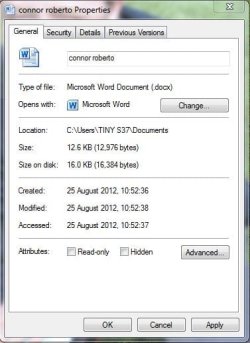
Have you tried right-clicking the file (Properties) and then changing the type of program it opens with?

Will upload a screenshot (:

Using my step-brothers computer, I'm sorry for any stupid files I use as examples
 

Attachments

  • Word.JPG
    Word.JPG
    35.8 KB · Views: 2

My Computer

Computer type
Laptop
OK that's pretty fair. but i want to make it completely free.
i mean i don't want .jar format to associate with any program.

Do you know some other way to do it.?
Have you tried it? is it working for you?:sarc:
 

My Computer

Computer type
Laptop
Computer Manufacturer/Model Number
Dell Insperon N5010
OS
Windows 7 Ultimate x64
CPU
i3 M380 2.53GHz
Motherboard
TOSHIBA MK5076GSX
Memory
4 Gb
Graphics Card(s)
intel HD
Sound Card
IDT
Screen Resolution
1366x768
Keyboard
Standerd PS2
Antivirus
ESET Smart Security 7
Browser
Google Chrome
Ok let me try and tell you.

No dude atleast you are trying and that's enough for me.;)
 

My Computer

Computer type
Laptop
Computer Manufacturer/Model Number
Dell Insperon N5010
OS
Windows 7 Ultimate x64
CPU
i3 M380 2.53GHz
Motherboard
TOSHIBA MK5076GSX
Memory
4 Gb
Graphics Card(s)
intel HD
Sound Card
IDT
Screen Resolution
1366x768
Keyboard
Standerd PS2
Antivirus
ESET Smart Security 7
Browser
Google Chrome
The first link supposed to work for me but it dint
Unfortunately the program Shawn suggested don't have the .jar format.
Hope it help sayanb06.
:)Anyway thanks x BlueRobot for trying.
 

My Computer

Computer type
Laptop
Computer Manufacturer/Model Number
Dell Insperon N5010
OS
Windows 7 Ultimate x64
CPU
i3 M380 2.53GHz
Motherboard
TOSHIBA MK5076GSX
Memory
4 Gb
Graphics Card(s)
intel HD
Sound Card
IDT
Screen Resolution
1366x768
Keyboard
Standerd PS2
Antivirus
ESET Smart Security 7
Browser
Google Chrome
what about making a copy of some random exe (say make a self-extracting archive and leave it on the desktop or use some portable program you have around, or copy an exe from some program you have, does not matter), then you tell the computer to open the file with that, then delete the random exe?

Works if I do it with a jpeg on my machine. after I deleted the thing, the "what you want to open this with?" window appears when I try to open the jpeg.
 

My Computer

Computer type
PC/Desktop
Computer Manufacturer/Model Number
custom built
OS
Win 7 Pro 64-bit 7601
CPU
AMD Phenom 9650 QuadCore, revision DR-B3
Motherboard
ASUS M4A78
Memory
5 GB yes I run 2x 2GB and 1x 1GB, different brand, spank me.
Graphics Card(s)
NVIDIA GeForce 9800 GT 512 Mb, unknown manufacturer.
Sound Card
Crappy Realtek Integrated Audio
Monitor(s) Displays
Fujitsu Siemens P19-3P
Screen Resolution
1280 x 1024 x 32 bits @ 60 Hz Oh yeah, 4:3 rocks!
Hard Drives
(1) MAXTOR S TM3320613AS SATA Disk Device (2) STM35004 18AS SATA Disk Device (3) TOSHIBA USB 2.5"-HDD
PSU
whatever, around 450w
Case
Scavenged from old company PC, 10+ years old
Cooling
CPU fan, GPU fan, case fan, nothing fancy
Keyboard
Microsoft, PS/2, white.
Mouse
Optical, logitec.
Internet Speed
effective max speeds: 70-ish kB/s down 30-ish kB/s up
Antivirus
Avira, free edition.
Browser
Firefox with FXChrome to make it look like Google Chrome :P
Other Info
Was discarded by previous owner due to "horrible performance".
Was running Win Xp from a IDE drive. Yeah. Was a pain.
SATA II drive and Win7 and it zips away! Yay!
The first link supposed to work for me but it dint
Unfortunately the program Shawn suggested don't have the .jar format.
Hope it help sayanb06.
:)Anyway thanks x BlueRobot for trying.

No problem, sorry couldn't help any further, maybe as .jar is a combination of Java class files (or is it .java source files? O.o cant' remember) and not a individual file is the reason why a file extension couldn't be found within the program.
 

My Computer

Computer type
Laptop
Hum. i also thought that.
anyways i am not much worry about it as long as it is not gona come in my way.
and i am not going back to work with java again (as photoshop is the new frend).
So who cares about a single file extantion which you have nothing to do with.
Again thanx for your efforts :)
 

My Computer

Computer type
Laptop
Computer Manufacturer/Model Number
Dell Insperon N5010
OS
Windows 7 Ultimate x64
CPU
i3 M380 2.53GHz
Motherboard
TOSHIBA MK5076GSX
Memory
4 Gb
Graphics Card(s)
intel HD
Sound Card
IDT
Screen Resolution
1366x768
Keyboard
Standerd PS2
Antivirus
ESET Smart Security 7
Browser
Google Chrome
did you see my post here? What I did works for me.
 

My Computer

Computer type
PC/Desktop
Computer Manufacturer/Model Number
custom built
OS
Win 7 Pro 64-bit 7601
CPU
AMD Phenom 9650 QuadCore, revision DR-B3
Motherboard
ASUS M4A78
Memory
5 GB yes I run 2x 2GB and 1x 1GB, different brand, spank me.
Graphics Card(s)
NVIDIA GeForce 9800 GT 512 Mb, unknown manufacturer.
Sound Card
Crappy Realtek Integrated Audio
Monitor(s) Displays
Fujitsu Siemens P19-3P
Screen Resolution
1280 x 1024 x 32 bits @ 60 Hz Oh yeah, 4:3 rocks!
Hard Drives
(1) MAXTOR S TM3320613AS SATA Disk Device (2) STM35004 18AS SATA Disk Device (3) TOSHIBA USB 2.5"-HDD
PSU
whatever, around 450w
Case
Scavenged from old company PC, 10+ years old
Cooling
CPU fan, GPU fan, case fan, nothing fancy
Keyboard
Microsoft, PS/2, white.
Mouse
Optical, logitec.
Internet Speed
effective max speeds: 70-ish kB/s down 30-ish kB/s up
Antivirus
Avira, free edition.
Browser
Firefox with FXChrome to make it look like Google Chrome :P
Other Info
Was discarded by previous owner due to "horrible performance".
Was running Win Xp from a IDE drive. Yeah. Was a pain.
SATA II drive and Win7 and it zips away! Yay!
The easiest way is by directly editing the file associations in the registry. Open an elevated regedit, go to HKEY_CLASSES_ROOT\.jar (the last key is a point plus the extension) and delete it. It completely blows up the association and makes the file type unknown again.
You may need to restart explorer/log off/reboot to see the change.

An alternative way is to use some program to edit the file associations for you. A good option is FileTypesMan - Alternative to 'File Types' manager of Windows

Unfortunately, the screen for touching associations in a nicer way was removed in Vista, so you have to do workarounds.
 

My Computer

Computer type
Laptop
Computer Manufacturer/Model Number
Toshiba Sattelite A665-S6092
OS
Windows 7 Ultimate x64
CPU
Intel Core i7-740QM
Memory
8 GB DDR3
Graphics Card(s)
NVIDIA GeForce 330GT
Screen Resolution
1366x768
Hard Drives
Samsung 840 SSD 500GB
1TB USB3 external HD
Cooling
Coolermaster Notepal U3 notebook cooling pad
Internet Speed
3mbps ASDL
Antivirus
ClamWin 0.98.7
Browser
Opera 12.17 x86 (main), Firefox 38 (sec), IE11 (last resort)
Back
Top