

- Local time
- 7:15 PM
- Messages
- 744
Okay so I need to reinstall my Windows 7 Ultimate x64 bit after having issues wityh windows update and SP1.
So here is my problem:
I have a 500GB hdd partitioned as follows:
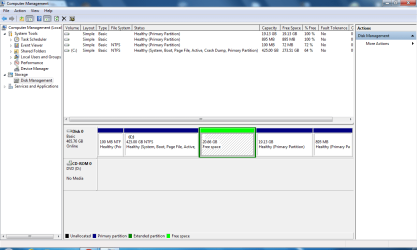
Basicly I have:
The 20.66GB extended partition, the green one wasn't there until this morning:sarc: and should not be there.
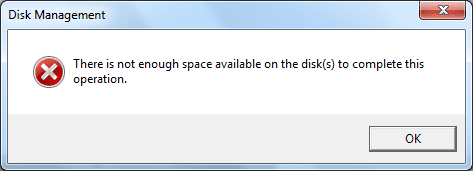
I cant delete this partition from Disk Management at all. It comes up with this error:
Now: I can delete my Ubuntu partitions easily, I have PartedMagic on hand, but I run into an dilemma, I am using the GRUB 2 boot loader to boot into Ubuntu or Windows, the Windows boot loader is still present but is being chain loaded:
Ubuntu<------Grub 2 loader---->Windows loader---->Windows 7
now, if I delete my Ubuntu partition I risk running into boot problems. Also, I have about 100GB of data that I cant move because this is in a laptop. This means I would need to uninstall all my application and shrink my current "C" partition. Then re-install windows with the 100MB emergency partition all with leaving the shrunken partition intact with my data.
Then after reinstall I can move my data to the new windows "C" partition, delete the old shrunken partition, and extend the new partition.
Complicated, maybe.
So any thoughts, just want to make sure there are not any mishaps during re-install.
So here is my problem:
I have a 500GB hdd partitioned as follows:
Basicly I have:
- Windows 100MB emergency partition
- Windows 7 "C" drive 425GB
- 20.66GB extended partition, did not exist until this morning

- 19.13GB to Ubuntu 10.10
- 895MB Swap space(Ubuntu)
The 20.66GB extended partition, the green one wasn't there until this morning:sarc: and should not be there.
I cant delete this partition from Disk Management at all. It comes up with this error:
Now: I can delete my Ubuntu partitions easily, I have PartedMagic on hand, but I run into an dilemma, I am using the GRUB 2 boot loader to boot into Ubuntu or Windows, the Windows boot loader is still present but is being chain loaded:
Ubuntu<------Grub 2 loader---->Windows loader---->Windows 7
now, if I delete my Ubuntu partition I risk running into boot problems. Also, I have about 100GB of data that I cant move because this is in a laptop. This means I would need to uninstall all my application and shrink my current "C" partition. Then re-install windows with the 100MB emergency partition all with leaving the shrunken partition intact with my data.
Then after reinstall I can move my data to the new windows "C" partition, delete the old shrunken partition, and extend the new partition.
Complicated, maybe.
So any thoughts, just want to make sure there are not any mishaps during re-install.
My Computer
- Computer type
- PC/Desktop
- Computer Manufacturer/Model Number
- HP Pavilion g7-1350dx
- OS
- Windows 7 Ultimate SP1 x64
- CPU
- AMD A6-3420M APU
- Memory
- 4.0 Gb DDR3 838 MHz
- Graphics Card(s)
- AMD Radeon HD 6520G
- Sound Card
- IDT HD Audio
- Screen Resolution
- 1600x 900
- Hard Drives
- 500GB Hitachi HTS547550A9E384

