Undefined network, new router dlinkgo go-rt-n150

pagul

New member
Local time
4:04 AM
Messages
3
Hi,

as mentioned above, I've got some problemes making my new router working with my computer with win7 although it works fine with my mobile phone. So: I added my computer to the list of devices that are connected to the router. I updated router's firmware to the latest version. I tried to use another channel than 11 but after this, my computer couldn't connect to the network. What am I supposed to do now? It still says the network is undefined.

I also try to reset and set up everything again but still, no way to connect to the Internet using WiFi only.
 

My Computer My Computer

At a glance

Windows 7 Home 64 bit
OS
Windows 7 Home 64 bit
Hi,

as mentioned above, I've got some problemes making my new router working with my computer with win7 although it works fine with my mobile phone. So: I added my computer to the list of devices that are connected to the router. I updated router's firmware to the latest version. I tried to use another channel than 11 but after this, my computer couldn't connect to the network. What am I supposed to do now? It still says the network is undefined.

I also try to reset and set up everything again but still, no way to connect to the Internet using WiFi only.

Did you try going into the Network and Sharing Center then to Manage Wireless Networks and filled out the profile for this Wireless Connection?

You need to type in the SSID, type of Security and encryption plus the wireless password.

It works best to type in the same security as the router is set up to use, WPA2 with AES encryption etc.
 

My Computer My Computer

At a glance

Windows 7 Ult, Windows 8.1 Pro,Q9650-4.275GHz, E8600 4.5GHz, E6750-3.8GHzG.Skill PC2 9600 1200Mhz 5 5 5 15 2TGTX480
Computer type
PC/Desktop
Computer Manufacturer/Model Number
Home built
OS
Windows 7 Ult, Windows 8.1 Pro,
CPU
Q9650-4.275GHz, E8600 4.5GHz, E6750-3.8GHz
Motherboard
Evga 780i FTW
Memory
G.Skill PC2 9600 1200Mhz 5 5 5 15 2T
Graphics Card(s)
GTX480
Sound Card
Asus Xonar D2
Monitor(s) Displays
HannsG
Screen Resolution
1680X1050
Hard Drives
GSkill Phoenix Pro 120GB SSD
PSU
ThermalTake Toughpower 1000Watt modular
Case
ThermalTake XaserV
Cooling
Xigmatek S1283
Keyboard
Logitech G15
Mouse
Logitech G9
Internet Speed
T1
Did you try going into the Network and Sharing Center then to Manage Wireless Networks and filled out the profile for this Wireless Connection?

You need to type in the SSID, type of Security and encryption plus the wireless password.

It works best to type in the same security as the router is set up to use, WPA2 with AES encryption etc.
As I looked there, windows created everything without my help. Password, the type of security and so on are the same as the router's ones.
 

My Computer My Computer

At a glance

Windows 7 Home 64 bit
OS
Windows 7 Home 64 bit
Did you try going into the Network and Sharing Center then to Manage Wireless Networks and filled out the profile for this Wireless Connection?

You need to type in the SSID, type of Security and encryption plus the wireless password.

It works best to type in the same security as the router is set up to use, WPA2 with AES encryption etc.
As I looked there, windows created everything without my help. Password, the type of security and so on are the same as the router's ones.

Windows certainly can't type in the wireless password without your help. Although clicking on your wireless connection will sometimes gather all the required information it's best to define them manually by going into Manage Wireless Networks. This is what it means to define the settings.

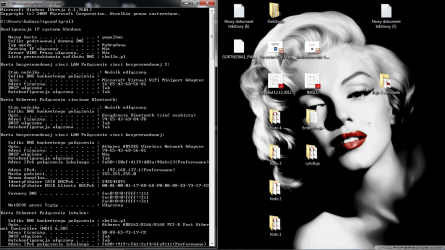
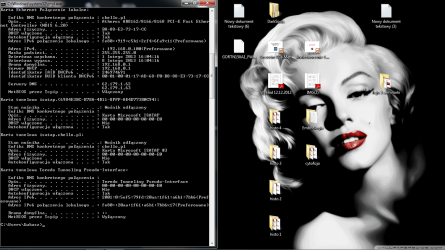
If you are still having problems please post a screen shot of the ipconfig/all from this machine.
 

My Computer My Computer

At a glance

Windows 7 Ult, Windows 8.1 Pro,Q9650-4.275GHz, E8600 4.5GHz, E6750-3.8GHzG.Skill PC2 9600 1200Mhz 5 5 5 15 2TGTX480
Computer type
PC/Desktop
Computer Manufacturer/Model Number
Home built
OS
Windows 7 Ult, Windows 8.1 Pro,
CPU
Q9650-4.275GHz, E8600 4.5GHz, E6750-3.8GHz
Motherboard
Evga 780i FTW
Memory
G.Skill PC2 9600 1200Mhz 5 5 5 15 2T
Graphics Card(s)
GTX480
Sound Card
Asus Xonar D2
Monitor(s) Displays
HannsG
Screen Resolution
1680X1050
Hard Drives
GSkill Phoenix Pro 120GB SSD
PSU
ThermalTake Toughpower 1000Watt modular
Case
ThermalTake XaserV
Cooling
Xigmatek S1283
Keyboard
Logitech G15
Mouse
Logitech G9
Internet Speed
T1
Here you go:
 

Attachments

  • ipconfigall1.png
    ipconfigall1.png
    143.5 KB · Views: 18
  • ipconfigall2.png
    ipconfigall2.png
    139 KB · Views: 4

My Computer My Computer

At a glance

Windows 7 Home 64 bit
OS
Windows 7 Home 64 bit
The wireless connection doesn't have appear to have DHCP enabled, but I can't tell for sure because of the language?

Not to mention it's missing other information, like the default gateway and the DNS servers are not showing up as they should be.

You need to check the adaptors properties for the Atheros 9285 to ensure that DHCP is enabled.

I'm sure you are aware that the wireless won't work if Ethernet is enabled and connected which appears to be the case.

If you haven't yet, you need to go into the Routers wireless set up page and define the wireless connection settings there.
 

My Computer My Computer

At a glance

Windows 7 Ult, Windows 8.1 Pro,Q9650-4.275GHz, E8600 4.5GHz, E6750-3.8GHzG.Skill PC2 9600 1200Mhz 5 5 5 15 2TGTX480
Computer type
PC/Desktop
Computer Manufacturer/Model Number
Home built
OS
Windows 7 Ult, Windows 8.1 Pro,
CPU
Q9650-4.275GHz, E8600 4.5GHz, E6750-3.8GHz
Motherboard
Evga 780i FTW
Memory
G.Skill PC2 9600 1200Mhz 5 5 5 15 2T
Graphics Card(s)
GTX480
Sound Card
Asus Xonar D2
Monitor(s) Displays
HannsG
Screen Resolution
1680X1050
Hard Drives
GSkill Phoenix Pro 120GB SSD
PSU
ThermalTake Toughpower 1000Watt modular
Case
ThermalTake XaserV
Cooling
Xigmatek S1283
Keyboard
Logitech G15
Mouse
Logitech G9
Internet Speed
T1
Back
Top