
Solved Undeletable 0 Byte File

aozgolo

New member
Local time
4:02 PM
Messages
18
Persist.jpg


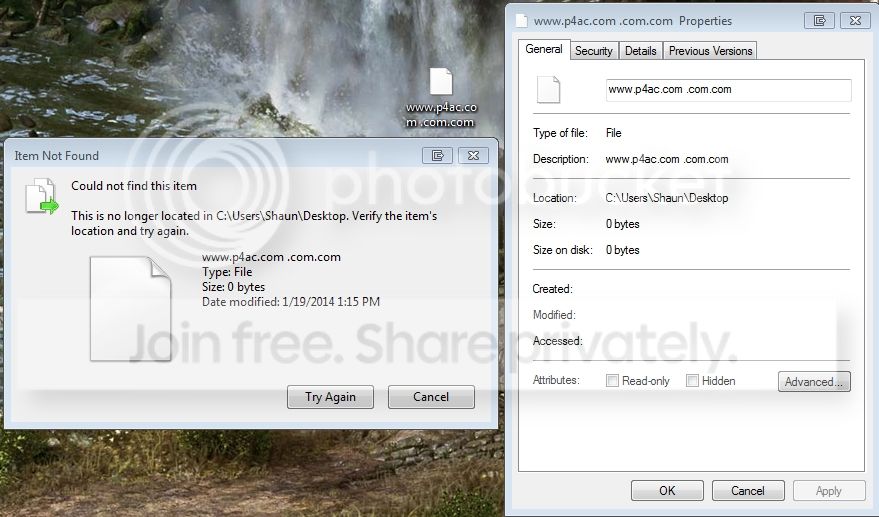
I've had this file on my computer desktop for a couple of months now, it is titled "www.p4ac.com .com.com ", is 0 bytes, has no file association, and cannot be removed by any process I have thus tried.

-F5 Refresh does nothing
-Delete shows the error above that it could not find the item
-Tools like File Assassin and Eraser cannot remove the item
-Safe Mode & Logged in under admin doesn't allow its removal

Whatever this is and however it got there, it's not able to be found by anything, it simply doesn't actually exist except in "name only" but this ghost file can't be removed through any means I've tried thus far, and it's been there for months!

Any advice to resolve this issue would be most helpful!
 

My Computer

Computer type
PC/Desktop
Computer Manufacturer/Model Number
Custom Build
OS
Windows 7 Professional 64Bit
CPU
Intel i7 4790k
Motherboard
ASUS Hero VII Maximus
Memory
16GB
Graphics Card(s)
GeForce GTX 970
PSU
750 Watt
Internet Speed
Cable @ 1.0 MPBS
Antivirus
Norton 360
Browser
Firefox
Did you try making a folder, then put the problem file/folder in that, then try to delete it ?

It looks like a website url, sometimes you have to re create a folder or finish creating it to delete it. Go to that website, save the url and save it in the same place as that 0 byte file, it should ask you to replace the one you have. Just say yes, then try to delete it.
 

My Computer

Computer type
PC/Desktop
Computer Manufacturer/Model Number
Skylake Special #666
OS
Windows 10 Pro x64
CPU
Intel Core i7 6700K
Motherboard
Asus Sabertooth Z170 Mark 1
Memory
GSkill TridentZ RGB 16GB 3600 16-16-16-36
Graphics Card(s)
EVGA GTX 980 Ti SC x2
Sound Card
Realtek High Definition
Monitor(s) Displays
AOC G2460PG
Screen Resolution
1920 x 1080 144Hz
Hard Drives
Samsung 860 Pro 256GB, Seagate Barracuda 4TB x2
PSU
EVGA 1000 P2, EVGA White Custom Braided Cables
Case
Corsair Vengeance C70 Gunmetal Black
Cooling
Corsair H100i v2, Corsair ML120 x2, Thermal Grizzly Kryonaut
Keyboard
Logitech G910 Orion Spectrum
Mouse
Logitech G700s
Internet Speed
Verizon Fios Quantum Gateway 75/75
Antivirus
Windows Defender, Malwarebytes Free 3.8.3
Browser
Chrome
Other Info
Corsair SP120 x4, LG Blu-ray Drive, Durabrand HT-395 100 Watt Dolby Digital Amp, Corsair H2100 Wireless 7.1 Headset
Have you attempted to rename the file first? I have a hunch the double .com at the end might be part of the issue. If you can rename it, do so, then attempt to delete it. If it still won't delete but will let you rename, reboot first, then attempt to delete it again.
 

My Computer

Computer type
PC/Desktop
Computer Manufacturer/Model Number
HP Pavillion Elite HPE-590t
OS
Win7 Home Premium x64
CPU
Intel Core i7 Extreme 990X @ 3.47GHz x6
Motherboard
PEGATRON CORPORATION 2A86
Memory
16GB DDR3
Graphics Card(s)
NVidia GeForce GTX460
Monitor(s) Displays
Samsung SyncMaster 2443ewx
Screen Resolution
1920x1200
Hard Drives
160 GB SSD @ 2 TB 7200 Internal
750 GB HP, 2 TB WD, 2 TB Samsung External & 3 TB G-Tech firewire external
It won't allow you to rename it or move it, gives the exact same error.

If I try to create a new file with the exact same name in it and move it to the desktop, it adds that file next to this ghost file without overwriting it, and deleting it still leaves the ghost.

It's definitely a website URL, it's from a website my girlfriend has been to in the past, I know she saved some of the webpages but I have not been able to recreate the same file name through that method.

There is no physical file on my computer basically, so all standard or advanced file operations aren't going to work on it, I need to know specifically what is allowing windows to maintain a non-existent file reference on the desktop? Maybe a MFT issue? I don't really know the intricacies of how the OS works so I have no real clue how to go about removing it.
 

My Computer

Computer type
PC/Desktop
Computer Manufacturer/Model Number
Custom Build
OS
Windows 7 Professional 64Bit
CPU
Intel i7 4790k
Motherboard
ASUS Hero VII Maximus
Memory
16GB
Graphics Card(s)
GeForce GTX 970
PSU
750 Watt
Internet Speed
Cable @ 1.0 MPBS
Antivirus
Norton 360
Browser
Firefox

My Computer

Computer type
Laptop
Computer Manufacturer/Model Number
Employer provided Dell Latitude
OS
W7 Pro SP1 64bit
CPU
i7
Memory
8GB
Graphics Card(s)
Intel HD Graphics
Hard Drives
crappy SSD
Antivirus
Employer mandated Symantec Endpoint Protection
Browser
Pale Moon 64bit, IE11 64bit & Chrome 64bit

My Computer

Computer type
PC/Desktop
Computer Manufacturer/Model Number
Skylake Special #666
OS
Windows 10 Pro x64
CPU
Intel Core i7 6700K
Motherboard
Asus Sabertooth Z170 Mark 1
Memory
GSkill TridentZ RGB 16GB 3600 16-16-16-36
Graphics Card(s)
EVGA GTX 980 Ti SC x2
Sound Card
Realtek High Definition
Monitor(s) Displays
AOC G2460PG
Screen Resolution
1920 x 1080 144Hz
Hard Drives
Samsung 860 Pro 256GB, Seagate Barracuda 4TB x2
PSU
EVGA 1000 P2, EVGA White Custom Braided Cables
Case
Corsair Vengeance C70 Gunmetal Black
Cooling
Corsair H100i v2, Corsair ML120 x2, Thermal Grizzly Kryonaut
Keyboard
Logitech G910 Orion Spectrum
Mouse
Logitech G700s
Internet Speed
Verizon Fios Quantum Gateway 75/75
Antivirus
Windows Defender, Malwarebytes Free 3.8.3
Browser
Chrome
Other Info
Corsair SP120 x4, LG Blu-ray Drive, Durabrand HT-395 100 Watt Dolby Digital Amp, Corsair H2100 Wireless 7.1 Headset

My Computer

Computer type
PC/Desktop
Computer Manufacturer/Model Number
Custom Build
OS
Windows 7 Professional 64Bit
CPU
Intel i7 4790k
Motherboard
ASUS Hero VII Maximus
Memory
16GB
Graphics Card(s)
GeForce GTX 970
PSU
750 Watt
Internet Speed
Cable @ 1.0 MPBS
Antivirus
Norton 360
Browser
Firefox
Sorry for the necro but the link to the video is no longer valid. I have the same exact problem. How was it solved?
 

My Computer

Computer type
PC/Desktop
Computer Manufacturer/Model Number
Custom
OS
Windows 7 Ultimate x64
CPU
AMD Phenom 965
Motherboard
Asus Crosshair III
Memory
8gb
Graphics Card(s)
GeForce 650 Ti Boost
Hard Drives
WD Caviar Black
I was able to delete the file by using a wildcard in an elevated DOS cmd prompt.

The file was named "Fan Talk "

Using windows explorer to delete, rename or move the file resulted in the error shown by the OP.

Using a CMD prompt DOS command:

DEL "Fan Talk "

(Used TAB key for automatic filename) resulted in "File not found."

Finally, typing:

DEL Fan*

... did the trick! Just make sure no other important files match that wildcard.
 

My Computer

Computer type
PC/Desktop
Computer Manufacturer/Model Number
Custom
OS
Windows 7 Ultimate x64
CPU
AMD Phenom 965
Motherboard
Asus Crosshair III
Memory
8gb
Graphics Card(s)
GeForce 650 Ti Boost
Hard Drives
WD Caviar Black
Delete undeletable folder/file

For me below worked:
Had folder called "b" with nested folders under it as

E:\b\b\b\b\b\b\xxxx with zero kb

Created empty folder called "a"

Used command robocopy a b /mir to delte all the folders/files under "b"
 

My Computer

Computer type
PC/Desktop
OS
win 10
For such cases I use the program Unlocker .
 

My Computer

OS
Win 7 Ult 64-bit
CPU
AMD Athlon 455 3core
Memory
6 Gb 1333Mhz
Graphics Card(s)
GForce 545 1,5Gb 192-bit
Monitor(s) Displays
LG IPS234
Hard Drives
1tb
Case
Acer Predator
Back
Top