Solved Under performing RAM

realism51

New member
Member
VIP
Local time
1:44 PM
Messages
96
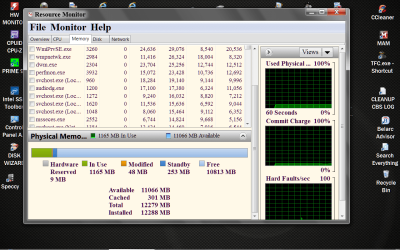
Okay so I have another post going in graphics, this might be related it might not be. I ran a PerformanceTest 8.0 and the Memory Mark is really low.
16GB Corsair XMS3 DDR 3
Bench mark test sets it at 1106 which is equal to 4GB of Kingston PC2-6400 RAM.
Yeah thats pretty bad.
Not sure whats going on, I cant get my memtest disc to boot at all. Not sure what to do at this point. Games get real choppy and mouse cursor lags sometimes.. Thats what Im experiencing. BIOS RAM is set to 1600 1.55Volts ganged
 

Attachments

  • memory.PNG
    memory.PNG
    8.5 KB · Views: 20

My Computer

OS
WIN 7 x64
CPU
AMD Phenom(tm) II X6 1090T Processor
Motherboard
Gigabyte Technology Co., Ltd. GA-970A-UD3
Memory
4X4 DDR3 XMS3 1600mhz
Graphics Card(s)
Radeon HD 7870 Ghz edition 2GB - Have older 6870 in now
Sound Card
VIA Technologies, Inc. ( board generic)
Monitor(s) Displays
Asus 25" something or other
Screen Resolution
1920x1080
Hard Drives
KINGSTON SH103S3240G ATA Device 240GB
WDC WD1001FALS-00J7B0 ATA Device 1TB
PSU
Corsair 750W Gold
Case
No Idea
Cooling
4 Ninja fans, 2 top, 1 front, 1 rear, Hyper 212 + for CPU
Keyboard
Microsoft wave
Mouse
M510
Internet Speed
30/5
Other Info
Award Modular BIOS v6.00PG
Your issue might not be RAM related at all but rather some other hardware issue with your gaming issues. With out any system specs correctly filled in, it's like finding the proverbial needle in the hay stack.
 

My Computer

Computer Manufacturer/Model Number
Custom built
OS
Windows 7 Ultimate 64 bit
CPU
AMD Phenom II X4 965 Black Edition
Motherboard
Gigabyte GA-MA790X-DS4
Memory
GSkill 4 X 2 GB PC 8500
Graphics Card(s)
XFX Radeon HD 6790 D
Sound Card
On board RealTek HD
Monitor(s) Displays
Dual monitors:Samsung SyncMaster S20B300
Screen Resolution
1600 X 900
Hard Drives
Seagate Barracuda 1TB (primary)
Seagate Barracuda 2 X 320 GB
PSU
Ultra X4 750 watt fully modular
Case
Thermaltake Overseer RX 1 full tower
Cooling
Core-Contact 92 mm CPU Cooler
Keyboard
Logitech G510
Mouse
Razor DeathAdder
Internet Speed
50/5 Mbps UL/DL
Other Info
Optical: Super Muliti DVD burner w/lightscribe, Hauppauge WinTV HVR-1800

My Computer

Computer type
PC/Desktop
Computer Manufacturer/Model Number
Home made Desktop
OS
Windows 10 Pro. 64/ version 1709 Windows 7 Pro/64
CPU
Intel i7-6800K @ 4.3
Motherboard
ASUS X-99 Deluxe II
Memory
Corsair Platinum 16 gig @2400
Graphics Card(s)
EVGA GTX 1070 OC
Monitor(s) Displays
Asus 27" LED LCD/VE278Q
Screen Resolution
1920-1080 or 1280-720 HDMI
Hard Drives
INTEL SSD 730-240 Gb Sata 3.0/
PSU
EVGA Platium 1200W
Case
Phanteks Luxe Tempered Glass 8 fans/ one radiator
Cooling
XSPC/ Water Cooled CPU
Keyboard
Das 4 Professional
Mouse
Logitech M705/MX Anywhere 2-S
Internet Speed
100 mbits
Antivirus
Microsoft Security Essentials/ Malwarebytes Premium 3.0/ SAS
Browser
I.E. 11 default/Firefox/ ISP Time Warner Cable/Spectrum
Other Info
LG BluRay Burner/
Sound system-KLipsch-THX/
Icy Dock ssd Hot Swap bays.
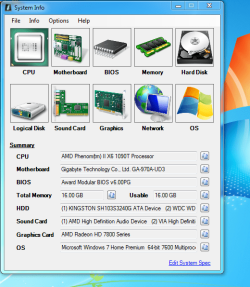
Nifty program, saves me typing a bit..
 

Attachments

  • system info.PNG
    system info.PNG
    49.9 KB · Views: 25

My Computer

OS
WIN 7 x64
CPU
AMD Phenom(tm) II X6 1090T Processor
Motherboard
Gigabyte Technology Co., Ltd. GA-970A-UD3
Memory
4X4 DDR3 XMS3 1600mhz
Graphics Card(s)
Radeon HD 7870 Ghz edition 2GB - Have older 6870 in now
Sound Card
VIA Technologies, Inc. ( board generic)
Monitor(s) Displays
Asus 25" something or other
Screen Resolution
1920x1080
Hard Drives
KINGSTON SH103S3240G ATA Device 240GB
WDC WD1001FALS-00J7B0 ATA Device 1TB
PSU
Corsair 750W Gold
Case
No Idea
Cooling
4 Ninja fans, 2 top, 1 front, 1 rear, Hyper 212 + for CPU
Keyboard
Microsoft wave
Mouse
M510
Internet Speed
30/5
Other Info
Award Modular BIOS v6.00PG
actually, if you follow the tutorial linked, there is an additional step to auto-upload all the findings in your profile's specs page, so everyone can see the specs from the My System Specs in the bottom right corner of any and all of your posts.
 

My Computer

Computer type
PC/Desktop
Computer Manufacturer/Model Number
custom built
OS
Win 7 Pro 64-bit 7601
CPU
AMD Phenom 9650 QuadCore, revision DR-B3
Motherboard
ASUS M4A78
Memory
5 GB yes I run 2x 2GB and 1x 1GB, different brand, spank me.
Graphics Card(s)
NVIDIA GeForce 9800 GT 512 Mb, unknown manufacturer.
Sound Card
Crappy Realtek Integrated Audio
Monitor(s) Displays
Fujitsu Siemens P19-3P
Screen Resolution
1280 x 1024 x 32 bits @ 60 Hz Oh yeah, 4:3 rocks!
Hard Drives
(1) MAXTOR S TM3320613AS SATA Disk Device (2) STM35004 18AS SATA Disk Device (3) TOSHIBA USB 2.5"-HDD
PSU
whatever, around 450w
Case
Scavenged from old company PC, 10+ years old
Cooling
CPU fan, GPU fan, case fan, nothing fancy
Keyboard
Microsoft, PS/2, white.
Mouse
Optical, logitec.
Internet Speed
effective max speeds: 70-ish kB/s down 30-ish kB/s up
Antivirus
Avira, free edition.
Browser
Firefox with FXChrome to make it look like Google Chrome :P
Other Info
Was discarded by previous owner due to "horrible performance".
Was running Win Xp from a IDE drive. Yeah. Was a pain.
SATA II drive and Win7 and it zips away! Yay!
open an elevated command prompt ( click start, type cmd in the search box, on the cmd entry that appears, right click it and select run as administrator ) type winsat mem and press enter. Post a screenshot when completed.

When that is completed you may try running winsat formal.

Here is a tutorial for running memtest86+ with a download link. Try re downloading the latest version and burn to disk again. http://www.sevenforums.com/tutorials/105647-ram-test-memtest86.html
 

My Computers

System One System Two

  • Computer type
    PC/Desktop
    Computer Manufacturer/Model Number
    ALWAYS UNDER CONSTRUCTION
    OS
    Windows 11 Pro
    CPU
    Ryzen 9 5900X
    Motherboard
    Asus X570 Crosshair Viii Hero
    Memory
    32GB G Skill DDR4-3600
    Graphics Card(s)
    EVGA RTX 3080 FTW 3 Ultra
    Sound Card
    On Board/Sennheiser PC37X Headset
    Monitor(s) Displays
    3 X Asus 27"
    Screen Resolution
    2560x1440
    Hard Drives
    2 X 1 TB NVME drives
    PSU
    EVGA 850
    Case
    Phanteks Eclipse P400A
    Cooling
    EVGA 280 AIO
    Keyboard
    Logitech G510s/ Logitech G13
    Mouse
    Logitech G502
    Internet Speed
    24/1
    Antivirus
    ESET/MBAM Pro/SAS Pro
    Browser
    Chrome/ Firefox/ Edge
  • Computer type
    Laptop
    System Manufacturer/Model Number
    Dell 16 Plus
    OS
    Windows 11 Pro
    CPU
    Intel Ultra 9 288V
    Memory
    32 GB LPDDR5X 8533
    Monitor(s) Displays
    16" Mini-LED HDR600 Touch 90 Hz
    Screen Resolution
    2560X1600
    Hard Drives
    1 TB NVME
Thanks for the top Essenbee.
Did some swapping today. Since I kept getting low RAM numbers on Performance test 8.0 I figured that is where the issue would be first tackled. Pulled out the RAM and put my HTPC RAM in there, all three sticks = 6GB. Ran performance test, came up with same numbers. Then tested it on Counter Strike GO, No problems, played for half an hour with no chugging or lag like symptoms. THen I moved to test with main RAM.
Next I plugged two RAM sticks into slots 1 and 3 on the MOBO. Tested, same number. Played CS GO, no issues.
Tested the other two RAM sticks in slots 1 and 3 on the MOBO. Tested, same number. Played CS GO, no issues.
After that I put two RAM sticks in slots 2 and 4. Tested, same number. Played CS GO, got the choppiness and lag like issues within a few minutes.
Left 1 stick RAM in slot 4 and retested with same numbers. Played CS GO, got the choppiness.
Swapped it over to slot 2, retested, same numbers. Played CS GO, no issues.
So RAM looks okay, just the MOBO RAM slots. Pity, bought the MOBO a month ago, and it didnt even make it a full month before having issues. Going to RMA it, and probably pick up a different brand MOBO.
 

My Computer

OS
WIN 7 x64
CPU
AMD Phenom(tm) II X6 1090T Processor
Motherboard
Gigabyte Technology Co., Ltd. GA-970A-UD3
Memory
4X4 DDR3 XMS3 1600mhz
Graphics Card(s)
Radeon HD 7870 Ghz edition 2GB - Have older 6870 in now
Sound Card
VIA Technologies, Inc. ( board generic)
Monitor(s) Displays
Asus 25" something or other
Screen Resolution
1920x1080
Hard Drives
KINGSTON SH103S3240G ATA Device 240GB
WDC WD1001FALS-00J7B0 ATA Device 1TB
PSU
Corsair 750W Gold
Case
No Idea
Cooling
4 Ninja fans, 2 top, 1 front, 1 rear, Hyper 212 + for CPU
Keyboard
Microsoft wave
Mouse
M510
Internet Speed
30/5
Other Info
Award Modular BIOS v6.00PG
We still need your spec.
 

My Computer

Computer type
PC/Desktop
Computer Manufacturer/Model Number
Home made Desktop
OS
Windows 10 Pro. 64/ version 1709 Windows 7 Pro/64
CPU
Intel i7-6800K @ 4.3
Motherboard
ASUS X-99 Deluxe II
Memory
Corsair Platinum 16 gig @2400
Graphics Card(s)
EVGA GTX 1070 OC
Monitor(s) Displays
Asus 27" LED LCD/VE278Q
Screen Resolution
1920-1080 or 1280-720 HDMI
Hard Drives
INTEL SSD 730-240 Gb Sata 3.0/
PSU
EVGA Platium 1200W
Case
Phanteks Luxe Tempered Glass 8 fans/ one radiator
Cooling
XSPC/ Water Cooled CPU
Keyboard
Das 4 Professional
Mouse
Logitech M705/MX Anywhere 2-S
Internet Speed
100 mbits
Antivirus
Microsoft Security Essentials/ Malwarebytes Premium 3.0/ SAS
Browser
I.E. 11 default/Firefox/ ISP Time Warner Cable/Spectrum
Other Info
LG BluRay Burner/
Sound system-KLipsch-THX/
Icy Dock ssd Hot Swap bays.
Interesting I placed the 4th stick of Ram in the slot and put my old video card in and it ran just fine. So I guess I may have been wrong in some ways, but how can one slot of RAM be causing issues with the Video card?
 

My Computer

OS
WIN 7 x64
CPU
AMD Phenom(tm) II X6 1090T Processor
Motherboard
Gigabyte Technology Co., Ltd. GA-970A-UD3
Memory
4X4 DDR3 XMS3 1600mhz
Graphics Card(s)
Radeon HD 7870 Ghz edition 2GB - Have older 6870 in now
Sound Card
VIA Technologies, Inc. ( board generic)
Monitor(s) Displays
Asus 25" something or other
Screen Resolution
1920x1080
Hard Drives
KINGSTON SH103S3240G ATA Device 240GB
WDC WD1001FALS-00J7B0 ATA Device 1TB
PSU
Corsair 750W Gold
Case
No Idea
Cooling
4 Ninja fans, 2 top, 1 front, 1 rear, Hyper 212 + for CPU
Keyboard
Microsoft wave
Mouse
M510
Internet Speed
30/5
Other Info
Award Modular BIOS v6.00PG
Bad ram can cause a multitude of errors that blame any number of things, and cause faults in a number of things. You can also have problems with other pieces of hardware that can show as bad ram, when that is not the underlying problem. That is why we keep asking you to fill out your system specs. It gives us the ability to see what hardware we are dealing with. It enables us to help you resolve your issues. If you will read this to http://www.sevenforums.com/tutorials/180324-system-info-see-your-system-specs.html
 

My Computers

System One System Two

  • Computer type
    PC/Desktop
    Computer Manufacturer/Model Number
    ALWAYS UNDER CONSTRUCTION
    OS
    Windows 11 Pro
    CPU
    Ryzen 9 5900X
    Motherboard
    Asus X570 Crosshair Viii Hero
    Memory
    32GB G Skill DDR4-3600
    Graphics Card(s)
    EVGA RTX 3080 FTW 3 Ultra
    Sound Card
    On Board/Sennheiser PC37X Headset
    Monitor(s) Displays
    3 X Asus 27"
    Screen Resolution
    2560x1440
    Hard Drives
    2 X 1 TB NVME drives
    PSU
    EVGA 850
    Case
    Phanteks Eclipse P400A
    Cooling
    EVGA 280 AIO
    Keyboard
    Logitech G510s/ Logitech G13
    Mouse
    Logitech G502
    Internet Speed
    24/1
    Antivirus
    ESET/MBAM Pro/SAS Pro
    Browser
    Chrome/ Firefox/ Edge
  • Computer type
    Laptop
    System Manufacturer/Model Number
    Dell 16 Plus
    OS
    Windows 11 Pro
    CPU
    Intel Ultra 9 288V
    Memory
    32 GB LPDDR5X 8533
    Monitor(s) Displays
    16" Mini-LED HDR600 Touch 90 Hz
    Screen Resolution
    2560X1600
    Hard Drives
    1 TB NVME
There done, system spec is put into the thing. kind of kills it for when I have questions about other computers I have though. oh well. Notice a small amount of lag with older card in too, mouse lag though, very slight and rare, but still there, much less than with the newer card. No lag in game though
 
Last edited:

My Computer

OS
WIN 7 x64
CPU
AMD Phenom(tm) II X6 1090T Processor
Motherboard
Gigabyte Technology Co., Ltd. GA-970A-UD3
Memory
4X4 DDR3 XMS3 1600mhz
Graphics Card(s)
Radeon HD 7870 Ghz edition 2GB - Have older 6870 in now
Sound Card
VIA Technologies, Inc. ( board generic)
Monitor(s) Displays
Asus 25" something or other
Screen Resolution
1920x1080
Hard Drives
KINGSTON SH103S3240G ATA Device 240GB
WDC WD1001FALS-00J7B0 ATA Device 1TB
PSU
Corsair 750W Gold
Case
No Idea
Cooling
4 Ninja fans, 2 top, 1 front, 1 rear, Hyper 212 + for CPU
Keyboard
Microsoft wave
Mouse
M510
Internet Speed
30/5
Other Info
Award Modular BIOS v6.00PG

My Computer

Computer type
PC/Desktop
Computer Manufacturer/Model Number
Home made Desktop
OS
Windows 10 Pro. 64/ version 1709 Windows 7 Pro/64
CPU
Intel i7-6800K @ 4.3
Motherboard
ASUS X-99 Deluxe II
Memory
Corsair Platinum 16 gig @2400
Graphics Card(s)
EVGA GTX 1070 OC
Monitor(s) Displays
Asus 27" LED LCD/VE278Q
Screen Resolution
1920-1080 or 1280-720 HDMI
Hard Drives
INTEL SSD 730-240 Gb Sata 3.0/
PSU
EVGA Platium 1200W
Case
Phanteks Luxe Tempered Glass 8 fans/ one radiator
Cooling
XSPC/ Water Cooled CPU
Keyboard
Das 4 Professional
Mouse
Logitech M705/MX Anywhere 2-S
Internet Speed
100 mbits
Antivirus
Microsoft Security Essentials/ Malwarebytes Premium 3.0/ SAS
Browser
I.E. 11 default/Firefox/ ISP Time Warner Cable/Spectrum
Other Info
LG BluRay Burner/
Sound system-KLipsch-THX/
Icy Dock ssd Hot Swap bays.
Okay got it, Took me a few to get what you meant and wanted.

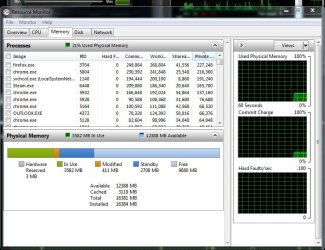
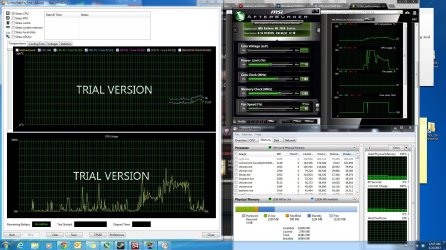
Also tested GPU on different computer with no stutter effect. Tossed it back into my Rig and played CSGO with FRAPS, AIDA64, Resource MOnitor, and MSI Afterburner running in background to record the usage and temps. Posting it for your viewing pleasure... THe spikes in the afterburner in the first part is most likely do to me adjusting the Video settings in CSGO to 1920x1080

__________update_____________
Put different RAM in and played to double check if the RAM I have is bad. Had same Problems with different RAM.
Not sure if its relevant or not, but I scrolled down on afterburner and shows min Memory usage on GPU as min 58 and max 266. WOndering if that is normal because of the low demand the game CS GO has on GPU.
GPU usage peaked at 85% and looks like it stayed steady ish between 40-55% GPU Usage, consistant with the last results.

__________update____________
Put 7870 into the second PCI-E slot and got much much less stuttering, still there a small degree. Can that top PCI-E port be bad and causing my issues? If so why do I not have any problems when I had my 6870 plugged into the same slot.
 

Attachments

  • memory snip w 7.JPG
    memory snip w 7.JPG
    88.6 KB · Views: 12
  • all three hombres.JPG
    all three hombres.JPG
    332.9 KB · Views: 9
Last edited:

My Computer

OS
WIN 7 x64
CPU
AMD Phenom(tm) II X6 1090T Processor
Motherboard
Gigabyte Technology Co., Ltd. GA-970A-UD3
Memory
4X4 DDR3 XMS3 1600mhz
Graphics Card(s)
Radeon HD 7870 Ghz edition 2GB - Have older 6870 in now
Sound Card
VIA Technologies, Inc. ( board generic)
Monitor(s) Displays
Asus 25" something or other
Screen Resolution
1920x1080
Hard Drives
KINGSTON SH103S3240G ATA Device 240GB
WDC WD1001FALS-00J7B0 ATA Device 1TB
PSU
Corsair 750W Gold
Case
No Idea
Cooling
4 Ninja fans, 2 top, 1 front, 1 rear, Hyper 212 + for CPU
Keyboard
Microsoft wave
Mouse
M510
Internet Speed
30/5
Other Info
Award Modular BIOS v6.00PG
Resource Monitor looks normal. The reason these things are asked of you is because you state you have ram problems. You might not have ram problems.
Please do as you were requested in post #6 by essenbe. winsat mem
It should look something like this.

Microsoft Windows [Version 6.1.7601]
Copyright (c) 2009 Microsoft Corporation. All rights reserved.

C:\Windows\System32>winsat mem
Windows System Assessment Tool
> Running: Feature Enumeration ''
> Run Time 00:00:00.00
> Running: System memory performance assessment ''
> Run Time 00:00:05.13
> Memory Performance 29750.43 MB/s
> Total Run Time 00:00:06.35
Did you or did you not rum memtest86+ as suggested in post #6 by essenbe?
Did you or did you not set your computer to default as requested in post # 12?
We need to know what you have done or not done and the results or I know of know way of helping you.
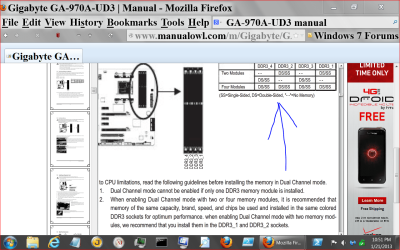
I asked in post #12 if you had a copy of the motherboard manual and received no answer. It will show you where to install the ram and what PCI slot to use and what speed those slots are.
 

My Computer

Computer type
PC/Desktop
Computer Manufacturer/Model Number
Home made Desktop
OS
Windows 10 Pro. 64/ version 1709 Windows 7 Pro/64
CPU
Intel i7-6800K @ 4.3
Motherboard
ASUS X-99 Deluxe II
Memory
Corsair Platinum 16 gig @2400
Graphics Card(s)
EVGA GTX 1070 OC
Monitor(s) Displays
Asus 27" LED LCD/VE278Q
Screen Resolution
1920-1080 or 1280-720 HDMI
Hard Drives
INTEL SSD 730-240 Gb Sata 3.0/
PSU
EVGA Platium 1200W
Case
Phanteks Luxe Tempered Glass 8 fans/ one radiator
Cooling
XSPC/ Water Cooled CPU
Keyboard
Das 4 Professional
Mouse
Logitech M705/MX Anywhere 2-S
Internet Speed
100 mbits
Antivirus
Microsoft Security Essentials/ Malwarebytes Premium 3.0/ SAS
Browser
I.E. 11 default/Firefox/ ISP Time Warner Cable/Spectrum
Other Info
LG BluRay Burner/
Sound system-KLipsch-THX/
Icy Dock ssd Hot Swap bays.
Microsoft Windows [Version 6.1.7600]
Copyright (c) 2009 Microsoft Corporation. All rights reserved.

C:\Windows\system32>winsat mem
Windows System Assessment Tool
> Running: Feature Enumeration ''
> Run Time 00:00:00.00
> Running: System memory performance assessment ''
> Run Time 00:00:05.13
> Memory Performance 13572.32 MB/s
> Total Run Time 00:00:06.24

C:\Windows\system32>

MEMtest was ran a few days ago with No errors, and the "OK got it" was meant for the MOBO manual.
Everything is set as default in MOBO - minus AHCI


Okay so it must be progressive issue, the old card is starting to now act the same way.
 
Last edited:

My Computer

OS
WIN 7 x64
CPU
AMD Phenom(tm) II X6 1090T Processor
Motherboard
Gigabyte Technology Co., Ltd. GA-970A-UD3
Memory
4X4 DDR3 XMS3 1600mhz
Graphics Card(s)
Radeon HD 7870 Ghz edition 2GB - Have older 6870 in now
Sound Card
VIA Technologies, Inc. ( board generic)
Monitor(s) Displays
Asus 25" something or other
Screen Resolution
1920x1080
Hard Drives
KINGSTON SH103S3240G ATA Device 240GB
WDC WD1001FALS-00J7B0 ATA Device 1TB
PSU
Corsair 750W Gold
Case
No Idea
Cooling
4 Ninja fans, 2 top, 1 front, 1 rear, Hyper 212 + for CPU
Keyboard
Microsoft wave
Mouse
M510
Internet Speed
30/5
Other Info
Award Modular BIOS v6.00PG
What ram do you have installed now. How many sticks and in which slots?
How long did you run memtest86+ and did you run it with your new ram and old ram installed.
You keep swapping hardware around and can't keep up with what you are doing with what.
 

My Computer

Computer type
PC/Desktop
Computer Manufacturer/Model Number
Home made Desktop
OS
Windows 10 Pro. 64/ version 1709 Windows 7 Pro/64
CPU
Intel i7-6800K @ 4.3
Motherboard
ASUS X-99 Deluxe II
Memory
Corsair Platinum 16 gig @2400
Graphics Card(s)
EVGA GTX 1070 OC
Monitor(s) Displays
Asus 27" LED LCD/VE278Q
Screen Resolution
1920-1080 or 1280-720 HDMI
Hard Drives
INTEL SSD 730-240 Gb Sata 3.0/
PSU
EVGA Platium 1200W
Case
Phanteks Luxe Tempered Glass 8 fans/ one radiator
Cooling
XSPC/ Water Cooled CPU
Keyboard
Das 4 Professional
Mouse
Logitech M705/MX Anywhere 2-S
Internet Speed
100 mbits
Antivirus
Microsoft Security Essentials/ Malwarebytes Premium 3.0/ SAS
Browser
I.E. 11 default/Firefox/ ISP Time Warner Cable/Spectrum
Other Info
LG BluRay Burner/
Sound system-KLipsch-THX/
Icy Dock ssd Hot Swap bays.
Post #1: 16GB Corsair XMS3 DDR 3 ... 4 slots filled 16/4... 4 sticks of ram
The exact make and model : CMZ16X3M4A1600C9
Ran Memtest Several Hours no issue. Dont see the need to run another test on unrelated RAM "just to make sure its good" the odds of a single stick of RAM going bad is way up there. THe odds of two sticks of RAM, one of which unrelated to the first set and which happens to be put into a same slot as bad. Yeah bordering up there at impossible. I'd have better luck buying a few winning million dollar lottery tickets. Besides I already tested my 16 Gigs of RAM in another computer with no issues during game session testing.

I keep swapping out each piece of hardware to solve my issue, I cant sit and run tests all day. The only piece I cant swap out is the MOBO.
 

My Computer

OS
WIN 7 x64
CPU
AMD Phenom(tm) II X6 1090T Processor
Motherboard
Gigabyte Technology Co., Ltd. GA-970A-UD3
Memory
4X4 DDR3 XMS3 1600mhz
Graphics Card(s)
Radeon HD 7870 Ghz edition 2GB - Have older 6870 in now
Sound Card
VIA Technologies, Inc. ( board generic)
Monitor(s) Displays
Asus 25" something or other
Screen Resolution
1920x1080
Hard Drives
KINGSTON SH103S3240G ATA Device 240GB
WDC WD1001FALS-00J7B0 ATA Device 1TB
PSU
Corsair 750W Gold
Case
No Idea
Cooling
4 Ninja fans, 2 top, 1 front, 1 rear, Hyper 212 + for CPU
Keyboard
Microsoft wave
Mouse
M510
Internet Speed
30/5
Other Info
Award Modular BIOS v6.00PG
And the only way you are going to find which piece of hardware is the problem is to spend the time testing it. Either that or spend a lot of money replacing hardware that is perfectly good.
 

My Computers

System One System Two

  • Computer type
    PC/Desktop
    Computer Manufacturer/Model Number
    ALWAYS UNDER CONSTRUCTION
    OS
    Windows 11 Pro
    CPU
    Ryzen 9 5900X
    Motherboard
    Asus X570 Crosshair Viii Hero
    Memory
    32GB G Skill DDR4-3600
    Graphics Card(s)
    EVGA RTX 3080 FTW 3 Ultra
    Sound Card
    On Board/Sennheiser PC37X Headset
    Monitor(s) Displays
    3 X Asus 27"
    Screen Resolution
    2560x1440
    Hard Drives
    2 X 1 TB NVME drives
    PSU
    EVGA 850
    Case
    Phanteks Eclipse P400A
    Cooling
    EVGA 280 AIO
    Keyboard
    Logitech G510s/ Logitech G13
    Mouse
    Logitech G502
    Internet Speed
    24/1
    Antivirus
    ESET/MBAM Pro/SAS Pro
    Browser
    Chrome/ Firefox/ Edge
  • Computer type
    Laptop
    System Manufacturer/Model Number
    Dell 16 Plus
    OS
    Windows 11 Pro
    CPU
    Intel Ultra 9 288V
    Memory
    32 GB LPDDR5X 8533
    Monitor(s) Displays
    16" Mini-LED HDR600 Touch 90 Hz
    Screen Resolution
    2560X1600
    Hard Drives
    1 TB NVME
If their test you don't want to do that is okay with me. Just let us know so we can get on with our life.
Have a nice day.
 

My Computer

Computer type
PC/Desktop
Computer Manufacturer/Model Number
Home made Desktop
OS
Windows 10 Pro. 64/ version 1709 Windows 7 Pro/64
CPU
Intel i7-6800K @ 4.3
Motherboard
ASUS X-99 Deluxe II
Memory
Corsair Platinum 16 gig @2400
Graphics Card(s)
EVGA GTX 1070 OC
Monitor(s) Displays
Asus 27" LED LCD/VE278Q
Screen Resolution
1920-1080 or 1280-720 HDMI
Hard Drives
INTEL SSD 730-240 Gb Sata 3.0/
PSU
EVGA Platium 1200W
Case
Phanteks Luxe Tempered Glass 8 fans/ one radiator
Cooling
XSPC/ Water Cooled CPU
Keyboard
Das 4 Professional
Mouse
Logitech M705/MX Anywhere 2-S
Internet Speed
100 mbits
Antivirus
Microsoft Security Essentials/ Malwarebytes Premium 3.0/ SAS
Browser
I.E. 11 default/Firefox/ ISP Time Warner Cable/Spectrum
Other Info
LG BluRay Burner/
Sound system-KLipsch-THX/
Icy Dock ssd Hot Swap bays.
6 hours of memtest is plenty. there is no need to test RAM that has never shown itself to be bad and works fine in another case. In any case, if any of you had a thought about it, I put a different SSD in that was not formated and had old install of windows. I had to remove all traces and reinstall AMD Catalyst 13.1 and driver. Tested CS GO, no issues. FIgured at that point failing SSD? rare but could happen. So I put my other SSD back in, Tested, choppy. Uninstalled every single trace of AMD catalyst, then reinstalled 13.1 and tested. It is holding steady without issue.
My educated guess and logical guess at this point is a corrupted driver that needed to be completely removed and then reinstalled. I call this the worst case of software malfunctioning I have seen yet.
 

My Computer

OS
WIN 7 x64
CPU
AMD Phenom(tm) II X6 1090T Processor
Motherboard
Gigabyte Technology Co., Ltd. GA-970A-UD3
Memory
4X4 DDR3 XMS3 1600mhz
Graphics Card(s)
Radeon HD 7870 Ghz edition 2GB - Have older 6870 in now
Sound Card
VIA Technologies, Inc. ( board generic)
Monitor(s) Displays
Asus 25" something or other
Screen Resolution
1920x1080
Hard Drives
KINGSTON SH103S3240G ATA Device 240GB
WDC WD1001FALS-00J7B0 ATA Device 1TB
PSU
Corsair 750W Gold
Case
No Idea
Cooling
4 Ninja fans, 2 top, 1 front, 1 rear, Hyper 212 + for CPU
Keyboard
Microsoft wave
Mouse
M510
Internet Speed
30/5
Other Info
Award Modular BIOS v6.00PG
Back
Top