Solved Understanding backup correct format.

Oldhead

New member
Member
Local time
12:12 AM
Messages
45
Im self taught ,and read this forum regulary for instruction and knowledge but .i have this issue re backup format /protocols.
SSD (C) drive with OS and apps.>
WD Black 1 Tb split into (2) 500gb drives (data)
Seagate 1 TB USB3 for backups ,offline until required for use. Manually connected .
Back ups held on both WD 500gb partition as well as External drive.

Aomei V2.5 ( one click backups and have used Aomei for 12 mths) no issues , easy interface and perform integity checks with each backup performed.
Aomei boot disk on USB is in drawer.

My question is .(1) I have been performing System backups ,size approx 26gb , includes MBR and do this on the 1st of every month.Then delete oldest 6 mths backup files ,so i have last 6 mths held as current.
So am i using the correct format (IE Full system) or should i perform an Image file backup or Clone ???????
Whats the diff ???? and does full system also include any data held on C drive??????
I dont want to do Incremental nor Differentials as issues can arise and i find that 26gb only takes approx 5 minutes inc integrity check but I DO want it to all be there just in case.!!!!

I have experienced the pain when a hardware failure MOBO or HD suddenly expires .(full re install)
Thanks in advance
 
Last edited:

My Computer

Computer type
PC/Desktop
Computer Manufacturer/Model Number
custom build
OS
Windows7 home premium 32bit
CPU
I5-3470 Intel
Motherboard
Asus P8Z77-MPro
Memory
4gig Corsair Vengence DDR3 1600
Graphics Card(s)
ATi radeon HD5670 1gig
Sound Card
on board
Monitor(s) Displays
Asus 22 inch
Hard Drives
WD 1tb Black caviar 64meg sata FAEX
Samsung EVO 840 120g
Seagate ext HD 1tb usb3
PSU
Corsair CX600 modular
Case
Antec 300
Cooling
3 Extra case fans
Antivirus
AVG internet Full vers / Malwarebytes Pro/ Superantispyware
Browser
Firefox
My question is .(1) I have been performing System backups ,size approx 26gb , includes MBR and do this on the 1st of every month.Then delete oldest 6 mths backup files ,so i have last 6 mths held as current.
So am i using the correct format (IE Full system) or should i perform an Image file backup or Clone ???????
Whats the diff ???? and does full system also include any data held on C drive??????

I assume the PC boots fine and operates well with only the SSD connected. Is that correct?

If it is correct, and all you want to do is be able to restore the C partition, including Windows and applications, you would have to make an image file of the C partition and most likely any other partition found on the SSD, such as "System Reserved" since your boot files probably are not on C. You could make separate image files of each partition, or make one image file containing all the necessary partitions.

You use the terms "full system" and ""Image file backup and clone". Is that Aomei nomenclature? I don't use that application and don't know for sure how those are defined.

A screen shot of Windows Disk Management and the Aomei interface showing the confusion options might help.
 

My Computer

Computer type
PC/Desktop
Computer Manufacturer/Model Number
Ignatz Special; 4 speed manual gearbox; factory air conditioning; one of one
OS
Windows 7 Home Premium SP1, 64-bit
CPU
Intel Skylake i5-6600K, not overclocked
Motherboard
AsRock Z170M Extreme 4, micro ATX
Memory
8 GB HyperX DDR4-2666 (2 x 4 GB)
Graphics Card(s)
none; graphics are integrated on CPU
Sound Card
onboard: Realtek ALC1150; external: USB Behringer UF0-202
Monitor(s) Displays
Dell S2340M 23 inch IPS
Screen Resolution
1600 x 900
Hard Drives
System: Crucial MX100 series SSD, 128 GB;
Data: Samsung Spinpoint 103SJ, 1 TB;
Backup: WD Caviar Green WD30EZRX-00D8PB0, 3 TB
PSU
Rosewill SilentNight 500 watt fanless, semi-modular
Case
Antec Solo II
Cooling
Noctua NH-U12S; Noctua F12 intake, Noctua S12A exhaust
Keyboard
Microsoft 200 6JH-00001 USB
Mouse
Dell or Microsoft optical wired; USB
Antivirus
Microsoft Security Essentials and Malwarebytes Premium
Browser
Pale Moon
Other Info
All fans PWM; speeds at idle: CPU circa 500 rpm; intake circa 600 rpm; exhaust circa 600 rpm; CPU temps 27 idle and 47 C load in a warm room (27 C/81 F) when running Intel Extreme Tuning Utility stress test.
The AOMEI definitions are all here. I think you want a system backup. A clone would give you a bootable system. You use that if you want to transfer the system from one disk to another. The term 'image file backup' is not separately described. I guess that would be an image and is the same as a system backup unless you mean a separate backup of the image files.
 

My Computer

Computer Manufacturer/Model Number
HP, Dell, Gateway, Toshiba - 4 laptops and 2 desktops
OS
Vista, Windows7, Mint Mate, Zorin, Windows 8
CPU
from 1.6GHz Duo to i7
Monitor(s) Displays
2x HP w2207
Hard Drives
5x HDD, 7x SSD, 12x Externals
Keyboard
with trackball - no mices
Mouse
Trackball mice
Internet Speed
DSL 6000
My question is .(1) I have been performing System backups ,size approx 26gb , includes MBR and do this on the 1st of every month.Then delete oldest 6 mths backup files ,so i have last 6 mths held as current.
So am i using the correct format (IE Full system) or should i perform an Image file backup or Clone ???????
Whats the diff ???? and does full system also include any data held on C drive??????

I assume the PC boots fine and operates well with only the SSD connected. Is that correct?

If it is correct, and all you want to do is be able to restore the C partition, including Windows and applications, you would have to make an image file of the C partition and most likely any other partition found on the SSD, such as "System Reserved" since your boot files probably are not on C. You could make separate image files of each partition, or make one image file containing all the necessary partitions.

You use the terms "full system" and ""Image file backup and clone". Is that Aomei nomenclature? I don't use that application and don't know for sure how those are defined.

A screen shot of Windows Disk Management and the Aomei interface showing the confusion options might help.

PC has both SSD and internal wd Black 1 tb running at optimum , SSD has only 1 partition (c) with 26 gig used space ,all i wanted to know was should i be performing

(1) (full system )with Aomei which includes MBR as a regular backup or perform a Disc (c) backup
as im haviing issues determining what format would be best if i ever have a hardware failure and need to recover.I fully understand you are not familiar with Aomei.
Thanks for prompt responce:)
 

My Computer

Computer type
PC/Desktop
Computer Manufacturer/Model Number
custom build
OS
Windows7 home premium 32bit
CPU
I5-3470 Intel
Motherboard
Asus P8Z77-MPro
Memory
4gig Corsair Vengence DDR3 1600
Graphics Card(s)
ATi radeon HD5670 1gig
Sound Card
on board
Monitor(s) Displays
Asus 22 inch
Hard Drives
WD 1tb Black caviar 64meg sata FAEX
Samsung EVO 840 120g
Seagate ext HD 1tb usb3
PSU
Corsair CX600 modular
Case
Antec 300
Cooling
3 Extra case fans
Antivirus
AVG internet Full vers / Malwarebytes Pro/ Superantispyware
Browser
Firefox
The AOMEI definitions are all here. I think you want a system backup. A clone would give you a bootable system. You use that if you want to transfer the system from one disk to another. The term 'image file backup' is not separately described. I guess that would be an image and is the same as a system backup unless you mean a separate backup of the image files.

Cheers ,thanks for link , I think :confused:you have answered my query , Clone !!!!
Im trying to determine which would be best if ever the need arose to recover from a hard drive failure and or corruption in the future (which will happen) sooner or later .
Full system ???? Disk ???? or Clone??????
The above 3 descriptions are causing head spins .:confused:
 

My Computer

Computer type
PC/Desktop
Computer Manufacturer/Model Number
custom build
OS
Windows7 home premium 32bit
CPU
I5-3470 Intel
Motherboard
Asus P8Z77-MPro
Memory
4gig Corsair Vengence DDR3 1600
Graphics Card(s)
ATi radeon HD5670 1gig
Sound Card
on board
Monitor(s) Displays
Asus 22 inch
Hard Drives
WD 1tb Black caviar 64meg sata FAEX
Samsung EVO 840 120g
Seagate ext HD 1tb usb3
PSU
Corsair CX600 modular
Case
Antec 300
Cooling
3 Extra case fans
Antivirus
AVG internet Full vers / Malwarebytes Pro/ Superantispyware
Browser
Firefox
Definitely not a clone. Cloning is typically used when everything is fine and you just want to move to a new hard drive. It's not intended for recovering from a disaster.

I don't see the term "full system" on the Aomei help page. I do see:

"Disk backup", which should be for ALL partitions on a drive. Including data partitions if you had any on that disk. I guess you don't.

"System backup" would be for only those partitions on a drive that would be needed to restore Windows. On your SSD, that would be C and the normally unseen System Reserved, which you may nor may not have since we have yet to see a screen shot of Windows Disk Management as requested.

I'd guess all you need to do is a "System Backup", saving the image files to some other drive entirely. When disaster strikes, you would then do a "System Restore".
 

My Computer

Computer type
PC/Desktop
Computer Manufacturer/Model Number
Ignatz Special; 4 speed manual gearbox; factory air conditioning; one of one
OS
Windows 7 Home Premium SP1, 64-bit
CPU
Intel Skylake i5-6600K, not overclocked
Motherboard
AsRock Z170M Extreme 4, micro ATX
Memory
8 GB HyperX DDR4-2666 (2 x 4 GB)
Graphics Card(s)
none; graphics are integrated on CPU
Sound Card
onboard: Realtek ALC1150; external: USB Behringer UF0-202
Monitor(s) Displays
Dell S2340M 23 inch IPS
Screen Resolution
1600 x 900
Hard Drives
System: Crucial MX100 series SSD, 128 GB;
Data: Samsung Spinpoint 103SJ, 1 TB;
Backup: WD Caviar Green WD30EZRX-00D8PB0, 3 TB
PSU
Rosewill SilentNight 500 watt fanless, semi-modular
Case
Antec Solo II
Cooling
Noctua NH-U12S; Noctua F12 intake, Noctua S12A exhaust
Keyboard
Microsoft 200 6JH-00001 USB
Mouse
Dell or Microsoft optical wired; USB
Antivirus
Microsoft Security Essentials and Malwarebytes Premium
Browser
Pale Moon
Other Info
All fans PWM; speeds at idle: CPU circa 500 rpm; intake circa 600 rpm; exhaust circa 600 rpm; CPU temps 27 idle and 47 C load in a warm room (27 C/81 F) when running Intel Extreme Tuning Utility stress test.
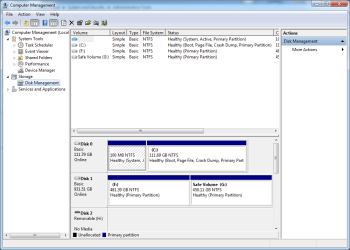
Copy of current disc management
 

Attachments

  • Disk Management.PNG
    Disk Management.PNG
    29.1 KB · Views: 1

My Computer

Computer type
PC/Desktop
Computer Manufacturer/Model Number
custom build
OS
Windows7 home premium 32bit
CPU
I5-3470 Intel
Motherboard
Asus P8Z77-MPro
Memory
4gig Corsair Vengence DDR3 1600
Graphics Card(s)
ATi radeon HD5670 1gig
Sound Card
on board
Monitor(s) Displays
Asus 22 inch
Hard Drives
WD 1tb Black caviar 64meg sata FAEX
Samsung EVO 840 120g
Seagate ext HD 1tb usb3
PSU
Corsair CX600 modular
Case
Antec 300
Cooling
3 Extra case fans
Antivirus
AVG internet Full vers / Malwarebytes Pro/ Superantispyware
Browser
Firefox
The SSD shows 2 partitions. C and a very small 100 mb partition marked "system, active, primary".

Windows needs both to start as you are now configured. So you would need to back up and later restore both of them.

I'd expect a "System Backup" per Aomei instruction page would back up both because Aomei will realize that both are needed and C isn't enough. You should confirm that by reading through the help files.

That small partition is not necessary IF your boot files are on some other partition, but in your case they are on the small one. So backing it up is mandatory. My SSD has C only.
 

My Computer

Computer type
PC/Desktop
Computer Manufacturer/Model Number
Ignatz Special; 4 speed manual gearbox; factory air conditioning; one of one
OS
Windows 7 Home Premium SP1, 64-bit
CPU
Intel Skylake i5-6600K, not overclocked
Motherboard
AsRock Z170M Extreme 4, micro ATX
Memory
8 GB HyperX DDR4-2666 (2 x 4 GB)
Graphics Card(s)
none; graphics are integrated on CPU
Sound Card
onboard: Realtek ALC1150; external: USB Behringer UF0-202
Monitor(s) Displays
Dell S2340M 23 inch IPS
Screen Resolution
1600 x 900
Hard Drives
System: Crucial MX100 series SSD, 128 GB;
Data: Samsung Spinpoint 103SJ, 1 TB;
Backup: WD Caviar Green WD30EZRX-00D8PB0, 3 TB
PSU
Rosewill SilentNight 500 watt fanless, semi-modular
Case
Antec Solo II
Cooling
Noctua NH-U12S; Noctua F12 intake, Noctua S12A exhaust
Keyboard
Microsoft 200 6JH-00001 USB
Mouse
Dell or Microsoft optical wired; USB
Antivirus
Microsoft Security Essentials and Malwarebytes Premium
Browser
Pale Moon
Other Info
All fans PWM; speeds at idle: CPU circa 500 rpm; intake circa 600 rpm; exhaust circa 600 rpm; CPU temps 27 idle and 47 C load in a warm room (27 C/81 F) when running Intel Extreme Tuning Utility stress test.
Many thanks ,for patience and advice ignatzatronic ! System backup it is.
 

My Computer

Computer type
PC/Desktop
Computer Manufacturer/Model Number
custom build
OS
Windows7 home premium 32bit
CPU
I5-3470 Intel
Motherboard
Asus P8Z77-MPro
Memory
4gig Corsair Vengence DDR3 1600
Graphics Card(s)
ATi radeon HD5670 1gig
Sound Card
on board
Monitor(s) Displays
Asus 22 inch
Hard Drives
WD 1tb Black caviar 64meg sata FAEX
Samsung EVO 840 120g
Seagate ext HD 1tb usb3
PSU
Corsair CX600 modular
Case
Antec 300
Cooling
3 Extra case fans
Antivirus
AVG internet Full vers / Malwarebytes Pro/ Superantispyware
Browser
Firefox
Back
Top