Undesired Windows Explorer behavior

GRoston

New member
Power User
VIP
Local time
2:05 AM
Messages
374
When using Windows Explorer, when I click an expand folder 'triangle' the folder list jumps so that the selected folder is at the bottom of the window. This is very annoying as each time I expand a folder, I must recenter the folder tree.

Is there some setting which says 'don't move the folder tree when expanding folders'?
 

My Computer

Computer type
PC/Desktop
OS
Windows 7 x64 Pro
CPU
Core i7 860 @ 3.8 GHz
Motherboard
MSI P55-GD80
Memory
16 GB F3-12800CL7D (DDR3 1600 7-7-7-24)
Graphics Card(s)
Sapphire Vapor-X 100283VXL Radeon HD 5770
Monitor(s) Displays
NEC LCD3090WQXi-BK
When using Windows Explorer, when I click an expand folder 'triangle' the folder list jumps so that the selected folder is at the bottom of the window. This is very annoying as each time I expand a folder, I must recenter the folder tree.

Is there some setting which says 'don't move the folder tree when expanding folders'?

Hello Welcome to SF,

You could try these steps see whether it works


  1. Open Windows Explorer.
  2. Click on Organize pull down menu.
  3. Select Folder and search options.
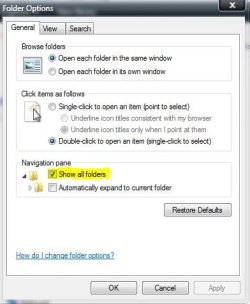
  4. In the General tab, tick the check box for Show all folders option under Navigation pane section.
Capture.JPG

Hope this helps,
Captain
 

My Computer

Computer Manufacturer/Model Number
Samsung NP550P5C-S02IN
OS
Windows 7 Ultimate - 64-bit | Windows 8 Pro - 64-bit
CPU
Intel® Core™ i7 Processor 3,610QM (2.30Hz, 6MB L3 Cach
Memory
8 GB
Graphics Card(s)
NVIDIA® GeForce® GT 650M 2GB Graphics, Optimus™ techno
Sound Card
SoundAlive™ JBL 3 Speakers (With sub-Woofer)
Monitor(s) Displays
39.62cm (15.6) SuperBright 300nit HD+ LED Display
Screen Resolution
1,600 x 900, Anti-Reflective
Hard Drives
1TB S-ATA II Hard Drive (5,400RPM)
There are several Threads talking about this. I don't think there is a fix.
 

My Computer

Computer type
PC/Desktop
Computer Manufacturer/Model Number
Dell OP7010
OS
Windows 7 Enterprise (x64); Windows Server 2008 R2 (x64)
Memory
16GB
Monitor(s) Displays
4 Dell 24" LCD
Screen Resolution
1280x1024
Keyboard
Dell
Mouse
Dell Optical
Internet Speed
40meg
There is no fix for it as of now. We are all hoping this will be fixed in SP1
 

My Computer

Computer type
Laptop
Computer Manufacturer/Model Number
HP EliteBook 8530w Mobile Workstation
OS
Windows 7 Ultimate x64 (XP, 98SE, 95, 3.11, DOS 7.10 on VM) + Ubuntu 10.04 LTS Lucid Lynx
CPU
Intel Core 2 Duo Processor P8600 (2.40 GHz, 3 MB L2 cache)
Motherboard
Mobile Intel PM45 Express Chipset ICH9M-Enhanced
Memory
4GB 800 MHz DDR2 SDRAM
Graphics Card(s)
ATI Mobility FireGL V5700 with 256 MB
Sound Card
SoundMAX Integrated Digital HD Audio
Monitor(s) Displays
15.4-inch WXGA anti-glare (1280 x 800 resolution)
Screen Resolution
1280 x 800
Hard Drives
500GB + 1TB
Mouse
Synaptics PS/2 Port Touchpad, USB Mouse
Internet Speed
4 Mbps
Antivirus
MSE
Browser
Firefox, Chrome, IE
Other Info
Authentec AES2810 Fingerprint Reader
Actually, maybe there is. Seems that I had checked the box 'Automatically expand to current folder'. (CJS - thanks for making me look there.) Unchecking this box seems to have made the problem go away - time will tell.
 

My Computer

Computer type
PC/Desktop
OS
Windows 7 x64 Pro
CPU
Core i7 860 @ 3.8 GHz
Motherboard
MSI P55-GD80
Memory
16 GB F3-12800CL7D (DDR3 1600 7-7-7-24)
Graphics Card(s)
Sapphire Vapor-X 100283VXL Radeon HD 5770
Monitor(s) Displays
NEC LCD3090WQXi-BK
Strange folder behavior in left pane of Windows Explorer Read there. It's possible partially fix this. Going through the steps provided, I've managed to make explorer at least little more usable. It's bug though, which MS doesn't consider as bug but "design", so don't think this will be fixed :-S
 

My Computer

Computer Manufacturer/Model Number
IBM
OS
Windows 7 x64
CPU
Intel Core 2 T8100 @ 2.10GHz
Memory
3 GB SO-DIMM DDR2-800
Graphics Card(s)
Nvidia GeForce Go 7300
Sound Card
SteelSeries Siberia 7.1 3D
Screen Resolution
1680x1050
Mouse
Logitech MX
I found a solution

Use this link Classic Shell: Features and download & install Classicshell. Not only will it fix the jumping folder nightmare but it also allows so much more.
1) Install the free Classic Shell. This is free, quite customisable and works as a mod for Windows Explorer, rather than a full blown replacement. Personally, I didn't install the Classic Start Menu option, but you can if you want.
2) Reboot the computer.
3) Launch Windows Explorer and turn on "Always Show Menus" (this is just for configuration, you can turn it off again afterwards if you want).
4) Right click on the menu bar and turn on the "Classic Explorer Bar". This adds a series of cut/copy/paste icons to Explorer. Crucially, it also adds the "Configuration" icon.
5) Go into the configuration and from here you can tweak things to your heart's content. To kill the horrible Windows 7 folder-jumping, switch the "Navigation Pane Style" to Vista. You can even go more retro and knock it back to XP mode if you want (this adds in the lines to the folder tree and adds a classic "+" icon for expanding folders).
6) Tweak the other settings as well. I have it so that the "More details" bit in copy dialogs is automatically expanded, I've checked the "Show free space and file size in status bar" option (no more having to right click on the drive to see how much space is left), personally I decided to stick with the Windows 7 style "file overwrite" dialog (the default is for the simpler Vista/XP style dialog), and I went for the Windows Vista style folder view which looks pretty much the same as the Windows 7 view, but gets rid of the horrible jumping.
After this, you can turn the toolbar and menus back off in Explorer if you wish. All I know, is that Windows Explorer looks largely the same for me, but folder no longer jump around at all and I finally have my "free disk space" entry back in the status bar.
Now, if only MS could code properly so that I didn't have to mess on with third party apps to get Windows to actually work properly......

Good Luck..
It made me feel like I took a Valium when I saw it working...

 

My Computer

Computer Manufacturer/Model Number
acer aspire 7736z-4905
OS
Windows 7 Home Premium 32bit.
Memory
3gb
Hard Drives
120gb
I notice that this only happens if I have first clicked on the folder that I'm going to expand. If I have clicked on some other folder besides the one I want to expand, when I then click on the one I want to expand it doesn't "jump" to the bottom. It will "jump" up in this case if that folder's sub-folders won't fit in the viewable space.
 

My Computer

OS
Windows 7 Ultimate
Open windows explorer
Click on organize
Select Folder and Search Options
Under Navigation Pane Check both "Show all folders" and "Automatically expand to current folder" checkboxes
I did this and now instead of the folder going to the bottom of the screen it goes to the top of the screen, which is much better. :cool:
 

My Computer

Computer Manufacturer/Model Number
Custom
OS
windows 7 professional 64 bit
CPU
Intel E8400
Motherboard
Intel DG43NB
Memory
4 Gb
Graphics Card(s)
ATI HD 4770
Sound Card
Integrated
Monitor(s) Displays
Dual 22" Acers
Hard Drives
Seagate 500 Gb
Back
Top