

- Local time
- 4:10 PM
- Messages
- 715
I have Windows 7 Pro installed with three partitions. Win 7 was installed on May 1, 2010. The OS is installed on C drive and only data is on D and E drives.
This morning when I booted up, there were all kinds of files on E drive that I had not placed there. Some examples are:
eula.1028.txt
eula.1031.txt
install.exe (for what I don't have a clue)
install.ini
install.res.1028.dll
and many more
I have included a screenshot showing the majority of the files.
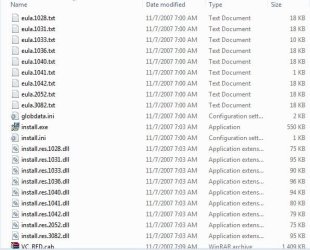
I know they have something to do with visual studio and Microsoft.NET\Framework. What I can not figure out is why they are on E drive and not C drive.
Is it safe to remove these or move to another location.
This morning when I booted up, there were all kinds of files on E drive that I had not placed there. Some examples are:
eula.1028.txt
eula.1031.txt
install.exe (for what I don't have a clue)
install.ini
install.res.1028.dll
and many more
I have included a screenshot showing the majority of the files.
I know they have something to do with visual studio and Microsoft.NET\Framework. What I can not figure out is why they are on E drive and not C drive.
Is it safe to remove these or move to another location.
My Computer
- OS
- Windows 7 Pro
- CPU
- Intel(R) Pentium(R) Duel CPU E2200 2.20 Ghz
- Motherboard
- GA-G41M-ES2L
- Memory
- 4 gb 2.96 Usable
- Graphics Card(s)
- Onboard
- Sound Card
- Onboard
- Hard Drives
- 2 - 1TB WD Sata Drives


 First I put those files into a folder (just to be safe) and moved to another drive. I then deleted the files from E drive. It has been several days and so far everything is running fine.