Unidentifed Network

Iceman

New member
I have a Win7 32bit desktop and Amilo Li3710 Laptop with also Win7 32bit.

Both have WLAN.

motherboard of desktop pc is P5k deluxe Wi-Fi editon.

I made on desktop pc an ad hoc conection with protection and securty key.

Turned on wlan on laptop and it was dectected. But as i try to conect, at the end i get unidentifed network and can't connect to internet.

But my first try was a success and i had internet and a working home group.

Now i don't know how sometimes i get home group (on my laptop i can share music, videos etc thats on my desktop pc) but i still dont have internet. Or in the worst chase both are gone.

Now i noticed when i go to Network and Sharing Center and then enter "Change advanced sharing settings" i see that a Public is the (current profile). How do i change that to be the Home?
 

My Computer

Computer Manufacturer/Model Number
ASUS
OS
Windows 7 Ultimate 64bit
CPU
Core2Duo E6420 2,13 GHz @ 2,93 GHz stock cooled
Motherboard
Asus P5k Deluxe Wi-Fi edition
Memory
Kingston 3GB DDR2 733 MHz RAM 2.1v
Graphics Card(s)
Asus 8800GTS 320MB 320-bit stock clocks, (burned in owen) xD
Sound Card
Creative Xi-Fi Extreme Music
Monitor(s) Displays
Samsung T220 22''
Screen Resolution
1680*1050
Hard Drives
320 GB
160 GB
PSU
Codegen 400W
Case
Codegen Briza 6097
Cooling
stock
Keyboard
Logitech media keyboard new
Mouse
RX 1000 laser mouse
Internet Speed
~1,5mb/sec
Hi Iceman, why did you feel the need to create the ad hoc connection?

If both have WLAN and are able to pick up the router's broadcasted wireless network. there isn't a need to create any extra connections. Is your securuty WEP or WPA? One time a member switched between the two and it worked.

Can i have a look at your Network Connections. click Change adapter settings and view it as Details.
 

My Computer

Computer Manufacturer/Model Number
Lenovo ThinkPad T60
OS
Windows 7 Ultimate 64Bit
CPU
GenuineIntel Intel(R) Core(TM) DuoCore T2400 @ 1.83GHz
Motherboard
Intel(R) 82801G (ICH7 Family)
Memory
2.00 GB
Graphics Card(s)
Mobile Intel(R) 945 Express Chipset
Sound Card
SoundMAX Integrated Digital HD Audio
Monitor(s) Displays
ThinkPad Display
Screen Resolution
1400x1050
Hard Drives
100Gb SATA
Keyboard
Standard Keyboard
Mouse
HID-compliant Mouse
Internet Speed
Cable Broadband - 54Mbps
Other Info
Intel(R) PRO/1000 PL Network Connection
11a/b/g Wireless LAN Mini PCI Express Adapter
Hello Iceman,
For the changing the profile if you go to your Network and Sharing Center you can click on Puplic network should be hyperlinked and change it to Home.
As for the not being connected, you might try to reboot your modem and your router. I have had that problem and that's all I needed to do. Also make sure that you are running IPv4 and not IPv6. I believe you have to be in a workgroup instead of a homegroup for this.

Let me know if that doesn't help,
Thanks,
Sarah
 

My Computer

Computer Manufacturer/Model Number
Dell Vostro 220 mini
OS
Windows 7 Pro. 32 bit
CPU
2.93 GHz E7500 Intel Core 2 Duo
Motherboard
Dell
Memory
2 GB
Graphics Card(s)
Intel G45/G43
Sound Card
Realtek High Def.
Monitor(s) Displays
17" acer (I know...its bad)
Screen Resolution
1024x768
Hard Drives
WD 250 GB
Keyboard
Dell L100
Mouse
Dell optical (standard)
Internet Speed
100 Mbps 11.91 dl 12.46 ul
Other Info
Have questions, just ask.
Image below is from my desktop PC. I don't get internet directly from WLAN on desktop PC, i have a cable internet connection. Im trying to connect my laptop to my pc so it can use it too.

On laptop Wireless Network Connection is Athereos AR5007EG Wireless Network Adapter.

I tryed both WEP and WPA, not working. But like i sad i did it once and i had internet on my laptop accross wlan and my internet connection on desktop pc :(
 

Attachments

  • Capture.PNG
    Capture.PNG
    11.8 KB · Views: 81

My Computer

Computer Manufacturer/Model Number
ASUS
OS
Windows 7 Ultimate 64bit
CPU
Core2Duo E6420 2,13 GHz @ 2,93 GHz stock cooled
Motherboard
Asus P5k Deluxe Wi-Fi edition
Memory
Kingston 3GB DDR2 733 MHz RAM 2.1v
Graphics Card(s)
Asus 8800GTS 320MB 320-bit stock clocks, (burned in owen) xD
Sound Card
Creative Xi-Fi Extreme Music
Monitor(s) Displays
Samsung T220 22''
Screen Resolution
1680*1050
Hard Drives
320 GB
160 GB
PSU
Codegen 400W
Case
Codegen Briza 6097
Cooling
stock
Keyboard
Logitech media keyboard new
Mouse
RX 1000 laser mouse
Internet Speed
~1,5mb/sec
Ok so you cable connect your pc to your modem, and the Pc has a wireless card which you are trying to have the laptop connected to it?

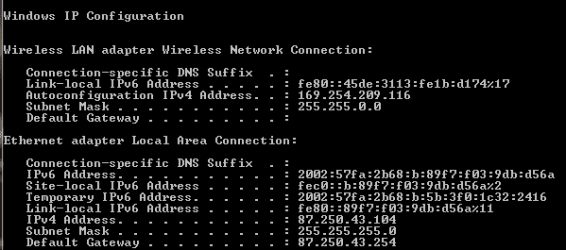
The first thing i would try and do is to get that pc connected to the internet, show us your ipconfig /all, on the Pc.
 

My Computer

Computer Manufacturer/Model Number
Lenovo ThinkPad T60
OS
Windows 7 Ultimate 64Bit
CPU
GenuineIntel Intel(R) Core(TM) DuoCore T2400 @ 1.83GHz
Motherboard
Intel(R) 82801G (ICH7 Family)
Memory
2.00 GB
Graphics Card(s)
Mobile Intel(R) 945 Express Chipset
Sound Card
SoundMAX Integrated Digital HD Audio
Monitor(s) Displays
ThinkPad Display
Screen Resolution
1400x1050
Hard Drives
100Gb SATA
Keyboard
Standard Keyboard
Mouse
HID-compliant Mouse
Internet Speed
Cable Broadband - 54Mbps
Other Info
Intel(R) PRO/1000 PL Network Connection
11a/b/g Wireless LAN Mini PCI Express Adapter
question:

Are you trying to configure internet connection sharing fromt he desktop to the laptop?

Or did you setup the "ROUTER" from your desktop?
 

My Computer

OS
7 Pro
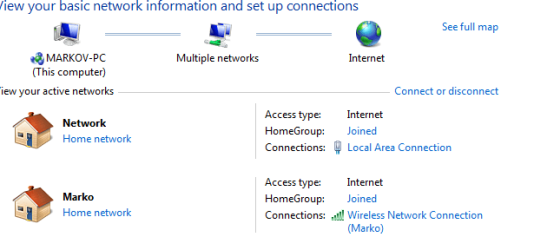
1. First picture shows how it looks on my desktop pc.

U can see the wireless connection named Marko (my name by the way:) ) and it says Access type: Internet
Everything looks good there.

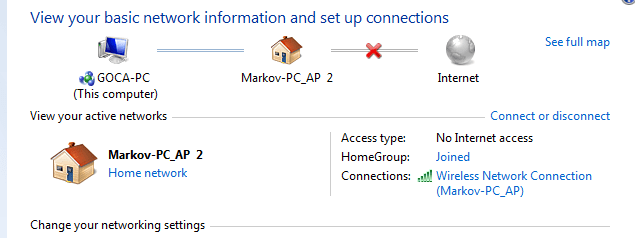
I searched Wlan on laptop and it detects "Marko". i press connect on laptop and enter password. It is identifying connection very long and at the end i get Unidentified network and below it says public network which is not hyperlinked. Access type: No internet access.

So i have internet on desktop pc. Do i need create ad hoc from laptop or from the pc with internet connection?
 

Attachments

  • DesktopPC.PNG
    DesktopPC.PNG
    34.8 KB · Views: 43
  • Ipconfig.PNG
    Ipconfig.PNG
    17.3 KB · Views: 39

My Computer

Computer Manufacturer/Model Number
ASUS
OS
Windows 7 Ultimate 64bit
CPU
Core2Duo E6420 2,13 GHz @ 2,93 GHz stock cooled
Motherboard
Asus P5k Deluxe Wi-Fi edition
Memory
Kingston 3GB DDR2 733 MHz RAM 2.1v
Graphics Card(s)
Asus 8800GTS 320MB 320-bit stock clocks, (burned in owen) xD
Sound Card
Creative Xi-Fi Extreme Music
Monitor(s) Displays
Samsung T220 22''
Screen Resolution
1680*1050
Hard Drives
320 GB
160 GB
PSU
Codegen 400W
Case
Codegen Briza 6097
Cooling
stock
Keyboard
Logitech media keyboard new
Mouse
RX 1000 laser mouse
Internet Speed
~1,5mb/sec
Can you please, leave the Homegroup or deleted it for the time being, assuming this issue is after you made the Homegroup.

I'm trying to see if you have any issue from just connecting to the internet via cable connection to modem.
 

My Computer

Computer Manufacturer/Model Number
Lenovo ThinkPad T60
OS
Windows 7 Ultimate 64Bit
CPU
GenuineIntel Intel(R) Core(TM) DuoCore T2400 @ 1.83GHz
Motherboard
Intel(R) 82801G (ICH7 Family)
Memory
2.00 GB
Graphics Card(s)
Mobile Intel(R) 945 Express Chipset
Sound Card
SoundMAX Integrated Digital HD Audio
Monitor(s) Displays
ThinkPad Display
Screen Resolution
1400x1050
Hard Drives
100Gb SATA
Keyboard
Standard Keyboard
Mouse
HID-compliant Mouse
Internet Speed
Cable Broadband - 54Mbps
Other Info
Intel(R) PRO/1000 PL Network Connection
11a/b/g Wireless LAN Mini PCI Express Adapter
Thanks brady but it didn't help.
 

My Computer

Computer Manufacturer/Model Number
ASUS
OS
Windows 7 Ultimate 64bit
CPU
Core2Duo E6420 2,13 GHz @ 2,93 GHz stock cooled
Motherboard
Asus P5k Deluxe Wi-Fi edition
Memory
Kingston 3GB DDR2 733 MHz RAM 2.1v
Graphics Card(s)
Asus 8800GTS 320MB 320-bit stock clocks, (burned in owen) xD
Sound Card
Creative Xi-Fi Extreme Music
Monitor(s) Displays
Samsung T220 22''
Screen Resolution
1680*1050
Hard Drives
320 GB
160 GB
PSU
Codegen 400W
Case
Codegen Briza 6097
Cooling
stock
Keyboard
Logitech media keyboard new
Mouse
RX 1000 laser mouse
Internet Speed
~1,5mb/sec
Does the desktop computer & the laptop computer each have different names for their computer names ? Also I have had much better luck with a business WorkGroup network setup rather than the New Win7 HomeGroup :(
 

My Computer

Computer type
PC/Desktop
Computer Manufacturer/Model Number
Built them myself, Science Experiments !
OS
Win7 Enterprise, Win7 x86 (Ult 7600), Win7 x64 Ult 7600, TechNet RTM on AMD x64 (2.8Ghz)
CPU
AMD fx8350 4ghz, AMD-32 2400mhz, AMD-64 3200mhz, AMDx64 2.8G
Motherboard
SIS 755, ECS-K8M890M-M (Ult 7600), GigaByte & others
Memory
2gb, 4gb on the Ult 7600, 4gb on Technet RTM, 32gb on FX8350
Graphics Card(s)
Draw my own Graphics, several nVidia cards
Sound Card
on motherboard
Monitor(s) Displays
19" flat scr, 28" I-Inc widescr,22" Emprex Widescr, 23" Acer
Screen Resolution
1280 x 1024, 1440 x 900, 1920 x 1080
Hard Drives
6 pata Ide HD's & 2 Sata HD's
added 80gb external on Ult 7600 computer,
numerous extra 1tb, 2TB, 3Tb SATA HD's
A collection of ext HD Docks w/ HDs
PSU
430w, 550w, 600w, 700, 800, etc
Case
All Generic Full Towers
Cooling
Open Air & a few fans, some w/ colored LEDs
Keyboard
Compaq & Dell recycled from GoodWill
Mouse
Made in China Optical Wired Mouse
Internet Speed
Fast Cable InterNet
Antivirus
AVG Free on 24 different Desktops, NO Problems!
Browser
IE 8 is preferred, but use FireFox sometimes
Other Info
Linksys Routers, switches, & Hubs
Too Many USB Flash Drives to count, Biggest is 64GB !
Eight computers in my home network.
Sixteen computers at my business network.
Linked via TeamViewer !
Lots of old used spare computer parts everywhere!
DocBrown they have different names.

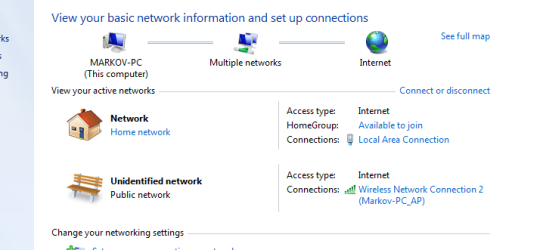
Im at a stage where i can share files (Home group) betwen laptop and pc.

This is how it looks now on pc, and second picture is on laptop.

By the way i tryed leaving home group, got the same thing.

I think that on my desktop pc i dont have valid IP config.
 

Attachments

  • desktoppc.PNG
    desktoppc.PNG
    42.6 KB · Views: 21
  • laptop.PNG
    laptop.PNG
    28.1 KB · Views: 17

My Computer

Computer Manufacturer/Model Number
ASUS
OS
Windows 7 Ultimate 64bit
CPU
Core2Duo E6420 2,13 GHz @ 2,93 GHz stock cooled
Motherboard
Asus P5k Deluxe Wi-Fi edition
Memory
Kingston 3GB DDR2 733 MHz RAM 2.1v
Graphics Card(s)
Asus 8800GTS 320MB 320-bit stock clocks, (burned in owen) xD
Sound Card
Creative Xi-Fi Extreme Music
Monitor(s) Displays
Samsung T220 22''
Screen Resolution
1680*1050
Hard Drives
320 GB
160 GB
PSU
Codegen 400W
Case
Codegen Briza 6097
Cooling
stock
Keyboard
Logitech media keyboard new
Mouse
RX 1000 laser mouse
Internet Speed
~1,5mb/sec
I think the reason could be a DNS issue.

On your Router, is it set to auto-config DHCP, and your wireless adapter's ipv4 also enable auto ip detect?
 

My Computer

Computer Manufacturer/Model Number
Lenovo ThinkPad T60
OS
Windows 7 Ultimate 64Bit
CPU
GenuineIntel Intel(R) Core(TM) DuoCore T2400 @ 1.83GHz
Motherboard
Intel(R) 82801G (ICH7 Family)
Memory
2.00 GB
Graphics Card(s)
Mobile Intel(R) 945 Express Chipset
Sound Card
SoundMAX Integrated Digital HD Audio
Monitor(s) Displays
ThinkPad Display
Screen Resolution
1400x1050
Hard Drives
100Gb SATA
Keyboard
Standard Keyboard
Mouse
HID-compliant Mouse
Internet Speed
Cable Broadband - 54Mbps
Other Info
Intel(R) PRO/1000 PL Network Connection
11a/b/g Wireless LAN Mini PCI Express Adapter
U think right. What i had to do is put a fixed or not to have laptop or desk pc obtain DNS server automatically.

So i have put my DNS server on both laptop and desk in IP4 properties window. Now i can make ad-hoc connection with no problems.

Problem resolved. Thanks to all for your help.
 

My Computer

Computer Manufacturer/Model Number
ASUS
OS
Windows 7 Ultimate 64bit
CPU
Core2Duo E6420 2,13 GHz @ 2,93 GHz stock cooled
Motherboard
Asus P5k Deluxe Wi-Fi edition
Memory
Kingston 3GB DDR2 733 MHz RAM 2.1v
Graphics Card(s)
Asus 8800GTS 320MB 320-bit stock clocks, (burned in owen) xD
Sound Card
Creative Xi-Fi Extreme Music
Monitor(s) Displays
Samsung T220 22''
Screen Resolution
1680*1050
Hard Drives
320 GB
160 GB
PSU
Codegen 400W
Case
Codegen Briza 6097
Cooling
stock
Keyboard
Logitech media keyboard new
Mouse
RX 1000 laser mouse
Internet Speed
~1,5mb/sec
U think right. What i had to do is put a fixed or not to have laptop or desk pc obtain DNS server automatically.

So i have put my DNS server on both laptop and desk in IP4 properties window. Now i can make ad-hoc connection with no problems.

Problem resolved. Thanks to all for your help.

Glad to hear your issue is solved. All the best. :D
 

My Computer

Computer Manufacturer/Model Number
Lenovo ThinkPad T60
OS
Windows 7 Ultimate 64Bit
CPU
GenuineIntel Intel(R) Core(TM) DuoCore T2400 @ 1.83GHz
Motherboard
Intel(R) 82801G (ICH7 Family)
Memory
2.00 GB
Graphics Card(s)
Mobile Intel(R) 945 Express Chipset
Sound Card
SoundMAX Integrated Digital HD Audio
Monitor(s) Displays
ThinkPad Display
Screen Resolution
1400x1050
Hard Drives
100Gb SATA
Keyboard
Standard Keyboard
Mouse
HID-compliant Mouse
Internet Speed
Cable Broadband - 54Mbps
Other Info
Intel(R) PRO/1000 PL Network Connection
11a/b/g Wireless LAN Mini PCI Express Adapter
Back
Top