
Solved Unidentified local area connection

Mrturkey

New member
Local time
5:37 AM
Messages
9
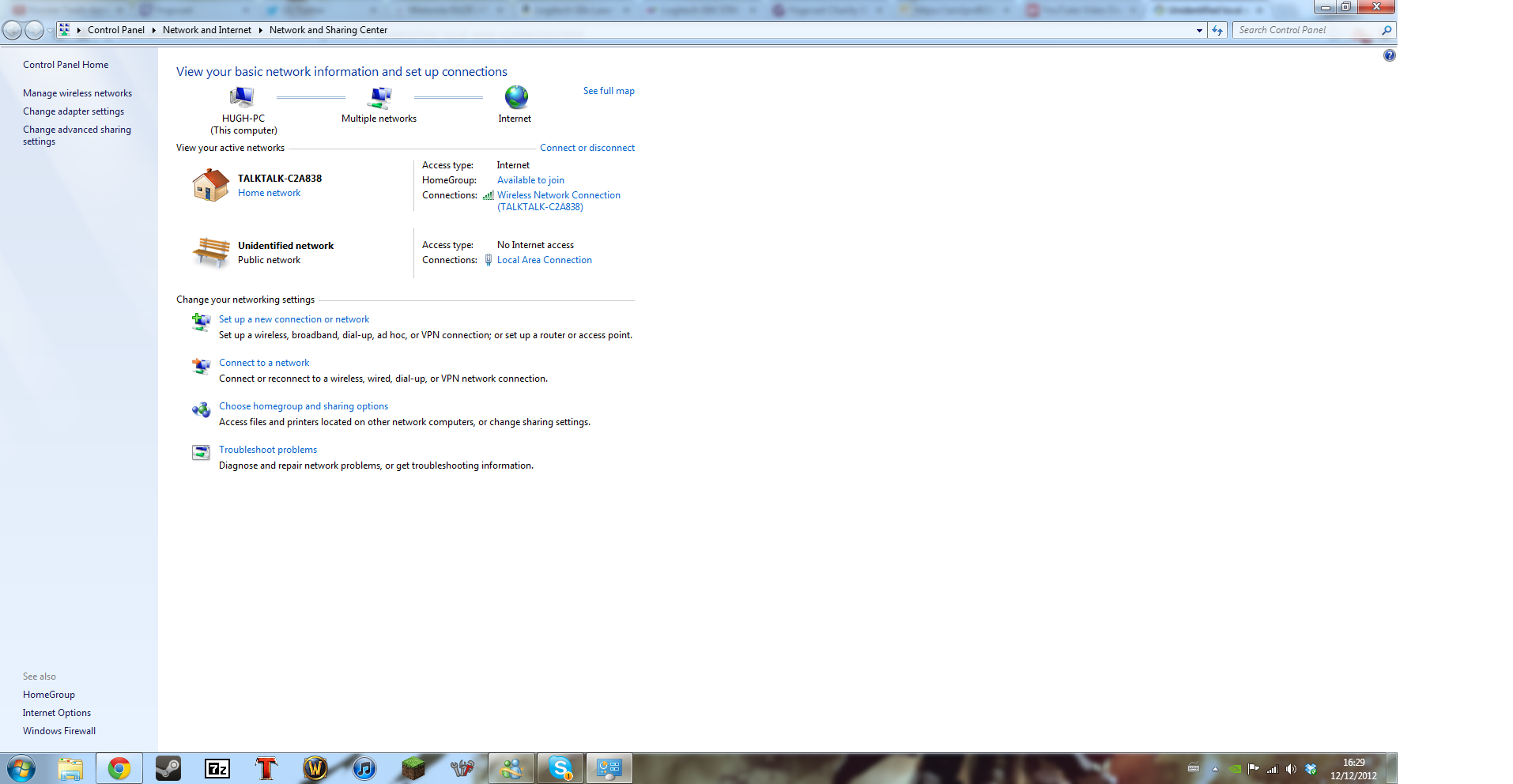
I am having trouble connecting to my local area connection as it is coming up as a public network. I am connecting through TP-link home plugs and it keeps saying it is an unidentified public network.
oOWeO.png

This what is showing up.


Any help is appreciated, I am at braking point here.
 
Last edited:

My Computer

OS
Windows 7 home premium 64bit
Do you have iTunes or Adobe photo shop or Adobe CS3 installed on this system?

Can you post a screen shot of the ipconfig/all?
 

My Computer

Computer type
PC/Desktop
Computer Manufacturer/Model Number
Home built
OS
Windows 7 Ult, Windows 8.1 Pro,
CPU
Q9650-4.275GHz, E8600 4.5GHz, E6750-3.8GHz
Motherboard
Evga 780i FTW
Memory
G.Skill PC2 9600 1200Mhz 5 5 5 15 2T
Graphics Card(s)
GTX480
Sound Card
Asus Xonar D2
Monitor(s) Displays
HannsG
Screen Resolution
1680X1050
Hard Drives
GSkill Phoenix Pro 120GB SSD
PSU
ThermalTake Toughpower 1000Watt modular
Case
ThermalTake XaserV
Cooling
Xigmatek S1283
Keyboard
Logitech G15
Mouse
Logitech G9
Internet Speed
T1
I have iTunes installed.
 

My Computer

OS
Windows 7 home premium 64bit
Well I kind of figured that.

If you can go into Windows services at services.msc, look for one called Bonjour, it may show up as "ID store" followed by bunch of numbers. You will want to disable this service then reboot the machine and if that changes anything.

The ipconfig/all might still come in handy if this doesn't work.
 

My Computer

Computer type
PC/Desktop
Computer Manufacturer/Model Number
Home built
OS
Windows 7 Ult, Windows 8.1 Pro,
CPU
Q9650-4.275GHz, E8600 4.5GHz, E6750-3.8GHz
Motherboard
Evga 780i FTW
Memory
G.Skill PC2 9600 1200Mhz 5 5 5 15 2T
Graphics Card(s)
GTX480
Sound Card
Asus Xonar D2
Monitor(s) Displays
HannsG
Screen Resolution
1680X1050
Hard Drives
GSkill Phoenix Pro 120GB SSD
PSU
ThermalTake Toughpower 1000Watt modular
Case
ThermalTake XaserV
Cooling
Xigmatek S1283
Keyboard
Logitech G15
Mouse
Logitech G9
Internet Speed
T1
Here is the ipconfig as well

C:\Users\Hugh>pconfig /all
'pconfig' is not recognized as an internal or external command,
operable program or batch file.

C:\Users\Hugh>ipconfig /all

Windows IP Configuration

Host Name . . . . . . . . . . . . : Hugh-PC
Primary Dns Suffix . . . . . . . :
Node Type . . . . . . . . . . . . : Hybrid
IP Routing Enabled. . . . . . . . : No
WINS Proxy Enabled. . . . . . . . : No

Wireless LAN adapter Wireless Network Connection:

Connection-specific DNS Suffix . :
Description . . . . . . . . . . . : Edimax EW-7612PIn Wireless PCI-Express Ad
apter
Physical Address. . . . . . . . . : 80-1F-02-2F-17-02
DHCP Enabled. . . . . . . . . . . : Yes
Autoconfiguration Enabled . . . . : Yes
Link-local IPv6 Address . . . . . : fe80::8827:b465:5f83:2dfc%13(Preferred)
IPv4 Address. . . . . . . . . . . : 192.168.1.8(Preferred)
Subnet Mask . . . . . . . . . . . : 255.255.255.0
Lease Obtained. . . . . . . . . . : 12 December 2012 16:08:52
Lease Expires . . . . . . . . . . : 13 December 2012 16:08:52
Default Gateway . . . . . . . . . : 192.168.1.1
DHCP Server . . . . . . . . . . . : 192.168.1.1
DHCPv6 IAID . . . . . . . . . . . : 327163650
DHCPv6 Client DUID. . . . . . . . : 00-01-00-01-18-5A-64-67-02-EF-22-FD-23-10

DNS Servers . . . . . . . . . . . : 192.168.1.1
192.168.1.1
NetBIOS over Tcpip. . . . . . . . : Enabled

Ethernet adapter Local Area Connection:

Connection-specific DNS Suffix . :
Description . . . . . . . . . . . : Realtek PCIe GBE Family Controller
Physical Address. . . . . . . . . : 02-EF-22-FD-23-10
DHCP Enabled. . . . . . . . . . . : Yes
Autoconfiguration Enabled . . . . : Yes
Link-local IPv6 Address . . . . . : fe80::69ae:7b3e:a44e:d123%12(Preferred)
Autoconfiguration IPv4 Address. . : 169.254.209.35(Preferred)
Subnet Mask . . . . . . . . . . . : 255.255.0.0
Default Gateway . . . . . . . . . :
DHCPv6 IAID . . . . . . . . . . . : 267676932
DHCPv6 Client DUID. . . . . . . . : 00-01-00-01-18-5A-64-67-02-EF-22-FD-23-10

DNS Servers . . . . . . . . . . . : fec0:0:0:ffff::1%1
fec0:0:0:ffff::2%1
fec0:0:0:ffff::3%1
NetBIOS over Tcpip. . . . . . . . : Enabled

Tunnel adapter isatap.{CFB11CA5-571E-4E2A-AFDC-6F79E05BF79F}:

Media State . . . . . . . . . . . : Media disconnected
Connection-specific DNS Suffix . :
Description . . . . . . . . . . . : Microsoft ISATAP Adapter
Physical Address. . . . . . . . . : 00-00-00-00-00-00-00-E0
DHCP Enabled. . . . . . . . . . . : No
Autoconfiguration Enabled . . . . : Yes

Tunnel adapter Teredo Tunneling Pseudo-Interface:

Media State . . . . . . . . . . . : Media disconnected
Connection-specific DNS Suffix . :
Description . . . . . . . . . . . : Teredo Tunneling Pseudo-Interface
Physical Address. . . . . . . . . : 00-00-00-00-00-00-00-E0
DHCP Enabled. . . . . . . . . . . : No
Autoconfiguration Enabled . . . . : Yes

Tunnel adapter isatap.{DA7ADD4B-9849-45F3-9E73-C59AF211A49E}:

Media State . . . . . . . . . . . : Media disconnected
Connection-specific DNS Suffix . :
Description . . . . . . . . . . . : Microsoft ISATAP Adapter #2
Physical Address. . . . . . . . . : 00-00-00-00-00-00-00-E0
DHCP Enabled. . . . . . . . . . . : No
Autoconfiguration Enabled . . . . : Yes
 

My Computer

OS
Windows 7 home premium 64bit
The only problem I see here is two default gateway's showing up for the DNS server, usually only one would show up as it points back to the router as the DNS server.

When two gateways show up it sometimes means there is a secondary router involved in the network which may not be configured correctly but for now disable the Bonjour service if you can find it.
 

My Computer

Computer type
PC/Desktop
Computer Manufacturer/Model Number
Home built
OS
Windows 7 Ult, Windows 8.1 Pro,
CPU
Q9650-4.275GHz, E8600 4.5GHz, E6750-3.8GHz
Motherboard
Evga 780i FTW
Memory
G.Skill PC2 9600 1200Mhz 5 5 5 15 2T
Graphics Card(s)
GTX480
Sound Card
Asus Xonar D2
Monitor(s) Displays
HannsG
Screen Resolution
1680X1050
Hard Drives
GSkill Phoenix Pro 120GB SSD
PSU
ThermalTake Toughpower 1000Watt modular
Case
ThermalTake XaserV
Cooling
Xigmatek S1283
Keyboard
Logitech G15
Mouse
Logitech G9
Internet Speed
T1
I have disabled Bonjour and there are still two networks with my local area connection showing up as a public network.
 

My Computer

OS
Windows 7 home premium 64bit
I have disabled Bonjour and there are still two networks with my local area connection showing up as a public network.

Is there more than one router in this network because the ipconfig is showing two default gateways for some reason.

From what I can see your LAN or the talktalk, is a separate network from the public one. Which one are you trying to use?
 

My Computer

Computer type
PC/Desktop
Computer Manufacturer/Model Number
Home built
OS
Windows 7 Ult, Windows 8.1 Pro,
CPU
Q9650-4.275GHz, E8600 4.5GHz, E6750-3.8GHz
Motherboard
Evga 780i FTW
Memory
G.Skill PC2 9600 1200Mhz 5 5 5 15 2T
Graphics Card(s)
GTX480
Sound Card
Asus Xonar D2
Monitor(s) Displays
HannsG
Screen Resolution
1680X1050
Hard Drives
GSkill Phoenix Pro 120GB SSD
PSU
ThermalTake Toughpower 1000Watt modular
Case
ThermalTake XaserV
Cooling
Xigmatek S1283
Keyboard
Logitech G15
Mouse
Logitech G9
Internet Speed
T1
As far as I know there is only one router.
 

My Computer

OS
Windows 7 home premium 64bit
From what I'm seeing that secondary default gateway is what's creating this Unidentified public network which is a very common problem although the cause can be different depending on many factors.

Have you tried to disable the Ethernet connection by going to Device Manager and disabling it, because it's showing that it's plugged but isn't getting a valid IP address .

Perhaps going through the link below which describes this problem and shows various solutions further down the page.
Windows 7 Unidentified Network, Limited Access, No Internet Connection Problem Resolved
 

My Computer

Computer type
PC/Desktop
Computer Manufacturer/Model Number
Home built
OS
Windows 7 Ult, Windows 8.1 Pro,
CPU
Q9650-4.275GHz, E8600 4.5GHz, E6750-3.8GHz
Motherboard
Evga 780i FTW
Memory
G.Skill PC2 9600 1200Mhz 5 5 5 15 2T
Graphics Card(s)
GTX480
Sound Card
Asus Xonar D2
Monitor(s) Displays
HannsG
Screen Resolution
1680X1050
Hard Drives
GSkill Phoenix Pro 120GB SSD
PSU
ThermalTake Toughpower 1000Watt modular
Case
ThermalTake XaserV
Cooling
Xigmatek S1283
Keyboard
Logitech G15
Mouse
Logitech G9
Internet Speed
T1
I decided to remove the home plugs out of the equation and just connect my computer to the router and it seems to work so I can only assume it is the home plugs causing the problem. I also tried that link and it didn't seem to work either.
 

My Computer

OS
Windows 7 home premium 64bit
I decided to remove the home plugs out of the equation and just connect my computer to the router and it seems to work so I can only assume it is the home plugs causing the problem. I also tried that link and it didn't seem to work either.

I've never put much faith in Home plugs connections and they seem to cause problems all the time.

With the Home plugs removed I'm wondering if that secondary default gateway is also removed. The ipconfig/all will show us that. :geek:

If that is the case then the Home plugs were setting up it's own default gateway which could probably be changed through it's settings but I have no idea what the Home plugs UI looks like.
 

My Computer

Computer type
PC/Desktop
Computer Manufacturer/Model Number
Home built
OS
Windows 7 Ult, Windows 8.1 Pro,
CPU
Q9650-4.275GHz, E8600 4.5GHz, E6750-3.8GHz
Motherboard
Evga 780i FTW
Memory
G.Skill PC2 9600 1200Mhz 5 5 5 15 2T
Graphics Card(s)
GTX480
Sound Card
Asus Xonar D2
Monitor(s) Displays
HannsG
Screen Resolution
1680X1050
Hard Drives
GSkill Phoenix Pro 120GB SSD
PSU
ThermalTake Toughpower 1000Watt modular
Case
ThermalTake XaserV
Cooling
Xigmatek S1283
Keyboard
Logitech G15
Mouse
Logitech G9
Internet Speed
T1
Here it is now:

Microsoft Windows [Version 6.1.7601]
Copyright (c) 2009 Microsoft Corporation. All rights reserved.

C:\Users\Hugh>ipconfig /all

Windows IP Configuration

Host Name . . . . . . . . . . . . : Hugh-PC
Primary Dns Suffix . . . . . . . :
Node Type . . . . . . . . . . . . : Hybrid
IP Routing Enabled. . . . . . . . : No
WINS Proxy Enabled. . . . . . . . : No

Wireless LAN adapter Wireless Network Connection 2:

Media State . . . . . . . . . . . : Media disconnected
Connection-specific DNS Suffix . :
Description . . . . . . . . . . . : Microsoft Virtual WiFi Miniport Adapter
Physical Address. . . . . . . . . : 80-1F-02-2F-17-02
DHCP Enabled. . . . . . . . . . . : Yes
Autoconfiguration Enabled . . . . : Yes

Wireless LAN adapter Wireless Network Connection:

Media State . . . . . . . . . . . : Media disconnected
Connection-specific DNS Suffix . :
Description . . . . . . . . . . . : Edimax EW-7612PIn Wireless PCI-Express Ad
apter
Physical Address. . . . . . . . . : 80-1F-02-2F-17-02
DHCP Enabled. . . . . . . . . . . : Yes
Autoconfiguration Enabled . . . . : Yes

Ethernet adapter Local Area Connection:

Connection-specific DNS Suffix . :
Description . . . . . . . . . . . : Realtek PCIe GBE Family Controller
Physical Address. . . . . . . . . : 02-EF-22-FD-23-10
DHCP Enabled. . . . . . . . . . . : Yes
Autoconfiguration Enabled . . . . : Yes
Link-local IPv6 Address . . . . . : fe80::69ae:7b3e:a44e:d123%12(Preferred)
IPv4 Address. . . . . . . . . . . : 192.168.1.19(Preferred)
Subnet Mask . . . . . . . . . . . : 255.255.255.0
Lease Obtained. . . . . . . . . . : 12 December 2012 18:00:14
Lease Expires . . . . . . . . . . : 13 December 2012 18:00:13
Default Gateway . . . . . . . . . : 192.168.1.1
DHCP Server . . . . . . . . . . . : 192.168.1.1
DHCPv6 IAID . . . . . . . . . . . : 267676932
DHCPv6 Client DUID. . . . . . . . : 00-01-00-01-18-5A-64-67-02-EF-22-FD-23-10

DNS Servers . . . . . . . . . . . : 192.168.1.1
192.168.1.1
NetBIOS over Tcpip. . . . . . . . : Enabled

Tunnel adapter isatap.{CFB11CA5-571E-4E2A-AFDC-6F79E05BF79F}:

Media State . . . . . . . . . . . : Media disconnected
Connection-specific DNS Suffix . :
Description . . . . . . . . . . . : Microsoft ISATAP Adapter
Physical Address. . . . . . . . . : 00-00-00-00-00-00-00-E0
DHCP Enabled. . . . . . . . . . . : No
Autoconfiguration Enabled . . . . : Yes

Tunnel adapter Teredo Tunneling Pseudo-Interface:

Connection-specific DNS Suffix . :
Description . . . . . . . . . . . : Teredo Tunneling Pseudo-Interface
Physical Address. . . . . . . . . : 00-00-00-00-00-00-00-E0
DHCP Enabled. . . . . . . . . . . : No
Autoconfiguration Enabled . . . . : Yes
IPv6 Address. . . . . . . . . . . : 2001:0:5ef5:73b8:2014:f9f:3f57:feec(Prefe
rred)
Link-local IPv6 Address . . . . . : fe80::2014:f9f:3f57:feec%17(Preferred)
Default Gateway . . . . . . . . . : ::
NetBIOS over Tcpip. . . . . . . . : Disabled

Tunnel adapter isatap.{DA7ADD4B-9849-45F3-9E73-C59AF211A49E}:

Media State . . . . . . . . . . . : Media disconnected
Connection-specific DNS Suffix . :
Description . . . . . . . . . . . : Microsoft ISATAP Adapter #2
Physical Address. . . . . . . . . : 00-00-00-00-00-00-00-E0
DHCP Enabled. . . . . . . . . . . : No
Autoconfiguration Enabled . . . . : Yes
 

My Computer

OS
Windows 7 home premium 64bit
Looks to me like you switched back to using the Ethernet connection. Still no change to the dual default gateway's, maybe someone mistakenly typed the default gateway into the DNS settings in IPv4 properties for some reason? Hard to say from here but it's not right but as long as it works I guess.

It also appears that you updated the wireless driver to a newer version because the Msoft Virtual WiFi mini port is now showing up, or maybe it was just disabled before?

I have a feeling that the Home plugs just wasn't connected to the router correctly or the settings weren't right.
 

My Computer

Computer type
PC/Desktop
Computer Manufacturer/Model Number
Home built
OS
Windows 7 Ult, Windows 8.1 Pro,
CPU
Q9650-4.275GHz, E8600 4.5GHz, E6750-3.8GHz
Motherboard
Evga 780i FTW
Memory
G.Skill PC2 9600 1200Mhz 5 5 5 15 2T
Graphics Card(s)
GTX480
Sound Card
Asus Xonar D2
Monitor(s) Displays
HannsG
Screen Resolution
1680X1050
Hard Drives
GSkill Phoenix Pro 120GB SSD
PSU
ThermalTake Toughpower 1000Watt modular
Case
ThermalTake XaserV
Cooling
Xigmatek S1283
Keyboard
Logitech G15
Mouse
Logitech G9
Internet Speed
T1
I meant I just used an Ethernet cable straight to the router rather than through the home plugs. I checked the ipv4 settings and they are all blank and on auto. The drivers being updated is strange as I didn't do that on purpose so I have no idea why it has done that.

I will connect back through the home plugs and make sure that the ipv4 settings are the same as what I am seeing now, although it works I don't think I can leave the wire out as it goes through three rooms and across the front door so it's a tiny bit in the way.

One more thing I noticed is the ipv4 address now is 192.168.1.19 whereas before it was 169.254.209.35. Could that be causing the problem?
 

My Computer

OS
Windows 7 home premium 64bit
I meant I just used an Ethernet cable straight to the router rather than through the home plugs. I checked the ipv4 settings and they are all blank and on auto. The drivers being updated is strange as I didn't do that on purpose so I have no idea why it has done that.

I will connect back through the home plugs and make sure that the ipv4 settings are the same as what I am seeing now, although it works I don't think I can leave the wire out as it goes through three rooms and across the front door so it's a tiny bit in the way.

One more thing I noticed is the ipv4 address now is 192.168.1.19 whereas before it was 169.254.209.35. Could that be causing the problem?

The IPv4 address 192.168.19 is a valid DHCP assigned IP which is coming from your router, the 169.254.209.35 IP address is just Windows way of telling you that the connection doesn't have a valid IP.

It appears that the Home plugs is setting up some type of secondary network for the wireless connection which then creates the "Unidentified Public Network" which it shouldn't be doing so it's probably not connected or set up properly. I'm thinking that you are only using the Home plug to create a wireless network because your router doesn't have wireless maybe?

You may need to give the Home plug interface an IPv4 IP which is outside the range of DHCP address space. The Home plug directions should cover all this in great detail.
 

My Computer

Computer type
PC/Desktop
Computer Manufacturer/Model Number
Home built
OS
Windows 7 Ult, Windows 8.1 Pro,
CPU
Q9650-4.275GHz, E8600 4.5GHz, E6750-3.8GHz
Motherboard
Evga 780i FTW
Memory
G.Skill PC2 9600 1200Mhz 5 5 5 15 2T
Graphics Card(s)
GTX480
Sound Card
Asus Xonar D2
Monitor(s) Displays
HannsG
Screen Resolution
1680X1050
Hard Drives
GSkill Phoenix Pro 120GB SSD
PSU
ThermalTake Toughpower 1000Watt modular
Case
ThermalTake XaserV
Cooling
Xigmatek S1283
Keyboard
Logitech G15
Mouse
Logitech G9
Internet Speed
T1
Well I can cautiously say it is fixed, for how long I have no idea. I went back to the link you sent before and tried it again this time I entered what was shown on the ipconfg, that I did when I used the Ethernet lead without the Home plugs, in to the IPv4 settings. Restarted my computer and it worked.

The reason why I use the Home plugs is because my computer doesn't connect wirelessly to my router where I have it set up so this was the easiest solution it seemed.

I can't say how grateful I am for your help tonight I thought I was going to have to suffer for days before I fixed it. Thank you so much. :D
 

My Computer

OS
Windows 7 home premium 64bit
Well I can cautiously say it is fixed, for how long I have no idea. I went back to the link you sent before and tried it again this time I entered what was shown on the ipconfg, that I did when I used the Ethernet lead without the Home plugs, in to the IPv4 settings. Restarted my computer and it worked.

The reason why I use the Home plugs is because my computer doesn't connect wirelessly to my router where I have it set up so this was the easiest solution it seemed.

I can't say how grateful I am for your help tonight I thought I was going to have to suffer for days before I fixed it. Thank you so much. :D

It's good you have it working with static IP although DHCP assigned IP's from the router should still be working. There is also the chance that the Bonjour service was creating this problem which is very common.

I'm not familiar with the Home plugs interface or I could give more precise directions on how to set it up.
 

My Computer

Computer type
PC/Desktop
Computer Manufacturer/Model Number
Home built
OS
Windows 7 Ult, Windows 8.1 Pro,
CPU
Q9650-4.275GHz, E8600 4.5GHz, E6750-3.8GHz
Motherboard
Evga 780i FTW
Memory
G.Skill PC2 9600 1200Mhz 5 5 5 15 2T
Graphics Card(s)
GTX480
Sound Card
Asus Xonar D2
Monitor(s) Displays
HannsG
Screen Resolution
1680X1050
Hard Drives
GSkill Phoenix Pro 120GB SSD
PSU
ThermalTake Toughpower 1000Watt modular
Case
ThermalTake XaserV
Cooling
Xigmatek S1283
Keyboard
Logitech G15
Mouse
Logitech G9
Internet Speed
T1
Back
Top