Solved Unidentified network, no connections available.

maxtheaxe

New member
Local time
1:05 AM
Messages
5
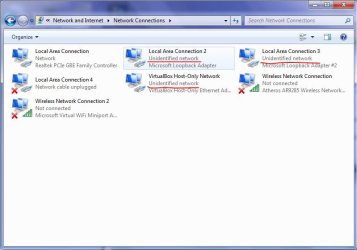
Okay so, yesterday i was watching a show online. when suddenly my PC decided that theres no connections availabe, and when i went and checked the router settings in the laptop, they were almost all unidentified.
i ran the troubleshooter and the resulsts were, most of them unidentified.
iam thinking that if acurasd (or anyone else, really) can remotly connect to my computer, so he can do his test/checks to see if theres anything we can do.
Oh and thanks in advance .
 

My Computer My Computer

OS
Windows 7 Home Premium x64 bit.
Either that didnt work, or i did it wrong, because it didnt work.
This is getting really annoying i need internet connection on my laptop.
Any possible solution would be GREAT, btw Roderunner, can u maybe use teamviewer and try to do it urself?, that is if u want.
Again, thanks in advance.
 

My Computer My Computer

OS
Windows 7 Home Premium x64 bit.
Thanks for the offer but I would need a constant connection to help you.
 

My Computer My Computer

Computer Manufacturer/Model Number
Look in my Signature.
OS
Win7 H.Prem. 32bit+SP1
Okay so, yesterday i was watching a show online. when suddenly my PC decided that theres no connections availabe, and when i went and checked the router settings in the laptop, they were almost all unidentified.
i ran the troubleshooter and the resulsts were, most of them unidentified.
iam thinking that if acurasd (or anyone else, really) can remotly connect to my computer, so he can do his test/checks to see if theres anything we can do.
Oh and thanks in advance .

Sounds to me like your router had a bit of an overload problem and quit on you.

Have you tried to reset the router?

We can't reset routers from here. :)
 

My Computer My Computer

Computer type
PC/Desktop
Computer Manufacturer/Model Number
Home built
OS
Windows 7 Ult, Windows 8.1 Pro,
CPU
Q9650-4.275GHz, E8600 4.5GHz, E6750-3.8GHz
Motherboard
Evga 780i FTW
Memory
G.Skill PC2 9600 1200Mhz 5 5 5 15 2T
Graphics Card(s)
GTX480
Sound Card
Asus Xonar D2
Monitor(s) Displays
HannsG
Screen Resolution
1680X1050
Hard Drives
GSkill Phoenix Pro 120GB SSD
PSU
ThermalTake Toughpower 1000Watt modular
Case
ThermalTake XaserV
Cooling
Xigmatek S1283
Keyboard
Logitech G15
Mouse
Logitech G9
Internet Speed
T1
Okay so, yesterday i was watching a show online. when suddenly my PC decided that theres no connections availabe, and when i went and checked the router settings in the laptop, they were almost all unidentified.
i ran the troubleshooter and the resulsts were, most of them unidentified.
iam thinking that if acurasd (or anyone else, really) can remotly connect to my computer, so he can do his test/checks to see if theres anything we can do.
Oh and thanks in advance .

Sounds to me like your router had a bit of an overload problem and quit on you.

Have you tried to reset the router?

We can't reset routers from here. :)
Yes, i have tried:
1.Resseting router.
2.Troubleshooting.
3.Changing router configs and stuff (the file that roderunner sent me above).
4.Using the netsh CMD commands.
5.Turning off firewalls.
 

My Computer My Computer

OS
Windows 7 Home Premium x64 bit.
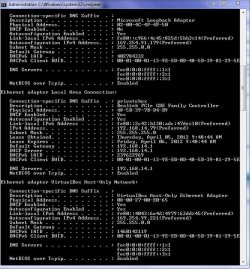
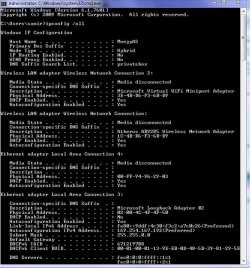
If you can post a screen shot of your ipconfig/all it would be helpful. :)
 

My Computer My Computer

Computer type
PC/Desktop
Computer Manufacturer/Model Number
Home built
OS
Windows 7 Ult, Windows 8.1 Pro,
CPU
Q9650-4.275GHz, E8600 4.5GHz, E6750-3.8GHz
Motherboard
Evga 780i FTW
Memory
G.Skill PC2 9600 1200Mhz 5 5 5 15 2T
Graphics Card(s)
GTX480
Sound Card
Asus Xonar D2
Monitor(s) Displays
HannsG
Screen Resolution
1680X1050
Hard Drives
GSkill Phoenix Pro 120GB SSD
PSU
ThermalTake Toughpower 1000Watt modular
Case
ThermalTake XaserV
Cooling
Xigmatek S1283
Keyboard
Logitech G15
Mouse
Logitech G9
Internet Speed
T1
Edit: wow, sorry wasting ur time guys but, my sister accidentally clicked the WLAN button yesterday, and thats why i had this problem, i just misclicked it, and it worked xD.
Again, sorry.
But thanks! in a weird way.
 

Attachments

  • TheRouters.JPG
    TheRouters.JPG
    46.6 KB · Views: 50
  • ThepRoblem.JPG
    ThepRoblem.JPG
    64.2 KB · Views: 37
  • ipconfig2.JPG
    ipconfig2.JPG
    99.8 KB · Views: 16
  • Ipconfig1.JPG
    Ipconfig1.JPG
    89.6 KB · Views: 8
Last edited:

My Computer My Computer

OS
Windows 7 Home Premium x64 bit.
Plenty of extra network adaptors there for sure, looks like a few are virtual adaptors. If you have any other problems you might want to disable some of those extra adaptors. I'll mark as solved.
 

My Computer My Computer

Computer type
PC/Desktop
Computer Manufacturer/Model Number
Home built
OS
Windows 7 Ult, Windows 8.1 Pro,
CPU
Q9650-4.275GHz, E8600 4.5GHz, E6750-3.8GHz
Motherboard
Evga 780i FTW
Memory
G.Skill PC2 9600 1200Mhz 5 5 5 15 2T
Graphics Card(s)
GTX480
Sound Card
Asus Xonar D2
Monitor(s) Displays
HannsG
Screen Resolution
1680X1050
Hard Drives
GSkill Phoenix Pro 120GB SSD
PSU
ThermalTake Toughpower 1000Watt modular
Case
ThermalTake XaserV
Cooling
Xigmatek S1283
Keyboard
Logitech G15
Mouse
Logitech G9
Internet Speed
T1
I have been having other problems, and like u said, after i disabled those, problems are gone o.o.
 

My Computer My Computer

OS
Windows 7 Home Premium x64 bit.
Back
Top