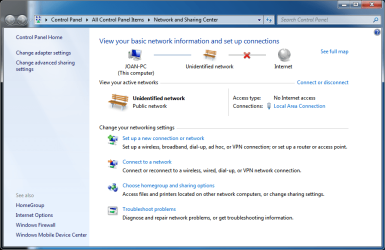
Unidentified Network, No Internet Access ... Again ! (On Eth Cable)

ermns

New member
Local time
1:32 AM
Messages
45
Unidentified Network, No Internet Access ... Again ! (Wired)

Hello everyone !! I know I know.. you've heard that before !!

Me too !! My wifes computer has had that issue many more times... But usually a simple reboot, disabling and reenabling and reboot.. would usually solve the problem...

This time though it has buffled me, for a couple of days...
Let me tell what I've done..

I actually have done all that I could find on the internet.. namely :

1. Rebooted the Computer.
2. Enabled and re-enabled the driver.
2.1 Rebooted the modem and switch
3. Looked for that ##.... service that a lot of people mention on the internet... (I don't have it)
4. Installed the extra service on Ipv4 for multicast networks...
5. Changed how windows treat unidentified networks...
6. Updated the driver.
7. Downloaded and updated all the drivers from the manufacturers site.
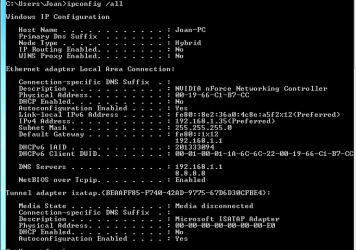
8. Tried to set specific Address : 192.168.1.128 and specific instead of automatic address, also set the DNS to 8.8.8.8 and 8.8.4.4
9. Rebooted a hundred times...

Nothing has worked so far !!

I am on ASRock 939N68PV-GLAN motherboard, with Nvidia NForce Networking.

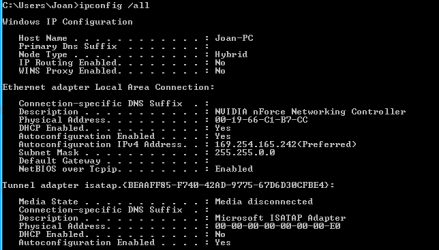
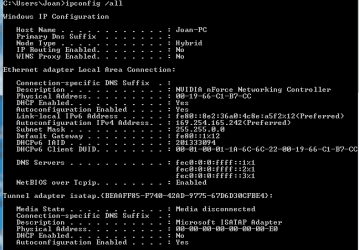
I am attaching my ipconfig, having set to find the address to auto...
What is strange is that it defaults to a strange address instead of 192.168.1.##, but when I specifically ask for an address it accepts it, but nothing happens beyond that.

It still finds and unidentified network, and no internet connection.
btw.. I am on an ethernet cable, and not wifi connection.

Everything was working absolutely fine until the day before yesterday.
All of a sudden in the morning I saw the dreaded sign.. and that was it :(

I am at a loss for options.. any ideas are welcome..
Please help !

ps. If you need any more information please let me know...
 

Attachments
  • ipconf01.PNG
    ipconf01.PNG
    8.1 KB · Views: 22
  • NSC01.PNG
    NSC01.PNG
    43.1 KB · Views: 0
Last edited:

My Computer My Computer

Computer type
PC/Desktop
OS
Windows 7 Pro, 32 bit
CPU
AMD Athlon 64 x2 3800+
Motherboard
ASRock 939N98PV-GLAN
Memory
DDR Dual Channel 4 Gbytes
Graphics Card(s)
Nvidia GeForce GT440
Antivirus
Avast
Browser
Chrome
After asking for specific IP Address and DNS

This is my ipconfig, after asking for specific IP Address and DNS.

It doesn't work either..
 

Attachments

  • ipconf02.PNG
    ipconf02.PNG
    8.7 KB · Views: 19

My Computer My Computer

Computer type
PC/Desktop
OS
Windows 7 Pro, 32 bit
CPU
AMD Athlon 64 x2 3800+
Motherboard
ASRock 939N98PV-GLAN
Memory
DDR Dual Channel 4 Gbytes
Graphics Card(s)
Nvidia GeForce GT440
Antivirus
Avast
Browser
Chrome
Hi there,

Could you please give more info about the number of computers, how are they connected, what is the router model, if you have any switches or other devices connected to the network? Is this PC connected directly to the router? What kind of security software is installed on it?

Otherwise the 169.254.x.x address is auto assigned when the PC cannot obtain IP from your local DHCP server (your router), so basically it seems like your computer doesn't see the router at all at the moment.

It would be a good idea to try and switch to a different port on the router for this PC .

You can also try to disable the Ipv6 usage for the Ethernet adapter by unchecking the check box next to "Internet Protocol Version 6" (TCP/IPv6) under your Local Area Connection properties.

Also when assigning the static IP address – the 192.168.1.35, have you checked if your router is using the same range? Are the other computers in the house using 192.168.1.1 for their gateway?

Hope that helps, if not provide some more details :)
 

My Computer My Computer

Computer type
PC/Desktop
OS
Windows
Hello and thank you for your interest in helping me. I will try to be as precise and detailed as possible.

This is a small network I have at home. Two windows machines, one Linux and three external HD and a lot of different wireless connections.... ipads, android pads and phones and occasional laptops..

Up until a couple of days ago everything was working just fine.
One morning I wake up, only to find the computer in question with the aforementioned problem...

All the wired connections are connecting on an asus switch (GigaX11088), which connect on my router provided by my telephone company and internet provider.

As fat as security software I have installed only avast antivirus.. which by the way.. in one of the millions of things I tried was to disable it, reboot and see what happens....

"Otherwise the 169.254.x.x address is auto assigned when the PC cannot obtain IP from your local DHCP server (your router), so basically it seems like your computer doesn't see the router at all at the moment. "

I totally agree with that statement. For some reason it does NOT see my router, when I set automatic IP address, and when I ask for 192.169.1.35 I cannot see on my router that address being assigned to anything. Although I see it on my IP config, I don't see it on my router :(

I will try the following as you said :

1. Switch port and see what happens.
2. Maybe change the Ethernet wire as well?
3. Will disable the IPv6 and see what happens.

"Also when assigning the static IP address – the 192.168.1.35, have you checked if your router is using the same range? Are the other computers in the house using 192.168.1.1 for their gateway? "

Yes and yes.

=======================================
1. Switch port.

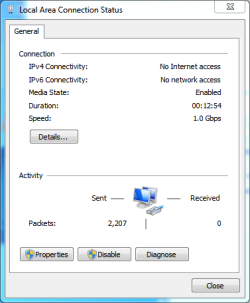
What I noticed is that the led when I switched the port is green.. both in position 1 and 4. Which means that it connects with the switch at the high speed of 1Gbit. The switch supports two different speeds.
I also see that on windows. So I am sure that there is a connection between the network controller and the switch.
Does that help.

2. Disabled the IPv6.

Nothing happened.

Here are the photos... You can see at the Local area Connection that it acknowledges that it is connected at 1Gb speed.
 

Attachments

  • NSC02.PNG
    NSC02.PNG
    41.9 KB · Views: 0
  • LAC01.PNG
    LAC01.PNG
    9.5 KB · Views: 16
  • ipconf03.PNG
    ipconf03.PNG
    5.7 KB · Views: 16

My Computer My Computer

Computer type
PC/Desktop
OS
Windows 7 Pro, 32 bit
CPU
AMD Athlon 64 x2 3800+
Motherboard
ASRock 939N98PV-GLAN
Memory
DDR Dual Channel 4 Gbytes
Graphics Card(s)
Nvidia GeForce GT440
Antivirus
Avast
Browser
Chrome
This is my ipconfig, after asking for specific IP Address and DNS.

It doesn't work either..

Looking at the dns in post #2 , this should not be your gateway address , your gateway should be 192.168.1.1
 

My Computer My Computer

Computer type
PC/Desktop
Computer Manufacturer/Model Number
Custom Build
OS
Windows 10 Pro - 64 bit
CPU
Intel i7 2600K
Motherboard
Asus P8P67
Memory
8 Gig ddr3 1600 mhz - viper extreme (Patriot)
Graphics Card(s)
EVGA 980 TI
Monitor(s) Displays
2 - Lg 21" LED , sony 48 " bravia LED
Hard Drives
one - samsung 840 series 465.76 GB SSD
two - wd 2 tB black
one - wd 1.5 tb black
one - wb 1 tb black
PSU
1000 Watt Coolmaster : Silent Pro Gold
Case
antec 1200
Cooling
watercooled
Mouse
logitech wireless
Antivirus
Norton Security 2015
Other Info
powerware 3.1 KVA FERRUPS with 4 - 1000 Amp Deep cycle batteries ...
This is my ipconfig, after asking for specific IP Address and DNS.

It doesn't work either..

Looking at the dns in post #2 , this should not be your gateway address , your gateway should be 192.168.1.1

Well, this is what it shows me on ipconfig, when I set it on automatic.
 

My Computer My Computer

Computer type
PC/Desktop
OS
Windows 7 Pro, 32 bit
CPU
AMD Athlon 64 x2 3800+
Motherboard
ASRock 939N98PV-GLAN
Memory
DDR Dual Channel 4 Gbytes
Graphics Card(s)
Nvidia GeForce GT440
Antivirus
Avast
Browser
Chrome
Have you tried resetting the TCP/IP protocol stack?

You have to run CMD as Administrator, and then run the following commands:

netsh winsock reset catalog {press Enter}

netsh int ip reset c:\resetlog.txt {press Enter}


Then reboot PC

If that doesn't help, I would boot this PC under Ubuntu to check if the situation will be the same. If it's a no go there as well - try and bypass the switch. Try to connect PC directly to the router.

And keep us posted :)
 

My Computer My Computer

Computer type
PC/Desktop
OS
Windows
Hello :-)

Thank you for your ideas!

So... This is what has happened so far...

1. Run the commands as an Administrator, and they run smoothly with no errors.... although...
I couldn't find the c:\resetlog.txt on C:, and I don't know why. I set to show hidden files.

2. You Linux idea was brilliant though :-) Why didn't I think of it?

Anyway, I booted from a USB stick with latest Ubuntu, and I chose to test it.
The interesting thing is that it couldn't either get an internet connection !!

So my thought went immediately to the actual cable!
So I took the Windows cable, and used it on my Linux machine.
Unfortunately... it worked ! Right now I am typing from my Linux machine, connected to the internet via the "windows" ethernet cable.
So the cable is not the problem...

So my thoughts are :

Windows drivers and OS, and software should be ok. I didn't change anything.. and Ubuntu not being able to get ip, seems to corroborate that.

What could it be? I am thinking hardware failure. Maybe smt happened on that night. Electricity spike?
Something that burned the chipset on my motherboard and the Network Adapter?

Could it be my switch? But it works with all the other computers connected to it...

My conclusion so far, is hardware and must be the windows computer..

What do you think?
 

My Computer My Computer

Computer type
PC/Desktop
OS
Windows 7 Pro, 32 bit
CPU
AMD Athlon 64 x2 3800+
Motherboard
ASRock 939N98PV-GLAN
Memory
DDR Dual Channel 4 Gbytes
Graphics Card(s)
Nvidia GeForce GT440
Antivirus
Avast
Browser
Chrome
What has really blown my mind is this :
When I use the "windows" ethernet cable, on my Linux machine, on the switch I see an green light.. which means 1Gbps speed connection...

However when I use the "original linux" ethernet cable (no matter the position on my switch) I get the orange light.. which means lower speed connection...

Can this be even possible??!!
 

My Computer My Computer

Computer type
PC/Desktop
OS
Windows 7 Pro, 32 bit
CPU
AMD Athlon 64 x2 3800+
Motherboard
ASRock 939N98PV-GLAN
Memory
DDR Dual Channel 4 Gbytes
Graphics Card(s)
Nvidia GeForce GT440
Antivirus
Avast
Browser
Chrome
Most probably it's a hardware thing by the looks of it. However I wouldn't go for a new Network Adapter without testing all other options. And you still haven't tried bypassing the switch. I know that the other wired devices work without issues, but you cannot be 100% sure.

What has really blown my mind is this :
When I use the "windows" Ethernet cable, on my Linux machine, on the switch I see an green light.. which means 1Gbps speed connection...

However when I use the "original linux" ethernet cable (no matter the position on my switch) I get the orange light.. which means lower speed connection...

Can this be even possible??!!

Well if you're using different type of cables, you'll get different speeds. Check out here:

http://www.sevenforums.com/network-...ng-cat-meaning-when-using-ethernet-cable.html
 

My Computer My Computer

Computer type
PC/Desktop
OS
Windows
Wow TechPumpkin !

Would you believe that I had NO IDEA about the "cat"..

So I guess my "Linux" cable is Cat 5 and my "Windows" cable is a "Cat 6".. right?

I guess I should go buy all Cat 6 Ethernet wiring...
How do I ask for it? Cat 6 Ethernet Cable?

Is there software able to determine the performance category of my cables?
 
Last edited:

My Computer My Computer

Computer type
PC/Desktop
OS
Windows 7 Pro, 32 bit
CPU
AMD Athlon 64 x2 3800+
Motherboard
ASRock 939N98PV-GLAN
Memory
DDR Dual Channel 4 Gbytes
Graphics Card(s)
Nvidia GeForce GT440
Antivirus
Avast
Browser
Chrome
You know I checked my cables...

My "fast" cable, the one that was connected originally on the Windows machine, is a Cat5, while the other one .. the "slow" one, the one that was connected originally on the Linux Machine, is a Cat5e !!

I read on the article that you've sent me :

"If Cat 6 rated patch cables, jacks and connectors are not used with Cat 6 wiring; overall performance is degraded to that of the cable or connector."

Is that true for Cat5 cables as well? .. because that would explain why the Cat5 is connecting at 1Gbps, and the Cat5e is not.
 

My Computer My Computer

Computer type
PC/Desktop
OS
Windows 7 Pro, 32 bit
CPU
AMD Athlon 64 x2 3800+
Motherboard
ASRock 939N98PV-GLAN
Memory
DDR Dual Channel 4 Gbytes
Graphics Card(s)
Nvidia GeForce GT440
Antivirus
Avast
Browser
Chrome
btw...

I have connected my Windows Machine directly with the router.
Linux could not connect.

Now I am running the Startup Repair for Windows.
I asked for a System Restore.. who knows..
We'll see if it comes up with smt..
 

My Computer My Computer

Computer type
PC/Desktop
OS
Windows 7 Pro, 32 bit
CPU
AMD Athlon 64 x2 3800+
Motherboard
ASRock 939N98PV-GLAN
Memory
DDR Dual Channel 4 Gbytes
Graphics Card(s)
Nvidia GeForce GT440
Antivirus
Avast
Browser
Chrome
Ok I think that it is definite now...
It must be hardware...

I can't think of anything else.

I have connected the router directly to the computer.
Neither Linux nor Windows can connect.

I asked Startup Repair to do a System Restore, but nothing changed.

Can you think of anything else?!

Now... given that the network card is on my motherboard and that my motherboard is this :
ASRock > 939N68PV-GLAN

what would you suggest I do?
Buy a network card?
Do you have any links of compatible, reliable and affordable network cards?
 

My Computer My Computer

Computer type
PC/Desktop
OS
Windows 7 Pro, 32 bit
CPU
AMD Athlon 64 x2 3800+
Motherboard
ASRock 939N98PV-GLAN
Memory
DDR Dual Channel 4 Gbytes
Graphics Card(s)
Nvidia GeForce GT440
Antivirus
Avast
Browser
Chrome
Ok this is getting a bit AGGRAVATING !!

I found an old PCI TP-Link TF-3239DL Network Adapter.
I installed it.
Disabled the old Network connection, and the Network Adapter is working fine.

I have connected the Windows machine directly to the Router and I am using the "Linux" Ethernet cable Cat5e.

I get the same error !!! and to top it off, Ubuntu can't connect either !!!

ARRRRRGGGGGHHH !!!!!!!!!

Ideas?!!
 

My Computer My Computer

Computer type
PC/Desktop
OS
Windows 7 Pro, 32 bit
CPU
AMD Athlon 64 x2 3800+
Motherboard
ASRock 939N98PV-GLAN
Memory
DDR Dual Channel 4 Gbytes
Graphics Card(s)
Nvidia GeForce GT440
Antivirus
Avast
Browser
Chrome
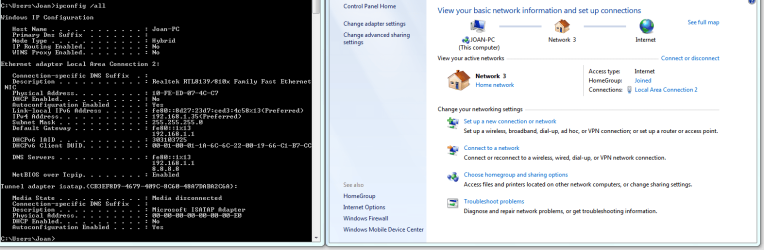
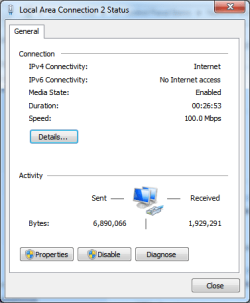
I got a break !! But I have no idea how and why !!

I connect the Windows PC with the Switch !!

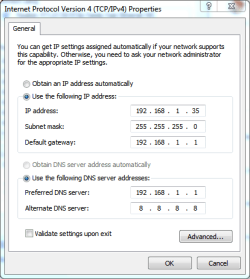
Then I just set the IP address, and although it accepts it, I don't see the address on the LAN addresses on the Router report.
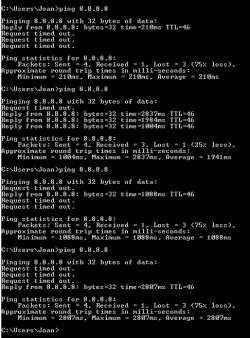
I get what you see in the photos.
It does connect, but the connection is crappy! Extremely slow and full of errors as you can see in the ping results...
 

Attachments

  • ipconf04.PNG
    ipconf04.PNG
    41.3 KB · Views: 3
  • LAC02.PNG
    LAC02.PNG
    11.8 KB · Views: 7
  • Ping 01.PNG
    Ping 01.PNG
    3.5 KB · Views: 7
  • TCPIPProps.PNG
    TCPIPProps.PNG
    13.8 KB · Views: 7

My Computer My Computer

Computer type
PC/Desktop
OS
Windows 7 Pro, 32 bit
CPU
AMD Athlon 64 x2 3800+
Motherboard
ASRock 939N98PV-GLAN
Memory
DDR Dual Channel 4 Gbytes
Graphics Card(s)
Nvidia GeForce GT440
Antivirus
Avast
Browser
Chrome
change your preferred dns from 192.168.1.1 to 8.8.4.4 , then restart the computer . Your dns can't be your gateway ...
 

My Computer My Computer

Computer type
PC/Desktop
Computer Manufacturer/Model Number
Custom Build
OS
Windows 10 Pro - 64 bit
CPU
Intel i7 2600K
Motherboard
Asus P8P67
Memory
8 Gig ddr3 1600 mhz - viper extreme (Patriot)
Graphics Card(s)
EVGA 980 TI
Monitor(s) Displays
2 - Lg 21" LED , sony 48 " bravia LED
Hard Drives
one - samsung 840 series 465.76 GB SSD
two - wd 2 tB black
one - wd 1.5 tb black
one - wb 1 tb black
PSU
1000 Watt Coolmaster : Silent Pro Gold
Case
antec 1200
Cooling
watercooled
Mouse
logitech wireless
Antivirus
Norton Security 2015
Other Info
powerware 3.1 KVA FERRUPS with 4 - 1000 Amp Deep cycle batteries ...
Hello Total :-)

I changed it.. but I don't see different results.
I pinged 8.8.8.8 with 100% packet loss.

But out of curiosity, why I shouldn't use 192.168.1.1 as my primary DNS? When I set it to automatic this is what it does by default...
 

My Computer My Computer

Computer type
PC/Desktop
OS
Windows 7 Pro, 32 bit
CPU
AMD Athlon 64 x2 3800+
Motherboard
ASRock 939N98PV-GLAN
Memory
DDR Dual Channel 4 Gbytes
Graphics Card(s)
Nvidia GeForce GT440
Antivirus
Avast
Browser
Chrome
Hello Total :-)

I changed it.. but I don't see different results.
I pinged 8.8.8.8 with 100% packet loss.

But out of curiosity, why I shouldn't use 192.168.1.1 as my primary DNS? When I set it to automatic this is what it does by default...


192.168.1.1 is your gateway ( out of the computer )

The dns is like a map for the computer to go to any web site .


Do your other computers work properly connected to the router ?
 

My Computer My Computer

Computer type
PC/Desktop
Computer Manufacturer/Model Number
Custom Build
OS
Windows 10 Pro - 64 bit
CPU
Intel i7 2600K
Motherboard
Asus P8P67
Memory
8 Gig ddr3 1600 mhz - viper extreme (Patriot)
Graphics Card(s)
EVGA 980 TI
Monitor(s) Displays
2 - Lg 21" LED , sony 48 " bravia LED
Hard Drives
one - samsung 840 series 465.76 GB SSD
two - wd 2 tB black
one - wd 1.5 tb black
one - wb 1 tb black
PSU
1000 Watt Coolmaster : Silent Pro Gold
Case
antec 1200
Cooling
watercooled
Mouse
logitech wireless
Antivirus
Norton Security 2015
Other Info
powerware 3.1 KVA FERRUPS with 4 - 1000 Amp Deep cycle batteries ...
Yes I see what you mean.
Well they work ok. No problems at all..

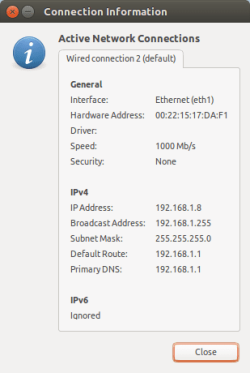
Here's my connection information from my Linux machine, from where I am communicating..
 

Attachments

  • Connection Information.png
    Connection Information.png
    8.9 KB · Views: 7

My Computer My Computer

Computer type
PC/Desktop
OS
Windows 7 Pro, 32 bit
CPU
AMD Athlon 64 x2 3800+
Motherboard
ASRock 939N98PV-GLAN
Memory
DDR Dual Channel 4 Gbytes
Graphics Card(s)
Nvidia GeForce GT440
Antivirus
Avast
Browser
Chrome
Back
Top