Solved Unidentified Network - No Internet Access

Dreamhunter

New member
Local time
4:54 PM
Messages
24
I just reformatted my hard drive because of network and Adobe problems.

That fixed my Adobe problems, but now my network has a new problem.

My PCI adapter card connects to the network automatically and shows connected, but there is no Internet connection because it cannot identify the network.

I can connect to my home network which does not have Internet, but when I connect to the free WIFI where I am. I can not connect. Before the reinstall, I could connect, but not automatically. Many suggestion were provided by this forum but none of them worked so I could connect automatically. That was one of the reason for the reformat and reinstall.

I can connect to the free WIFI with two of my other computers with no problems. That is why I am sure it is a WIN7 problem.

I tried the diagnostics and it 'fixed' lack of valid IP configuration and the default gateway, but I still can not get connected.

The only way to connect is with my tethered smartphone. At least it works.
 

My Computer

OS
Ultimate 64
I just reformatted my hard drive because of network and Adobe problems.

That fixed my Adobe problems, but now my network has a new problem.

My PCI adapter card connects to the network automatically and shows connected, but there is no Internet connection because it cannot identify the network.

I can connect to my home network which does not have Internet, but when I connect to the free WIFI where I am. I can not connect. Before the reinstall, I could connect, but not automatically. Many suggestion were provided by this forum but none of them worked so I could connect automatically. That was one of the reason for the reformat and reinstall.

I can connect to the free WIFI with two of my other computers with no problems. That is why I am sure it is a WIN7 problem.

I tried the diagnostics and it 'fixed' lack of valid IP configuration and the default gateway, but I still can not get connected.

The only way to connect is with my tethered smartphone. At least it works.

Can you show us a few screenshots of the network and sharing center when connected to your "rv/home" network and when connected to your "campground" wifi?
 

My Computer

Computer Manufacturer/Model Number
Homebrew PC - "Alpha_Dawg"
OS
Windows 7 Ultimate 64 bit Steve Ballmer Signature Edition
CPU
Intel Core 2 Quad - Q9550 - 2.83GHz stock - OC'd to 3.6GHz
Motherboard
Gigabyte EP45-UD3P
Memory
4GB DDR2 800MHz (PC6400) OCZ Reaper
Graphics Card(s)
Nvidia GE Force 8800 GTS
Sound Card
Asus Xonar DX
Monitor(s) Displays
Samsung SyncMaster 2333HD
Screen Resolution
1920 x 1080
Hard Drives
WD Caviar Black 750GB - 7200RPM - 32MB cache
WD Caviar Green 1.5TB - 5400RPM - 64MB cache
WD Caviar Green 2.0TB - 5400RPM - 64MB cache
PSU
PC Power & Cooling Silencer 750
Case
Gigabyte 3D Aurora
Cooling
Case is Air - 5ea. 120mm fans (mix of Arctic and Xigmatec)
Keyboard
MS Natural Wireless KB
Mouse
MS Wireless Mouse
Internet Speed
50 mbps down/5 mbps up
Other Info
AVerMedia - AVerTVHD G2 Dual Tuner Card
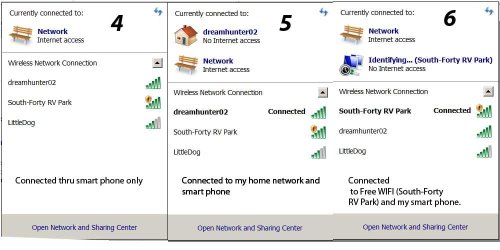
I an uploading two images. One is of the network sharing and the other is of the sys tray.

There are note below each to specify which connection.

Hope this helps.
 

Attachments

  • Network Sharing.jpg
    Network Sharing.jpg
    101.8 KB · Views: 439
  • Network Sys Tray.jpg
    Network Sys Tray.jpg
    72 KB · Views: 498

My Computer

OS
Ultimate 64
Nothing looks out of the ordinary there... try disabling the Win7 firewall and test again.
You might also ask the person who runs the campground network to please reboot their router.
I am also assuming that everyone else in the campground has working Internet...???
 

My Computer

Computer Manufacturer/Model Number
Homebrew PC - "Alpha_Dawg"
OS
Windows 7 Ultimate 64 bit Steve Ballmer Signature Edition
CPU
Intel Core 2 Quad - Q9550 - 2.83GHz stock - OC'd to 3.6GHz
Motherboard
Gigabyte EP45-UD3P
Memory
4GB DDR2 800MHz (PC6400) OCZ Reaper
Graphics Card(s)
Nvidia GE Force 8800 GTS
Sound Card
Asus Xonar DX
Monitor(s) Displays
Samsung SyncMaster 2333HD
Screen Resolution
1920 x 1080
Hard Drives
WD Caviar Black 750GB - 7200RPM - 32MB cache
WD Caviar Green 1.5TB - 5400RPM - 64MB cache
WD Caviar Green 2.0TB - 5400RPM - 64MB cache
PSU
PC Power & Cooling Silencer 750
Case
Gigabyte 3D Aurora
Cooling
Case is Air - 5ea. 120mm fans (mix of Arctic and Xigmatec)
Keyboard
MS Natural Wireless KB
Mouse
MS Wireless Mouse
Internet Speed
50 mbps down/5 mbps up
Other Info
AVerMedia - AVerTVHD G2 Dual Tuner Card
The campground has reset their router for me but I still can not get connected. I can connect with two of my other PCs with no problem.

The only way I can connect is thru my tethered phone.

I think it is something to do with the network settings but I do not know which ones.
 

My Computer

OS
Ultimate 64
Your tethering connection uses the built in wifi adapter so when the tethering is on, you can't connect to another network using wifi. This is what i have found with my iphone.
 

My Computer

Computer Manufacturer/Model Number
Lenovo ThinkPad T60
OS
Windows 7 Ultimate 64Bit
CPU
GenuineIntel Intel(R) Core(TM) DuoCore T2400 @ 1.83GHz
Motherboard
Intel(R) 82801G (ICH7 Family)
Memory
2.00 GB
Graphics Card(s)
Mobile Intel(R) 945 Express Chipset
Sound Card
SoundMAX Integrated Digital HD Audio
Monitor(s) Displays
ThinkPad Display
Screen Resolution
1400x1050
Hard Drives
100Gb SATA
Keyboard
Standard Keyboard
Mouse
HID-compliant Mouse
Internet Speed
Cable Broadband - 54Mbps
Other Info
Intel(R) PRO/1000 PL Network Connection
11a/b/g Wireless LAN Mini PCI Express Adapter
aem brings up a good possibility... what phone and what sw are you using for tethered connect?

But... after the sw refresh, did you first try wifi a few times, then as a test later you tethered? Or???
 

My Computer

Computer Manufacturer/Model Number
Homebrew PC - "Alpha_Dawg"
OS
Windows 7 Ultimate 64 bit Steve Ballmer Signature Edition
CPU
Intel Core 2 Quad - Q9550 - 2.83GHz stock - OC'd to 3.6GHz
Motherboard
Gigabyte EP45-UD3P
Memory
4GB DDR2 800MHz (PC6400) OCZ Reaper
Graphics Card(s)
Nvidia GE Force 8800 GTS
Sound Card
Asus Xonar DX
Monitor(s) Displays
Samsung SyncMaster 2333HD
Screen Resolution
1920 x 1080
Hard Drives
WD Caviar Black 750GB - 7200RPM - 32MB cache
WD Caviar Green 1.5TB - 5400RPM - 64MB cache
WD Caviar Green 2.0TB - 5400RPM - 64MB cache
PSU
PC Power & Cooling Silencer 750
Case
Gigabyte 3D Aurora
Cooling
Case is Air - 5ea. 120mm fans (mix of Arctic and Xigmatec)
Keyboard
MS Natural Wireless KB
Mouse
MS Wireless Mouse
Internet Speed
50 mbps down/5 mbps up
Other Info
AVerMedia - AVerTVHD G2 Dual Tuner Card
I am using a Motorola Droid 2 Global phone and am tethering with PDAnet.

Before reformatting and reinstalling all my software, I could connect to the WIFI but not automatically when I started the PC. After I connected manually, I could get to the Internet. At the same time several of my Adobe program would hang up when loading.

After reformatting and reinstalling all my software, I can connect to the WIFI automatically when I start the PC but I can not get to the Internet. Win7 stats it is trying to identify the WIFI network but can not. After a while it states 'Unidentified network - No Internet access' in the systray.

Now my Adobe programs load without hanging up.

I do not see how there can be an connection between the two.

I will keep looking.
 

My Computer

OS
Ultimate 64
Going by your screenshot, the pdanet is connect and this tethering, right? If so, you can't use your built-in wifi as secondary internet source. You may be able to connect to your home wifi but that does not mean you can get internet connection. Unless you hardware is capable of handling multiple wifi connections with one wifi adapter.
 

My Computer

Computer Manufacturer/Model Number
Lenovo ThinkPad T60
OS
Windows 7 Ultimate 64Bit
CPU
GenuineIntel Intel(R) Core(TM) DuoCore T2400 @ 1.83GHz
Motherboard
Intel(R) 82801G (ICH7 Family)
Memory
2.00 GB
Graphics Card(s)
Mobile Intel(R) 945 Express Chipset
Sound Card
SoundMAX Integrated Digital HD Audio
Monitor(s) Displays
ThinkPad Display
Screen Resolution
1400x1050
Hard Drives
100Gb SATA
Keyboard
Standard Keyboard
Mouse
HID-compliant Mouse
Internet Speed
Cable Broadband - 54Mbps
Other Info
Intel(R) PRO/1000 PL Network Connection
11a/b/g Wireless LAN Mini PCI Express Adapter
With my phone unplugged (Not tethered), I can connect to the WIFI but do not have internet access.

Tomorrow I will be moving to a different campground that has free WIFI and I will try there and see if I have the same problem.

I will post the results.
 

My Computer

OS
Ultimate 64
With my phone unplugged (Not tethered), I can connect to the WIFI but do not have internet access.

Tomorrow I will be moving to a different campground that has free WIFI and I will try there and see if I have the same problem.

I will post the results.

I use my Droid and PDAnet all the time, works fine for me when needed. PLease keep us informed when you get to the new campground.
 

My Computer

Computer Manufacturer/Model Number
Homebrew PC - "Alpha_Dawg"
OS
Windows 7 Ultimate 64 bit Steve Ballmer Signature Edition
CPU
Intel Core 2 Quad - Q9550 - 2.83GHz stock - OC'd to 3.6GHz
Motherboard
Gigabyte EP45-UD3P
Memory
4GB DDR2 800MHz (PC6400) OCZ Reaper
Graphics Card(s)
Nvidia GE Force 8800 GTS
Sound Card
Asus Xonar DX
Monitor(s) Displays
Samsung SyncMaster 2333HD
Screen Resolution
1920 x 1080
Hard Drives
WD Caviar Black 750GB - 7200RPM - 32MB cache
WD Caviar Green 1.5TB - 5400RPM - 64MB cache
WD Caviar Green 2.0TB - 5400RPM - 64MB cache
PSU
PC Power & Cooling Silencer 750
Case
Gigabyte 3D Aurora
Cooling
Case is Air - 5ea. 120mm fans (mix of Arctic and Xigmatec)
Keyboard
MS Natural Wireless KB
Mouse
MS Wireless Mouse
Internet Speed
50 mbps down/5 mbps up
Other Info
AVerMedia - AVerTVHD G2 Dual Tuner Card
I stayed at that campground for a few days but could not get reliable WIFI connection to be sure of what was happening. Some times I could connect and others I could not.

Today I moved to another campground that has better WIFI and I am able to get connected to the Internet. I will keep trying the WIFI here to see if everything is OK.

I will post again tomorrow or the next day with the latest results.

Lee
 

My Computer

OS
Ultimate 64
Perhaps an external antenna would help????
 

My Computer

Computer Manufacturer/Model Number
Homebrew PC - "Alpha_Dawg"
OS
Windows 7 Ultimate 64 bit Steve Ballmer Signature Edition
CPU
Intel Core 2 Quad - Q9550 - 2.83GHz stock - OC'd to 3.6GHz
Motherboard
Gigabyte EP45-UD3P
Memory
4GB DDR2 800MHz (PC6400) OCZ Reaper
Graphics Card(s)
Nvidia GE Force 8800 GTS
Sound Card
Asus Xonar DX
Monitor(s) Displays
Samsung SyncMaster 2333HD
Screen Resolution
1920 x 1080
Hard Drives
WD Caviar Black 750GB - 7200RPM - 32MB cache
WD Caviar Green 1.5TB - 5400RPM - 64MB cache
WD Caviar Green 2.0TB - 5400RPM - 64MB cache
PSU
PC Power & Cooling Silencer 750
Case
Gigabyte 3D Aurora
Cooling
Case is Air - 5ea. 120mm fans (mix of Arctic and Xigmatec)
Keyboard
MS Natural Wireless KB
Mouse
MS Wireless Mouse
Internet Speed
50 mbps down/5 mbps up
Other Info
AVerMedia - AVerTVHD G2 Dual Tuner Card
Found out yesterday that I could not send an email thru the WIFI, but I could send one when I disconnected from the WIFI and used my tethered smart phone.

Still not sure what the problem is, but I will keep looking.

Lee
 

My Computer

OS
Ultimate 64
No outgoing mail... that could just due to many ISPs that do not allow mail forwarding through their systems.

What do you use for mail... outloook, thunderbird, or?

At least you know that the issue is not your PC and was the old campground.
 

My Computer

Computer Manufacturer/Model Number
Homebrew PC - "Alpha_Dawg"
OS
Windows 7 Ultimate 64 bit Steve Ballmer Signature Edition
CPU
Intel Core 2 Quad - Q9550 - 2.83GHz stock - OC'd to 3.6GHz
Motherboard
Gigabyte EP45-UD3P
Memory
4GB DDR2 800MHz (PC6400) OCZ Reaper
Graphics Card(s)
Nvidia GE Force 8800 GTS
Sound Card
Asus Xonar DX
Monitor(s) Displays
Samsung SyncMaster 2333HD
Screen Resolution
1920 x 1080
Hard Drives
WD Caviar Black 750GB - 7200RPM - 32MB cache
WD Caviar Green 1.5TB - 5400RPM - 64MB cache
WD Caviar Green 2.0TB - 5400RPM - 64MB cache
PSU
PC Power & Cooling Silencer 750
Case
Gigabyte 3D Aurora
Cooling
Case is Air - 5ea. 120mm fans (mix of Arctic and Xigmatec)
Keyboard
MS Natural Wireless KB
Mouse
MS Wireless Mouse
Internet Speed
50 mbps down/5 mbps up
Other Info
AVerMedia - AVerTVHD G2 Dual Tuner Card
I am now at another campground that has WIFI with a strength of-60/-65 dBm.

I can get connected to the WIFI, but Internet access comes and goes.

I tried to sent this message earlier, but lost Internet access as I clicked send.

The signal strength is good so I am sure it is something to do with my PC. This is the same problem I had at the last two campgrounds so I am sure it is not something at all the WIFI locations. The only common thing is my PC.

Still looking for an answer.

Will post when I get an message that I have Internet. Otherwise I will tether my phone and send that way.
 

My Computer

OS
Ultimate 64
I am now at a location that does not have WIFI so I can only use my phone.

Based on that, I am going to mark this thread as solved as I can not test any more ideas.

Thanks for all the suggestions.

Lee
 

My Computer

OS
Ultimate 64
Fix it!

I had this same problem a 5 min ago,well i connect with my ipad and 2 macs OK but nothing in Windows 7,but i do a reset TCP/IP with microsoft support and work,here will go:

1-Click Start and then click run and copy (or type):
cmd

2-At the command prompt,copy and paste (or type) the following command and then press enter:

netsh int ip c:\resetlog.txt

3-Reboot the computer(Restart)!

I hope can help who have the same problem because for me works!
 

My Computer

OS
Windows 7 Home Premium 64 Bits
Back
Top