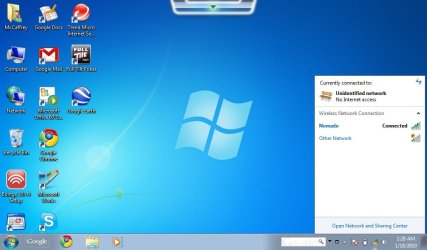
Unidentified network, No Internet access

TJ M

New member
Local time
6:31 PM
Messages
4
Hello,
I am traveling in South America with my brand new Asus Eee 1005HA-PU17, running Windows 7. I was able to connect to Wifi networks without a problem until 2 days ago, when Windows installed some new updates. Now, when I try to connect to a Wifi network it shows that I am connected, but it also says ¨No Internet access¨ and I can not connect to any sites. I´ve done the troubleshoting over and over with no success. I can see that other people around me are connected to the internet with thier laptops. I don´t know what to do. I´ve attached a screen shot.

Please help,
TJ
 

Attachments
  • network connection screen shot.jpg
    network connection screen shot.jpg
    54.8 KB · Views: 186

My Computer

Computer Manufacturer/Model Number
Asus
OS
WIndow 7
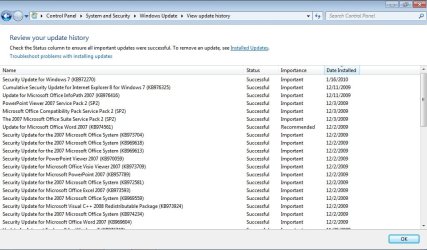
Go to the update panel and look at the previously installed updates, get a shot of what you installed so we can see what you did.
 

My Computer

Computer Manufacturer/Model Number
Zen Productions
OS
Windows 7 Ultimate x64
CPU
Intel i7-860
Motherboard
Gigabyte GA-P55A-UD4P
Memory
Corsair Dominator 1600Mhz, 8-8-8-24 1.65v 2x2GB
Graphics Card(s)
ATI Radeon 5770 HD
Sound Card
Intel High Definition Sound
Monitor(s) Displays
Samsung P2570HD
Screen Resolution
1920x1080
Hard Drives
Western Digital Caviar Black 500gb
PSU
Corsair CMPSU-750HX 750W
Case
Antec p183
Cooling
Corsair H50 Water Cooler
Keyboard
Logitech G110
Mouse
Logitech MX Revolution
Internet Speed
768 mb/s
Well it says you are connected just not to the internet ?

Try restarting the router.
 

My Computer

Computer Manufacturer/Model Number
Lenovo ThinkPad T60
OS
Windows 7 Ultimate 64Bit
CPU
GenuineIntel Intel(R) Core(TM) DuoCore T2400 @ 1.83GHz
Motherboard
Intel(R) 82801G (ICH7 Family)
Memory
2.00 GB
Graphics Card(s)
Mobile Intel(R) 945 Express Chipset
Sound Card
SoundMAX Integrated Digital HD Audio
Monitor(s) Displays
ThinkPad Display
Screen Resolution
1400x1050
Hard Drives
100Gb SATA
Keyboard
Standard Keyboard
Mouse
HID-compliant Mouse
Internet Speed
Cable Broadband - 54Mbps
Other Info
Intel(R) PRO/1000 PL Network Connection
11a/b/g Wireless LAN Mini PCI Express Adapter
Zen00,
I was not able to find the information for the update that Windows installed automaticly, probably because I restored the system to a point prior to the installation. Should I look somewhere else?

aem,
This is not a router in my home. I have had this problem on every network that I have tried to connect to since my computer restarted to install updates. I have tried to get online in about 3 or 4 different locations so far. I´m travelling for the next year, so I´m connecting to Wifi whenever I get the chance.
 

My Computer

Computer Manufacturer/Model Number
Asus
OS
WIndow 7
OK,
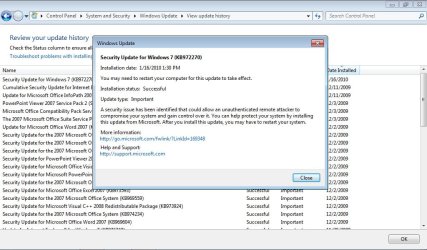
I found some information on the update and have attached some screen shots. The update in question occured on Jan. 16th.
 

Attachments

  • Update history.jpg
    Update history.jpg
    93.6 KB · Views: 141
  • update details jan 16th.jpg
    update details jan 16th.jpg
    97 KB · Views: 179

My Computer

Computer Manufacturer/Model Number
Asus
OS
WIndow 7
Please try disabling the windows firewall :)
 

My Computer

Computer Manufacturer/Model Number
Dell Inspiron N5010
OS
Windows 7 Ultimate x64 SP1
CPU
Intel Core i3
Memory
4 GB DDR3
Screen Resolution
1366 X 768
Hard Drives
Seagate 500 GB
Internet Speed
4 MBPS
What is your Wifi Adapter make and model ?

If you know the manufacturer, just download the latest drivers for the adapter !!!
 

My Computer

Computer Manufacturer/Model Number
Dell Inspiron N5010
OS
Windows 7 Ultimate x64 SP1
CPU
Intel Core i3
Memory
4 GB DDR3
Screen Resolution
1366 X 768
Hard Drives
Seagate 500 GB
Internet Speed
4 MBPS
You can try downloading the latest WIFI drivers for your hardware.
 

My Computer

Computer type
PC/Desktop
Computer Manufacturer/Model Number
DELL VOSTRO 3650
OS
Windows 8.1 PRO
CPU
3rd Generation Intel Core i7‐3612QM CPU @ 2.10GHZ
Memory
8GB DDR3
Graphics Card(s)
NVIDIA GeForce GT 525M (128 bit), 1GB Grpahics
Screen Resolution
1920X1080
Hard Drives
750GB 5400RPM
Isnt there a setting for each one that allows access to the Internet? I am sure there is because I had the same problem with my new router/laptop after an update. It also said no internet access. I looked through all the network stuff and found a tickbox somewhere. Cant look it up at present as I am at work with no access to my Windows 7 laptop
 

My Computer

Computer Manufacturer/Model Number
Selfbuilt
OS
Windows 7 Ultimate x64
CPU
Intel Core I7 980X
Motherboard
Gigabyte GA-X58A-UD7
Memory
8GB 4x2GB Corsair DDR3 2000
Graphics Card(s)
NVidia GEForce GTX480 - Gigabyte GV-N480D5
Sound Card
Creative X-Fi
Monitor(s) Displays
HP LP2475w
Screen Resolution
1920x1200
Hard Drives
2 x 2TB Segate
PSU
SilverStone 1500W
Case
CoolMaster HAF 932
Cooling
Just the Breeze
Keyboard
Standard
Mouse
Razer Mamba
Internet Speed
ADSL
Nothing to worry about it.

* If, you have any wired connection, connect your Laptop and try updating the WIFI divers :)

* Try to find out the adapter brand name and model from LAN properties !!!
 

My Computer

Computer Manufacturer/Model Number
Dell Inspiron N5010
OS
Windows 7 Ultimate x64 SP1
CPU
Intel Core i3
Memory
4 GB DDR3
Screen Resolution
1366 X 768
Hard Drives
Seagate 500 GB
Internet Speed
4 MBPS
Do what Venths said.

As your screen shot shows nothing being installed which should directly affect your wireless connection, it could be that the installation damaged a driver file somewhere.

By the way, can you connect to the internet on a wired channel?
 

My Computer

Computer Manufacturer/Model Number
Zen Productions
OS
Windows 7 Ultimate x64
CPU
Intel i7-860
Motherboard
Gigabyte GA-P55A-UD4P
Memory
Corsair Dominator 1600Mhz, 8-8-8-24 1.65v 2x2GB
Graphics Card(s)
ATI Radeon 5770 HD
Sound Card
Intel High Definition Sound
Monitor(s) Displays
Samsung P2570HD
Screen Resolution
1920x1080
Hard Drives
Western Digital Caviar Black 500gb
PSU
Corsair CMPSU-750HX 750W
Case
Antec p183
Cooling
Corsair H50 Water Cooler
Keyboard
Logitech G110
Mouse
Logitech MX Revolution
Internet Speed
768 mb/s
Thanks everyone

Well, after two days of restarts and messing around with things, the darn thing started working seemingly all on it's own. I think I'll just cross my fingers and try not to touch anything for now.

Thanks everyone,
TJ
 

My Computer

Computer Manufacturer/Model Number
Asus
OS
WIndow 7
Well, after two days of restarts and messing around with things, the darn thing started working seemingly all on it's own. I think I'll just cross my fingers and try not to touch anything for now.

Thanks everyone,
TJ

Glad to hear that your issue was resolved by itself :).

In addition, I would advice you to create a 'System Restore Point' at this time, so that it may be useful for you in case of any future issues !!!

♠ Cheers ♠
 

My Computer

Computer Manufacturer/Model Number
Dell Inspiron N5010
OS
Windows 7 Ultimate x64 SP1
CPU
Intel Core i3
Memory
4 GB DDR3
Screen Resolution
1366 X 768
Hard Drives
Seagate 500 GB
Internet Speed
4 MBPS
From the image posted in his first post, he has connected to the wireless network, it says connected. The Unidentified network means that the adapter/W7 cannot obtain all the necessary IP details from the ISP through the router. He can try and find out the IP, subnet, Default gateway, DNS and do a static IP on his adapter. If he is able to get into the router's conrol panel, he can check to see if the MAC clone option is enabled. Don't discount the fact that the router can block MAC address from reaching the ISP.
 

My Computer

Computer Manufacturer/Model Number
Lenovo ThinkPad T60
OS
Windows 7 Ultimate 64Bit
CPU
GenuineIntel Intel(R) Core(TM) DuoCore T2400 @ 1.83GHz
Motherboard
Intel(R) 82801G (ICH7 Family)
Memory
2.00 GB
Graphics Card(s)
Mobile Intel(R) 945 Express Chipset
Sound Card
SoundMAX Integrated Digital HD Audio
Monitor(s) Displays
ThinkPad Display
Screen Resolution
1400x1050
Hard Drives
100Gb SATA
Keyboard
Standard Keyboard
Mouse
HID-compliant Mouse
Internet Speed
Cable Broadband - 54Mbps
Other Info
Intel(R) PRO/1000 PL Network Connection
11a/b/g Wireless LAN Mini PCI Express Adapter
Windows 7 and Wireless Configuration

I was experiencing a similiar problem when I went from XP to W7. I could not get my wireless adapter to connect to the internet, though it appeared that I was solidly connected to the router.

As I struggled to find a solution, it dawned on me that I kept missing a simple but important configuration query setting: Public Network vs. Home Network...well say no more! Once I clicked on Home Network and answered one or two simple questions, I was once again flying high online!

Its the little things in life that matter! :)
 
Last edited:

My Computer

OS
xp

My Computer

Computer type
PC/Desktop
Computer Manufacturer/Model Number
Home built
OS
Windows 7 Ult, Windows 8.1 Pro,
CPU
Q9650-4.275GHz, E8600 4.5GHz, E6750-3.8GHz
Motherboard
Evga 780i FTW
Memory
G.Skill PC2 9600 1200Mhz 5 5 5 15 2T
Graphics Card(s)
GTX480
Sound Card
Asus Xonar D2
Monitor(s) Displays
HannsG
Screen Resolution
1680X1050
Hard Drives
GSkill Phoenix Pro 120GB SSD
PSU
ThermalTake Toughpower 1000Watt modular
Case
ThermalTake XaserV
Cooling
Xigmatek S1283
Keyboard
Logitech G15
Mouse
Logitech G9
Internet Speed
T1
Back
Top