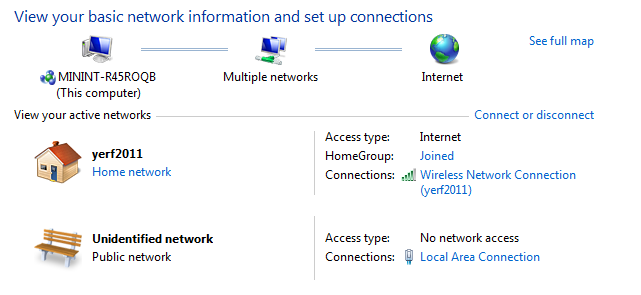
Unidentified Network - No network access

Syntic

New member
Local time
3:42 AM
Messages
4
Yesterday it worked and when I booted today it didn't I have absolutely no idea what the problem is and I have checked everything I know with no use.

So here are the facts:

- I am using d-Lan (PowerLan) and have had no problems with it until today.
- My router, modem and the d-lan devices are functioning properly which I have tested multiple times so I'm sure the problem lies with my computer.
- I have tried Troubleshooting with no effect
- It isn't an IP conflict
- It isn't a 3rd party program (I started it in safe mode, same problem)
- Internet still works over my W-Lan but is incredibly slow and unstable

So here is my ipconfig:

q26Qs.png


And my network

nOECs.png


I hope that's all the info you need :)

I've been at it for hours so any help would be greatly appreciated.
 

My Computer

OS
Windows 7 Home Premium 64bit
Hello Syntic, and welcome to the Sevenforums!

You might look through this tutorial and see if anything helps you out: http://www.sevenforums.com/tutorials/89919-troubleshooting-internet-explorer-issues.html

Failing that, try downloading (perhaps to a USB drive from another computer) your Ethernet LAN driver from your motherboard's manufacturer (You haven't listed it in your specs othewise I'd link you). Don't install it until you completely remove the previous driver. Then, install it.

Found another guide but haven't looked through it, it might be useful: http://www.sevenforums.com/tutorials/18203-internet-troubleshooting-guide.html
 

My Computer

Computer type
PC/Desktop
Computer Manufacturer/Model Number
Custom Asus Build
OS
Microsoft Windows 8.1 Pro 64-bit
CPU
Intel(R) Core(TM) i3-4130 CPU @ 3.40GHz
Motherboard
B85M-E
Memory
8.00 GB
Graphics Card(s)
None
Sound Card
Realtek High Definition Audio
Monitor(s) Displays
Asus 23.6" Monitor
Screen Resolution
1920 x 1080 x 32 bits (4294967296 colors) @ 60 Hz
Hard Drives
INTEL SSDSC2BW180A4
Samsung SSD 840 PRO Series
PSU
Seasonic S12II-380Bronze
Case
Lian Li
Cooling
Fan, Passive
Keyboard
Logitech K120
Mouse
Microsoft Touch Mouse
Internet Speed
4ms Ping, 19.0 Mbps Download, 19.0 Mbps Upload
Antivirus
Eset Endpoint
Browser
Internet Explorer, Chrome
I tried reinstalling the driver and that didnt help. Then I tried the troubleshooting guide but got stuck right at the beginning.

Look for IPV4 Address. If its anything other than 169.254.xxx.xxx, you have a valid IP address.

I checked and I have a 169.254.xxx.xxx IP so I did

Code:
netsh winsock reset catalog

But that didn't change it and I don't have a backup. Is reinstalling windows really the only way here :( ?
 

My Computer

OS
Windows 7 Home Premium 64bit
Just need to keep scrolling down:
For ip address 169.254.xxx.xxx, follow these steps:
A: In the command prompt window, type
netsh winsock reset catalog and press Enter. Now restart your computer.(See the screenshot below).


B: Try a system restore.

C: Click Start and in the Start Search box, type services.msc and press Enter. Then double-click DHCP client service and make sure the Startup type is Automatic and Status is Enabled.

D: Remove the internet cable from computer, restart your cable modem and computer and plug the internet cable back to the computer.

E: Reinstall Windows 7.


My Computer

Computer type
PC/Desktop
Computer Manufacturer/Model Number
Custom Asus Build
OS
Microsoft Windows 8.1 Pro 64-bit
CPU
Intel(R) Core(TM) i3-4130 CPU @ 3.40GHz
Motherboard
B85M-E
Memory
8.00 GB
Graphics Card(s)
None
Sound Card
Realtek High Definition Audio
Monitor(s) Displays
Asus 23.6" Monitor
Screen Resolution
1920 x 1080 x 32 bits (4294967296 colors) @ 60 Hz
Hard Drives
INTEL SSDSC2BW180A4
Samsung SSD 840 PRO Series
PSU
Seasonic S12II-380Bronze
Case
Lian Li
Cooling
Fan, Passive
Keyboard
Logitech K120
Mouse
Microsoft Touch Mouse
Internet Speed
4ms Ping, 19.0 Mbps Download, 19.0 Mbps Upload
Antivirus
Eset Endpoint
Browser
Internet Explorer, Chrome
Just need to keep scrolling down:
For ip address 169.254.xxx.xxx, follow these steps:
A: In the command prompt window, type
netsh winsock reset catalog and press Enter. Now restart your computer.(See the screenshot below).


B: Try a system restore.

C: Click Start and in the Start Search box, type services.msc and press Enter. Then double-click DHCP client service and make sure the Startup type is Automatic and Status is Enabled.

D: Remove the internet cable from computer, restart your cable modem and computer and plug the internet cable back to the computer.

E: Reinstall Windows 7.


A: Tried that, didn't work
B: I haven't got system restore setup so I cannot restore
C: Enabled and on automatic
D: Tried that a thousand times :D
E: I'd like to avoid it...
 

My Computer

OS
Windows 7 Home Premium 64bit
Unfortunately, it may be the only option available to you. I am not completely sure, so someone else may have to confirm it. But I'm all out of ideas.

I appologize that I couldn't be of further help :(
 

My Computer

Computer type
PC/Desktop
Computer Manufacturer/Model Number
Custom Asus Build
OS
Microsoft Windows 8.1 Pro 64-bit
CPU
Intel(R) Core(TM) i3-4130 CPU @ 3.40GHz
Motherboard
B85M-E
Memory
8.00 GB
Graphics Card(s)
None
Sound Card
Realtek High Definition Audio
Monitor(s) Displays
Asus 23.6" Monitor
Screen Resolution
1920 x 1080 x 32 bits (4294967296 colors) @ 60 Hz
Hard Drives
INTEL SSDSC2BW180A4
Samsung SSD 840 PRO Series
PSU
Seasonic S12II-380Bronze
Case
Lian Li
Cooling
Fan, Passive
Keyboard
Logitech K120
Mouse
Microsoft Touch Mouse
Internet Speed
4ms Ping, 19.0 Mbps Download, 19.0 Mbps Upload
Antivirus
Eset Endpoint
Browser
Internet Explorer, Chrome
Unfortunately, it may be the only option available to you. I am not completely sure, so someone else may have to confirm it. But I'm all out of ideas.

I appologize that I couldn't be of further help :(

Well I really appreciate the help. I guess at least I'll get a clean system again. Thanks for trying.
 

My Computer

OS
Windows 7 Home Premium 64bit
Back
Top