Solved Unidentified network problem again

benjaminswill

New member
Local time
6:40 PM
Messages
11
Hello,

Thanks for all your work on this problem, glad to know I'm not alone. I have tried many of the solutions I found and come up with nothing.

I have a brand new Acer Aspire AS5742 running windows 7 64-bit home premium.

I am trying to connect to the internet in the simplest way I know how - ethernet cable directly into the cable box modem from the wall, no router.

When I plug in the cable it comes up with the unidentified network, no internet access message.

I have tried this fix: Windows 7 Unidentified Network, Limited Access, No Internet Connection Problem Resolved

to no avail (because the ipconfg is not showing a default gateway at all, i just put in 192.168.1.1)

I have also tried the "put 12 random alpha numeric characters in the network address" fix

I have disabled and uninstalled bonjour

I have tried an ipconfig /release /renew

I tried copying the ip address and other configurations from this, working, computer and putting them into the laptop, no luck.

I have a desktop that I am working on now, if I take the cable that is connecting the desktop and put it into the laptop instead, it does not work, so it's not the cable or the modem.

I have been online with a public wifi connection at the library, so the computer seems to work fine in some settings.

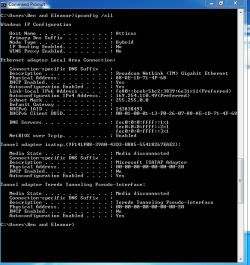
I've attached the ipconfig /all

Thank you in advance for the help. Let me know what other information I can give you.

here is the ipconfig /all
Capture.PNG
 

My Computer

Computer Manufacturer/Model Number
Acer Aspire AS5742
OS
Windows 7 home premium 64-bit
CPU
Inter core i5
Memory
4GB
From your ipconfig I don't see anything coming from the modem at all, only the default windows ip which shows up when there is no connection.

The link you showed only works when there is a default IP of 0.0.0.0 which is different than the problem you seem to be having, in fact I was most likely the one who posted the link for that.

I'd say that either your Broadcom eithernet adpator doesn't have the correct driver or there is something blocking the wired connection like your A/V software or a third party firewall. You sometimes need to uninstall your A/V as often times disabling won't work. Either that or look around for a better driver for your broadcom adaptor and make sure it's installed correctly.
 

My Computer

Computer type
PC/Desktop
Computer Manufacturer/Model Number
Home built
OS
Windows 7 Ult, Windows 8.1 Pro,
CPU
Q9650-4.275GHz, E8600 4.5GHz, E6750-3.8GHz
Motherboard
Evga 780i FTW
Memory
G.Skill PC2 9600 1200Mhz 5 5 5 15 2T
Graphics Card(s)
GTX480
Sound Card
Asus Xonar D2
Monitor(s) Displays
HannsG
Screen Resolution
1680X1050
Hard Drives
GSkill Phoenix Pro 120GB SSD
PSU
ThermalTake Toughpower 1000Watt modular
Case
ThermalTake XaserV
Cooling
Xigmatek S1283
Keyboard
Logitech G15
Mouse
Logitech G9
Internet Speed
T1
no luck

I updated the driver to the latest and uninstalled my anti-virus software. I was running avast. Still getting a 169.x ip
 

My Computer

Computer Manufacturer/Model Number
Acer Aspire AS5742
OS
Windows 7 home premium 64-bit
CPU
Inter core i5
Memory
4GB
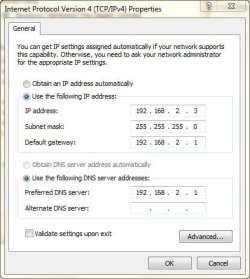
Sounds like you did try putting in a static IP address, right? If so, it should look something like this:

IPV4Prop.jpg

only your would be 192.168.1.x
 

My Computer

Computer type
PC/Desktop
Computer Manufacturer/Model Number
Lenovo IdeaCenter 450
OS
Windows 10 Pro X64
CPU
Intel Quad Core i7-4770 @ 3.4Ghz
Memory
16.0GB PC3-12800 DDR3 SDRAM 1600 MHz
Graphics Card(s)
Intel Integrated HD Graphics
Sound Card
Realtek HD Audio
Monitor(s) Displays
HP 22" LCD
Screen Resolution
1680 x 1050
Hard Drives
250GB Samsung EVO SATA-3 SSD
2TB Seagate ST2000DM001 SATA-2
1.5TB Seagate ST3150041AS SATA
Keyboard
Dell USB
Mouse
Lenovo USB
Internet Speed
Cable via Road Runner 3MB Upload, 30MB Download
Antivirus
Windows Defender, MBAM Pro, MBAE
Browser
Seamonkey
Other Info
UEFI/GPT
PLDS DVD-RW DH16AERSH
still nothing

Yeah, I tried taking the settings from my working connection, ip, subnet mask, gateway, dns servers andthe connection-specific DNS suffix. still no luck.

I am plugging directly into the modem, and even if I try a a 192.168.1.x it still does not work.
 

My Computer

Computer Manufacturer/Model Number
Acer Aspire AS5742
OS
Windows 7 home premium 64-bit
CPU
Inter core i5
Memory
4GB
Fixed!

I actually seem to have fixed the problem using a fix I found on another thread on this forum. I simply disconnected the coax cable from the modem, and plugged in my laptop as usual. The modem assigned my computer a valid 192.x.x.x ip, and when I reconnected the coax everything was working fine.

Thanks for all your help.
 

My Computer

Computer Manufacturer/Model Number
Acer Aspire AS5742
OS
Windows 7 home premium 64-bit
CPU
Inter core i5
Memory
4GB
So a modem restart, reboot or reconnection was required, usually that would be the first thing to try. :confused:

You kinda messed up when assuming this> I have a desktop that I am working on now, if I take the cable that is connecting the desktop and put it into the laptop instead, it does not work, so it's not the cable or the modem.

Assumptions like this don't really hold water, this is one of the many reasons I tell people to get a router as modems don't do DHCP worth a damn.

Glad you have it working ben.
 

My Computer

Computer type
PC/Desktop
Computer Manufacturer/Model Number
Home built
OS
Windows 7 Ult, Windows 8.1 Pro,
CPU
Q9650-4.275GHz, E8600 4.5GHz, E6750-3.8GHz
Motherboard
Evga 780i FTW
Memory
G.Skill PC2 9600 1200Mhz 5 5 5 15 2T
Graphics Card(s)
GTX480
Sound Card
Asus Xonar D2
Monitor(s) Displays
HannsG
Screen Resolution
1680X1050
Hard Drives
GSkill Phoenix Pro 120GB SSD
PSU
ThermalTake Toughpower 1000Watt modular
Case
ThermalTake XaserV
Cooling
Xigmatek S1283
Keyboard
Logitech G15
Mouse
Logitech G9
Internet Speed
T1
I actually seem to have fixed the problem using a fix I found on another thread on this forum. I simply disconnected the coax cable from the modem, and plugged in my laptop as usual. The modem assigned my computer a valid 192.x.x.x ip, and when I reconnected the coax everything was working fine.

Thanks for all your help.

So a modem restart, reboot or reconnection was required, usually that would be the first thing to try. :confused:

You kinda messed up when assuming this> I have a desktop that I am working on now, if I take the cable that is connecting the desktop and put it into the laptop instead, it does not work, so it's not the cable or the modem.

Assumptions like this don't really hold water, this is one of the many reasons I tell people to get a router as modems don't do DHCP worth a damn.

Glad you have it working ben.

So I dont assume anything either... are we talking about the Ethernet Cord hard lining into the modem? instead of a router?

I to am having this exact problem... I too have tried the above steps that have failed. But, I have reset, reboot, and reconnected my modem to my computer. I also have the IP addy of above (has preferred next to it)

Not trying to thread jack.. just curious..

TIA,
Starlette
 

My Computer

OS
Windows 7 64bit
That 169 IP is just what windows uses when there isn't a functional IP assigned, it's a default no value IP.

Yes you need to unscrew the cable going into the modem then power down the modem and wait a minute, power it up and put the cable wire back in the modem then plug the machines eithernet cable into it. This will make the modem assign a new IP for the machine being plugged in.

Only one machine at a time with a modem, you can't just go from one machine to the other and expect it to work. If you have more than one machine you could set up ICS "internet connection sharing" but there are a few drawbacks to ICS, ideally you need a router.

I just assumed that the Op already went through the modems set up procedure for the second machine so my fault for not covering the basics first.
 

My Computer

Computer type
PC/Desktop
Computer Manufacturer/Model Number
Home built
OS
Windows 7 Ult, Windows 8.1 Pro,
CPU
Q9650-4.275GHz, E8600 4.5GHz, E6750-3.8GHz
Motherboard
Evga 780i FTW
Memory
G.Skill PC2 9600 1200Mhz 5 5 5 15 2T
Graphics Card(s)
GTX480
Sound Card
Asus Xonar D2
Monitor(s) Displays
HannsG
Screen Resolution
1680X1050
Hard Drives
GSkill Phoenix Pro 120GB SSD
PSU
ThermalTake Toughpower 1000Watt modular
Case
ThermalTake XaserV
Cooling
Xigmatek S1283
Keyboard
Logitech G15
Mouse
Logitech G9
Internet Speed
T1
Back
Top