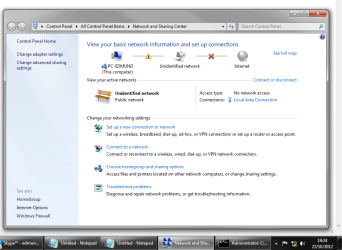
Unidentified Network through Ethernet

edmundkong36

New member
Member
Local time
3:21 PM
Messages
47
Hello again,

My case can be retrieved from my other thread: http://www.sevenforums.com/network-sharing/254537-wifi-not-showing-up.html

So now my problem is that I am having problems getting internet access through ethernet for my PC. It says it is an unidentified network. Sometimes it has trouble connecting to the network and tries to identify it, sometimes it doesn't realize that ethernet has been plugged in and and no network is sensed.

However, internet through Wifi works.

Yesterday night I managed to solve the problem (I have no idea how) but when I woke up it didn't work again.

I have tried different ethernet cables, different slots.

I have tried ethernet over my laptop, which also says unidentified network.


When I look at my ipconfig /all I have no default gateway
Code:
Microsoft Windows [Version 6.1.7601]
Copyright (c) 2009 Microsoft Corporation.  All rights reserved.

C:\Users\Edmund>ipconfig /all

Windows IP Configuration

   Host Name . . . . . . . . . . . . : PC-Edmund
   Primary Dns Suffix  . . . . . . . :
   Node Type . . . . . . . . . . . . : Hybrid
   IP Routing Enabled. . . . . . . . : No
   WINS Proxy Enabled. . . . . . . . : No

Ethernet adapter Bluetooth Network Connection:

   Media State . . . . . . . . . . . : Media disconnected
   Connection-specific DNS Suffix  . :
   Description . . . . . . . . . . . : Bluetooth Device (Personal Area Network)
   Physical Address. . . . . . . . . : 00-26-83-39-62-0D
   DHCP Enabled. . . . . . . . . . . : Yes
   Autoconfiguration Enabled . . . . : Yes

Ethernet adapter Local Area Connection:

   Connection-specific DNS Suffix  . :
   Description . . . . . . . . . . . : Intel(R) 82579V Gigabit Network Connectio
n
   Physical Address. . . . . . . . . : C8-60-00-73-BF-8B
   DHCP Enabled. . . . . . . . . . . : Yes
   Autoconfiguration Enabled . . . . : Yes
   Link-local IPv6 Address . . . . . : fe80::dd0b:ad35:3caa:978f%10(Preferred)
   Autoconfiguration IPv4 Address. . : 169.254.151.143(Preferred)
   Subnet Mask . . . . . . . . . . . : 255.255.0.0
   Default Gateway . . . . . . . . . :
   DHCPv6 IAID . . . . . . . . . . . : 248012800
   DHCPv6 Client DUID. . . . . . . . : 00-01-00-01-17-60-0E-9D-C8-60-00-73-BF-8B

   DNS Servers . . . . . . . . . . . : fec0:0:0:ffff::1%1
                                       fec0:0:0:ffff::2%1
                                       fec0:0:0:ffff::3%1
   NetBIOS over Tcpip. . . . . . . . : Enabled

Tunnel adapter Teredo Tunneling Pseudo-Interface:

   Media State . . . . . . . . . . . : Media disconnected
   Connection-specific DNS Suffix  . :
   Description . . . . . . . . . . . : Teredo Tunneling Pseudo-Interface
   Physical Address. . . . . . . . . : 00-00-00-00-00-00-00-E0
   DHCP Enabled. . . . . . . . . . . : No
   Autoconfiguration Enabled . . . . : Yes

Tunnel adapter isatap.{446FB09B-A8E6-4EF3-BE70-9BD961FBEFA6}:

   Media State . . . . . . . . . . . : Media disconnected
   Connection-specific DNS Suffix  . :
   Description . . . . . . . . . . . : Microsoft ISATAP Adapter #2
   Physical Address. . . . . . . . . : 00-00-00-00-00-00-00-E0
   DHCP Enabled. . . . . . . . . . . : No
   Autoconfiguration Enabled . . . . : Yes

C:\Users\Edmund>

Note: I also checked ipconfig on my laptop, same no default gateway through ethernet adapter local area connection

Hope that helps you help me find a solution.

Any help would be appreciated.
Thanks
 

My Computer

OS
Windows 7 Ultimate x64
CPU
i5-2500K
Motherboard
Asus P8Z68 V-Pro Gen3
Memory
Corsair Vengeance DDR3 8GB
PSU
OCZ ZT 750W
Case
Cooler Master HAF X
Cooling
Custom Watercooling
That is because you are not connected to anything. The IP address you are getting is the Default Windows IP address assign to network adapters that are not connected to a DHCP server. Check your router, check the cable.
 

My Computer

OS
7 x64
I have reset the router by poking the little hole. Checked the router settings via wifi. This is my third router with a problem. I have already tried
different cables
 

My Computer

OS
Windows 7 Ultimate x64
CPU
i5-2500K
Motherboard
Asus P8Z68 V-Pro Gen3
Memory
Corsair Vengeance DDR3 8GB
PSU
OCZ ZT 750W
Case
Cooler Master HAF X
Cooling
Custom Watercooling
I have reset the router by poking the little hole. Checked the router settings via wifi. This is my third router with a problem. I have already tried
different cables

You may have a problem with TCP/IP, winsock or the network stack is corrupted.

You should save the file below, unzip and run the file, this will reset everything related to the network stack, will flush the DNS and reset winsock, your machine will reboot automatically.

It sounds from your last thread that you are having router problems, you will want to update the routers firmware to the latest version because from what I'm seeing the firmware is not up to date.

You may want to look around for the most recent driver for the Intel 82579V wired connection.
 

Attachments

My Computer

Computer type
PC/Desktop
Computer Manufacturer/Model Number
Home built
OS
Windows 7 Ult, Windows 8.1 Pro,
CPU
Q9650-4.275GHz, E8600 4.5GHz, E6750-3.8GHz
Motherboard
Evga 780i FTW
Memory
G.Skill PC2 9600 1200Mhz 5 5 5 15 2T
Graphics Card(s)
GTX480
Sound Card
Asus Xonar D2
Monitor(s) Displays
HannsG
Screen Resolution
1680X1050
Hard Drives
GSkill Phoenix Pro 120GB SSD
PSU
ThermalTake Toughpower 1000Watt modular
Case
ThermalTake XaserV
Cooling
Xigmatek S1283
Keyboard
Logitech G15
Mouse
Logitech G9
Internet Speed
T1
Is DGND3700v2 firmware 1.1.00.12_1.1.00.12 the latest firmware for my router? That is what I am running.

I have also updated the adapter driver.

I have also ran ipresetall but it didnt seem to have done anything...

Most of the time it connects to an unidentified network with internet access through wifi but none through ethernet. Sometimes it manages to connect to the home network (no longer unidentified) and I get internet access on my pc for roughly ten minutes.

if you have read my other thread you would know that I also have a D-Link router. I tried that and it connects both through ethernet and wifi. It gives me good download speeds. But when I try browse the web, its really unstable and slow. I have to try a couple of times/minutes before I get on any website e.g. google
 

My Computer

OS
Windows 7 Ultimate x64
CPU
i5-2500K
Motherboard
Asus P8Z68 V-Pro Gen3
Memory
Corsair Vengeance DDR3 8GB
PSU
OCZ ZT 750W
Case
Cooler Master HAF X
Cooling
Custom Watercooling

My Computer

Computer type
PC/Desktop
Computer Manufacturer/Model Number
Home built
OS
Windows 7 Ult, Windows 8.1 Pro,
CPU
Q9650-4.275GHz, E8600 4.5GHz, E6750-3.8GHz
Motherboard
Evga 780i FTW
Memory
G.Skill PC2 9600 1200Mhz 5 5 5 15 2T
Graphics Card(s)
GTX480
Sound Card
Asus Xonar D2
Monitor(s) Displays
HannsG
Screen Resolution
1680X1050
Hard Drives
GSkill Phoenix Pro 120GB SSD
PSU
ThermalTake Toughpower 1000Watt modular
Case
ThermalTake XaserV
Cooling
Xigmatek S1283
Keyboard
Logitech G15
Mouse
Logitech G9
Internet Speed
T1
Unfortunately that was not the case :(

I followed the guide to disable Bonjour but when rebooted unidentified network still exists.

As for the guide from Microsoft, I typed in route delete 0.0.0.0 but it said 'The router deletion failed: Element not found.'

Thanks
 

My Computer

OS
Windows 7 Ultimate x64
CPU
i5-2500K
Motherboard
Asus P8Z68 V-Pro Gen3
Memory
Corsair Vengeance DDR3 8GB
PSU
OCZ ZT 750W
Case
Cooler Master HAF X
Cooling
Custom Watercooling
Unfortunately that was not the case :(

I followed the guide to disable Bonjour but when rebooted unidentified network still exists.

As for the guide from Microsoft, I typed in route delete 0.0.0.0 but it said 'The router deletion failed: Element not found.'

Thanks

So you did have either iTunes or Bonjour installed on this system?

Now that you have it deleted or disabled can I see the ipconfig/all again please?

Which A/V software do you have installed on this system?
 

My Computer

Computer type
PC/Desktop
Computer Manufacturer/Model Number
Home built
OS
Windows 7 Ult, Windows 8.1 Pro,
CPU
Q9650-4.275GHz, E8600 4.5GHz, E6750-3.8GHz
Motherboard
Evga 780i FTW
Memory
G.Skill PC2 9600 1200Mhz 5 5 5 15 2T
Graphics Card(s)
GTX480
Sound Card
Asus Xonar D2
Monitor(s) Displays
HannsG
Screen Resolution
1680X1050
Hard Drives
GSkill Phoenix Pro 120GB SSD
PSU
ThermalTake Toughpower 1000Watt modular
Case
ThermalTake XaserV
Cooling
Xigmatek S1283
Keyboard
Logitech G15
Mouse
Logitech G9
Internet Speed
T1
Ye I had both itunes and bonjour, now I cant use my itunes :(
And here is the ipconfig

Edit: itunes still works :)
 

Attachments

My Computer

OS
Windows 7 Ultimate x64
CPU
i5-2500K
Motherboard
Asus P8Z68 V-Pro Gen3
Memory
Corsair Vengeance DDR3 8GB
PSU
OCZ ZT 750W
Case
Cooler Master HAF X
Cooling
Custom Watercooling
Ye I had both itunes and bonjour, now I cant use my itunes :(
And here is the ipconfig

Edit: itunes still works :)

According to the ipconfig/all you aren't getting anything from the router at all.

Does it still say Unidentified network?

Are you using the drivers in the link below? If not try installing the other driver on this page, choose Windows 7 64 bit if that what you are using.

http://downloadcenter.intel.com/SearchResult.aspx?lang=eng&ProductFamily=Ethernet+Components&ProductLine=Ethernet+Controllers&ProductProduct=Intel%c2%ae+82579+Gigabit+Ethernet+Controller
 

My Computer

Computer type
PC/Desktop
Computer Manufacturer/Model Number
Home built
OS
Windows 7 Ult, Windows 8.1 Pro,
CPU
Q9650-4.275GHz, E8600 4.5GHz, E6750-3.8GHz
Motherboard
Evga 780i FTW
Memory
G.Skill PC2 9600 1200Mhz 5 5 5 15 2T
Graphics Card(s)
GTX480
Sound Card
Asus Xonar D2
Monitor(s) Displays
HannsG
Screen Resolution
1680X1050
Hard Drives
GSkill Phoenix Pro 120GB SSD
PSU
ThermalTake Toughpower 1000Watt modular
Case
ThermalTake XaserV
Cooling
Xigmatek S1283
Keyboard
Logitech G15
Mouse
Logitech G9
Internet Speed
T1
I'm not too sure actually so here is an updated version of the ipconfig.

I managed to get both unidentified and connected.

And yes I am using drivers from that page.

Thanks
 

Attachments

My Computer

OS
Windows 7 Ultimate x64
CPU
i5-2500K
Motherboard
Asus P8Z68 V-Pro Gen3
Memory
Corsair Vengeance DDR3 8GB
PSU
OCZ ZT 750W
Case
Cooler Master HAF X
Cooling
Custom Watercooling
I'm not too sure actually so here is an updated version of the ipconfig.

I managed to get both unidentified and connected.

And yes I am using drivers from that page.

Thanks

So now the problem is fixed I presume, lets hope the problem doesn't come back again.

Getting rid of Bonjour should have fixed the problem, if not did you do anything else to fix the problem?
 

My Computer

Computer type
PC/Desktop
Computer Manufacturer/Model Number
Home built
OS
Windows 7 Ult, Windows 8.1 Pro,
CPU
Q9650-4.275GHz, E8600 4.5GHz, E6750-3.8GHz
Motherboard
Evga 780i FTW
Memory
G.Skill PC2 9600 1200Mhz 5 5 5 15 2T
Graphics Card(s)
GTX480
Sound Card
Asus Xonar D2
Monitor(s) Displays
HannsG
Screen Resolution
1680X1050
Hard Drives
GSkill Phoenix Pro 120GB SSD
PSU
ThermalTake Toughpower 1000Watt modular
Case
ThermalTake XaserV
Cooling
Xigmatek S1283
Keyboard
Logitech G15
Mouse
Logitech G9
Internet Speed
T1
Oh the problem isnt fixed. Its just like before. Its still on unidentified but very rarely it does manage to connect to a home network and I get internet. But most of the time its either unidentified or no network at all.

The connection goes after roughly ten minutes too
 

My Computer

OS
Windows 7 Ultimate x64
CPU
i5-2500K
Motherboard
Asus P8Z68 V-Pro Gen3
Memory
Corsair Vengeance DDR3 8GB
PSU
OCZ ZT 750W
Case
Cooler Master HAF X
Cooling
Custom Watercooling
Oh the problem isnt fixed. Its just like before. Its still on unidentified but very rarely it does manage to connect to a home network and I get internet. But most of the time its either unidentified or no network at all.

The connection goes after roughly ten minutes too

The Intel drivers are just generic ones from what the site says, have you gone to the Asus site to get the specific drivers for your board?

The Asus site shows this driver for your board> Intel(R) Gigabit Ethernet Driver V15.6.0.0 for Windows XP/Vista/7 32bit & 64bit.(WHQL)

You might want to obtain the other board specific drivers while you are there.

Have you been to Windows update center?
 

My Computer

Computer type
PC/Desktop
Computer Manufacturer/Model Number
Home built
OS
Windows 7 Ult, Windows 8.1 Pro,
CPU
Q9650-4.275GHz, E8600 4.5GHz, E6750-3.8GHz
Motherboard
Evga 780i FTW
Memory
G.Skill PC2 9600 1200Mhz 5 5 5 15 2T
Graphics Card(s)
GTX480
Sound Card
Asus Xonar D2
Monitor(s) Displays
HannsG
Screen Resolution
1680X1050
Hard Drives
GSkill Phoenix Pro 120GB SSD
PSU
ThermalTake Toughpower 1000Watt modular
Case
ThermalTake XaserV
Cooling
Xigmatek S1283
Keyboard
Logitech G15
Mouse
Logitech G9
Internet Speed
T1
I would try resetting the Router and see if that works. That happens to my PC sometimes too. :rolleyes:
 

My Computer

Computer Manufacturer/Model Number
HP G60
OS
Windows 7 Ultimate
Memory
4 Gigs RAM
Graphics Card(s)
Nvidia GeForce 8200 mg
Screen Resolution
1024 X 768
Internet Speed
100 MBPS
Oh the problem isnt fixed. Its just like before. Its still on unidentified but very rarely it does manage to connect to a home network and I get internet. But most of the time its either unidentified or no network at all.

The connection goes after roughly ten minutes too

The Intel drivers are just generic ones from what the site says, have you gone to the Asus site to get the specific drivers for your board?

The Asus site shows this driver for your board> Intel(R) Gigabit Ethernet Driver V15.6.0.0 for Windows XP/Vista/7 32bit & 64bit.(WHQL)

You might want to obtain the other board specific drivers while you are there.

Have you been to Windows update center?

Hello, I downloaded the drivers from Asus, tried to install them but it said that I have a newer version of Intel PROSet for Windows Device Manager installed on the computer. I could only install the drivers if I uninstall PROSet. Where can I uninstall that? But what if my drivers are up to date?

No updates at Windows update center.

Sometimes, pages don't load even though connected to the internet (on the laptop). This was exactly like when I was using my D-Link router for my computer through ethernet:
if you have read my other thread you would know that I also have a D-Link router. I tried that and it connects both through ethernet and wifi. It gives me good download speeds. But when I try browse the web, its really unstable and slow. I have to try a couple of times/minutes before I get on any website e.g. google
I pinged google.com in cmd. No idea what I'm doing but if you think this might be related or another problem I have that information saved if you want it.

Thanks
 

My Computer

OS
Windows 7 Ultimate x64
CPU
i5-2500K
Motherboard
Asus P8Z68 V-Pro Gen3
Memory
Corsair Vengeance DDR3 8GB
PSU
OCZ ZT 750W
Case
Cooler Master HAF X
Cooling
Custom Watercooling
I would try resetting the Router and see if that works. That happens to my PC sometimes too. :rolleyes:

That has been done many times. The matter is far worse because I have been through three new routers with problems so I doubt its the router settings as I have checked that thoroughly. Something to do with the network I think. I hope not my computer :huh:
 

My Computer

OS
Windows 7 Ultimate x64
CPU
i5-2500K
Motherboard
Asus P8Z68 V-Pro Gen3
Memory
Corsair Vengeance DDR3 8GB
PSU
OCZ ZT 750W
Case
Cooler Master HAF X
Cooling
Custom Watercooling
Oh the problem isnt fixed. Its just like before. Its still on unidentified but very rarely it does manage to connect to a home network and I get internet. But most of the time its either unidentified or no network at all.

The connection goes after roughly ten minutes too

The Intel drivers are just generic ones from what the site says, have you gone to the Asus site to get the specific drivers for your board?

The Asus site shows this driver for your board> Intel(R) Gigabit Ethernet Driver V15.6.0.0 for Windows XP/Vista/7 32bit & 64bit.(WHQL)

You might want to obtain the other board specific drivers while you are there.

Have you been to Windows update center?

Hello, I downloaded the drivers from Asus, tried to install them but it said that I have a newer version of Intel PROSet for Windows Device Manager installed on the computer. I could only install the drivers if I uninstall PROSet. Where can I uninstall that? But what if my drivers are up to date?

No updates at Windows update center.

Sometimes, pages don't load even though connected to the internet (on the laptop). This was exactly like when I was using my D-Link router for my computer through ethernet:
if you have read my other thread you would know that I also have a D-Link router. I tried that and it connects both through ethernet and wifi. It gives me good download speeds. But when I try browse the web, its really unstable and slow. I have to try a couple of times/minutes before I get on any website e.g. google
I pinged google.com in cmd. No idea what I'm doing but if you think this might be related or another problem I have that information saved if you want it.

Thanks

You will need to go to the control panel then too add/remove programs then uninstall the Intel proset software and install the Asus version which is made specifically for your board.
 

My Computer

Computer type
PC/Desktop
Computer Manufacturer/Model Number
Home built
OS
Windows 7 Ult, Windows 8.1 Pro,
CPU
Q9650-4.275GHz, E8600 4.5GHz, E6750-3.8GHz
Motherboard
Evga 780i FTW
Memory
G.Skill PC2 9600 1200Mhz 5 5 5 15 2T
Graphics Card(s)
GTX480
Sound Card
Asus Xonar D2
Monitor(s) Displays
HannsG
Screen Resolution
1680X1050
Hard Drives
GSkill Phoenix Pro 120GB SSD
PSU
ThermalTake Toughpower 1000Watt modular
Case
ThermalTake XaserV
Cooling
Xigmatek S1283
Keyboard
Logitech G15
Mouse
Logitech G9
Internet Speed
T1
Intel proset couldnt be found in program & features. So I couldnt uninstall.
 

My Computer

OS
Windows 7 Ultimate x64
CPU
i5-2500K
Motherboard
Asus P8Z68 V-Pro Gen3
Memory
Corsair Vengeance DDR3 8GB
PSU
OCZ ZT 750W
Case
Cooler Master HAF X
Cooling
Custom Watercooling
Intel proset couldnt be found in program & features. So I couldnt uninstall.

Try uninstalling from Device Manager.

You need to get the Asus drivers installed as they appear to be completely different than the generic Intel drivers.
 

My Computer

Computer type
PC/Desktop
Computer Manufacturer/Model Number
Home built
OS
Windows 7 Ult, Windows 8.1 Pro,
CPU
Q9650-4.275GHz, E8600 4.5GHz, E6750-3.8GHz
Motherboard
Evga 780i FTW
Memory
G.Skill PC2 9600 1200Mhz 5 5 5 15 2T
Graphics Card(s)
GTX480
Sound Card
Asus Xonar D2
Monitor(s) Displays
HannsG
Screen Resolution
1680X1050
Hard Drives
GSkill Phoenix Pro 120GB SSD
PSU
ThermalTake Toughpower 1000Watt modular
Case
ThermalTake XaserV
Cooling
Xigmatek S1283
Keyboard
Logitech G15
Mouse
Logitech G9
Internet Speed
T1
Back
Top