Unidentified Network using Windows 7 Professional. Other OS's work

minitw

New member
Local time
12:26 PM
Messages
5
I have several different OS's including MAC OS Lion, Windows 7 Home, Windows XP, and Windows 7 Professional. Starting yesterday my 7 Pro box all of sudden could not connect to the internet. I keeps spinning and spinning and it says "Unidentified Network" I looked online and there seems to be several causes of this, but I can't find a fix to my particular problem. Here are some of things I've tried so far

1. Power cycle both the router and the cable modem - Didn't fix it.
2. Plug Windows 7 Pro directly into the cable modem (after power cycle) - Didn't fix it.
3. ipconfig /release - Says an address has not been associated with an endpoint
4. ipconfig /renew - Just sits there an eventually times out
5. ipconfig /flushdns - Didn't help
6. A bunch of netsh commands - Didn't work
7. Updated the LAN driver with the latest from Intel - Acer has one from 2009, but the intel one is 2011. Still didn't work.
8. Updated the BIOS of the computer - Didn't work
9. Disabled Windows firewall - Didn't help
10. Uninstall McAfee - Didn't help

I think I've listed everything I've tried. Again, this is only happening on my 7 Pro box. All my other OS's are working when they were directly plugged into the modem and the via the router. All the updates on the box from Windows are the most up to date. I didn't install anything or change anything (that I know of). One thing I noticed is that strangely enough the box says Unidentified Network and No network access (in the bottom right icon), but then amazingly an update was able to be downloaded from Windows Update and it installed. Very very strange because I don't seem to have a valid IP address (when I ran ipconfig the IP was a 169 address) Does anyone have any ideas? Very frustrating!
 

My Computer My Computer

At a glance

Windows 7 Professional
OS
Windows 7 Professional
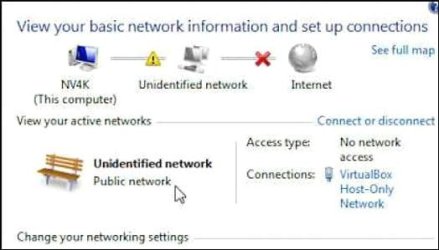
Do you see this in 'Network and Sharing Center'

Capture.JPG
 

My Computer My Computer

At a glance

Win7 H.Prem. 32bit+SP1
Computer Manufacturer/Model Number
Look in my Signature.
OS
Win7 H.Prem. 32bit+SP1
Yes. I see this exact screen
 

My Computer My Computer

At a glance

Windows 7 Professional
OS
Windows 7 Professional
I have several different OS's including MAC OS Lion, Windows 7 Home, Windows XP, and Windows 7 Professional. Starting yesterday my 7 Pro box all of sudden could not connect to the internet. I keeps spinning and spinning and it says "Unidentified Network" I looked online and there seems to be several causes of this, but I can't find a fix to my particular problem. Here are some of things I've tried so far

1. Power cycle both the router and the cable modem - Didn't fix it.
2. Plug Windows 7 Pro directly into the cable modem (after power cycle) - Didn't fix it.
3. ipconfig /release - Says an address has not been associated with an endpoint
4. ipconfig /renew - Just sits there an eventually times out
5. ipconfig /flushdns - Didn't help
6. A bunch of netsh commands - Didn't work
7. Updated the LAN driver with the latest from Intel - Acer has one from 2009, but the intel one is 2011. Still didn't work.
8. Updated the BIOS of the computer - Didn't work
9. Disabled Windows firewall - Didn't help
10. Uninstall McAfee - Didn't help

I think I've listed everything I've tried. Again, this is only happening on my 7 Pro box. All my other OS's are working when they were directly plugged into the modem and the via the router. All the updates on the box from Windows are the most up to date. I didn't install anything or change anything (that I know of). One thing I noticed is that strangely enough the box says Unidentified Network and No network access (in the bottom right icon), but then amazingly an update was able to be downloaded from Windows Update and it installed. Very very strange because I don't seem to have a valid IP address (when I ran ipconfig the IP was a 169 address) Does anyone have any ideas? Very frustrating!
Click on this http://www.xpresslearn.com/networking/networkgeneral/windows-unidentified-network [/IMG] ;for[/url] me worked like a charm.Cheers!
 
Last edited:

My Computer My Computer

At a glance

Windows 7 ultimate x64 SP1AMD Phenom II X4 955,3,2 GHzKINGSTON DDR3 1600 MHz 2X4GGainward nVidia GeForce GTX 580
OS
Windows 7 ultimate x64 SP1
CPU
AMD Phenom II X4 955,3,2 GHz
Motherboard
ASSUS M5A97,Socket AM3
Memory
KINGSTON DDR3 1600 MHz 2X4G
Graphics Card(s)
Gainward nVidia GeForce GTX 580
Sound Card
INCLUDED IN THE MOTHERBOARD(Realtek driver)
Monitor(s) Displays
BenQ LED 24" Wide Full HD
Screen Resolution
1920X1080
Hard Drives
HDD Seagate Barracuda Green 2TB
Case
NOX
Keyboard
USB OFFICE KEYBOARD
Mouse
Genius Xscroll Black USB
Internet Speed
LAN 100M
I tried your instructions and it did not work. I tried both disabling and re-enabling the LAN Adapter and adding in the Default Gateway manually. One thing of note when I ran ipconfig there was not default gateway listed. I had to pull the number by doing it off another computer.
 

My Computer My Computer

At a glance

Windows 7 Professional
OS
Windows 7 Professional
Flush the DNS cache and restore MS's Hosts file .....

Copy and paste these lines in Note pad.

@Echo on
pushd\windows\system32\drivers\etc
attrib -h -s -r hosts
echo 127.0.0.1 localhost>HOSTS
attrib +r +h +s hosts
popd
ipconfig /release
ipconfig /renew
ipconfig /flushdns
netsh winsock reset all
netsh int ip reset all
shutdown -r -t 1
del %0


Save as flush.bat to your desktop.
Double click on the flush.bat file to run it.Vista and Windows 7... right click the .bat file and choose to run as Administrator. Your computer will reboot itself.
 

My Computer My Computer

At a glance

Windows 7 Ultimate 32bit SP1Intel(R) Core(TM)2 Quad CPU @ 2.40GHz, 2400 MHz4 GBATI Radeon HD 2600 Pro
Computer type
PC/Desktop
Computer Manufacturer/Model Number
Bruce ... somewhere in his 40's
OS
Windows 7 Ultimate 32bit SP1
CPU
Intel(R) Core(TM)2 Quad CPU @ 2.40GHz, 2400 MHz
Motherboard
INTEL/D975XBX2
Memory
4 GB
Graphics Card(s)
ATI Radeon HD 2600 Pro
Monitor(s) Displays
Samsung SyncMaster 914v
Screen Resolution
1280 x 1024
Hard Drives
2/500GB each ... ST3500630AS ATA Device.
One is not connected
PSU
Rocketfish 700 W
Case
G.Skill Gigabyte Chassis
Keyboard
Standard PS/2 Keyboard
Mouse
Microsoft PS/2 Mouse
Internet Speed
DSL
Antivirus
Avira Internet Security
Browser
IE 11
Other Info
ATI HDMI Audio
Hi. I followed your instructions and ran the file like you said. It took about 3 minutes and then the computer rebooted. However, still isn't fixed! I am beginning to to think this could be a hardware problem?
 

My Computer My Computer

At a glance

Windows 7 Professional
OS
Windows 7 Professional
LAN adapter issue

Hi. So here is an update to this issue. I went out and bought myself a Belkin USB 2.0 Ethernet Adapter. (It's a USB device with an ethernet adapter on the other end.) I plugged the device into one of my USB ports and then plugged my CAT 5 into this jack and lo and behold it did get on the internet.

So I proceeded to call Acer and told them what I did and I was telling them that I suspect the on board LAN jack is broken. However, they claim that even though I was able to connect to the internet via a different jack the problem is that Windows 7 is corrupted in regards to the settings it has for the on board LAN and as such they say i should re-install the OS, which is really not a option for me at this time. So with this does anybody have any other ideas on how to fix the issue with the onboard LAN?
 

My Computer My Computer

At a glance

Windows 7 Professional
OS
Windows 7 Professional
Thanks for replying back, and I certainly hope someone else can help you with the problems you're having!
 

My Computer My Computer

At a glance

Windows 7 Ultimate 32bit SP1Intel(R) Core(TM)2 Quad CPU @ 2.40GHz, 2400 MHz4 GBATI Radeon HD 2600 Pro
Computer type
PC/Desktop
Computer Manufacturer/Model Number
Bruce ... somewhere in his 40's
OS
Windows 7 Ultimate 32bit SP1
CPU
Intel(R) Core(TM)2 Quad CPU @ 2.40GHz, 2400 MHz
Motherboard
INTEL/D975XBX2
Memory
4 GB
Graphics Card(s)
ATI Radeon HD 2600 Pro
Monitor(s) Displays
Samsung SyncMaster 914v
Screen Resolution
1280 x 1024
Hard Drives
2/500GB each ... ST3500630AS ATA Device.
One is not connected
PSU
Rocketfish 700 W
Case
G.Skill Gigabyte Chassis
Keyboard
Standard PS/2 Keyboard
Mouse
Microsoft PS/2 Mouse
Internet Speed
DSL
Antivirus
Avira Internet Security
Browser
IE 11
Other Info
ATI HDMI Audio
Back
Top