Unidentified Network when setting IP address to static - solution!

jaywcube

New member
Local time
1:56 PM
Messages
9
Finally found a solution to my static IP issue. Whenever I would set my IP to static, the network would become Unidentified. To get the network back to Home I would change to DHCP, then back to static. After waking the computer up from Sleep mode it would go back to Unidentified. Since it didn't prevent me from doing anything I just gave up on it.
Today, on a whim, I re-enabled IPv6 on the Local Area Connection and, instantly, the network was Home again.

TLDNR - enable IPv6 to fix Unidentified Network when using a static IP address
 

My Computer

OS
Windows 7 Professional
CPU
AMD Phenom II X4
Motherboard
Asus
Memory
G.Skill 2x2GB
Graphics Card(s)
Nvidia GeForce 8800GTS
Thanks for reminding us all that disabling IPv6 is not very wise, here is more information about IPv6 and what it does.

The Argument against Disabling IPv6

It is unfortunate that some organizations disable IPv6 on their computers running Windows Vista or Windows Server 2008, where it is installed and enabled by default. Many disable IPv6-based on the assumption that they are not running any applications or services that use it. Others might disable it because of a misperception that having both IPv4 and IPv6 enabled effectively doubles their DNS and Web traffic. This is not true.
From Microsoft's perspective, IPv6 is a mandatory part of the Windows operating system and it is enabled and included in standard Windows service and application testing during the operating system development process. Because Windows was designed specifically with IPv6 present, Microsoft does not perform any testing to determine the effects of disabling IPv6. If IPv6 is disabled on Windows Vista, Windows Server 2008, or later versions, some components will not function. Moreover, applications that you might not think are using IPv6—such as Remote Assistance, HomeGroup, DirectAccess, and Windows Mail—could be.
Therefore, Microsoft recommends that you leave IPv6 enabled, even if you do not have an IPv6-enabled network, either native or tunneled. By leaving IPv6 enabled, you do not disable IPv6-only applications and services (for example, HomeGroup in Windows 7 and DirectAccess in Windows 7 and Windows Server 2008 R2 are IPv6-only) and your hosts can take advantage of IPv6-enhanced connectivity.

Read more. http://technet.microsoft.com/en-us/m....cableguy.aspx
 

My Computer

Computer type
PC/Desktop
Computer Manufacturer/Model Number
Home built
OS
Windows 7 Ult, Windows 8.1 Pro,
CPU
Q9650-4.275GHz, E8600 4.5GHz, E6750-3.8GHz
Motherboard
Evga 780i FTW
Memory
G.Skill PC2 9600 1200Mhz 5 5 5 15 2T
Graphics Card(s)
GTX480
Sound Card
Asus Xonar D2
Monitor(s) Displays
HannsG
Screen Resolution
1680X1050
Hard Drives
GSkill Phoenix Pro 120GB SSD
PSU
ThermalTake Toughpower 1000Watt modular
Case
ThermalTake XaserV
Cooling
Xigmatek S1283
Keyboard
Logitech G15
Mouse
Logitech G9
Internet Speed
T1
Scratch that. As soon as I restarted, Unidentified Network is back. How hard could it be for MS to allow a static IP on the Home Network?:mad:
 

My Computer

OS
Windows 7 Professional
CPU
AMD Phenom II X4
Motherboard
Asus
Memory
G.Skill 2x2GB
Graphics Card(s)
Nvidia GeForce 8800GTS
Windows doesn't have any problems using static IP's far as I know.

If you can post a screen shot of your ipconfig/all here it would be most helpful. :)
 

My Computer

Computer type
PC/Desktop
Computer Manufacturer/Model Number
Home built
OS
Windows 7 Ult, Windows 8.1 Pro,
CPU
Q9650-4.275GHz, E8600 4.5GHz, E6750-3.8GHz
Motherboard
Evga 780i FTW
Memory
G.Skill PC2 9600 1200Mhz 5 5 5 15 2T
Graphics Card(s)
GTX480
Sound Card
Asus Xonar D2
Monitor(s) Displays
HannsG
Screen Resolution
1680X1050
Hard Drives
GSkill Phoenix Pro 120GB SSD
PSU
ThermalTake Toughpower 1000Watt modular
Case
ThermalTake XaserV
Cooling
Xigmatek S1283
Keyboard
Logitech G15
Mouse
Logitech G9
Internet Speed
T1
Same Problem

I'm having the same problem here. Did Jaycube ever find a solution?
 

My Computer

OS
Windows 2008 64
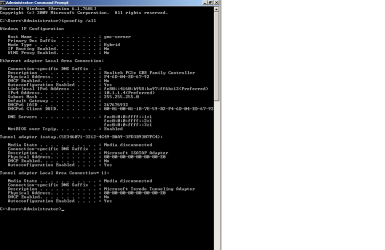
I have the same issue, as soon as I change the IP to static it goes as Unidentified-Public :mad:; attached the ipconfig /all
I need static IP - private ..
Does anyone have solution?
 

Attachments

  • ipconfig-all-static-IP.png
    ipconfig-all-static-IP.png
    39.6 KB · Views: 6

My Computer

OS
XP
Help pls?

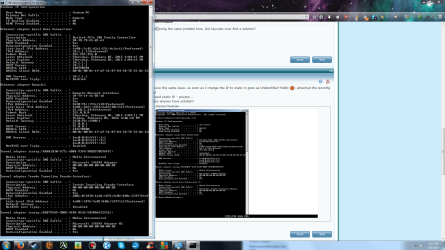
Sorry to post on an ancient thread, but I am getting the same issue.
 

Attachments

  • My ipconfig.png
    My ipconfig.png
    464.1 KB · Views: 9

My Computer

Computer type
PC/Desktop
Computer Manufacturer/Model Number
Custom
OS
Windows 7 Home Premium 64bit
CPU
Inter Core i5-3570 CPU 3.40 GHz
Motherboard
Unknown
Memory
Unknown
Graphics Card(s)
Radeon 7700
Hard Drives
Unknown
Antivirus
AVG 2015 free
Browser
Mozilla Firefox
Hello,

You have a wrong subnet mask.
. before making your IP into static, try doing an ipconfig /all using DHCP, take note of the subnet mast that will show.
or can you post your ipconfig when it is connected to DHCP. so that we can help you on your configuration.
 

My Computer

Computer type
PC/Desktop
Computer Manufacturer/Model Number
HP
OS
Windows 7 Pro 32bit
CPU
Dual Core
Antivirus
Trend Micro
You have a wrong subnet mask.

?
His subnet mask is fine.

It appears that Hamachi introduces this type of issues. You can try searching for "Hamachi DNS Problems" and see if you can find a solution. You can also try to disable the Hamachi adapter and see if that would fix your issues.


@TrickyDicky, if you are still around, your problem is that your are using IPv6 DNS addresses, but your computer's IPv6 address is link-local, link-local doesn't "go on the internet". Change your DNS IPs to an IPv4 address 10.1.1.1
 

My Computer

Computer type
PC/Desktop
OS
Windows 7 Pro
Yeah I will see if anything is on the web about it. Thank you.
 

My Computer

Computer type
PC/Desktop
Computer Manufacturer/Model Number
Custom
OS
Windows 7 Home Premium 64bit
CPU
Inter Core i5-3570 CPU 3.40 GHz
Motherboard
Unknown
Memory
Unknown
Graphics Card(s)
Radeon 7700
Hard Drives
Unknown
Antivirus
AVG 2015 free
Browser
Mozilla Firefox
I tried everything I could find on it without success. I later uninstalled hamachi however it still did not work. I will see if I can do anything with what ShoTTas said.
 

My Computer

Computer type
PC/Desktop
Computer Manufacturer/Model Number
Custom
OS
Windows 7 Home Premium 64bit
CPU
Inter Core i5-3570 CPU 3.40 GHz
Motherboard
Unknown
Memory
Unknown
Graphics Card(s)
Radeon 7700
Hard Drives
Unknown
Antivirus
AVG 2015 free
Browser
Mozilla Firefox
I accidentally made a new thread?
 

My Computer

Computer type
PC/Desktop
Computer Manufacturer/Model Number
Custom
OS
Windows 7 Home Premium 64bit
CPU
Inter Core i5-3570 CPU 3.40 GHz
Motherboard
Unknown
Memory
Unknown
Graphics Card(s)
Radeon 7700
Hard Drives
Unknown
Antivirus
AVG 2015 free
Browser
Mozilla Firefox
I tried everything I could find on it without success. I later uninstalled hamachi however it still did not work. I will see if I can do anything with what ShoTTas said.
 

My Computer

Computer type
PC/Desktop
Computer Manufacturer/Model Number
Custom
OS
Windows 7 Home Premium 64bit
CPU
Inter Core i5-3570 CPU 3.40 GHz
Motherboard
Unknown
Memory
Unknown
Graphics Card(s)
Radeon 7700
Hard Drives
Unknown
Antivirus
AVG 2015 free
Browser
Mozilla Firefox
What the hell?
 

My Computer

Computer type
PC/Desktop
Computer Manufacturer/Model Number
Custom
OS
Windows 7 Home Premium 64bit
CPU
Inter Core i5-3570 CPU 3.40 GHz
Motherboard
Unknown
Memory
Unknown
Graphics Card(s)
Radeon 7700
Hard Drives
Unknown
Antivirus
AVG 2015 free
Browser
Mozilla Firefox
Oh I see. Sorry guys.
 

My Computer

Computer type
PC/Desktop
Computer Manufacturer/Model Number
Custom
OS
Windows 7 Home Premium 64bit
CPU
Inter Core i5-3570 CPU 3.40 GHz
Motherboard
Unknown
Memory
Unknown
Graphics Card(s)
Radeon 7700
Hard Drives
Unknown
Antivirus
AVG 2015 free
Browser
Mozilla Firefox
Could you describe your problem in more detail? I.e. details about your network, the exact problem, error messages (if any), etc.
 

My Computer

Computer type
PC/Desktop
OS
Windows 7 Pro
Well I get unidentified network access whenever I set my ip to static and I cannot access the internet. If I use windows network diagnostics the problem it is fixed however my ip stays the same as before. The problem according to diagnostics is "DHCP is not enabled for Local Area Connection".
 

My Computer

Computer type
PC/Desktop
Computer Manufacturer/Model Number
Custom
OS
Windows 7 Home Premium 64bit
CPU
Inter Core i5-3570 CPU 3.40 GHz
Motherboard
Unknown
Memory
Unknown
Graphics Card(s)
Radeon 7700
Hard Drives
Unknown
Antivirus
AVG 2015 free
Browser
Mozilla Firefox
How are you connecting to the internet and how many computers on the network?
 

My Computer

Computer type
PC/Desktop
OS
Windows 7 Pro
I use a modem and 5 computers (2 have not seen use for a very long time) are in my home network.
 

My Computer

Computer type
PC/Desktop
Computer Manufacturer/Model Number
Custom
OS
Windows 7 Home Premium 64bit
CPU
Inter Core i5-3570 CPU 3.40 GHz
Motherboard
Unknown
Memory
Unknown
Graphics Card(s)
Radeon 7700
Hard Drives
Unknown
Antivirus
AVG 2015 free
Browser
Mozilla Firefox
Bump.
 

My Computer

Computer type
PC/Desktop
Computer Manufacturer/Model Number
Custom
OS
Windows 7 Home Premium 64bit
CPU
Inter Core i5-3570 CPU 3.40 GHz
Motherboard
Unknown
Memory
Unknown
Graphics Card(s)
Radeon 7700
Hard Drives
Unknown
Antivirus
AVG 2015 free
Browser
Mozilla Firefox
Back
Top